ssh: Secure Shell
The ssh program suite is an interesting way to establish a secure communication channel between hosts across the Internet. It replaces a few usual communication channels (such as telnet, rlogin, rsh and rcp) and provides equivalent functionality via a new secure protocol. This article is meant to introduce the user to ssh features without any pretense of being an authoritative tutorial on security issues.
First of all, as usual with encryption material, let's throw in some legalese. The Unix implementation of the package is distributed free of charge for non-commercial use and can be retrieved from major ftp sites around the world. The meaning of “non-commercial use” is well stated in the COPYING file within the ssh distribution. Non-commercial use includes use of the tool by people who work on the Internet, provided ssh is not used as a selling argument. However, being allowed by the license is not enough to use the package. You must also ensure your government allows using cryptographic material: some countries prohibit citizens from using any type of cryptography.
As far as standardization is concerned, the IETF (Internet Engineering Task Force) is working on the ssh idea. This means that the protocol is going to be standardized and will always remain throughly documented. Anyone can reimplement the software and distribute her version with different copying policies. Although there is no RFC about ssh yet, three Internet drafts are already available which document the different aspects of the protocol. The drafts I downloaded in June are going to expire on September 1, 1997, but new drafts (or a real Request For Comments) will be released before that time.
The main aim of ssh is overcoming the security problems of TELNET and rsh-like protocols. These protocols, though widely used, are very weak as far as security is concerned: TELNET transmits clear-text passwords over the network, while rsh and friends are easily broken by spoofing techniques (skilled system administrators or anyone with physical access to the wire can exploit the .rhosts files to be granted access on remote computers). These vulnerabilities are addressed by the ssh protocol by enforcing a strong authentication scheme between the communicating parties.
The protocol not only authenticates the client host with the server, but also enforces encryption of all the data sent through the established communication channel. Although encryption requires some computational load in the communicating hosts, the user can be confident that no sniffer can make sense out of network packets, and nobody can forge packets to be granted access with the server.
Finally, the protocol is designed to allow encapsulation of other communication channels within an ssh stream, so that non-encrypted protocols can benefit from ssh capabilities at no cost. This feature is most useful for establishing secure X11 connections, but its use is much more flexible than just that security.
As far as the user interface is concerned, the new programs are designed as drop-in replacements for rsh, rlogin and rcp. While the system administrator needs to deal with the ssh issue at least to install the package, the final user can happily ignore the fact that the underlying communication mechanisms have been changed.
The current version of ssh, as I'm writing this article, is 1.2.20. It is distributed with a configure script, so that:
./configure && make && make install
does the complete job of installing the package. Even if /usr/local belongs to you, you'll need to be a privileged user in order to install ssh. This requirement is necessary, because both the server and some client programs must be able to open privileged TCP ports. Moreover, the package installs its system-wide files in the /etc directory. If you must run an ssh session without installing the programs as a privileged user, you should first read the FAQ file, which describes how to accomplish this without too much trouble.
The program suite is made up of a server program, a few clients and a pair of support tools. In order to become an ssh server, the suggested action is to invoke sshd from your initialization files when the computer boots. The program is installed by default in the /usr/local/sbin directory, and it listens to port 22/tcp of the local host to accept incoming connections. You should add a line like the following one to the /etc/services file, if it is not already included:
ssh 22/tcp # secure shell
It is possible to run sshd from /etc/inetd.conf, by passing the -i flag to the daemon. This practice is discouraged, because the daemon can take several seconds to start, as it generates an encryption key each time it starts.
On the client side, nothing needs to be done at installation time to enable use of the services. After installation, several programs can be found in the /usr/local/bin directory that can be executed by anyone. Here's a list of these programs:
ssh (slogin): The ssh client program behaves like rsh in that it executes a command on a remote host, redirecting its own stdin, stdout and stderr to the remote. If only one argument is specified in the command line, it is taken as the remote host, and ssh opens a terminal session on that host, just as rlogin does. The slogin client is just a symbolic link to ssh. Usually, the user is asked to provide a password for authentication on the remote host.
scp: “Secure CoPy” is a replacement for “Remote CoPy”. It uses the same syntax and performs the same task, with the same security enhancements offered by ssh. The user is usually prompted for a password to perform authentication.
ssh-keygen: This program generates new keys associated to the user who invokes it. The public key and the private key generated are saved by default in the directory $HOME/.ssh/, in two files called identity and identity.pub. A pair of keys is needed, when you wish to securely log into the local host from outside without providing a password.
ssh-agent: This program is meant to manage security for a user session. It stores the private keys for the user and can be contacted by any child process. See the man page for more information about ssh-agent.
ssh-add: This program adds identities to the authentication agent. ssh-agent must be an ancestor of the process running ssh-add in order for them to communicate.
ssh-askpass: This short program is used internally by ssh-add and ssh-keygen to ask for a pass phrase using the X graphical environment.
make-ssh-known-hosts: This PEl script retrieves the public keys of all hosts in a domain; it queries the DNS and talks with hosts belonging to a domain. This program updates the /etc/ssh_known_hosts file to hold the new keys. The program should be run periodically, usually via cron, to reflect any change in host public keys or new installations of ssh on hosts in the local networks.
Although the number of installed files might scare a novice user, there's nothing new to learn as long as you just use the plain ssh and scp client programs. The system administrator can even choose to replace ssh for rsh and scp for rcp, so that secure operation is completely transparent to the final user. Actually, such a replacement is not completely transparent, since ssh introduces a new feature not present in plain rsh or rlogin: X11 forwarding. This feature is considered a “side effect”of using the ssh protocol and is described in the next section.
The role of the other programs is secondary. They help to set up a good working environment to avoid typing too many passwords during normal operation without compromising system security. While knowing their internals is not essential for program operation, a quick look over the documentation might provide interesting insights about current encryption technology and can help in configuring hosts to automate the login process.
The ssh protocol is designed to be flexible and supports multiplexing of several communication channels within a single TCP stream. This design choice results in two effects: on one side the implementation of the protocol is much more elaborate than other TCP-based protocols, and on the other side the final user can exploit the added flexibility to achieve new goals. One of these goals is establishing secure communication channels between the X server and client applications. This feature is enabled by default whenever an ssh session is established.
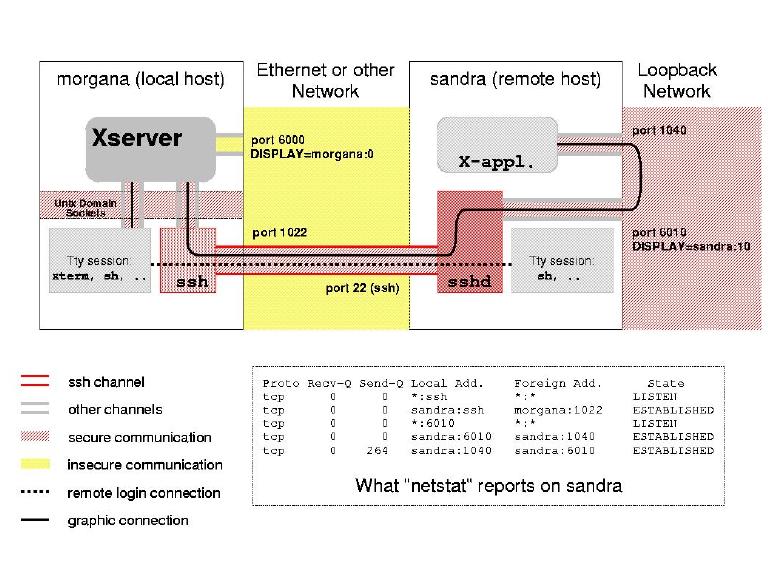
The idea behind X11 forwarding is quite straightforward. The ssh application runs locally and is able to connect to the local X server without resorting to the network (via local Unix-domain sockets). Remote graphic programs, on the other hand, can connect locally to the sshd server which spawned the remote shell (via the loopback network interface). The remote sshd can encapsulate graphic data in the secure communication channel it owns, to complete the path linking the graphic application and the X server.
Figure 1 shows how a remote X application (running on a computer named sandra) securely connects to the local X server (on morgana).
Figure 1. Secure Connection to X Server
When you log into a remote computer through ssh, the DISPLAY environment variable is automatically set to a proper value, and no user intervention is needed to establish the graphical channel. The following screen-shot shows automatic assignment of DISPLAY:
morgana% ssh sandra env | grep DISPLAY
DISPLAY=sandra.systemy.it:10.0
It is apparent how any graphic program invoked on sandra by the ssh session will connnect to a local display (i.e., sandra:10).
The ssh/sshd programs can also forward other TCP channels, according to the user's needs. This capability can be activated by specifying command-line switches to the client ssh program. I won't describe the mechanisms here, as the manual page for ssh is well written.
The main problem when establishing a connection through an insecure network is performing reliable authentication. The ssh package is quite pedantic about authentication, and you'll be prompted for your password more frequently than usual. Typing passwords over and over is distressing and can be avoided by proper configuration of system files. Note also that any password you type is transmitted after establishing the encrypted communication channel.
You can type ssh -v (verbose) to get a report on what is happening. The information returned is very useful if you are unexpectedly prompted for a password. Now, let's look at the steps performed by ssh to authenticate a user in the remote server.
First, if the target account has no password, access is granted. If it does, different kinds of authentication engines are tried; each of which can be enabled or disabled into the server. For example, by default “PasswordAuthentication” and “RhostsRSAAuthentication” are enabled, and “RhostsAuthentication” is disabled.
The following is the sequence of actions when you try to log into a server running with the default configuration—which can be changed in /etc/sshd_config.
The client receives the public key of the server. If it is not recognized, ssh asks the user interactively if the connection must be continued. By confirming, the user trusts that the remote host matches its name, and the public key of the server is saved on the client, in the file $HOME/.ssh/known_hosts. This step is not performed if the server host is known system-wide (i.e., it appears in /etc/ssh_known_hosts).
The client tries authenticating through “RhostsRSA”. This requires that “Rhosts” authentication succeeds: either .rhosts in the user's home directory or /etc/hosts.equiv allows login. sshd is more pedantic than rlogind in checking these files and denies permission if any of the files are group-writable or world-writable. Needless to say, the entry beginning with the “plus” character in either file is disregarded. Moreover, .rhosts is not even used if the home directory of the user is group-writable or world-writable, and /etc/hosts.equiv is not used to authorize root logins. In addition to the standard files, sshd also checks .shosts in the home directory of the user and /etc/shosts.equiv. These files are useful if you still wish to run rshd or rlogind on the server hosts by trusting fewer hosts than you trust via ssh.
If the previous step succeeds, RSA is tried (Random-State Authentication). This technique consists in the client sending a challenge to the server, which must reply correctly. The challenge consists of random data encrypted using the client's private key; the server must decrypt such data and return its checksum. The server can solve the challenge only if it knows the public key of the client, which is known only if the remote user agreed to trust the client (local) host. RSA is used to prevent authorizing untrusted hosts which forge DNS records or which temporarily steal the IP address of a trusted host.
If either of the previous steps fails, i.e., if “RhostsRSA Authentication” as a whole fails, the client reverts to “Password Authentication”, by asking for a password from the local user.
If your .rhosts file is correctly configured and you are still prompted for a password, the problem is most likely caused by RSA not succeeding. The easiest way to store the client's public key in the server is invoking ssh right away to connect back to the client computer. When confirming to continue the connection, the server (now acting as a client) downloads the public key of the local host (now acting as a server).
The design of ssh is full of hooks for future extensibility. First of all, the client and the server exchange a “software version” and a “protocol version” at the beginning of each section. While the “software version”is mainly used in debugging problems, the “protocol version” is a great resource to accomplish smooth upgrading from one version of the software to the next one. Both the client and the server are required to support at least the previous version of the protocol, in addition to the current one. This requirement is designed to help deal with the transition period whenever the protocol gets enhanced (which doesn't happen too often). When running ssh<\!s>-v, you can see, among other things, the exchange of version strings.
Another great design feature of the protocol is that new cryptographic algorithms (“ciphers”) can be added to the basic machinery without losing generality. This is accomplished by making the choice of the cipher to use at runtime. During handshake (the first few packets being exchanged by the communicating parties), the server declares which ciphers it supports, and the client chooses one of those ciphers. Every ssh implementation is required to support at least 3DES, in order to ensure a secure link can be established between any client and any server. Users and/or organizations are, nevertheless, free to implement new ciphers and specify them as the default choice. A few ciphers are part of the official ssh distribution, and the user can ask for a specific algorithm on the ssh command line to override the default.
The protocol also supports compression of session data. A compressed session can actually be faster than a non-compressed one, if the local network is slightly loaded. Once again, compression is optional, and the communicating parties agree whether or not to use it.
The standardization efforts endorsed by the IETF are aimed at defining version 2.0 of the secure shell protocol (the version supported by ssh-1.2.20 is called 1.5). The Internet drafts currently available document three different aspects of the upcoming 2.0 protocol:
the connection protocol, draft-ietf-secsh-connect-00.txt),
the transport-layer protocol, draft-ietf-secsh-transport-00.txt)
the authentication protocol, draft-ietf-secsh-userauth-00.txt.
These documents are quite technical, but very interesting to peruse. The protocol the IETF is working on looks promising, giving even more flexibility than the current one.
The curious reader is urged to browse the network to retrieve more information on these topics. I can provide a few pointers to begin with, but I'm pretty sure you'll find several more pointers about this kind of topic.