The Coda Distributed File System
The Coda distributed file system is a state-of-the-art experimental file system developed in the group of M. Satyanarayanan at Carnegie Mellon University (CMU). Numerous people contributed to Coda, which now incorporates many features not found in other systems:
Mobile Computing:
disconnected operation for mobile clients
reintegration of data from disconnected clients
bandwidth adaptation
Failure Resilience:
read/write replication servers
resolution of server/server conflicts
handles network failures which partition the servers
handles disconnection of client's client
Performance and scalability:
client-side persistent caching of files, directories and attributes for high performance
write-back caching
Security:
Kerberos-like authentication
access control lists (ACLs)
Well-defined semantics of sharing
Freely available source code
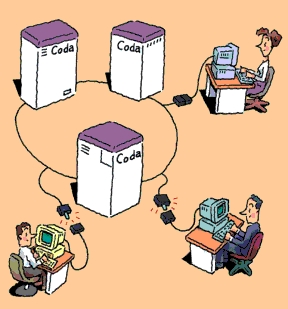
A distributed file system stores files on one or more computers called servers and makes them accessible to other computers called clients, where they appear as normal files. There are several advantages to using file servers: the files are more widely available since many computers can access the servers, and sharing the files from a single location is easier than distributing copies of files to individual clients. Backups and safety of the information are easier to arrange since only the servers need to be backed up. The servers can provide large storage space, which might be costly or impractical to supply to every client. The usefulness of a distributed file system becomes clear when considering a group of employees sharing documents; however, more is possible. For example, sharing application software is an equally good candidate. In both cases system administration becomes easier.
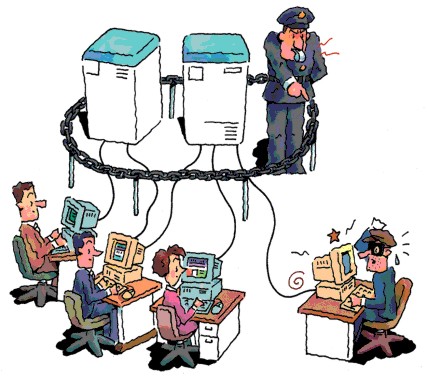
There are many problems facing the design of a good distributed file system. Transporting many files over the Net can easily create sluggish performance and latency; network bottlenecks and server overload can result. The security of data is another important issue: how can we be sure that a client is really authorized to have access to information and how can we prevent data being sniffed off the network? Two further problems facing the design are related to failures. Often, client computers are more reliable than the network connecting them, and network failures can render a client useless. Similarly, a server failure can be very unpleasant, since it can disable all clients from accessing crucial information. The Coda project has paid attention to many of these issues and implemented them as a research prototype.
Figure 2. Servers Control Security (Illustration by Gaich Muramatsu)
Coda was originally implemented on Mach 2.6 and has recently been ported to Linux, NetBSD and FreeBSD. Michael Callahan ported a large portion of Coda to Windows 95, and we are studying Windows NT to understand the feasibility of porting Coda to NT. Currently, our efforts are on ports and on making the system more robust. A few new features are being implemented (write-back caching and cells for example), and in several areas, components of Coda are being reorganized. We have already received very generous help from users on the Net, and we hope that this will continue. Perhaps Coda can become a popular, widely used and freely available distributed file system.
If Coda is running on a client, which we shall take to be a Linux workstation, typing mount will show a file system—of type “Coda”--mounted under /coda. All the files, which any of the servers may provide to the client, are available under this directory, and all clients see the same name space. A client connects to “Coda” and not to individual servers, which come into play invisibly. This is quite different from mounting NFS file systems which is done on a per server, per export basis. In the most common Windows systems (Novell and Microsoft's CIFS) as well as with Appleshare on the Macintosh, files are also mounted per volume. Yet the global name space is not new. The Andrew file system, Coda's predecessor, pioneered the idea and stored all files under /afs. Similarly, the distributed file system DFS/DCE from OSF mounts its files under one directory. Microsoft's new distributed file system (dfs) provides glue to put all server shares in a single file tree, similar to the glue provided by auto-mount daemons and yellow pages on UNIX. Why is a single mount point advantageous? It means that all clients can be configured identically, and users will always see the same file tree. For large installations this is essential. With NFS, the client needs an up-to-date list of servers and their exported directories in /etc/fstab, while in Coda a client merely needs to know where to find the Coda root directory /coda. When new servers or shares are added, the client will discover these automatically in the /coda tree.
To understand how Coda can operate when the network connections to the server have been severed, let's analyze a simple file system operation. Suppose we type:
cat /coda/tmp/foo
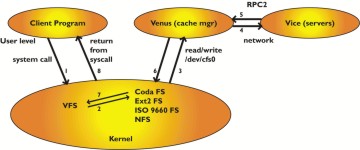
to display the contents of a Coda file. What actually happens? The cat program will make a few system calls in relation to the file. A system call is an operation through which a program asks the kernel for service. For example, when opening the file the kernel will want to do a lookup operation to find the inode of the file and return a file handle associated with the file to the program. The inode contains the information to access the data in the file and is used by the kernel; the file handle is for the opening program. The open call enters the virtual file system (VFS) in the kernel, and when it is realized that the request is for a file in the /coda file system, it is handed to the Coda file system module in the kernel. Coda is a fairly minimalistic file-system module: it keeps a cache of recently answered requests from the VFS, but otherwise passes the request on to the Coda cache manager, called Venus. Venus will check the client disk cache for tmp/foo, and in case of a cache miss, it contacts the servers to ask for tmp/foo. When the file has been located, Venus responds to the kernel, which in turn returns the calling program from the system call. Schematically we have the image shown in Figure 3.
The figure shows how a user program asks for service from the kernel through a system call. The kernel passes it up to Venus, by allowing Venus to read the request from the character device /dev/cfs0. Venus tries to answer the request, by looking in its cache, asking servers or possibly by declaring disconnection and servicing it in disconnected mode. Disconnected mode kicks in when there is no network connection to any server which has the files. Typically this happens for laptops when taken off the network or during network failures. If servers fail, disconnected operation can also come into action.
When the kernel passes the open request to Venus for the first time, Venus fetches the entire file from the servers, using remote procedure calls to reach the servers. It then stores the file as a container file in the cache area (currently /usr/coda/venus.cache/). The file is now an ordinary file on the local disk, and read/write operations to the file do not reach Venus but are (almost) entirely handled by the local file system (EXT2 for Linux). Coda read/write operations take place at the same speed as those to local files. If the file is opened a second time, it will not be fetched from the servers again, but the local copy will be available for use immediately. Directory files (remember, a directory is just a file) as well as all the attributes (ownership, permissions and size) are all cached by Venus, and Venus allows operations to proceed without contacting the server if the files are present in the cache. If the file has been modified and it is closed, Venus updates the servers by sending the new file. Other operations which modify the file system, such as making directories, removing files or directories and creating or removing (symbolic) links are propagated to the servers also.
So we see that Coda caches all the information it needs on the client, and only informs the server of updates made to the file system. Studies have confirmed that modifications are quite rare compared to “read only” access to files, hence we have gone a long way towards eliminating client-server communication. These mechanisms to aggressively cache data were implemented in AFS and DFS, but most other systems have more rudimentary caching. We will see later how Coda keeps files consistent, but first pursue what else one needs to support disconnected operation.
The origin of disconnected operation in Coda lies in one of the original research aims of the project: to provide a file system with resilience to network failures. AFS, which supported thousands of clients in the late 80s on the CMU campus had become so large that network outages and server failures occurred somewhere almost every day. This was a nuisance. Coda also turned out to be a well-timed effort because of the rapid advent of mobile clients (viz. laptops). Coda's support for failing networks and servers equally applied to mobile clients.
We saw in the previous section that Coda caches all information needed to provide access to the data. When updates to the file system are made, these need to be propagated to the server. In normal connected mode, such updates are propagated synchronously to the server, i.e., when the update is complete on the client it has also been made on the server. If a server is unavailable or if the network connections between client and server fail, such an operation will incur a time-out error and fail. Sometimes, nothing can be done. For example, trying to fetch a file, which is not in the cache, from the servers is impossible without a network connection. In such cases, the error must be reported to the calling program. However, often the time-out can be handled gracefully as follows.
To support disconnected computers or to operate in the presence of network failures, Venus will not report failure(s) to the user when an update incurs a time-out. Instead, Venus realizes that the server(s) in question are unavailable and that the update should be logged on the client. During disconnection, all updates are stored in the CML, the client modification log, which is frequently flushed to disk. The user doesn't notice anything when Coda switches to disconnected mode. Upon re-connection to the servers, Venus will reintegrate the CML: it asks the server to replay the file system updates on the server, thereby bringing the server up to date. Additionally the CML is optimized—for example, it cancels out if a file is first created and then removed.
There are two other issues of profound importance to disconnected operation. First, there is the concept of hoarding files. Since Venus cannot serve a cache miss during a disconnection, it would be nice if it kept important files in the cache up to date, by frequently asking the server to send the latest updates. Such important files are in the user's hoard database which can be automatically constructed by “spying” on the user's file access. Updating the hoarded files is called a hoard walk. In practice, our laptops hoard enormous amounts of system software, such as the X11 Window System binaries and libraries, or Wabi and Microsoft Office. Since a file is a file, legacy applications run just fine.
Figure 4. Hoarded Files are “sticky” in the cache. (Illustration by Gaich Muramatsu)
The second issue is that during reintegration it may appear that during the disconnection another client has modified the file too, and has shipped it to the server. This is called a local/global conflict (viz. Client/Server) which needs repair. Repairs can sometimes be done automatically by application-specific resolvers (which know that one client inserting an appointment into a calendar file for Monday and another client inserting one for Tuesday have not created an irresolvable conflict). Sometimes, but quite infrequently, human intervention is needed to repair the conflict.
On Friday one leaves the office with a good deal of source code hoarded on the laptop. After hacking in one's mountain cabin, the harsh return to the office on Monday (10 days later of course) starts with a re-integration of the updates made during the weekend. Mobile computing is born.
In most network file systems, the servers enjoy a standard file structure and export a directory to clients. Such a directory of files on the server can be mounted on the client and is called a network share in Windows jargon and a network file system in the UNIX world. For most of these systems it is not practical to mount further distributed volumes inside the already mounted network volumes. Extreme care and thought goes into the server layout of partitions, directories and shares. Coda's (and AFS's) organization differs substantially.
Files on Coda servers are not stored in traditional file systems. Partitions on the Coda server workstations can be made available to the file server. These partitions will contain files which are grouped into volumes. Each volume has a directory structure like a file system, i.e., a root directory for the volume and a tree below it. A volume is on the whole much smaller than a partition, but much larger than a single directory and is a logical unit of files. For example, a user's home directory would normally be a single Coda volume and similarly the Coda sources would reside in a single volume. Typically a single server would have some hundreds of volumes, perhaps with an average size approximately 10MB. A volume is a manageable amount of file data which is a very natural unit from the perspective of system administration and has proven to be quite flexible.
Coda holds volume and directory information, access control lists and file attribute information in raw partitions. These are accessed through a log-based recoverable virtual memory package (RVM) for speed and consistency. Only file data resides in the files in server partitions. RVM has built-in support for transactions—this means that in case of a server crash, the system can be restored to a consistent state without much effort.
A volume has a name and an ID, and it is possible to mount a volume anywhere under /coda. For example, to mount the volume u.braam on /coda/usr/braam, issue the command:
cfs makemount u.braam /coda/usr/braam
Coda does not allow mount points to be existing directories; instead, it will create a new directory as part of the mount process. This eliminates the confusion that can arise in mounting UNIX file systems on top of existing directories. While it seems quite similar to the Macintosh and Windows traditions of creating a “network drive and volumes”, the crucial difference is that the mount point is invisible to the client: it appears as an ordinary directory under /coda. A single volume enjoys the privilege of being the root volume; it is the volume which is mounted on /coda at startup time.
Coda identifies a file by a triple of 32-bit integers called a Fid: it consists of a VolumeId, a VnodeId and a Uniquifier. The VolumeId identifies the volume in which the file resides. The VnodeId is the “inode” number of the file, and the uniquifiers are needed for resolution. The Fid is unique in a cluster of Coda servers.
Coda has read/write replication servers, i.e., a group of servers can hand out file data to clients, and generally updates are made to all servers in this group. The advantage of this is higher availability of data: if one server fails, others take over without a client noticing the failure. Volumes can be stored on a group of servers called the VSG (Volume Storage Group).
For replicated volumes, the VolumeId is a replicated VolumeId. The replicated volume ID brings together a Volume Storage Group and a local volume on each of the members.
The VSG is a list of servers which hold a copy of the replicated volume.
The local volume for each server defines a partition and local volume ID holding the files and meta-data on that server.
When Venus wishes to access an object on the servers, it first needs to find the VolumeInfo for the volume containing the file. This information contains the list of servers and the local volume IDs on each server by which the volume is known. For files, the communication with the servers in a VSG is “read-one, write-many”; that is, read the file from a single server in the VSG and propagate updates to all of the available VSG members, the AVSG. Coda can employ multicast RPCs, and hence the write-many updates are not a severe performance penalty.
The overhead of first having to fetch volume information is deceptive too. While there is a onetime lookup for volume information, subsequent file access enjoys much shorter path traversals, since the root of the volume is much nearer than is common in mounting large directories.
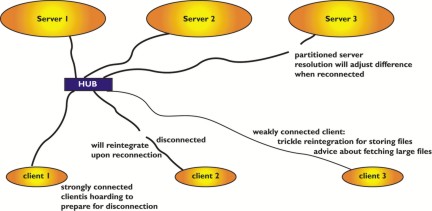
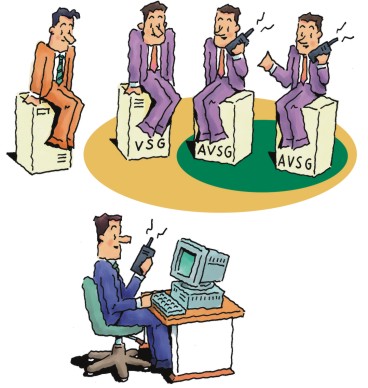
Server replication, like disconnected operation, has two cousins who need introduction: resolution and repair. Some servers in the VSG can become partitioned from others through network or server failures. In this case, the AVSG for certain objects will be strictly smaller than the VSG. Updates cannot be propagated to all servers, but only to the members of the AVSG, thereby introducing global (viz. server/server) conflicts.
Figure 6. AVSG vs. VSG (Illustration by Gaich Muramatsu)
Before fetching an object or its attributes, Venus will request the version stamps from all available servers. If it detects that some servers do not have the latest copy of files, it initiates a resolution process which tries to automatically resolve the differences. If this fails, a user must repair manually. The resolution, though initiated by the client, is handled entirely by the servers.
Replication servers and resolution are marvelous. We have suffered disk failures from time to time in some of our servers. To repair the server, all that needs to be done is to put in a new drive and tell Coda: resolve it. The resolution system brings the new disk up to date with respect to other servers.
Coda is in constant active use at CMU. Several dozen clients use it for development work (of Coda), as a general purpose file system and for specific disconnected applications. The following two scenarios have exploited the features of Coda very successfully. We have purchased a number of licenses for Wabi and Windows software. Wabi allows people to run MS PowerPoint. We have stored Wabi and Windows 3.1 including MS Office in Coda and it is shared by our clients. Of course .ini files with preferences are particular to a given user, but most libraries and applications are not. Through hoarding we continue to use the software on disconnected laptop computers for presentations. This is frequently done at conferences.
Over the years of its use we have not lost user data. Sometimes disks in our servers have failed, but since all of our volumes are replicated, we replaced the disk with an empty one and asked the resolution mechanism to update the repaired server. All one needs to do for this is to type ls -lR in the affected file tree when the new disk is in place. The absence of the file on the repaired server will be noticed, and resolution will transport the files from the good servers to the newly repaired one.
There are a number of compelling future applications where Coda could provide significant benefits.
FTP mirror sites should be Coda clients. As an example, let's take ftp.redhat.com, which has many mirrors. Each mirror activates a Perl script, which walks the entire tree at Red Hat to see what has been updated and fetches it—regardless of whether it is needed at the mirror. Contrast this with Red Hat storing their ftp area in Coda. Mirror sites should all become Coda clients too, but only Red Hat would have write permission. When Red Hat updates a package, the Coda servers notify the mirror sites that the file has changed. The mirror sites will fetch this package, but only the next time someone tries to fetch this package.
WWW replication servers should be Coda clients. Many ISPs are struggling with a few WWW replication servers. They have too much access to use just a single http server. Using NFS to share the documents to be served has proven problematic due to performance problems, so manual copying of files to the individual servers is frequently done. Coda could come to the rescue since each server could be a Coda client and hold the data in its cache. This provides access at local disk speeds. Combine this with clients of the ISP who update their web information off-line and we have a good application for mobile clients too.
Network computers could exploit Coda as a cache to dramatically improve performance. Updates to the network computer would automatically be made as they become available on servers, and for the most part the computer would operate without network traffic, even after restarts.
Our current efforts are mostly to improve the quality of Coda. The rough edges, which inevitably come with research systems, are slowly being smoothed out. Write-back caching will be added in order for Coda to operate much faster. The disconnected operation is an extreme form of write-back caching, and we are leveraging these mechanisms for write-back caching during connected operation. Kerberos support is being added. The networking protocols supporting Coda are making this easily possible. We would like to have cells which will allow clients to connect to more than a single Coda cluster simultaneously. Further ports will hopefully allow many systems to use Coda.
Coda is available by FTP from ftp.coda.cs.cmu.edu. You will find RPM packages for Linux as well as tar files of the source. Kernel support for Coda will come with the Linux 2.2 kernels. On the WWW site http://www.coda.cs.cmu.edu/, you will find additional resources such as mailing lists, manuals and research papers.