
The sysctl Interface
The sysctl system call is an interesting feature of the Linux kernel; it is quite unique in the Unix world. The system call exports the ability to fine-tune kernel parameters and is tightly bound to the /proc file system, a simpler, file-based interface that can be used to perform the same tasks available by means of the system call. sysctl appeared in kernel 1.3.57 and has been fully supported ever since. This article explains how to use sysctl with any kernel between 2.0.0 and 2.1.35.
When running Unix kernels, system administrators often need to fine-tune some low-level features according to their specific needs. Usually, system tailoring requires you rebuilding the kernel image and rebooting the computer. These tasks are lengthy ones which require good skills and a little luck to be successfully completed. Linux developers diverged from this approach and chose to implement variable parameters in place of hardwired constants; run-time configuration can be performed by using the sysctl system call or more easily by exploiting the /proc file system. The internals of sysctl are designed not only to read and modify configuration parameters, but also to support a dynamic set of such variables. In other words, the module writer can insert new entries in the sysctl tree and allow run-time configuration of driver features.
Most Linux users are familiar with the /proc file system. In short, the file system can be considered a gateway to kernel internals: its files are entry points to certain kernel information. Such information is usually exchanged in textual form to ease interactive use, although the exchange can involve binary data when required. The typical example of a binary /proc file is /proc/kcore, a core file that represents the current kernel. Thus, you can execute the command:
gdb /usr/src/linux/vmlinux /proc/kcore
and peek into your running kernel. Naturally, gdb on /proc/kcore gives much better results if vmlinux has been compiled using the -g compiler option.
Most of the /proc files are read-only: writing to them has no effect. This applies, for instance, to /proc/interrupts, /proc/ioports, /proc/net/route and all the other information nodes. The directory /proc/sys, on the other hand, behaves differently; it is the root of a file tree related to system control. Each subdirectory in /proc/sys deals with a kernel subsystem like net/ and vm/, while the kernel/ subdirectory is special as it includes kernel-wide parameters, like the file kernel/hostname.
Each sysctl file includes numeric or string values—sometimes a single value, sometimes an array of them. For example, if you go to the /proc/sys directory and give the command:
grep . kernel/*
kernel 2.1.32 returns data similar to the following:
kernel/ctrl-alt-del:0
kernel/domainname:systemy.it
kernel/file-max:1024
kernel/file-nr:128
kernel/hostname:morgana
kernel/inode-max:3072
kernel/inode-nr:384     263
kernel/osrelease:2.1.32
kernel/ostype:Linux
kernel/panic:0nn
kernel/printk:6   4    1   7
kernel/securelevel:0
kernel/version:#9 Mon Apr 7 23:08:18 MET DST 1997
It's worth stressing that reading /proc items with less doesn't work, because they appear as zero-length files to the stat system call, and less checks the attributes of the file before reading it. The inaccuracy of stat is a feature of /proc, rather than a bug. It's a saving in human resources (in writing code), and kernel size (in carrying the code around). stat information is completely irrelevant for most files, as cat, grep and all the other tools work fine. If you really need to use less to look at the contents of a /proc file, you can resort to:
catIf you want to change system parameters, all you need to do is write the new values to the correct file in /proc/sys. If the file contains an array of values, they will be overwritten in order. Let's look at the kernel/printk file as an example. printk was first introduced in kernel version 2.1.32. The four numbers in /proc/sys/kernel/printk control the “verbosity” level of the printk kernel function. The first number in the array is console_loglevel: kernel messages with priority less than or equal to the specified value will be printed to the system console (i.e., the active virtual console, unless you've changed it). This parameter doesn't affect the operation of klogd, which receives all the messages in any case. The following commands show how to change the log level:
# cat kernel/printk
6       4       1       7
# echo 8 > kernel/printk
# cat kernel/printk
8       4       1       7
A level of 8 corresponds to debug messages, which are not printed on the console by default. The example session shown above changes the default behaviour so that every message, including the debug ones, are printed.
Similarly, you can change the host name by writing the new value to /proc/kernel/hostname—a useful feature if the hostname command is not available.
Even though the /proc file system is a great resource, it is not always available in the kernel. Since it's not vital to system operation, there are times when you choose to leave it out of the kernel image or simply don't mount it. For example, when building an embedded system, saving 40 to 50KB can be advantageous. Also, if you are concerned about security, you may decide to hide system information by leaving /proc unmounted.
The system call interface to kernel tuning, namely sysctl, is an alternative way to peek into configurable parameters and modify them. One advantage of sysctl is that it's faster, as no fork/exec is involved (i.e., no external programs are spawned) nor is any directory lookup. However, unless you run an ancient platform, the performance savings are irrelevant.
To use the system call in a C program, the header file sys/sysctl.h must be included; it declares the sysctl function as:
int sysctl (int *name, int nlen, void *oldval,
  size_t *oldlenp, void *newval, size_t newlen);
If your standard library is not up to date, the sysctl function will neither be prototyped in the headers nor defined in the library. I don't know exactly when the library function was first introduced, but I do know libc-5.0 does not have it, while libc-5.3 does. If you have an old library you must invoke the system call directly, using code such as:
#include <linux/unistd.h>
#include <linux/sysctl.h>
/* now "_sysctl(struct __sysctl_args *args)"
   can be called */
_syscall1(int, _sysctl, struct __sysctl_args *,
        args);
The system call gets a single argument instead of six of them, and
the mismatch in the prototypes is solved by prepending an
underscore to the name of the system call. Therefore, the system
call is _sysctl and gets one argument, while the
library function is sysctl and gets six
arguments. The sample code introduced in this article uses the
library function.
The six arguments of the sysctl library function have the following meaning:
name points to an array of integers: each of the integer values identifies a sysctl item, either a directory or a leaf node file. The symbolic names for such values are defined in the file linux/sysctl.h.
nlen states how many integer numbers are listed in the array name. To reach a particular entry you need to specify the path through the subdirectories, so you need to specify the length of this path.
oldval is a pointer to a data buffer where the old value of the sysctl item must be stored. If it is NULL, the system call won't return values to user space.
oldlenp points to an integer number stating the length of the oldval buffer. The system call changes the value to reflect how much data has been written, which can be less than the buffer length.
newval points to a data buffer hosting replacement data. The kernel will read this buffer to change the sysctl entry being acted upon. If it is NULL, the kernel value is not changed.
newlen is the length of newval. The kernel will read no more than newlen bytes from newval.
Now, let's write some C code to access the four parameters contained in /proc/sys/kernel/printk. The numeric name of the file is KERN_PRINTK, within the directory CTL_KERN/ (both symbols are defined in linux/sysctl.h). The code shown in Listing 1, pkparms.c, is the complete program to access these values.
Changing sysctl values is similar to reading them—just use newval and newlen. A program similar to pkparms.c can be used to change the console log level, the first number in kernel/printk. The program is called setlevel.c, and the code at its core looks like:
int newval[1];
int newlen = sizeof(newval);
/* assign newval[0] */
error = sysctl (name, namelen, NULL /* oldval */,
         0 /* len */, newval, newlen);
The program overwrites only the first sizeof(int) bytes of the kernel entry, which is exactly what we want.
Please remember that the printk parameters are not exported to sysctl in version 2.0 of the kernel. The programs won't compile under 2.0 due to the missing KERN_PRINTK symbol; also, if you compile either of them against later versions and then run under 2.0, you'll get an error when invoking sysctl.
The source files for pkparms.c, setlevel.c and hname.c (which will be introduced in a while) are in the 2365.tgz1 file.
A simple run of the two programs introduced above looks like the following:
# ./pkparms
len is 16 bytes
6       4       1       7
# cat /proc/sys/kernel/printk
6       4       1       7
# ./setlevel 8
# ./pkparms
len is 16 bytes
8       4       1       7
If you run kernel 2.0, don't despair—the files acting on kernel/printk are just samples, and the same code can be used to access any sysctl item available in 2.0 kernels with minimal modifications.
On the same ftp site you'll also find hname.c, a bare-bones hostname command based on sysctl. The source works with the 2.0 kernels and demonstrates how to invoke the system call with no library support, since my Linux-2.0 runs on a libc-5.0-based PC.
Although low-level, the tunable parameters of the kernel are very interesting to tweak and can help optimize system performance for the different environments where Linux is used.
The following list is an overview of some relevant /kernel and /vm files in /proc/sys. (This information applies to all kernels from 2.0 through 2.1.35.)
kernel/panic - The integer value is the number of seconds the system will wait before automatic reboot in case of system panic. A value of 0 means “disabled”. Automatic reboot is an interesting feature to turn on for unattended systems. The command-line option panic=value can be used to set this parameter at boot time.
kernel/file-max - The maximum number of open files in the system. file-nr, on the other hand, is the per-process maximum and can't be modified, because it is constrained by the hardware page size. Similar entries exist for the inodes: a system-wide entry and an immutable per-process one. Servers with many processes and many open files might benefit by increasing the value of these two entries.
kernel/securelevel - This is a hook for security features in the system. The securelevel file is currently read-only even for root, so it can only be changed by program code (e.g., modules). Only the EXT2 file system uses securelevel—it refuses to change file flags (like immutable and append-only) if securelevel is greater than 0. This means that a kernel, precompiled with a non-zero securelevel and no support for modules, can be used to protect precious files from corruption in case of network intrusions. But stay tuned for new features of securelevel.
vm/freepages - Contains three numbers, all counts of free pages. The first number is the minimum free space in the system. Free pages are needed to fulfill atomic allocation requests, like incoming network packets. The second number is the level at which to start heavy swapping, and the third is the level to start light swapping. A network server with high bandwidth benefits from higher numbers in order to avoid dropping packets due to free memory shortage. By default, one percent of the memory is kept free.
vm/bdflush - The numbers in this file can fine-tune the behaviour of the buffer cache. They are documented in fs/buffer.c.
vm/kswapd - This file exists in all of the 2.0.x kernels, but has been removed in 2.1.33 as not useful. It can safely be ignored.
vm/swapctl - This big file encloses all the parameters used in fine-tuning the swapping algorithms. The fields are listed in include/linux/swapctl.h and are used in mm/swap.c.
Module writers can easily add their own tunable features to /proc/sys by using the programming interface to extend the control tree. The kernel exports to modules the following two functions:
struct ctl_table_header *
        register_sysctl_table(ctl_table * table,
        int insert_at_head);
void unregister_sysctl_table(
        struct ctl_table_header * table);
The former function is used to register a “table” of entries and returns a token, which is used by the latter function to detach (unregister) your table. The argument insert_at_head tells whether the new table must be inserted before or after the other ones, and you can easily ignore the issue and specify 0, which means “not at head”.
What is the ctl_table type? It is a structure made up of the following fields:
int ctl_name - This is a numeric ID, unique within each table.
const char *procname - If the entry must be visible through /proc, this is the corresponding name.
void *data - The pointer to data. For example, it will point to an integer value for integer items.
int maxlen - The size of the data pointed to by the previous field; for example, sizeof(int).
mode_t mode - The mode of the file. Directories should have the executable bit turned on (e.g., 0555 octal).
ctl_table *child - For directories, the child table. For leaf nodes, NULL.
proc_handler *proc_handler - The handler is in charge of performing any read/write spawned by /proc files. If the item has no procname, this field is not used.
ctl_handler *strategy - This handler reads/writes data when the system call is used.
struct proc_dir_entry *de - Used internally.
void *extra1, *extra2 - These fields have been introduced in version 1.3.69 and are used to specify extra information for specific handlers. The kernel has an handler for integer vectors, for example, that uses the extra fields to be notified about the allowable minimum and maximum allowed values for each number in the array.
Well, the previous list may have scared most readers. Therefore, I won't show the prototypes for the handling functions and will instead switch directly to some sample code. Writing code is much easier than understanding it, because you can start by copying lines from existing files. The resulting code will fall under the GPL—of course, I don't see that as a disadvantage.
Let's write a module with two integer parameters, called ontime and offtime. The module will busy-loop for a few timer ticks and sleep for a few more; the parameters control the duration of each state. Yes, this is silly, but it is the simplest hardware-independent example I could imagine.
The parameters will be put in /proc/sys/kernel/busy, a new directory. To this end, we need to register a tree like the one shown in Figure 1. The /kernel directory won't be created by register_sysctl_table, because it already exists. Also, it won't be deleted at unregister time, because it still has active child files; thus, by specifying the whole tree of directories you can add files to every directory within /proc/sys.
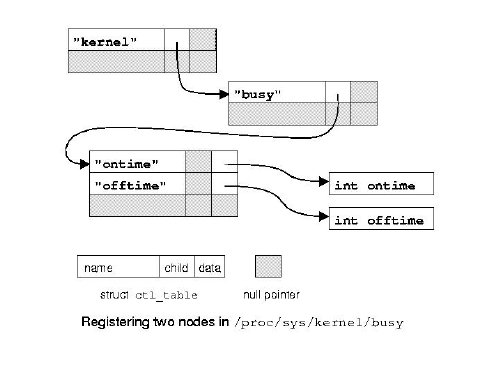
Listing 2 is the interesting part of busy.c, which does all the work related to sysctl. The trick here is leaving all the hard work to proc_dointvec and sysctl_intvec. These handlers are exported only by version 2.1.8 and later of the kernel, so you need to copy them into your module (or implement something similar) when compiling for older kernels.
I won't show the code related to busy looping here, because it is completely out of the scope of this article. Once you have downloaded the source from the FTP site1, it can be compiled on your own system. It works with both version 2.0 and 2.1 on the Intel, Alpha and SPARC platforms.
Despite the usefulness of sysctl, it's hard to find documentation. This is not a concern for system programmers, who are accustomed to peeking at the source code to extract information. The main entry points to the sysctl internals are kernel/sysctl.c and net/sysctl_net.c. Most items in the sysctl tables act on solely on strings or arrays of integers. So to search through the whole source tree for an item, you will end up using the data field as the argument to grep. I see no shortcut to this method.
As an example, let's trace the meaning of ip_log_martians in /proc/sys/net/ipv4. You'll first find that sysctl_net.c refers to ipv4_table, which in turn is exported by sysctl_net_ipv4.c. This file in turn includes the following entry in its table:
{NET_IPV4_LOG_MARTIANS, "ip_log_martians",
&ipv4_config.log_martians, sizeof(int), 0644,
NULL, &proc_dointvec},
Understanding the role of our control file, therefore, reduces to looking for the field ipv4config.log_martians throughout the sources. Some grepping will show that the field is used to control verbose reporting (via printk) of erroneous packets received by this host.
Unfortunately, many system administrators are not programmers and need other sources of information. For their benefit, kernel developers sometimes write a little documentation as a break from writing code, and this documentation is distributed with the kernel source. The bad news is that, sysctl is quite recent in design, and such extra documentation is almost nonexistent.
The file Documentation/networking/Configurable is a short introduction to sysctl (much shorter than this article) and points to net/TUNABLE, which in turn is a huge list of configurable parameters in the network subtree. Unfortunately the description of each item is quite technical, so that people who don't know the details of networking can't proficiently tune network parameters. As I'm writing, this file is the only source of information about system control, if you don't count C source files.
Alessandro Rubini reads e-mail as rubini@linux.it and enjoys breeding oaks and playing with kernel code. He is currently looking for a job in either field.

