
IP Masquerading Code Follow-up
Over a year ago this magazine graciously allowed me to write a couple of articles for them. One of them concerned the topic of IP Masquerading (July 1996, Issue 27) as supported by the Linux kernel. Since that time a number of changes have occurred during the ongoing development of Linux. I'd like to bring the Linux Journal readers up to date on what changes have taken place, explain a few of the technical details and take some guesses at where things are going in the future. Many of the technical details of functionality will not be revisited because overall the functionality hasn't changed. The previous article still applies in that area.
IP Masquerading is a way of performing address hiding. It may be that a company does not have enough registered IP addresses to connect all of its computers to the Internet or, if you're like me, you have one address through a local dial-up account, but three computers. Each of these circumstances can be solved by using masquerading to allow the “internal” computers access via the one external connection point. The external connection point will use masquerading to hide addresses. Figure 1 is a diagram of the local network I have as my setup.
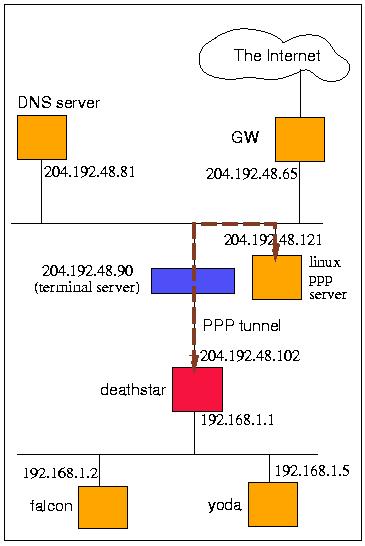
Figure 1. Masqueraded Network Diagram
Using masquerading is still as easy as ever. I have one network where I want all of my hosts to have access to the Internet. Since they are on 192.168.1.0 (the network), I can masquerade the entire class C address space. You'll notice, being the good administrator that I am, I'm using a private address as defined by RFC 1918.
To start masquerading, I defined an rc.masq file in my /etc/rc.d/ directory and added it to execute in /etc/rc.d/rc.local. The rc.masq file looks like this:
#!/bin/sh
#
PATH=/usr/local/bin; export PATH
#
#       setup system forwarding policy
ipfwadm -F -p deny
#
#       masquerading rules
ipfwadm -F a m -S 192.168.1.0/24 -D 0.0.0.0/0
#
#       list out the current ruleset
ipfwadm -F -l -n,
First, you'll notice the command to set up masquerading is the ipfwadm (version 2.3.0) command. This is noticeably different from the previous article when only the ipfw command could be used. Since kernels 1.3.66 ipfwadm is the only command to manipulate masquerading rules and is available from http://www.xos.nl/linux/ipfwadm/.
There are really just two statements given. The first one:
ipfwadm -F -p deny
defines the forwarding policy (-F) of this machine—deathstar from Figure 1. It sets the policy to deny all packets to be forwarded by deathstar. Forwarding is the situation where a packet has a source address and destination address different from any of deathstar's interfaces and is to be routed through.
The second statement:
ipfwadm -F -a m -S 192.168.1.0/24 -D 0.0.0.0/0
added a masquerading rule for the source (-S) network 192.168.1.0. We can tell it is for the entire network by the 24-bit netmask associated with it. 24 bits equates to 255.255.255.0 to indicate the network versus the host portion of an IP address. The destination (-D) address is the all encompassing 0.0.0.0 network, which is used to identify any network. That's it.
The last command allows me to look at the rules set for deathstar. The output looks like this:
IP firewall forward rules, default policy: deny
type  prot source           destination   ports
acc/m all  192.168.1.0/24   0.0.0.0/0     n/a
Briefly, the output indicates that it will masquerade for all protocols from source 192.168.1.* to anywhere for all source and destination ports.
The ipfwadm program is primarily used to set the rules for the firewalling code in the Linux 2.x kernels.
Masquerading takes a small amount of effort to get configured. Before kernel 2.0.30 the masquerading code was still considered experimental. As such, many pieces of the code were not included with the full distribution, but only included as patches. If you are running a 2.0.x kernel where is x is 29 or lower, see the “Code Maturity Level” sidebar for patching the kernel to include masquerading. My kernel is set up running version 2.0.30 with masquerading included. The configuration options related to masquerading are shown in Listing 1.
You'll notice that parts of the masquerading code can only be included as kernel modules. These are for specific protocols or applications; examples include FTP, VDOLive and Real Audio.
Currently, IP Masquerading has support for TCP and UDP, FTP, Real Audio, IRC, ICMP (configuration option), VDOLive, CUSeeMe and Quake. Normal TCP and UDP applications like TELNET or DNS are supported directly in the kernel masquerading code. The abnormal (i.e. pathological) protocols such as FTP and IRC (which have IP addresses as a part of the message stream) and Real Audio (because the control protocol needs to know where you are) are supported via kernel modules. VDOLive, CUSeeME and Quake are also kernel modules.
The ipfwadm command, as mentioned, is used to set up the forwarding rules for masquerading. It's also used for creating the firewall and accounting rules also supported by the Linux kernel. While we won't worry about that aspect here, it should be noted that firewall administration and IP masquerading can be tightly coupled depending upon what task you are attempting.
As well as setting the rules, ipfwadm allows you to view the current status of any masqueraded connections. For example, the command:
# ipfwadm -M -l -n
gives the following output:
IP masquerading entries
prot expire   source       destination    ports
udp  03:31.50 192.168.1.5  164.109.1.3    1110 (61009) -53
udp  03:36.67 192.168.1.5  164.109.1.3    1112 (61011) -53
tcp  14:06.91 192.168.1.5  207.79.74.21   1304 (61016) -80
tcp  14:07.17 192.168.1.5  207.79.74.21   1303 (61015) -80
tcp  14:05.62 192.168.1.5  207.79.74.21   1302 (61014) -80
tcp  01:44.79 192.168.1.5  204.192.48.81  1301 (61013) -23
The -M option is used for masquerading administration and is only used with the -l or -s options. The -l option provides the selected (in this case, masquerading) list. As you can see, the output listing shows the originating port number and the masqueraded port number in parentheses going to the destination port. Our traffic shows three DNS queries, three HTTP connections and a TELNET connection currently established.
The expire column pertains to the timers associated with masquerading. A masqueraded packet will have an expiration time if no further traffic is seen. TCP connections have two timers. The first one for the masqueraded connection and the second one for when the FIN segment is received. Each of these timers can be set with the -s option of ipfwadm. TCP connections have a default timeout value of 15 minutes and UDP, a timeout value of 5 minutes. You can change the values by giving a command such as:
# ipfwadm -M -s 1200 60 120
This command signals that TCP connections expire after 20 minutes of inactivity, a 1 minute expiration after receiving the FIN segment and 2 minutes for UDP entries. The default values will, in most cases, work well.
When I added the rule to masquerade the 192.168.1.0 network, I could have indicated which interface masqueraded traffic would be sent and received. I could have extended the command as follows:
ipfwadm -F -a m -S 192.168.1.0/24 \
        -D 0.0.0.0/0 -W ppp0
ppp0 is the interface name for the 204.192.48.109 address. While this name is optional for our example, it becomes necessary to give it if the masquerading machine has more than one internal network connection. For example, suppose deathstar had two Ethernet connections for networks 192.168.1.0 and 192.168.2.0. Without the -W option, traffic between the two internal networks would also be masqueraded causing a great deal of confusion.
I chose to deny all packets that were to be forwarded as my default policy using the command:
ipfwadm -F -p deny
You are allowed to set up the default policy as masquerade:
# ipfwadm -F -p masqueradeThis command masquerades all connections going out and those coming in. In other words, if a host on the network external to the masquerading machine sets up a route to the internal network, they can send packets and set up connections (even ping) to internal machines. The danger is clear—your network is no longer hidden.
A certain problem did arise with the 2.0.30 kernel and ipfwadm. The IP masquerading code includes entries in the /proc/net/ip_masquerade file for ICMP as shown in Listing 2. ipfwadm has a problem with this and will give the following error:
# ipfwadm -M -l -n
IP masquerading entries
ipfwadm: unexpected input data
Try ipfwadm -h for more information.
This problem will be taken care of in the near future.
One last option to ipfwadm that I find useful is the -o option, which turns on kernel-level debugging for matched packets according to rules set by ipfwadm. Note however, this option is only effective when the kernel option for CONFIG_IP_FIREWALL_VERBOSE is selected.
As we've noted, some protocols are simply incompatible with the basic concept of masquerading. Support exists for a few of the more popular ones—FTP, CUSeeMe, VDOLive, IRC and Quake. A few applications/protocols still exist that are not supported by the 2.0.30 distribution. These include talk, the “R” programs such as rsh or rlogin, Mplayer and other games.
A great replacement for the “R” programs is ssh (Secure Shell). It functions as a direct replacement for rsh, rlogin and rcp, as well as support for X11 sessions. Its main provision is for secure communications and strong authentication; however, since it is TCP based, it works quite well with masqueraded hosts. This program is highly recommended for remote communications in general.
IP Masquerading does a very good job of hiding the internal network. If it is hidden, no one can get to you, right? Maybe this isn't a particularly desirable situation. Incoming connections can make sense for resources such as a web server, anonymous FTP server or e-mail. It could be that your Linux host could function for all of these services, and more than likely you would want to proxy incoming mail anyway. If you have a requirement for an internal web server, a couple of programs are available to forward or redirect traffic bound from the external host to an internal host. The simplest is the redir program updated by Nigel Metheringham and available from sunsite.unc.edu:/pub/Linux/system/Network/daemons/redir-0.7.tar.gz. redir is a TCP port redirector that resides on your masquerading host waiting for connections on a port and redirected to an internal server. A simple example to redirect HTTP and log all connections is:
# redir --syslog 192.168.1.5 80 80 &
You can also start redir from inetd for more convenience.
Every once in a while I'll have X terminals redirected from machines on the outside sent to “yoda” internally (when I'm not running ssh). I typically have X running on “deathstar”, so I use ports above 6000 for the redirection. For example, I set up the redirection in this way:
# redir --syslog 192.168.1.5 6001 6000 &
And on the external host I would send the xterm display to port 6001.
xterm -display 204.192.48.109:1.0 &You wouldn't want to open this up to everyone, so it's probably a good idea to implement a couple of firewall rules about incoming traffic to the masquerading host to restrict who could connect to you or start redir from inetd and use something like tcpd to restrict connections.
For UDP traffic there are a few programs available to redirect traffic from external to internal hosts. udpspoof (http://www.america.com/~chrisf/web/udpspoof.c) and udprelay (ftp://ftp.wang.com/pub/fitz/udprelay-0.2.tar.Z) are good ones. Probably the most popular though is ipautofw, which is generic enough to handle both TCP and UDP traffic. It is implemented in the Linux kernel as a part of the 2.0.30 kernel, and it is also a command interface to set up auto-forwarding rules. It's available from ftp://ftp.netis.com/pub/members/rlynch/ipautofw.tar.gz.
The ipautofw command sets rules in the /proc/net/ip_autofw file to automatically forward packets for masqueraded hosts. For example, in order to handle Real Audio traffic before the kernel module was implemented, you could use ipautofw to give the command:
ipautofw -A -r udp 6970 7170 -c tcp 7070
This associated a TCP control connection (-c<\!s>7070) with a range of return UDP packets, ports 6970 through 7170 inclusive.
Now, suppose we had that web server behind our masquerading host. We could add an auto-forwarding entry such as
# ipautofw -A -r tcp 80 80 -h 195.168.1.5
This command forwards HTTP requests to yoda (195.168.1.5). However, ipautofw is only able to fulfill one request at a time. As long as a masquerade entry exists for that connection, all other connection requests are sent TCP “resets” until the timer expires. This is not a good scenario for a web server.
Redirecting traffic to more than one host is another problem with masqueraded redirections. Many sites have multiple web servers internally and use them to load balance the traffic. None of the utilities I've listed so far support this situation.
IP Fragmentation used to be a problem with masqueraded connections. Because the follow-on fragments contained no transport (TCP or UDP) header information, the datagram could not be correlated to an existing connection. The option for “always defragment” from the configuration menu is shown here:
IP: always defragment (CONFIG_IP_ALWAYS_DEFRAG)
[N/y/?] (NEW) y
This option will cause fragmented datagrams to be reassembled at the masquerading host rather than at the destination.
Still, the notion of performing reassembly in the “middle” of data transfer goes against the general principle of IP delivery. Other methods exist to help eliminate fragmentation. Two of these are MSS negotiation and path MTU discovery.
MSS (maximum segment size) negotiation is an area where IP Masquerading could improve. What I mean by this is best shown in an example.
From Figure 1, let's look at the TCP traffic generated during a connection open from the machine called falcon to an external machine. Listings 3 and 4 shows the traffic.
Listing 3. TCP three-way hand-shake traffic from falcon to deathstar on 192.168.1.0.
As we can see, the MSS advertised from the masqueraded connection (1326) is exactly the same as the one sent from the original host, falcon. The catch here is how I set up the PPP connection from deathstar to the PPP server. I set the MTU to be 296 knowing fragmentation would occur if the connection was not handled properly. A method of handling that takes advantage of the MSS to eliminate fragmentation is for deathstar, the masquerading host, to readjust the MSS based on knowledge it has of the next hop connection. An MSS of 256 (i.e. 296-40) is more appropriate.
You may also notice the (DF) field in the traffic from Figure 4. This is the “Don't Fragment” bit in the IP header. It indicates that if a datagram must be fragmented on its way to the destination, it will be discarded and an ICMP error message sent back to the source. Path MTU discovery is usually responsible for setting the DF bit. It does so in order to look for those ICMP error messages, and if found, it will adjust how much data is put into a TCP segment and resend. A host will continue to do this until a segment size can be found such that the Maximum Transmission Units of all of the data links between the source and destination can accommodate the datagrams without fragmentation.
Given the multitude of methods for overcoming fragmentation, it is no longer a problem in masqueraded networks.
A network address translator (NAT) device is one which performs address hiding. A NAT works on relationships that can be 1:1, many:1 or many:n; it also allocates addresses for external use statically or dynamically.
Instead of having a single ISP assigned IP address, a user or company may have an entire class-C, address space. However, the internal network might still be large. With NAT, addresses could be assigned for different functions. For example, assume 199.1.1.0 is the address we have. Further, assume we are using 172.16.0.0 through 172.31.255.255 for our internal networks. We could assign the following:
199.1.1.1-10: permanent addresses assigned outside of NAT device
199.1.1.11-25: statically assigned to corresponding internal addresses 172.16.1.11-25
199.1.1.26-254: dynamically assigned to remaining internal addresses
IP Masquerading is a many:1, static allocation case of NAT
Linux 2.1.x kernels now have support for NAT as a marked entry in the routing table. A full-featured implementation is rumored to be implemented sometime during the 2.1.x development. For many of the abnormal protocols that IP Masquerading already supports, NAT will have to go through the same growing pains. However, it should lead to a more feature-rich and flexible address-hiding environment.
Although the basic functionality has stayed the same, IP Masquerading has progressed tremendously in the past year. Support for new protocols and better handling of old problems have evolved it from experimental status to a fully functional part of Linux kernels. It solves many real world problems for many people and will continue to do so. During the evolutionary development of Linux it may happen that NAT will replace the work that has preceded it, but until then I highly recommend this amazing piece of technology.
Chris Kostick is a Senior Computer Scientist at Computer Sciences Corporation's Network Security Department. He enjoys working with Linux, beginning with kernel version 1.1.18. As far as computers go, he's not sure if he has more fun debugging TCP/IP problems or shooting DOS machines. He can be reached at ckostick@csc.com or by just yelling “Chris” real loud.
