Using Linux to Teach Unix System Administration

College of DuPage
There are several handicaps inherent in teaching a class in Unix administration in an academic environment. In order to learn to be an administrator you need to actually administer the system—you must have complete control of the box. In most colleges and universities this is an impossibility, given security concerns, administrative overhead for such a setup and the need to equip individual workstations with the Unix operating system. Those colleges having such a setup in place have found it inefficient—either the hours must be limited or the machines go unused outside of class hours.
I have been able to alleviate the above concerns by utilizing Yggdrasil Linux, with the added advantage that the students can take the operating system home, work with it and bring it back to class for labs or assignments. Yggdrasil Linux can be run entirely off CD-ROM and RAM, and it uses a single diskette for booting and data storage. The overhead for such a setup is the same as the normal maintenance costs for a PC; the only additional requirement being a CD-ROM drive, if one is not already installed on the system.
The College of DuPage in Glen Ellyn, Illinois (the second largest community college in the U.S.) has offered classes in Unix administration since 1985, due to the close proximity of Bell Labs and the former Western Electric facilities. Initially, the students ran Minux on an 8086 PC, and the lab was entirely devoted to Unix.
This lab was dropped when the College obtained an AIX system, and as a result, the students no longer had a place to practice administering a Unix system. Over time, more and more restrictions were placed on access to administrative files or doing administrative type functions not requiring root access. At first, access to the AIX system was over a network using a boot disk and, more recently, using a menu selection in DOS and MS-Windows. The overwhelming majority of students in the classes are computer professionals. The prerequisites for this class include “Introduction to Unix”, which in turn requires knowledge of a programming language.
When I started teaching the Unix administration class about six years ago, we were using a four-year-old book which did not cover many of the current features of Unix. In addition, there was no easy way to conduct meaningful labs. I went through three more textbooks over the next five years while looking for a book that was relevant to the students. Most textbooks covered too many versions of Unix, which was confusing for many students.
My teaching options were:
Continue using the system as it existed and resign myself to the students being unable to practice administration.
Request that individual workstations be set up to run Unix. As this had not been done before, this option would have been difficult, as well as costly, to implement.
Investigate running Unix on a PC without affecting the current academic networking environment.
I felt the third option was the only viable one. There are several manufacturers of Unix or Unix-like operating systems for the PC, including SCO Unix and Solaris x86. However, none of them have the wealth of free software along with available source code that Linux has. In addition, there are no licensing or distribution restrictions on Linux other than the GNU-type copyrights. It is supported by many USENET newsgroups and many helpful people on the Internet.
Last year, in addition to AIX, I decided to give my students the option of running Linux from a CD-ROM—in fact, I encouraged it. I was not willing to require it until I saw the results of my experiment. It was an overwhelming success and most students welcomed running Linux at home, since it allowed them to do assignments without having to come to the campus except for class. Only one student had a PC at home without a CD-ROM drive, and he was able to come to campus to use a PC. Therefore, this solution did not prevent any students from doing their assignments.
This year I made running Linux a requirement and chose as the textbook Linux System Administrator's Survival Guide by Timothy Parker, Ph.D., published by SAMS. I chose this text over a number of other books because it covered most of the class topics, was easy to read and was easily supplemented. I have written a Lab and Projects manual that includes assignments in Linux, AIX and generic Unix. I am planning to expand it to a full-fledged text as time permits, using recommendations of my students and my experiences.
My requirements for a Linux distribution for my class are that it be easy to run, require no configuration by the students and run right out of the box. I experimented with a number of versions of Linux. Except for Yggdrasil, all the versions either used the CD-ROM for installation only or had a live file system that required both a knowledge of Linux and the setup of a hard disk partition. We could fulfill neither of these requirements in our academic environment. Yggdrasil includes the boot diskette and does not require the student to configure either a boot or a root diskette.
The essential hardware ingredients are:
The kernel and other files are loaded into RAM from the boot diskette. This is mounted as the file system /ramdisk.
Boot Diskette contains the basic Linux kernel and basic Linux system files. Once the software is loaded into RAM, the boot diskette is no longer needed. This frees the diskette drive for loading customized files or backup.
CD-ROM loads more advanced files into /ramdisk and contains the remainder of the live file system, which is mounted as /.
You may think the missing ingredient is the hard disk, but it's not. I haven't listed the HD because you don't need it.
Linux is started by putting the boot diskette and Linux CD-ROM into the computer, then powering on or rebooting the PC. The PC loads the basic Linux kernel and checks for various hardware devices by probing base addresses and evaluating the response. This probing process can cause the PC to hang, making it necessary to modify the boot parameters.
I have found that on many PCs it has been necessary or advisable to use additional boot parameters. The opportunity to modify boot parameters is given when the system displays the boot: prompt. If you wish to continue with no changes, you press enter.
You usually do not need additional boot parameters when running Linux on a SCSI-based system. However, I have taught in colleges which use IDE/ATAPI CD-ROMS on their PCS, not SCSI devices. Using an IDE or EIDE hard disk and CD-ROM presents some configuration challenges. Most current EIDE controller cards allow for primary and secondary IDE controllers. In addition, two devices, known as master and slave drives, can be attached to each channel. IDE CD-ROMs follow the same conventions as hard drives.
It is important that students understand this in order to set up their own PCs and use the college's equipment. Over half my students had problems that were eliminated once they understood the IDE configuration issues. My experience has been that it is better to have a motherboard with integrated, rather than separate, IDE controllers. Separate IDE controllers tend to have timing problems with some motherboards.
I needed several common boot parameters in order to get Linux working on both the school's system and the students' home systems.
Figure 1. IDE Disk Layout in Linux
As shown in Figure 1, you can specify an IDE/ATAPI CD-ROM device by entering the “hd” device as follows:
linux hdc=cdrom
hdc refers to the /dev device and can actually be one of the following values:
hda--the master drive on the primary IDE controller
hdb--the slave drive on the primary IDE controller
hdc--the master drive on the secondary IDE controller
hdd--the slave drive on the secondary IDE controller
Some motherboards look at a single IDE controller as the primary controller, regardless of whether the board contains primary and secondary controllers.
Since most of the file system is stored in RAM, you need to increase the size of the RAM disk. On a system with 16MB of RAM, a RAM disk of 8MB is sufficient for classwork, leaving 8MB for the operating system. You can adjust the size upward as memory size increases. Even if you specify all the RAM as RAM disk, Linux is intelligent enough to reduce the RAM disk size to make space for the operating system. You set the RAM disc size with the following command:
linux ramdisk=8000
where 8000 refers to 8000 blocks of 1024 bytes each.
Another useful option is hda=serialize, a parameter that forces Linux to handle one controller at a time. A complete command line at the boot prompt could look like:
linux ramdisk=8000 hda=serialize hdc=cdrom
Other options can speed things up, such as disabling the check for a Sound Blaster Pro CD-ROM controller.
When you are done entering the linux command-line options, press enter. After all the messages detailing unsuccessful checks for various hardware devices, the system gives you a login prompt. The following four options are displayed on the screen:
demo--gives an X-windows demo program that runs very slowly from the CD-ROM on the first use, but runs much more quickly once it is in memory.
guest--sets up a guest login with normal user rights. This is useful for teaching labs in which students need to determine access rights for certain files and directories by accessing them as guest.
install--allows you to install Linux and gives several menus on the screen.
root--gives you permissions to all files and commands.
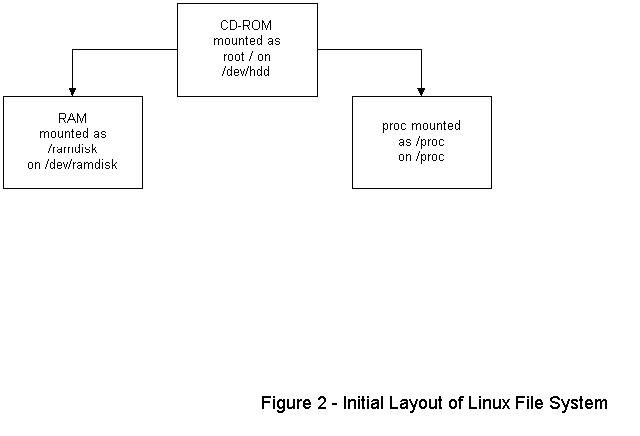
For the purposes of this discussion, a root login is assumed. When you type the mount command without arguments, the screen output will look similar to the following:
/dev/hdd on / type iso9660
/dev/ramdisk on /ramdisk type ext2 (rw) /proc on on type /proc (type)
/dev/hdd refers to the CD-ROM mounted as root. /dev/ramdisk refers to the file system named /ramdisk, which is using internal RAM and can to be altered. /proc is the standard Unix pointer location for devices.
Figure 2. Initial Layout of Linux File System
I have my students enter the following command:
mkdir /ramdisk/mnt /ramdisk/dos
This command creates two directories on /ramdisk to be used as follows:
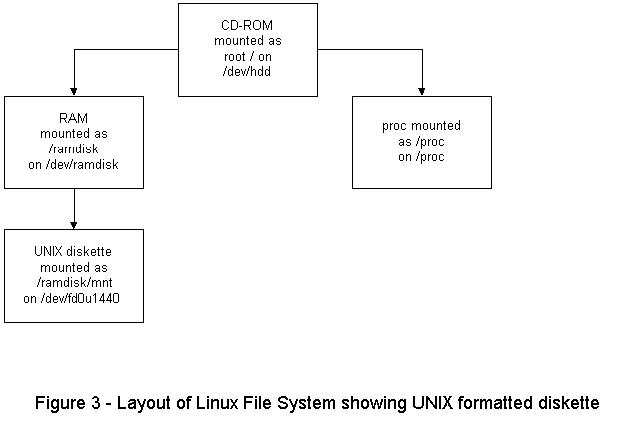
/ramdisk/mnt is used to mount a Unix-formatted diskette.
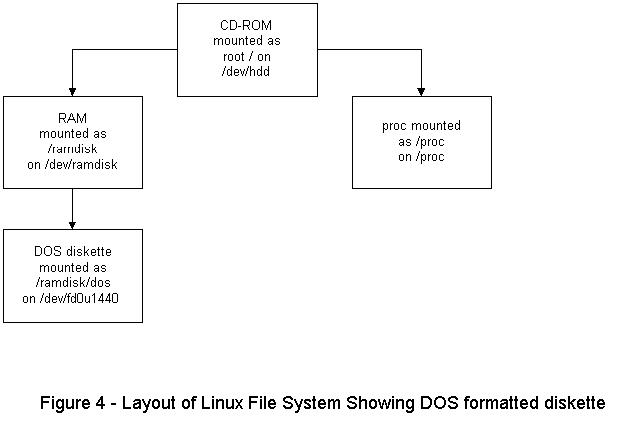
/ramdisk/dos is used to mount a DOS-formatted diskette.
You format a 1.44MB diskette by typing the command:
fdformat /dev/fd0h1440
The following output will appear on the screen:
Double sided, 80 tracks, 19s sec/track. Total capacity is 1440KB formatting...done verifying... done
Note that formatting will destroy any files already on the diskette you insert.
Now, to create a Unix file system on the diskette, type the following command:
mkfs /dev/fd0H1440
You can then mount the diskette by typing:
mount /dev/fd0H1440 /ramdisk/mntNow, when you type mount alone, the following output appears on the screen:
/dev/hdd on / type iso9660 (ro)/dev/ramdisk on /ramdisk type ext2 (rw) /proc on on type /proc (type) /dev/fd0u1440 on /ramdisk/mnt type ext2 (rw)
Linux files can now be saved to /ramdisk/mnt. To unmount the diskette use the command:
umount /ramdisk/mnt
or:
umount /dev/fd0H1440
It is sometimes necessary to transfer student assignments from the Linux box to the AIX box. Because networking is not done under Linux, it is necessary to use the diskette as the transfer media. The transfer is done using FTP from a DOS/Windows PC to the AIX box.
You will need to format the diskette under DOS. (Be sure you unmount any diskettes from the above exercise.) DOS formatting is done in Linux with the command:
mformat a:
Mount the DOS diskette with the command:
mount -t msdos /dev/fd0H1440 /ramdisk/dosTyping mount alone produces the following output:
/dev/hdd on / type iso9660 (ro)/dev/ramdisk on /ramdisk type ext2 (rw) /proc on on type /proc (type) /dev/fd0u1440 on /ramdisk/dos type msdos (rw)
You can now save files in DOS format to /ramdisk/dos. Note that you must use the standard DOS file naming convention of up to 8 characters for the prefix, then a period, then up to 3 characters for the extension. You can unmount the diskette with the command:
umount /ramdisk/dos
Printing is one of the biggest problems I have dealt with. Since setting up the print spooler requires modifying configuration files and running daemons, I opted for the “quick and dirty” until such time as the students were more experienced. Generally, Yggdrasil Linux sets up the PC printer port as /dev/lp1. For some reason unknown to me, it sometimes establishes /dev/lp0 as the printer port. Keep this in mind in the following discussion.
Files can be printed by using the following command:
cat filename > /dev/lp1
This sends the raw file to the device port.
echo ^v^l > /dev/lp1Use the sequence ctrl-vctrl-l. This will send a form feed to the printer and eject the last page of your printout. The second step is necessary because without it the first step will not completely print the file. If you are logged in as guest, make sure you have read/write permissions by typing: chmod 666 /dev/lp1 or chmod 666 /dev/lp0.
Some printers, such as the IBM Proprinter, have a problem printing Unix files using the above method, since they do not insert a carriage return upon receiving only the line feed at the end of a line. As a result, the output will step across the page. In this case you can use a Unix-to- DOS program such as to-dos to convert the file format before printing. Modify the printing command as follows:
cat filename | todos > /dev/lp1 echo ^v^l > \
/dev/lp1
The ultimate solution to the printing problem is, of course, to run the print spooler. However, if the configuration is not done just right, the spooler doesn't work; thus, using the “quick and dirty” way gets the students started. It also helps the students understand the printing process and learn how to debug printer problems.
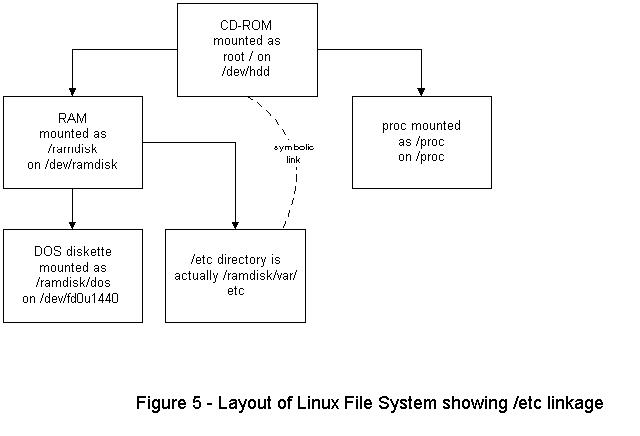
The /etc directory is symbolically linked to the /ramdisk/var/etc directory; therefore, students have write access to most files needed to administer the system. The files are saved on the diskette in Linux format, and the next time the student reboots the system the changed files are loaded. It is even possible to modify the boot diskette; just be sure to back it up first.
Figure 5. Layout of Linux File System Showing /etc Linkage
After the above steps are completed and understood by the students, they can have full control of the Linux system. There is no need to network and no need to use local hard disks. I hope to include networking and related skills as my class progresses.
Yggdrasil Linux can be set up quite effectively to teach Unix administration. It is inexpensive, relatively secure and the students can use it at home without modifying their PCs. It helps solve the biggest problems I have experienced as an instructor of Unix. Once the hardware is in place and network security issues are addressed, I am looking forward to using Linux to teach networking as well.
Joe Kaplenk has been a part-time instructor at the College of DuPage in Glen Ellyn, Illinois for 13 years. He has taught classes in introduction to computers and programming languages as well as Unix. He works full-time for IBM CS Systems in Oakbrook Terrace, Illinois. This article is based on excerpts from a textbook he is writing for teaching Unix administration. Joe enjoys all forms of skating, writing, singing country music songs and country dancing. He also enjoys spending time with his wife Ramona and daughter Anisa. He can be reached at jkaplenk@aol.com.