Linux as an Internet Kiosk
If you are at all interested in consumer applications of the Internet, you have no doubt heard about cybercafés and so-called “Internet kiosks”. Both attempt to bring ubiquitous Internet accessibility to the general public. In cybercafés, the idea is to let you browse the Internet (or even do real work) while basking in the comfort of a familiar café. Internet kiosks are supposed to be quick and easy-to-use stations for checking e-mail or looking up a bit of information on the Web.
Café Liberty, a cybercafé in Cambridge, Massachusetts, was the first of its kind in the greater Boston area, founded in the fall of 1994. From the start, we have had several computers available for use by customers for a small hourly fee. Our own experiences, coupled with that of other café owners, eventually led us to the conclusion that there were a lot of us interested in giving their customers Internet access, but who had absolutely no idea how to go about it.
In March 1996, the NetPod project was born, to be funded and managed by Café Liberty. We set out to build a public access Internet terminal, a “NetPod”, that would allow anyone with a dollar to surf the Web, TELNET, check e-mail or do any common Internet function. The system had to be extremely easy to use, foolproof, fast, reliable and painless to install in the target site. Perhaps not surprisingly, we chose Linux for every machine in our network. The article, “Linux—The Internet Appliance?” by Phil Hughes, in the April 1997 Linux Journal struck a chord with us, since much of what he said is exactly what we are doing. While our system is not designed for the home, it does attempt to provide an interface that anyone can understand, it does it on cheap hardware, it is an Internet appliance and, of course, it runs Linux.
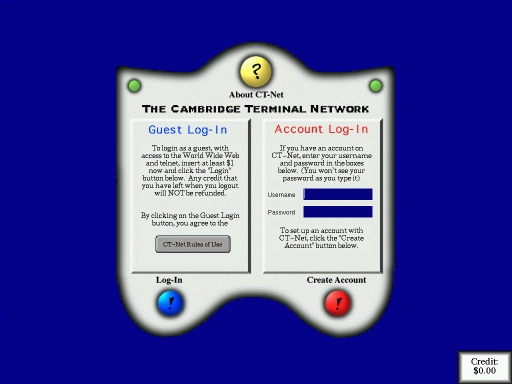
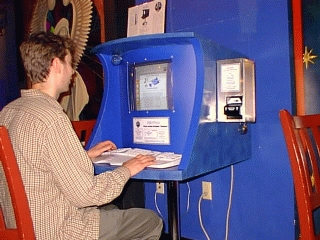
In order to understand our network architecture, it's necessary to understand what kind of services we wish to offer. When a user approaches the NetPod, he sees a heavily modified XDM (X Display Manager) which presents him with several options: Guest Login, Account Login, About and Create Account (see Figure 1). The machine costs six dollars an hour to use, paid in increments of one dollar for ten minutes. Users insert bills into a bill validator on the side of the NetPod (see Figure 2).
Figure 2. NetPod Terminal with Validator
A guest login provides access only to Netscape Navigator and to TELNET, while an account (which costs three dollars a month) also provides e-mail (both sending and receiving) and access to Usenet newsgroups from a full news feed.
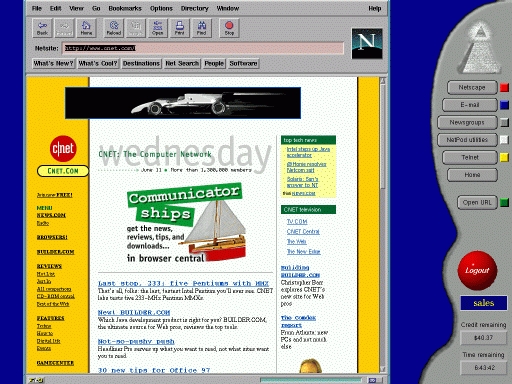
After login, the user is presented with a large Netscape window and a tool bar on the right hand side of the screen that lets them switch between the various parts of the system (see Figure 3). Their remaining time is also displayed on the tool bar. When an account holder logs out, their remaining money is kept for their next login session. When a guest logs out, any remaining money is lost.
Figure 3. Netscape Window with Toolbar
As mentioned earlier, we used XDM for the login screen. This is because XDM is relatively easy to modify and takes care of all the details of logging a user in, like setting X access controls and creating an environment. The entire login program was simply linked to XDM through the Greet() function. Since we didn't want to deal with much of the bloat of Motif or the complexity of the X toolkit, we designed our own library of GUI tools for the NetPod. This let us tailor every last detail of our system's appearance. It also let us easily construct unique interface elements, like shaped graphic buttons, some of which can be seen in Figure 1.
The tool bar was considerably more difficult to write. We chose to use FVWM as a window manager because it is easily customizable and provides a module function that allows a separate program to probe FVWM's internal window information and structures. We configured FVWM to allow no window movement, no special menus and no key control; in short, it was locked up tight so the user couldn't do anything involving window management.
The tool bar continually receives information from FVWM about window updates so we can extract the window IDs of Netscape windows, TELNET sessions, etc. and move around the windows when the user clicks on the tool bar buttons.
This scheme would work fine, if Netscape were a relatively simple program, but Netscape opens many other windows during normal operation, such as mail and news windows, dialogs and others. Keeping track of all these windows is a bit of a chore, and it has only become more difficult with our recent incorporation of Netscape Communicator, which opens far more windows than Navigator.
Simple though it may be, many users have praised our straightforward interface for its ease of use and its speed. People used to sluggish Windows and Mac systems simply cannot believe machines like ours (Pentium 100 with 16MB RAM) can be as quick and responsive as they are—which is due in large part to our use of Linux and the X Window System.
Our network is a mishmash of random hardware and hand-built software. Coming into Café Liberty are two 384Kbps fractional T1 lines. One runs to our ISP and provides Internet service using the Cisco HDLC protocol. The other is a frame-relay line that serves the NetPods. The two T1s are attached to our router (a 486DX/40 running Linux), which also has two Ethernet cards. One Ethernet is for the café (including network jacks for public use), and the other is for NetPod machines.
You don't often hear of a single Linux box being used as a router for multiple Ethernets and T1 lines with differing protocols, let alone a wimpy 486DX/40. But, thanks to SDL Communications' RISCom/N2 cards, it is possible. One RISCom/N2 with a T1 CSU/DSU attached to its v.35 port runs the frame-relay connection, and the other RISCom/N2csu (with built-in CSU/DSU) runs the Cisco HDLC Internet connection.
Getting the cards up and running is mostly straightforward, though there are many small details, like electrical characteristics of the T1 lines, that we sometimes had to just guess at and hope it worked. After the cards were up, routing was easy—just compile IP forwarding into the kernel, set up some subnets and all falls into place.
The NetPod Ethernet has only a couple of machines on it, the most important of which is the NetPod server. The server is a Pentium 100 (running Linux) with 32MB of RAM that deals with NetPod mail (using ZMailer), the Usenet feed (inn), NFS serving of users' home directories, and the NetPod database. The database, which keeps track of user information, was custom-written and communicates with the NetPods over encrypted channels for security.
The server has IP firewalling turned on in full force. While anybody can connect to the SMTP, POP and IMAP daemons, everything else (most specifically NFS) is tightly controlled.
Each NetPod has a 56Kbps frame-relay connection. As far as we know, we are the only Internet terminal company in the world to have chosen frame-relay; the vast majority use standard phone lines and a couple use ISDN. Each frame-relay line is assigned a different PVC (Permanent Virtual Circuit) number. Their data is consolidated and appears on the frame-relay T1 at café Liberty.
Though frame-relay may seem like massive overkill for an Internet terminal, it has enormous benefits.
Frame-relay is fast. The latency on frame-relay lines is a lot less than a PPP connection over a modem. This translates directly into faster TCP connection times for Netscape. We are guaranteed 56Kbps of bandwidth, while the average 33.6Kbps or 56Kbps modem is unlikely to ever get its theoretical maximum bandwidth.
Frame-relay is cheap. Our lines cost somewhere around $150 a month. This may seem like a quite a premium to pay for the comparatively mediocre speed benefits mentioned above, but remember that Massachusetts is in NYNEX (phone company for northeast U.S.) territory. [NYNEX, which covered the east coast of the U.S. from Maine to New York, and Bell Atlantic, which covered from new Jersey south to Virginia, have just merged. The combined company is Bell Atlantic—Ed.] We have found that NYNEX would charge us thousands of dollars per month for a 64Kbps ISDN connection up 24 hours a day. The situation with standard analog dial-ups isn't much better; there is simply no way to avoid a ludicrous per-minute charge on business phone lines of any type.
Thus, frame-relay was the obvious choice. Yet the startup costs for frame-relay are crippling. One SDL RISCom/N2dds (with built-in 56Kbps CSU/DSU) and frame-relay software costs $750. The installation costs for the line are several hundred more. Despite these numbers, we feel that there are very real benefits to the frame-relay technology. Being able to remotely access the NetPods at any time of day or night is immensely useful.
In an attempt to reduce the cost of frame-relay, we have embarked on a side project to add frame-relay support to Linux. We had often wondered why Linux had no frame-relay protocol driver. It seems that the main reasons are complexity and cost. You can tell that parts of frame-relay were designed by committee; every person involved managed to get his or her pet feature fit in somewhere, yet they don't all fit quite right. All the relevant standards documents have to be purchased from the ITU (International Telecommunications Union) and then deciphered.
We figure we can drop the cost of frame-relay about $500 if we use a BAT Electronics CSU/DSU (the most inexpensive we could find) and then tack on a minimalist synchronous to asynchronous converter of our own design. This converter takes the CSU/DSU's synchronous bitstream, repackages it in RS-232 bytes at 115,200 baud and sends it to the NetPod, which then interprets it with the frame-relay driver. As of early June, we have established successful TCP connections through this system, and we are now concentrating on improving the stability and performance of the drivers. Once they are ready for release, we will donate the drivers to the standard kernel distribution so that any device that generates an HDLC-framed bitstream (like Z8530-based synchronous cards) can be used for frame-relay.
We are a 100% Linux shop. Except for some graphics work that we do on Macintoshes to keep professional printers happy, every last machine is a PC running Linux. Linux has given us so much that, in the true spirit of Linux, we feel we have to give something back to the community, which we hope to do with our frame-relay package.
Though we were one of the first, we are certainly not the only company trying to create a public Internet access solution. We are initially targeting a small segment of the market, namely cafés and similar establishments, but we realize that our system can be applied to a much broader range of sites. We feel that we have, in a general sense, the best Internet terminal system on the market.
We feel this way for a number of reasons. First, we have an interface that is as idiot-proof as we can make it (Netscape notwithstanding). We have a fast and reliable link to the Internet that is up all the time. We provide accounts and other services that others do not. We don't make users pay through the nose to use our terminal.
By comparison, other Internet terminals (most of which run Microsoft operating systems) are more geared towards giving the user “neat toys” to play with, without providing any incentive to actually use the system. In order to get these toys, the machines have to run Windows, which means that they give up all the benefits of Linux that we have exploited. They are unstable and crash all the time. They do not provide an easy-to-use interface. Billing systems are often kludged on; many systems simply cut power to the keyboard and mouse when a user's time is up. They provide minimal security; on virtually every terminal we have played with, we have managed to get full administrative access to the system in only a few minutes.
The fundamental point to remember here is that, without Linux, we could not have done any of this with as little capital, as little time and as few headaches as we did. Some of it is outright impossible with any other operating system, even other Unices. Because Linux is Unix-like, we can control every aspect of the system. And because Linux is free, we can do things like add our own frame-relay drivers to the kernel with impunity.
Our first NetPod became available for public use at café Liberty in August, 1996. After many months of feedback from our users (and after waiting three months for NYNEX to install our frame-relay lines), we placed two more NetPods at the Someday café and Seattle Joe's café in the Cambridge/Boston area in February, 1997. We are preparing for a massive set of new sites this Fall.
Building the infrastructure for the NetPod system, both the network and the core software, has been challenging, but we have shown that it works, and that it works well. As we faced each challenge, we saw that a box running Linux could provide a solution. Now we can concentrate on adding new features to expand the appeal of the system.
Unfortunate though it may seem, it turns out that many of our users want to access their America Online accounts through our NetPods. We purchased a copy of Wabi (Windows application binary interface) through Caldera, and we have found (much to our amazement) that it actually runs AOL's Windows software, and in fact runs it quite well. We recently incorporated it, along with many other new features and a streamlined, more complete set of user tools. There are still many new features under construction.
In short, if it involves networking, we want to add it to the NetPod. The reason the NetPods can do what they do, and the reason we're justified in even considering some of the crazy ideas we have, is that we use Linux on every system in the NetPod network. Just imagine using Windows 95 to implement multiuser access controls over a distributed file system using frame-relay, then switching from Netscape to an SVGAlib virtual terminal running Quake, then to AOL running inside a Windows emulator. It should send shivers up your spine. With Linux, it's a piece of cake.
Kevin McCormick is a senior at the Massachusetts Institute of Technology, majoring in Electrical Engineering and Computer Science. He is the head programmer for the NetPod project. When not slaving away at MIT or NetPod, he tries to network everything in sight to the Internet, including (no kidding) the toilets at his fraternity. He can be reached at fbyte@netpod.com.