Linux Network Programming, Part 1
Like most other Unix-based operating systems, Linux supports TCP/IP as its native network transport. In this series, we will assume you are fairly familiar with C programming on Linux and with Linux topics such as signals, forking, etc.
This article is a basic introduction to using the BSD socket interface for creating networked applications. In the next article, we will deal with issues involved in creating (network) daemon processes. Future articles will cover using remote procedure calls and developing with CORBA/distributed objects.
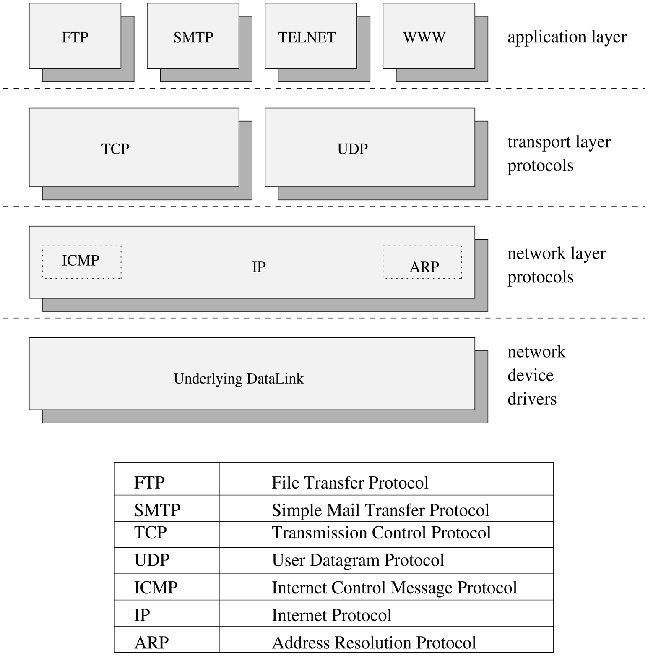
The TCP/IP suite of protocols allows two applications, running on either the same or separate computers connected by a network, to communicate. It was specifically designed to tolerate an unreliable network. TCP/IP allows two basic modes of operation—connection-oriented, reliable transmission and connectionless, unreliable transmission (TCP and UDP respectively). Figure 1 illustrates the distinct protocol layers in the TCP/IP suite stack.
Figure 1. TCP/IP Protocol Layers
TCP provides sequenced, reliable, bi-directional, connection-based bytestreams with transparent retransmission. In English, TCP breaks your messages up into chunks (not greater in size than 64KB) and ensures that all the chunks get to the destination without error and in the correct order. Being connection-based, a virtual connection has to be set up between one network entity and the other before they can communicate. UDP provides (very fast) connectionless, unreliable transfer of messages (of a fixed maximum length).
To allow applications to communicate with each other, either on the same machine (using loopback) or across different hosts, each application must be individually addressable.
TCP/IP addresses consist of two parts—an IP address to identify the machine and a port number to identify particular applications running on that machine.
The addresses are normally given in either the “dotted-quad” notation (i.e., 127.0.0.1) or as a host name (foobar.bundy.org). The system can use either the /etc/hosts file or the Domain Name Service (DNS) (if available) to translate host names to host addresses.
Port numbers range from 1 upwards. Ports between 1 and IPPORT_RESERVED (defined in /usr/include/netinet/in.h—typically 1024) are reserved for system use (i.e., you must be root to create a server to bind to these ports).
The simplest network applications follow the client-server model. A server process waits for a client process to connect to it. When the connection is established, the server performs some task on behalf of the client and then usually the connection is broken.
The most popular method of TCP/IP programming is to use the BSD socket interface. With this, network endpoints (IP address and port number) are represented as sockets.
The socket interprocess communication (IPC) facilities (introduced with 4.2BSD) were designed to allow network-based applications to be constructed independently of the underlying communication facilities.
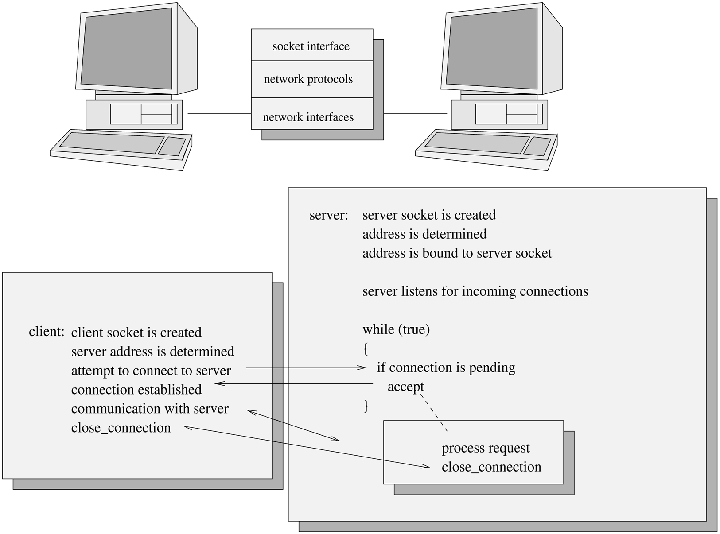
To create a server application using the BSD interface, you must follow these steps:
Create a new socket by typing: socket().
bind an address (IP address and port number) to the socket by typing: bind. This step identifies the server so that the client knows where to go.
listen for new connection requests on the socket by typing: listen().
accept new connections by typing: accept().
Often, the servicing of a request on behalf of a client may take a considerable length of time. It would be more efficient in such a case to accept and deal with new connections while a request is being processed. The most common way of doing this is for the server to fork a new copy of itself after accepting the new connection.
Figure 2. Representation of Client/Server Code
The code example in Listing 1 shows how servers are implemented in C. The program expects to be called with only one command-line argument: the port number to bind to. It then creates a new socket to listen on using the socket() system call. This call takes three parameters: the domain in which to listen to, the socket type and the network protocol.
The domain can be either the PF_UNIX domain (i.e., internal to the local machine only) or the PF_INET (i.e., all requests from the Internet). The socket type specifies the communication semantics of the connection. While a few types of sockets have been specified, in practice, SOCK_STREAM and SOCK_DGRAM are the most popular implementations. SOCK_STREAM provides for TCP reliable connection-oriented communications, SOCK_DGRAM for UDP connectionless communication.
The protocol parameter identfies the particular protocol to be used with the socket. While multiple protocols may exist within a given protocol family (or domain), there is generally only one. For TCP this is IPPROTO_TCP, for UDP it is IPPROTO_UDP. You do not have to explicitly specify this parameter when making the function call. Instead, using a value of 0 will select the default protocol.
Once the socket is created, its operation can be tweaked by means of socket options. In the above example, the socket is set to reuse old addresses (i.e., IP address + port numbers) without waiting for the required connection close timeout. If this were not set, you would have to wait four minutes in the TIME_WAIT state before using the address again. The four minutes comes from 2 * MSL. The recommended value for MSL, from RFC 1337, is 120 seconds. Linux uses 60 seconds, BSD implementations normally use around 30 seconds.
The socket can linger to ensure that all data is read, once one end closes. This option is turned on in the code. The structure of linger is defined in /usr/include/linux/socket.h. It looks like this:
struct linger
{
        int l_onoff;   /* Linger active */
        int l_linger;  /* How long to linger */
};
If l_onoff is zero, lingering is disabled. If it is non-zero, lingering is enabled for the socket. The l_linger field specifies the linger time in seconds.
The server then tries to discover its own host name. I could have used the gethostname() call, but the use of this function is deprecated in SVR4 Unix (i.e., Sun's Solaris, SCO Unixware and buddies), so the local function _GetHostName() provides a more portable solution.
Once the host name is established, the server constructs an address for the socket by trying to resolve the host name to an Internet domain address, using the gethostbyname() call. The server's IP address could instead be set to INADDR_ANY to allow a client to contact the server on any of its IP addresses—used, for example, with a machine with multiple network cards or multiple addresses per network card.
After an address is created, it is bound to the socket. The socket can now be used to listen for new connections. The BACK_LOG specifies the maximum size of the listen queue for pending connections. If a connection request arrives when the listen queue is full, it will fail with a connection refused error. [This forms the basis for one type of denial of service attack —Ed.] See sidebar on TCP listen() Backlog.
Having indicated a willingness to listen to new connection requests, the socket then prepares to accept the requests and service them. The example code achieves this using an infinite for() loop. Once a connection has been accepted, the server can ascertain the address of the client for logging or other purposes. It then forks a child copy of itself to handle the request while it (the parent) continues listening for and accepting new requests.
The child process can use the read() and write() system calls on this connection to communicate with the client. It is also possible to use the buffered I/O on these connections (e.g., fprint()) as long as you remember to fflush() the output when necessary. Alternatively, you can disable buffering altogether for the process (see the setvbuf() (3) man page).
As you can see from the code, it is quite common (and good practice) for the child processes to close the inherited parent-socket file descriptor, and for the parent to close the child-socket descriptor when using this simple forking model.
The client code, shown in Listing 2, is a little simpler than the corresponding server code. To start the client, you must provide two command-line arguments: the host name or address of the machine the server is running on and the port number the server is bound to. Obviously, the server must be running before any client can connect to it.
In the client example (Listing 2), a socket is created like before. The first command-line argument is first assumed to be a host name for the purposes of finding the server's address. If this fails, it is then assumed to be a dotted-quad IP address. If this also fails, the client cannot resolve the server's address and will not be able to contact it.
Having located the server, an address structure is created for the client socket. No explicit call to bind() is needed here, as the connect() call handles all of this.
Once the connect() returns successfully, a duplex connection has been established. Like the server, the client can now use read() and write() calls to receive data on the connection.
Be aware of the following points when sending data over a socket connection:
Sending text is usually fine. Remember that different systems can have different conventions for the end of line (i.e., Unix is \012, whereas Microsoft uses \015\012).
Different architectures may use different byte-ordering for integers etc. Thankfully, the BSD guys thought of this problem already. There are routines (htons and nstoh for short integers, htonl and ntohl for long integers) which perform host-to-network order and network-to-host order conversions. Whether the network order is little-endian or big-endian doesn't really matter. It has been standardized across all TCP/IP network stack implementations. Unless you persistently pass only characters across sockets, you will run into byte-order problems if you do not use these routines. Depending on the machine architecture, these routines may be null macros or may actually be functional. Interestingly, a common source of bugs in socket programming is to forget to use these byte-ordering routines for filling the address field in the sock_addr structures. Perhaps it is not intuitively obvious, but this must also be done when using INADDR_ANY (i.e., htonl(INADDR_ANY)).
A key goal of network programming is to ensure processes do not interfere with each other in unexpected ways. In particular, servers must use appropriate mechanisms to serialize entry through critical sections of code, avoid deadlock and protect data validity.
You cannot (generally) pass a pointer to memory from one machine to another and expect to use it. It is unlikely you will want to do this.
Similarly, you cannot (generally) pass a file descriptor from one process to another (non-child) process via a socket and use it straightaway. Both BSD and SVR4 provide different ways of passing file descriptors between unrelated processes; however, the easiest way to do this in Linux is to use the /proc file system.
Additionally, you must ensure that you handle short writes correctly. Short writes happen when the write() call only partially writes a buffer to a file descriptor. They occur due to buffering in the operating system and to flow control in the underlying transport protocol. Certain system calls, termed slow system calls, may be interrupted. Some may or may not be automatically restarted, so you should explicitly handle this when network programming. The code excerpt in Listing 3 handles short writes.
Using multiple threads instead of multiple processes may lighten the load on the server host, thereby increasing efficiency. Context-switching between threads (in the same process address space) generally has much less associated overhead than switching between different processes. However, since most of the slave threads in this case are doing network I/O, they must be kernel-level threads. If they were user-level threads, the first thread to block on I/O would cause the whole process to block. This would result in starving all other threads of any CPU attention until the I/O had completed.
It is common to close unnecessary socket file descriptors in child and parent processes when using the simple forking model. This prevents the child or parent from potential erroneous reads or writes and also frees up descriptors, which are a limited resource. But do not try this when using threads. Multiple threads within a process share the same memory space and set of file descriptors. If you close the server socket in a slave thread, it closes for all other threads in that process.
Listing 4 shows a connectionless server using UDP. While UDP applications are similar to their TCP cousins, they have some important differences. Foremost, UDP does not guarantee reliable delivery—if you require reliability and are using UDP, you either have to implement it yourself in your application logic or switch to TCP.
Like TCP applications, with UDP you create a socket and bind an address to it. (Some UDP servers do not need to call bind(), but it does no harm and will save you from making a mistake.) UDP servers do not listen or accept incoming connections, and clients do not explicitly connect to servers. In fact, there is very little difference between UDP clients and servers. The server must be bound to a known port and address only so that the client knows where to send messages. Additionally, the order of expected data transmissions is reversed, i.e., when you send data using send() in the server, your client should expect to receive data using recv().
It is common for UDP clients to fill in the sockaddr_in structure with a sin_port value of 0. (Note that 0 in either byte-order is 0.) The system then automatically assigns an unused port number (between 1024 and 5000) to the client. I'm leaving it as an exercise to the reader to convert the server in Listing 4 into a UDP client.
In order to connect to a server, you must first know both the address and port number on which it is listening. Many common services (FTP, TELNET, etc.) are listed in a text database file called /etc/services. An interface exists to request a service by name and to receive the port number (correctly formatted in network byte-order) for that service. The function is getservbyname(), and its prototype is in the header file /usr/include/netdb.h. This example takes a service name and protocol type and returns a pointer to struct servent.
struct servent
{
        char *s_name;   /* official service name */
        char **s_aliases;       /* alias list */
        int s_port;     /* port number, network<\n>
                         * byte-order--so do not
                         * use host-to-network macros */
        char *s_proto;  /* protocol to use */
};
This article has introduced network programming in Linux, using C and the BSD Socket API. In general, coding with this API tends to be quite laborious, especially when compared to some of the other techniques available. In future articles, I will compare two alternatives to the BSD Socket API for Linux: the use of Remote Procedure Calls (RPCs) and the Common Object Request Broker Architecture (CORBA). RPCs were introduced in Ed Petron's article “Remote Procedure Calls” in Linux Journal Issue #42 (October, 1997).
Major System Calls The next article in this series will cover the issues involved in developing long-lived network services (daemons) in Linux.
All listings referred to in this article are available by anonymous download in the file ftp://ftp.linuxjournal.com/lj/listings/issue46/2333.tgz.
Ivan Griffin (ivan.griffin@ul.ie) is a research postgraduate student in the ECE department at the University of Limerick, Ireland. His interests include C++/Java, WWW, ATM, the UL Computer Society (http://www.csn.ul.ie/) and, of course, Linux (http://www.trc.ul.ie/~griffini/linux.html).
Dr. John Nelson (john.nelson@ul.ie) is a senior lecturer in Computer Engineering at the University of Limerick. His interests include mobile communications, intelligent networks, Software Engineering and VLSI design.