Developing Imaging Applications with XIE
In this article I'll introduce the X Image Extension (XIE), and illustrate how it might be used by a C programmer to add image display support to a simple application. The following assumptions are made about the reader:
You are comfortable reading C language code.
You are comfortable with (or at least have a basic understanding of) Xlib development, e.g., creating windows, drawing text and graphics. Since the example program uses Motif, some exposure to Xt and a widget set such as Motif or Xaw would also be helpful, but is not required.
I've been using XIE and Linux together since late 1994. At that time, I had to build my own X server (an early beta version of X11R6) to support XIE, plus I had to port the client library (libXIE.a) to Linux since an X environment that supported XIE was not yet available in any of the Linux distributions. Now, all currently available Linux distributions provide a more than adequate platform for XIE client development, as well as the runtime support needed for clients that use XIE.
In X, a client (i.e., an application) connects to an X server, which you can think of as essentially nothing more than a display with a keyboard and a mouse attached to it. The core X protocol provides all the functionality needed by a client to produce a user interface on the server. Using the core X protocol, a client can:
Create, move and destroy windows.
Render graphics and text into windows and off-screen pixmaps.
Receive notification of events occurring on the server which are of interest to the client. Such events include button presses, mouse movement, keyboard presses, window exposure notification and so forth.
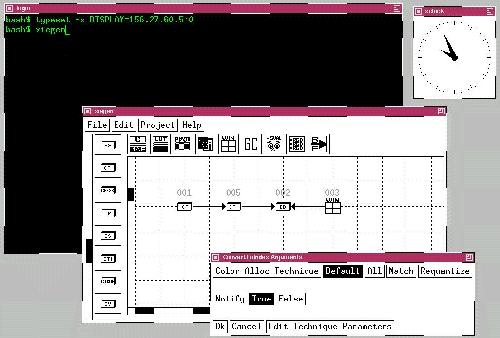
For most of you, the client and server are both running on the same machine, i.e., on a single Linux system, but it doesn't have to be that way. The X Window System protocol is designed so that communication between the client and server can be carried out over a network connection, e.g., TCP/IP. (If run locally, it is a local, i.e., AF_UNIX, connection.) Therefore, you can have the situation as illustrated in Figure 1. There, the X server is my Linux machine at home. The clock application and terminal emulator (xterm) are processes running on my Linux machine locally. In addition, I have a PPP connection to my ISP (which is running Solaris or some other Linux-wannabe) and within the xterm I am executing a telnet session between my local machine and the ISP. The other two windows (xiegen) display an application executing remotely on my ISP's machine. This application is displaying its client windows on my Linux machine, responding to keyboard and mouse events that occur on my Linux machine, courtesy of the X protocol. Prior to executing the remote application, I needed to set the DISPLAY environment variable to the IP address of my Linux machine which acts as the server. Xlib (on the remote host) reads this variable on client startup and uses its value to open a connection to the X server running on my Linux machine. The :0 characters in the following line indicate a logical display on the server:
$ typeset -x DISPLAY=123.45.67.89:0
Figure 1. Linux X Server Displaying Both Local and Remote Applications
Note that except for the screen, mouse and keyboard, the client generating xiegen's output in Figure 1 is interacting with resources on the remote Solaris host. If my remote client opens a file, /etc/passwd for example, it is opening /etc/passwd on the Solaris host, not the Linux host.
In reality, running console-based UNIX or Linux applications from a dumb terminal over an RS-232 connection has much in common with running UNIX or Linux applications from an X server over a network connection, except that when using X, the graphics support is much better.
Additional functionality can be added by vendors to the core X protocol via extension protocols. XIE is one example. Other extension protocols include the Phigs graphics extension to X (PEX), and the shape extension, which allows X to display non-rectangular windows. There are many other extensions; execute the xdpyinfo command to take a look at which ones are supported by your X server.
XIE is an extension that was released with the first version of X11R6 back in July 1994. XIE was developed in an attempt to provide clients with support in the following areas:
Transmission of image data between the client and the server (in either direction)
Image enhancement and manipulation
Image display
The core X protocol provides only minimal support for the transmission, manipulation and display of image data. Let's look at each of these areas in more detail, and discuss what core X is missing with regard to imaging support, and what XIE brings to the table.
In order to display image data, the client must first transmit the image from the client to the server. Encoding of image data, as well as efficiency of the transfer, are the two main concerns addressed by XIE.
Core X requires clients to transmit image data using X-specific encoding. If a client is working with JPEG image data, for example, it must decode the JPEG image data and convert it to X-specific encoding before sending it to the server. XIE, on the other hand, is capable of receiving and decoding image data encoded in several popular image encodings, including JPEG Baseline and the CCITT FAX encodings G31D, G32D and G42D. However, the list of encodings supported by XIE may seem fairly restricted to some; GIF is not supported because LZW has licensing issues associated with it, and PNG was not invented prior to the latest release of XIE. Vendors are free to add to the list of supported encodings. However, truly portable applications will support only encodings defined by the protocol specification. XIE supports two encodings, UncompressedSingle and UncompressedTriple, which can be used to transmit uncompressed two-tone, gray-scale and color images. Clients can use these encodings to send “raw” image data, or they can convert image data from an unsupported encoding (e.g., LZW) to either of UncompressedSingle or UncompressedTriple prior to transmission.
In terms of efficiency, an 8-bit 640x480 gray-scale image is around 2.3MB in size, and a color version (24-bit, 640x480) is three times as large. Transmitting such large amounts of data is expensive. Because XIE allows images to be transmitted in an encoded form (e.g., JPEG), performance is increased, since fewer bytes are sent between the client and server.
Once in the server, image data can be cached in a local image storage resource called a photomap. Doing so considerably reduces the use of network bandwidth in interactive imaging applications.
In core X, client manipulation of image data is performed at a very low level: pixel values can only be read from or written to an image. Higher-level operations, such as image scaling, image arithmetic and blending must be implemented by the client utilizing these primitives. In addition, all manipulations must be performed on the client side, with the resulting pixel values transferred across the network from the client to the server after the manipulation has been performed.
In XIE, image manipulation is performed entirely on the server side. If XIE doesn't support a needed operation, it can be done on the client side. XIE supports high-level operations that allow the client to:
Improve the quality of the image data.
Perform geometric operations such as scaling, axis-flipping and rotation.
Prepare image data for display in a window belonging to a specific X Visual class.
Interactive imaging applications are best implemented using a combination of server-side processing and image caching with photomap resources.
The operations to be performed on image data, including image decode, image manipulation and enhancement, and image display, are described by a data structure called a photoflo. A photoflo is a directed acyclic graph (meaning it can have no cycles) that consists of photoflo elements. Each photoflo element in a photoflo graph performs a specific atomic operation, passing its result to elements further downstream. Elements at the head of the photoflo are known as import elements, and are used to read and decode image data sent to the photoflo by the client. They also read image data directly from a photomap resource if needed. Elements further downstream, called process elements, perform image manipulation tasks. Export elements are used to route the image data to a window, a photomap resource or back to the client and are found at the end of a photoflo graph.
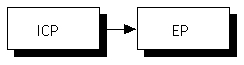
Figure 2 illustrates a simple photoflo graph, one we will use later in our example. The first photoflo consists of two elements, ImportClientPhoto (ICP) and ExportPhotomap (EP). ImportClientPhoto is used here to read and decode a JPEG image. ExportPhotomap reads the result from ImportClientPhoto and stores it in a server-side resource called a Photomap. The arrow shows how image data flows in the photoflo graph. Much more ambitious photoflos are possible. To summarize, the rules involving photoflo topologies are:
All paths in a photoflo must start with an import element, may be followed by one or more process elements, and must end with an export element.
No cycles are allowed in a photoflo graph.
As stated earlier, ImportClientPhoto reads image data sent by a client. The client must specify to ImportClientPhoto the encoding of the image data to be sent, and it must do this at the time the photoflo is being constructed. This is done by specifying a technique constant as an argument to the function that is used to add ImportClientPhoto to the photoflo graph—the photoflo element convenience function. For example, to decode TIFF-PackBits-encoded image data, the client passes the constant xieValDecodeTIFFPackBits as an argument to XieFloImportClientPhoto. In addition, most techniques require a set of technique parameters. These define more precisely how the technique will carry out its task. Technique parameters are specified by passing a pointer to a structure containing the needed information. XIElib provides convenience functions that can be used to allocate and initialize these structures. Most import, process and export elements support techniques and technique parameters. In some cases, a default technique can be specified by the client. In this situation, technique parameters are not supplied, as the server decides upon appropriate defaults.
Parameters common to all techniques are supplied using arguments to the photoflo element convenience function. For example, XieFloImportClientPhoto takes width, height and levels arguments. The levels argument is an array of three long integers that specifies, per band, the depth of the image and how many distinct colors it can represent. If we are dealing, for example, with a 24-bit color image, levels would be set to {256,256,256}.
These read data from the client or from server resources. Import elements are how image data is made available to a photoflo for processing. The import elements supported by XIE are shown in the sidebar “Import Elements”.
These read image data from elements earlier in a photoflo graph and manipulate the image data before passing it along to downstream elements.
Most process elements are able to handle both SingleBand (gray scale or two-tone) or TripleBand (color) image data transparently. Some process elements allow only one input, some operate on one or two inputs, and one (BandCombine) requires three SingleBand inputs. The output of a process element is image data. For example, Arithmetic takes two images, or an image and a constant, and adds them together pixel-by-pixel; the result is its output. Process elements supported by XIE are shown in the sidebar “Process Elements”. Export elements supported by XIE are shown in the sidebar “Export Elements”.
One thing lacking in XIE is client-side support for the handling of image file formats. An image file format defines how image data is stored on disk. For example, JPEG-encoded image data can be stored in TIFF or JFIF formatted files. Why are file formats needed? They organize the way image data, palettes and header information describing image width, height and depth are stored in a file. The problem with XIE is that clients need to find out what a particular file contains and provide the code needed to read image data and header information from the file. Once again, header information is needed because the client must tell XIE about the image data it will be sending to ImportClientPhoto.
The Internet contains good resources for dealing with this problem. See the XIElib example code section of my home page (the URL is given at the end of this article) to download example code dealing with this issue. The example code is based upon two libraries, supplied along with my examples, and available elsewhere on the Net. The first, libtiff, can be used to read header information and encoded image data from TIFF files. The other library can be used to extract header information and encoded image data from JFIF (JPEG) format files.
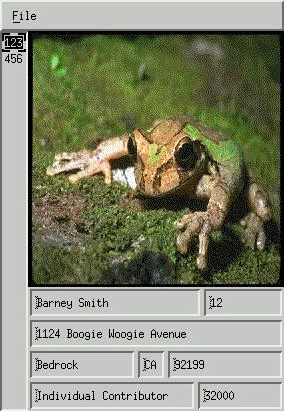
Let's turn to the specifics of adding image support to a fictitious application. Figure 3 illustrates a simple Motif client I will develop in the remainder of this article. The example client reads the current directory for files ending with .emp. Information about a specific employee is stored in these files. For example:
123
12
Barney Smith
1124
Boogie Woogie Avenue
Bedrock
CA
91911
Individual Contributor
32000
barney.img
The first line is the employee number (123). The second is the department number (12). The line immediately preceding the last is his salary (32000). The last line is a file containing a 256x256 JPEG image of the employee. For simplicity's sake, I used fixed width and height images to avoid the need to perform scaling. This is not because XIE doesn't support scaling. XID's Geometry element, which is used to perform scaling, would require its own article to describe fully.
Figure 3. Motif Client Displaying Employee Picture
In Figure 3, the employee numbers are displayed in a scrolled list on the left-hand side of the GUI. As the user clicks on an employee number, the GUI displays the employee's picture and other data read from the file.
In the following code, I'm going to ignore issues related to the reading of records and the Motif GUI. If you have specific questions about these areas, I'd be glad to answer them by e-mail. Think of our task as follows: we have a Motif application that does everything described above except it lacks the ability to display the employee's picture. We've added the Motif code needed to provide an area into which the image is to be displayed (using a DrawingArea widget). Our task is to add the image display feature to the application, and we are required to come up with a solution that uses XIE.
All XIE client applications must include the file XIElib.h using the following preprocessor directive:
#include <X11/extensions/XIElib.h>
The following include file is my own creation, and is supplied on my web site with the example code. It is needed to define data structures used by the photoflo backend code that I will describe later in the article.
#include "backend.h"Before main, a couple of static globals are also declared:
static XieExtensionInfo *xieInfo;
static XiePhotospace photospace;
The first thing an XIE application must do is establish a connection to the XIE extension.
This is done after connecting to the display. In our main application, just after we establish the connection to the server using XOpenDisplay or some equivalent, we connect to XIE using the following code:
if ( !XieInitialize( display, &xieInfo ) ) {
fprintf( stderr,
        "XIE not supported on this display!\n");
exit( 1 );
}
The variable xieInfo is a handle that represents the connection to XIE. Its fields contain information about the capabilities of XIE on the server pointed to by display. Most clients need not concern themselves with the contents of the structure, except when dealing with XIE errors and events (which I won't discuss here).
Next, we declare a photospace. This represents a context in which immediate photoflos can execute on the server. Immediate photoflos are created and executed using a single XIElib API call named XieExecuteImmediate. After an immediate photoflo executes, it is destroyed by the X server. A stored photoflo, on the other hand, persists on the server until explicitly destroyed, or the creating client breaks the server connection and no other clients are referencing the photoflo. Stored photoflos can be executed more than once. Our example client needs a photospace, since we are executing immediate photoflos in our example. This is done by calling XieCreatePhotospace:
photospace = XieCreatePhotospace( display );
Before we call XtAppMainLoop to handle the GUI of the application, a call is made to a routine we provide named LoadEmp. LoadEmp reads all of the .emp files found in the current directory and stores them in a linked list of EmpDat structures. LoadEmp also calls a routine, LoadImage, passing a pointer to the EmpDat structure containing the name of the image data file. LoadImage reads the file and stores the image data on the server, using XIE. The image data read by LoadImage is stored in JFIF files and is encoded as JPEG Baseline, an encoding supported by XIE. LoadImage supports both color and gray-scale JPEG images.
Let's take a close look at LoadImage. What LoadImage does is the following:
It creates a Photomap resource on the X server. The Photomap resource will be used to hold or cache the image data on the server so that we transport it over the network to the X server only once. The image data will be stored in the Photomap resource in an uncompressed format.
It reads the JPEG image from the specified file, obtaining the image data as well as the header information, i.e., width, height, levels and number of bands (gray scale or color).
It constructs a photoflo to receive the image data from the client, decode it and store it in the Photomap resource. The photoflos used to handle color image data and gray-scale image data differ. Both photoflos use ImportClientPhoto to receive and decode the image data, and ExportPhotomap to store the result in the Photomap resource. If the image is TripleBand (color), we add a third element, ConvertToRGB, between ImportClientPhoto and ExportPhotomap to convert the image data from the YCbCr color space to the RGB color space. All image data displayed in a window must correspond to the RGB color space, since video displays are RGB devices.
It executes the photoflo and sends the image data.
It stores the resource ID of the Photomap resource in the EmpDat structure passed by reference to LoadImage so that we can make use of it later. We also record the number of levels in the JPEG image (3 or 1); this is needed to determine how to generate pixel data from the image data prior to display.
Here is the LoadImage code:
int
LoadImage( EmpDat *newp )
{
int floSize, size, decodeTech, floId = 1, idx;
Bool notify;
short w, h;
char d, l, *bytes;
XieConstant bias;
XiePointer decodeParms;
XiePhotoElement *flograph;
XieYCbCrToRGBParam *rgbParm = 0;
XieLTriplet width, height, levels;
Now we create a photomap resource and store the result in
newp for later use.
if ( ( newp->pmap = XieCreatePhotomap( display ) )
        == (XiePhotomap) NULL ) return( 1 );
GetJFIFData is a routine available
on my web site that reads JFIF files for image data and header
information. We use it next:
if ( ( size = GetJFIFData( newp->image, &bytes,
        &d, &w, &h, &l )) == 0 ) {
XieDestroyPhotomap( display, newp->pmap );
fprintf( stderr,
        "Problem getting JPEG data from %s\n",
        newp->image );
return( 1 );
}
newp->bands = l;
This example only supports 8-bit gray-scale or 24-bit color (8,8,8)
image data.
if ( d != 8 ) {
XieDestroyPhotomap( display, newp->pmap );
fprintf( stderr, "Image %s must be 256 levels\n",
        newp->image );
return( 1 );
}
XieAllocatePhotofloGraph allocates
a photoflo graph which we then fill in with elements. If we are
dealing with gray-scale image data (l == 1), we need only two
elements. If we are dealing with color image data (l == 3), we need
a third element to convert the image from YCbCr color space to RGB.
floSize = (l == 3 ? 3 : 2 );
flograph = XieAllocatePhotofloGraph(floSize );
Set up the width, height, and levels arguments to XieFloImportClientPhoto. This information was obtained by reading the header information from the JFIF file.
width[0] = width[1] = width[2] = w;
height[0] = height[1] = height[2] = h;
levels[0] = levels[1] = levels[2] = 256;
The image, SingleBand or TripleBand, is JPEG Baseline, so specify the corresponding decode technique and allocate the needed technique parameters. The decode technique and technique parameters are also passed to XieFloImportClientPhoto.
decodeTech = xieValDecodeJPEGBaseline;
decodeParms = ( char * ) XieTecDecodeJPEGBaseline(
        xieValBandByPixel, xieValLSFirst, True);
Now we can add ImportClientPhoto as the first element of the
photoflo graph.
idx = 0;
notify = False;
XieFloImportClientPhoto(
&flograph[idx],  /* address of element
                  * in photoflo graph */
(l == 3 ? xieValTripleBand : xieValSingleBand),
                 /* data class */
width,       /* width of each band */
height,      /* height of each band */
levels,      /* levels of each band */
notify,      /* send DecodeNotify event? */
decodeTech,  /* decode technique */
decodeParms  /* decode parameters */
);
idx++;
If the image is color, then convert from YCbCr to RGB.
XieTecYCbCrToRGB is used to
allocate the technique parameter needed by the
YCbCrToRGB technique. Both the
allocated technique parameters and the technique are passed to
XieFloConvertToRGB, which is used
to add the ConvertToRGB element to the photoflo graph. It is beyond
the scope of this article to discuss the arguments and technique
parameters used, but the code below should work for most color JPEG
Baseline images encountered by an application.
if ( l == 3 ) {
bias[ 0 ] = 0.0;
bias[ 1 ] = bias[ 2 ] = 127.0;
levels[ 0 ] = levels[ 1 ] = levels[ 2 ] = 256;
rgbParm = XieTecYCbCrToRGB( levels,
        (double) 0.2125, (double) 0.7154,
        (double) 0.0721, bias, xieValGamutNone,
        NULL
        );
XieFloConvertToRGB( &flograph[idx], idx,
        xieValYCbCrToRGB, (XiePointer) rgbParm
        );
idx++;
}
The final element in the photoflo is
ExportPhotomap. The encode
technique used is
xieValEncodeServerChoice. Given
the photoflo we are dealing with, this should cause XIE to store
the image in an uncompressed, canonical format within the Photomap
resource.
XieFloExportPhotomap( &flograph[idx], idx,
        newp->pmap, xieValEncodeServerChoice,
        (XiePointer) NULL);
idx++;
Now that we have a photoflo graph, we can send it to the server and
start its execution by calling
XieExecuteImmediate:
XieExecuteImmediate( display, photospace, floId,
        False, flograph, floSize );
Once execution starts, the photoflo will be blocked, awaiting image
data from the client. The XIElib function that sends this data is
XiePutClientData, and it can be
used to send any client data (ROIs, LUTs and images) to the
ImportClient element awaiting the data.
PumpTheClientData is a utility
function I wrote (also available on my web site) that is a wrapper
around XiePutClientData and makes the process of sending data to an
ImportClient element a little
easier.
PumpTheClientData( display, floId, photospace, 1,
        bytes, size, sizeof(char), 0, True );
At this point, the image data has been read by the photoflo,
decoded, converted to RGB color space (if it was color) and stored
in the server-side Photomap cache for later use. In addition, the
photoflo we executed has been destroyed by the server. Now, we need
to free the memory allocated to the photoflo graph and other items
in the above code.
if ( rgbParm )
XFree( rgbParm );
free( bytes );
XieFreePhotofloGraph( flograph, floSize );
XFree( decodeParms );
return( 0 );
}
We need code that will transfer the image data from a Photomap resource to a window. Two different situations will cause the client to perform the actual drawing:
The user selects an employee number from the scrolled list.
The DrawingArea widget's window becomes exposed, and server backing store is not enabled.
XtSetArg(args[0], XmNselectionPolicy,
        XmSINGLE_SELECT);
list_w = XmCreateScrolledList(rowcol,
        "scrolled_list", args, 1);
XtAddCallback(list_w, XmNsingleSelectionCallback,
        ListCallback, NULL);
XtManageChild(list_w);
Thus, when the user clicks on an item, Xt will call the function
ListCallback. Inside of
ListCallback, we perform the following tasks:
Determine which employee was selected, and obtain a pointer to the corresponding EmpDat structure.
Update the text fields in the dialog with information about the employee (e.g., name, department, address and salary).
Call a function to display the employee image in the window owned by the DrawingArea widget.
static void
ListCallback(Widget list_w, XtPointer client_data,
        XmListCallbackStruct *cbs)
{
char    *choice, buf[ 32 ];
EmpDat *p;
/* Read the list item, and then look it up in our
 * linked list of employee records */
XmStringGetLtoR(cbs->item, charset, &choice);
p = FindChoice( choice );
XtFree(choice);
/* If we have a match, display the text
 * information in the dialog */
if ( p != (EmpDat *) NULL ) {
/* first do the text fields */
sprintf( buf, "%d", p->code );
XmTextFieldSetString( codeT, buf );
XmTextFieldSetString( nameT, p->name );
XmTextFieldSetString( streetT, p->street );
XmTextFieldSetString( cityT, p->city );
XmTextFieldSetString( stateT, p->state );
XmTextFieldSetString( zipT, p->zip );
XmTextFieldSetString( descT, p->desc );
sprintf( buf, "%ld", p->salary );
XmTextFieldSetString( salaryT, buf );
/* Go and display the image. gDrawP is discussed
 * later */
gDrawP = p;
DisplayPhotomap( p );
}
}
The routine that does the real work associated with transferring
the image data from the photomap to a window is
DisplayPhotomap. It is a separate
routine (i.e., not part of ListCallback), because we need to call
it when handling window exposures.
void
DisplayPhotomap( EmpDat *p )
{
XiePhotoElement *flograph;
Visual *visual;
Backend *backend;
int floId = 1, screen, idx, floSize, beSize;
Display *display;
if ( p == (EmpDat *) NULL ) return;
The first thing we do is generate a backend for the photoflo we are
constructing. A backend is a set of process elements, plus
ExportDrawable or, if the image is
two-toned, ExportDrawablePlane.
The purpose of these elements is to prepare the image data for
display in the specified window. The backend is responsible for the
following:
Ensuring that the levels attribute of the image corresponds to the target window. For example, if the image is 8-bit color, and we are displaying to a 1-bit StaticGray window, we must insert a Dither element into the backend to reduce the levels of the image from 256 to 2. Dither is the best way to preserve the contents of the image in these cases. Other process elements can do the job but will mangle the result quite a bit. If the levels attribute of the image and the capabilities of the window do not match, XIE will generate an error and abort the photoflo.
Converting image intensity values to color-map index data. From Xlib programming, recall code such as the following which allocates the color red from a specific color map:
        Display *display;       /* server connection */
        int screen;     /* usually 0 */
        Colormap cmap;  /* resource ID of color map */
        XColor color;   /* holds info about a color */
        cmap = DefaultColormap( display, screen );
        color.red = 65535;
        color.green = color.blue = 0;
        XAllocColor( display, cmap, &color );
Now, we can use the returned color to draw, for example, a red line in a window by setting the foreground color of the GC we associate with the window to the pixel value returned by XAllocColor:XSetForeground( display, GC, color.pixel ); XDrawLine( display, window, gc, x1, y1, x2, y2 );Thus, when we want to draw a line of a particular color in a window, we actually draw to the window the pixel value which indexes the color in the color map associated with the window. The same thing has to happen when displaying images. X expects our window to contain pixel values. The server (hardware) takes these pixel values and converts them to colors that we see as the screen is refreshed. A convenient way to map colors in our image to a set of pixel values is to add a ConvertToIndex element to the photoflo backend. ConvertToIndex's job is to translate all of the color values into pixels and allocate any cells needed in the color map.The final task of the backend is displaying the image in the window. If the image is gray scale or color, we add an ExportDrawable element as the last element of the backend. If the image is two-toned, then we use ExportDrawablePlane.
display = XtDisplay( drawingArea );
screen = DefaultScreen( display );
visual = DefaultVisual( display, screen );
if ( p->bands == 1 )
        backend = (Backend *)
        InitBackend( display, screen,
        visual->class, xieValSingleBand,
        1<<DefaultDepth( display, screen ),
        -1, &beSize );
else
        backend = (Backend *) InitBackend( display,
        screen, visual->class,
        xieValTripleBand,
        0, -1, &beSize);
        if ( backend == (Backend *) NULL ) {
                fprintf( stderr,
                "Unable to create backend\n" );
        exit( 1 );
 }
Now that we have taken care of the backend, we allocate the
photoflo graph and add ImportPhotomap as its first element. We pass
to XieFloImportPhotomap the resource ID of the photomap from which
the image should be read. This resource ID is stored in the
EmpDat structure passed into this routine as an
argument.
floSize = 1 + beSize;
flograph = XieAllocatePhotofloGraph( floSize );
idx = 0;
XieFloImportPhotomap( &flograph[idx],
        p->pmap, False );
idx++;
Next, a call is made to
InsertBackend, which adds the
backend elements to the photoflo graph.
if ( !InsertBackend( backend, display,
        XtWindow( drawingArea ), 0, 0, gc,
        flograph, idx ) ) {
fprintf( stderr, "Unable to add backend\n" );
exit( 1 );
}
Now that we have a photoflo graph, we call XieExecuteImmediate,
which is responsible for transmitting the photoflo to the server
and executing it. Since the photoflo is immediate, it will be
destroyed by the server once execution completes. At this point,
the image data in the photomap should be visible to the user in the
DrawingArea widget's window.
XieExecuteImmediate( display, photospace, floId,
        False, flograph, floSize );
XieFreePhotofloGraph( flograph, floSize );
CloseBackend( backend, display );
}
The final routine to discuss is
RedrawPicture. This simple routine
is a callback, registered with the DrawingArea widget instance, to
be called whenever the DrawingArea widget's window receives an
expose event. Recall that
ListCallback stored the pointer to the EmpDat
structure corresponding the user's list selection to a global
variable named gDrawP. Thus,
gDrawP holds a pointer to the currently
displayed employee data. All we need to do in RedrawPicture is
check whether gDrawP points to valid data; if
so, we know the user had previously made a selection. Now, we can
call DisplayPhotomap, passing gDrawP as an
argument, to render the image to the window.
static void
RedrawPicture(Widget w, XtPointer
client_data, XmDrawingAreaCallbackStruct *cbs)
{
if ( gDrawP != (EmpDat *) NULL ) DisplayPhotomap(
        gDrawP );
}
The complete source code for the example discussed in this article, and the library routines needed to build it, can be found at my home page located on the Internet at http://www.users.cts.com/crash/s/slogan/. This article describes just one of over 40 example clients you will find there. My book on XIElib programming, Developing Imaging Applications with XIElib, published by Prentice Hall, goes into much greater detail than I could provide in an article of this length. More information on my book can be found on my web site as well or at http://www.prenhall.com/. If you have any questions about XIE, this article, my other examples, or for that matter X11, please feel free to drop me an e-mail.