NF/ Observatory Networking with Linux
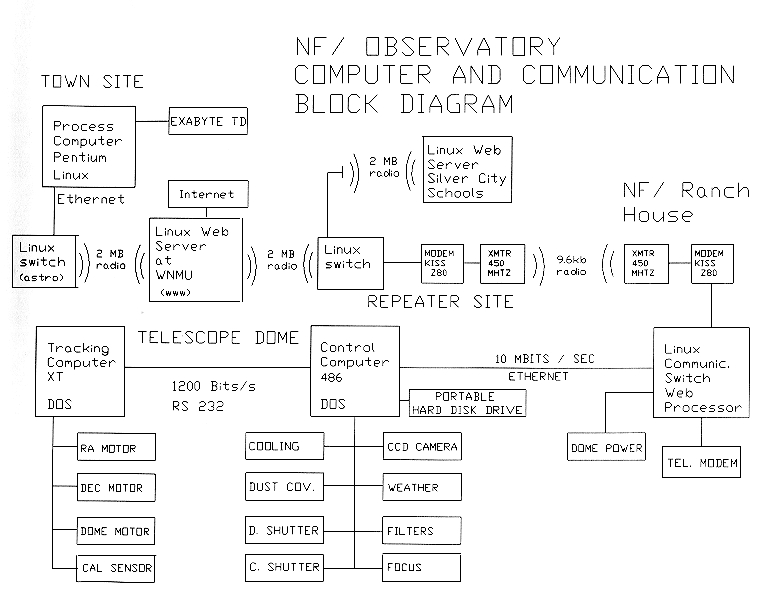
This article describes the network that NF/ Observatory (NFO) uses to remotely control an automatic optical telescope. More information about the observatory can be found at Western New Mexico University's web site at http://www.wnmu.edu/nfo.
Each of the computers in the NFO network uses the Linux operating system. The four primary computers use version 1.2.13 while some of the R & D computers use version 2.0.0. Linux was chosen because of its reliability, versatility, low cost and native support for the large variety of networking types that we use. NFO uses Ethernet, Spread Spectrum wireless, ham radio and telephone modems at various points in the network.

The NF/ Ranch House
This node is located at the NF/ ranch and is the one that uses the antenna shown in Figure 1. When we built the telescope in 1986 there was no telephone service to the ranch. In fact, there wasn't even commercial power to the ranch until 1984! The three media types used here are ham radio, coaxial Ethernet and telephone modem. Ham radio has been in use for 10 years and predates Linux. The radio link receives information used to program the observing list for the telescope. It also transmits the pictures and telemetry from the telescope back to the data reduction computer and the Internet connection in Silver City.

The Digital Relay Dish at NFO

The Automatic Radio Linked Telescope
The ham radio equipment consists of a Terminal Node Controller (MFJ 1270), a TAPR 9600 bps modem (http://www.tapr.org/) and a Motorola MOCOM 70 commercial FM transceiver which we modified to send and receive data. Linux communicates with the TNC via an RS-232 serial link. The relevant portion of scope's /etc/rc.d/rc.local files is:
#!/bin/sh
/bin/echo "Setting TNC RS232 speed to 9600"
# Also setting clocal to ignore modem control
# lines.
/bin/stty 9600 clocal < /dev/cua2
/bin/stty -a < /dev/cua2
/bin/echo "Sending commands to TNC"
sleep 1
# txdelay
/bin/echo -ne "\300\001\020\300" > /dev/cua2
# persist
/bin/echo -ne "\300\002\377\300" > /dev/cua2
# slot time
/bin/echo -ne "\300\003\004\300" > /dev/cua2
# tail
/bin/echo -ne "\300\004\004\300" > /dev/cua2
/bin/echo "Commands to TNC done."
/bin/echo "Setting port to AX25 mode."
sleep 1
/usr/local/bin/axattach -s 9600 /dev/ttyS2 KC5ZG-2
sleep 1
/usr/local/ax25/etc/axaddarp 44.30.2.130 WY5G-4
/sbin/ifconfig sl0 198.59.153.205 mtu 512
/sbin/route add 44.30.2.130 sl0
/sbin/route add default gw 44.30.2.130 sl0
The Ethernet hardware is an NE2000 clone card that communicates with the dedicated telescope control computer via about 100 feet of RG058 coaxial cable. The two computers communicate using the FTP protocol to move data back and forth. The telescope control computer doesn't use Linux, since it is involved in the real-time control of the CCD camera.
The telephone modem provides a backup link to town. It is rarely used, since it is a long distance call from Silver City to the ranch, and the ham radio link has been quite reliable.
This node is located at 8000 feet near the Continental Divide and can be reached by a jeep trail, if it hasn't snowed lately; otherwise, it is a strenuous but beautiful backpacking trip. The reliability of Linux is important here! In addition to the radio that communicates with the ranch, this site also boasts a 2 Mbs Spread Spectrum link and another ham radio link using a PI2 card instead of a TNC. The /etc/rc.d/rc.local file looks like this:
#! /bin/sh
# Attach link to NM2 Node Stack
/sbin/axattach -s 9600 /dev/ttyS0 WY5G-8
sleep 1
echo "Ifconfig sl0 to 198.59.153.200"
/sbin/ifconfig sl0 198.59.153.200
/sbin/ifconfig sl0 mtu 512
# configure Wavlan Spread Spectrum link.
/sbin/ifconfig eth0 198.59.153.200
echo "Adding routes"
/sbin/route -n add 44.30.2.130 sl0
/sbin/route -n add 198.59.153.205 sl0
/sbin/route -n add 192.136.110.150 gw 192.136.110.153\
        eth0
/sbin/route -n add 192.136.110.153 eth0\
/sbin/route -n add default gw 192.136.110.153 eth0
echo "Configuring PI2 Card Port A"
/sbin/ifconfig pi0a 198.59.153.200
/sbin/ifconfig pi0a hw ax25 WY5G-8
/sbin/ifconfig pi0a broadcast 198.59.153.255
/sbin/ifconfig pi0a netmask 255.255.255.0
/sbin/ifconfig pi0a arp mtu 512 up
/pi2/piconfig pi0a speed 9600 txdelay 250\
        persist 255 squelch 10 slot 1
echo "Configuring PI2 Card Port B"
/sbin/ifconfig pi0b 44.30.2.137
/sbin/ifconfig pi0b hw ax25 WY5G7
/sbin/ifconfig pi0b broadcast 44.30.2.255
/sbin/ifconfig pi0b netmask 255.255.255.0
/sbin/ifconfig pi0b arp mtu 512 up
/sbin/ifconfig pi0b 44.30.2.137 hw ax25 WY5G-7 up
/pi2/piconfig pi0b speed 1200
/sbin/route -/
- add 192.136.110.151 sl0
# /sbin/route -n add 192.136.110.151 gw 44.30.2.136 sl0
/bin/axaddarp 198.59.153.205 kc5zg-2
One point of interest in the above file is that the commands normally sent to configure the TNC are missing. In this case, the TNC is configured by its internal X1J Node software, which also sets the TNC's serial port to communicate in ax25 mode instead of the more usual nrs mode. This configuration allows the Linux computer and the X1J Node to share one transceiver, a Motorola MITREK modified for data transmission.
The Wavelan interface looks like an Ethernet card to Linux. It is configured by an append line in the /etc/lilo.conf, like this:
# LILO configuration file
# generated by "liloconfig"
#
# Start LILO global section
boot = /dev/hda
# compact and faster, but won't work on all
# systems.
delay = 50
vga = normal  # force sane state
ramdisk = 0   # paranoia setting
# End LILO global section
# Linux bootable partition config ends
image = /zImage.wav
root = /dev/hda2
label = wavelan
append = "ether=0,0x390,0x5280,eth0"
read-only
The Wavelan interface is experimental, and doesn't work well enough over the seven mile path to the WNMU Node to be used as our primary link. With improved antennas we expect it to be an excellent high speed link.
The other experimental interface uses a PI2 card to control a radio link on another frequency. So far this link hasn't been used, since it interferes with a nearby ham radio voice repeater.
The WNMU Node is NFO's connection to the Internet. The eth0 interface is an NE2000 card connected to Western New Mexico University's system. The eth1 interface is the Wavelan card that talks to both the Pinos Altos Node and to the David's Basement Node. Wavelan works very well over the one mile path to David's Basement. The WNMU Node is unique in that it must act as the proxy server for the computers not directly connected to WNMU's system. Check the arp settings in the following rc.local file:
#! /bin/sh
echo "setting ttyS2 to irq 5"
/bin/setserial /dev/ttyS2 irq 5
echo "sending commands to TNC"
sleep 1
/bin/stty 9600 clocal < /dev/cua2
/bin/echo -ne "\300\001\025\300" > /dev/cua2
/bin/echo -ne "\300\002\377\300" > /dev/cua2
/bin/echo -ne "\300\003\004\300" > /dev/cua2
/bin/echo -ne "\300\004\004\300" %gt; /dev/cua2
/bin/echo "Commands to TNC done..."
#echo "setting /dev/ttyS3 to irq 11"
#/bin/setserial /dev/ttyS3 irq 11
/sbin/ifconfig eth0 192.136.110.153
/sbin/ifconfig eth1 192.136.110.153
echo "Starting WWW Server"
/etc/httpd
echo "Attaching AX25 link to Radio Port"
/sbin/axattach -s 9600 /dev/ttyS2 KC5ZG-1
sleep 1
/sbin/ifconfig sl0 192.136.110.153
/sbin/ifconfig sl0 mtu 512
/sbin/route -n add 192.136.110.150 eth1
/sbin/route -n add 192.136.110.158\
        gw 192.136.110.150 eth1
/sbin/route -n add 192.136.110.159\
        gw 192.136.110.150 eth1
/sbin/route -n add 192.136.110.170\
        gw 192.136.110.150 eth1
/sbin/route -n add 192.136.110.152\
        gw 192.136.110.150 eth1
/sbin/route -n add 192.136.110.128 eth0
/sbin/route -n add default gw 192.136.110.128 eth0
/sbin/route -n add 192.136.110.3 eth0
/sbin/route -n add 44.30.2.130 sl0
/sbin/route -n add 44.30.2.136 sl0
/sbin/route -n add 44.30.2.151 gw 44.30.2.130\
        sl0
/sbin/route -n add 192.136.110.151 gw 44.30.2.130\
        sl0
/sbin/route -n add 192.136.110.154 gw 44.30.2.130\
        sl0
/sbin/route -n add 198.59.153.200 eth1
/sbin/route -n add 198.59.153.205 gw 44.30.2.130\
        sl0
/sbin/route -n add 192.136.110.152\
        gw 192.136.110.150 eth1
/sbin/route -n add 192.136.110.150 eth1
/sbin/route -n add 192.136.110.155 gw 44.30.2.130\
        sl0
/sbin/route -n add 192.136.110.156 gw 44.30.2.130\
        sl0
/sbin/route -n add 44.30.2.145 gw 44.30.2.130 sl0
echo "Clearing stale file locks"
rm /etc/mtab~
rm /nos/spool/mail/*.lck
rm /nos/spool/mqueue/*.lck
rm /nos/spool/*.lck
echo "Publishing wnmu arp entries"
/sbin/arp -s 198.59.153.200 00:c0:df:46:b1:b6 pub
/sbin/arp -s 198.59.153.205 00:c0:df:46:b1:b6 pub
/sbin/arp -s 192.136.110.150 00:c0:df:46:b1:b6 pub
The ham radio equipment for this node is similar to that used at the NF/ Ranch Node with the exception the the transceiver which is a TEKK data radio. In its spare time www.wnmu.edu also acts as the web server for the University and NFO.
This node is located in the basement of a Victorian mansion in downtown Silver City. It is the mail server for the observatory and connects the Wavlan part of the network to a coaxial cable Ethernet that is the LAN for the computers we use for teaching an advanced astronomy class. These computers are located near the astro mansion. The data reduction computer is also on the Ethernet LAN and is in a house around the corner from the astro mansion. rc.local looks like this:
#! /bin/sh
/sbin/ifconfig eth1 192.136.110.150
echo "Adding routes"
#/sbin/route -n add 44.30.2.147 sl0
#/sbin/route -n add 44.30.2.146 gw 44.30.2.147 sl0
/sbin/route -n add 192.136.110.153 eth1
/sbin/route -n add default gw 192.136.110.153 eth1
/sbin/route -n add 192.136.110.152 eth0
/sbin/route -n add 192.136.110.158 eth0
/sbin/route -n add 192.136.110.159 eth0
/sbin/arp -s 192.136.110.152 00:40:95:26:76:fb
/sbin/arp -s 192.136.110.158 00:40:95:26:77:ab
echo "Publishing wnmu arp entries"
/sbin/arp -s 192.136.110.1 00:40:95:14:ea:41 pub
/sbin/arp -s 192.136.110.3 00:40:95:14:ea:41 pub
/sbin/arp -s 192.136.110.4 00:40:95:14:ea:41 pub
/sbin/arp -s 192.136.110.5 00:40:95:14:ea:41 pub
/sbin/arp -s 192.136.110.6 00:40:95:14:ea:41 pub
/sbin/arp -s 192.136.110.150 00:40:95:14:ea:41 pub
/sbin/arp -s 192.136.110.156 00:40:95:14:ea:41 pub
/sbin/arp -s 192.136.110.151 00:40:95:14:ea:41 pub
/sbin/arp -s 192.136.110.154 00:40:95:14:ea:41 pub
/sbin/arp -s 192.136.110.153 00:40:95:14:ea:41 pub
/sbin/arp -s 192.136.110.7 00:40:95:14:ea:41 pub
/sbin/route add 198.59.153.200 gw 192.136.110.153\
        eth1
/sbin/route add 198.59.153.205 gw 192.136.110.153\
        eth1
How the NF/Observatory Got Its Name
I Hope I've provided enough detail in this article to help others set up their own wide area network. Some of the ham radio information will be useful only to licensed amateur radio operators, but the Spread Spectrum devices are available to everyone.