
XVScan

Manufacturer: tummy.com, ltd.
Phone: 970-223-8215; Fax: 408-490-2728
E-Mail/URL: xvscan@tummy.com
URL: http://www.tummy.com/xvscan/
Price: $50 US for ftp or e-mail shippingAdditional $15 US for media in the United States$25 US internationally
Platforms: Linux, HP-UX, BSD/OS, FreeBSD, SunOS and Solaris
Reviewer: Michael Montoure
I'm a little biased—I had been happily using John Bradley's xv image manipulation software long before I ever heard of XVScan. So when I heard that someone had added the ability to acquire images from an HP ScanJet scanner to xv, I was immediately intrigued. Sean Reifschneider, who wrote the software, posted the following message to comp.os.linux.hardware in 1995:
When I first got the ScanJet I wrote a hpscanpbm (I don't think the real one was available then, and anyway, it only took 4 hours) that I used for a couple of months until I could get the time to write something better.
The end result is “XVScan”, a scanning extension to XV. While the “hpscanpbm” worked okay, this is about a thousand times better. I mean, I used to do the scan, load it into xv, and maybe I'd have to tweak, re-load, etc... Now I can just scan directly into XV.
Now, if you've never used xv, you might not understand my enthusiasm for it; it is, after all, a simple, straightforward tool. It certainly isn't in the same league as PhotoShop, but it's good at what it does—reading and writing files in a dozen different formats, window capturing, color-map editing, cropping and some fairly interesting image manipulation algorithms. In short, while it may not have all the fancy bells and whistles, it does have those things I use on a regular basis when manipulating images.
XVScan should run with any version of Linux—it's been tested with the 1.2.x and 2.0.x kernels, but it hasn't been tested with MkLinux yet. (Mac users—if you try this and get it to work, let tummy.com know—they're interested.) XVScan requires built-in generic SCSI driver support—no earlier than version 1.1.79. You don't need Motif, and you can use any version of XFree (X11R5, X11R6).
If you're not running Linux, you can also run XVScan under HP-UX, BSD/OS, FreeBSD, SunOS and Solaris—although if you're using Solaris and require SG, the generic pass-through SCSI driver, there is an extra charge.
XVScan was installed by Peter Struijk, one of SSC's Systems Administrators, before I started using it. A few minutes of looking through the documentation for XVScan makes installation seem easy, as Peter confirmed.
There's a setup program, used by the INSTALL-xvscan script, that searches your hardware for a scanner—namely, a SCSI ScanJet scanner, the only type XVScan can currently use. If one is found, the script creates the /dev/scanjet device file. Seems straightforward to me. In the Linux version, if XVScan can't find a scanner attached to the SCSI chain, you can still use the regular xv functions—just the scanning is disabled. Peter tells me the only tricky business is to remember that if in the future you change any of your SCSI devices, you must rerun this setup program; otherwise, XVScan will no longer be able to find the scanner.
Some users, apparently, even pick up XVScan just to have an easy-to-install, pre-built copy of xv. This makes sense when you consider that the $50 price tag includes the $25 xv license fee, it's distributed with full source code and updates are free for the first year.
When I first started up XVScan, my first thought was, “This looks exactly like xv”--and it does. Only when you look at the Control menu do you notice the addition of a Scanner button that, when clicked, brings up the scanning window in which the scanned image is displayed. Other differences are even less apparent. Another change from the normal release of xv are the defaults used when XVScan starts.
By default, XVScan turns on -nolimits, which lets images be larger than your screen—sometimes much, much larger. I suppose I can see the point of doing this, but I found it annoying not to have the image appear as a small, convenient window I could easily move around on my screen.
On the other hand, the other default it changes is that -rwcolor--read/write color entries—is set “on” at startup. Thus, any color editing I do to the image happens in real time, without having to manually Apply changes. That's kind of nice—I like it.
According to the documentation, both of these default options can be disabled. The documentation is handled nicely. When you click on the scanning window's Help button, it automatically launches a web browser that points at the on-line documentation at http://www.tummy.com/xvscan/. Therefore, you never have to remember their URL, and you don't have to keep a copy of their documentation on your hard drive. Of course, if you don't have an Internet connection up all the time, you might not find this so convenient.
The scanning window can be a little daunting to a first-time user, as you're immediately presented with a display of options, controls and buttons (see Figure 1). I suppose that's unavoidable for a program this flexible, but at first I was a little worried about the program's apparent complexity.
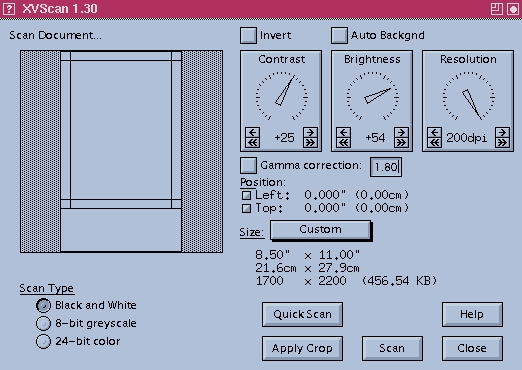
I shouldn't have worried. The interface is surprisingly easy to decipher and use. There are generally several ways to do any one task. For example, if you want to resize the area you're scanning, you can enter numbers to resize it, pick from a standard selection of paper sizes (conveniently, you can define your own common document sizes) or click and drag the bars at the edges of the scan window.
Scanning is fast and the quality is high; XVScan can quickly and easily handle scanning all the way up to 600 dpi. You can precisely select the dpi to use for scanning and you can adjust the brightness, the contrast, the gamma correction—most anything you'd like to control.
Unlike a lot of scanners, XVScan doesn't give you a miniature of the image in the “pre-scan” mode. Instead, when the QuickScan option is selected, XVScan scans the image and adjusts the resolution so that the resultant image exactly fits the scanning window. This action might end up displaying the image at a lower resolution than you have in mind for your final image; it might just as easily be higher. (For me, it was often higher. I scan images to look good on a web page, not to be printed, so I don't need to scan at resolutions higher than 72 dpi.)
Once you have your QuickScan image on screen, you can adjust the appropriate settings as you wish to enhance it and, if necessary, set crop limits. Once you click on Apply Crop, the cropped image is displayed filling the scanning window. Now, click on Scan for your next pass, and XVScan scans only the area inside the crop limits—very convenient.
That's great, I can hear you say, but I don't always want to play around in a fancy X Windows' user interface—sometimes I'd like to be able to just scan an image using the command line. You can do that, too. Although their manual boasts that the GUI makes their product “more user friendly than hpscanpbm”, it's also distributed with sjscan, a command-line scanning utility.
By the way, while XVScan can read and write in several different image formats, their manual warns:
xv has a whopping grand total of two internal image formats: 8-bit color mapped and 24-bit RGB. Every image you load is converted to one of these two formats, as part of the image loading procedure, before you ever see the image.
In other words, you might occasionally get some minor artifacts creeping into the images as they're converted back and forth—but if this is a serious problem, I have yet to encounter it.
I did a search on DejaNews (http://www.dejanews.com/) while researching this review, to see if I could find any negative comments people had posted to Usenet about XVScan. I couldn't find any. The closest thing I found to a negative remark was a few die-hard free software fans grumbling about having to actually pay money for it. On the whole, everyone who had used the software seemed to recommend it. In fact, in response to a general question about scanning under Linux, one user suggested that the person asking should buy an HP ScanJet just so he could run XVScan.
Personally, I like having an environment that allows me to do high-quality scans and to manipulate the image within the same application. I'm far too used to programs that do just one thing well; XVScan appears to aim at doing everything well, and I think it succeeds.
Michael Montoure is the webmaster for Specialized Systems Consultants, the publishers of Linux Journal. He's been on the Internet for the better part of a decade now, used to wish everyone would use it, and now is sorry he said anything. As long as you don't want to tell him how to “Make Money Fast”, feel free to send him e-mail at michael@ssc.com.
