Remote Procedure Calls
As any programmer knows, procedure calls are a vital software development technique. They provide the leverage necessary for the implementation of all but the most trivial of programs. Remote procedure calls (RPC) extend the capabilities of conventional procedure calls across a network and are essential in the development of distributed systems. They can be used both for data exchange in distributed file and database systems and for harnessing the power of multiple processors. Linux distributions provide an RPC version derived from the RPC facility developed by the Open Network Computing (ONC) group at Sun Microsystems.
In case the reader is not familiar with the following terms, we will define them here since they will be important in later discussion:
Caller: a program which calls a subroutine
Callee: a subroutine or procedure which is called by the caller
Client: a program which requests a connection to and service from a network server
Server: a program which accepts connections from and provides services to a client
There is a direct parallel between the caller/callee relationship and the client/server relationship. With ONC RPC (and with every other form of RPC that I know), the caller always executes as a client process, and the callee always executes as a server process.
In order for an RPC to execute successfully, several steps must take place:
The caller program must prepare any input parameters to be passed to the RPC. Note that the caller and the callee may be running completely different hardware, and that certain data types may be represented differently from one machine architecture to the next. Because of this, the caller cannot simply feed raw data to the remote procedure.
The calling program must somehow pass its data to the remote host which will execute the RPC. In local procedure calls, the target address is simply a machine address on the local processor. With RPC, the target procedure has a machine address combined with a network address.
The RPC receives and operates on any input parameters and passes the result back to the caller.
The calling program receives the RPC result and continues execution.
As was pointed out earlier, an RPC can be executed between two hosts that run completely different processor hardware. Data types, such as integer and floating-point numbers, can have different physical representations on different machines. For example, some machines store integers (C ints) with the low order byte first while some machines place the low order byte last. Similar problems occur with floating-point numeric data. The solution to this problem involves the adoption of a standard for data interchange.
One such standard is the ONC external data representation (XDR). XDR is essentially a collection of C functions and macros that enable conversion from machine specific data representations to the corresponding standard representations and vice versa. It contains primitives for simple data types such as int, float and string and provides the capability to define and transport more complex ones such as records, arrays of arbitrary element type and pointer bound structures such as linked lists.
Most of the XDR functions require the passing of a pointer to a structure of “XDR” type. One of the elements of this structure is an enumerated field called x_op. It's possible values are XDR_ENCODE, XDR_DECODE, or XDR_FREE. The XDR_ENCODE operation instructs the XDR routine to convert the passed data to XDR format. The XDR_DECODE operation indicates the conversion of XDR represented data back to its local representation. XDR_FREE provides a means to deallocate memory that was dynamically allocated for use by a variable that is no longer needed. For more information on XDR, see the information sources listed in the References section of this article.
The flow of data from caller to callee and back again is illustrated in Figure 1. The calling program executes as a client process and the RPC runs on a remote server. All data movement between the client and the network and between the server and the network pass through XDR filter routines. In principle, any type of network transport can be used, but our discussion of implementation specifics centers on ONC RPC which typically uses either Transmission Control Protocol routed by Internet Protocol (the familiar TCP/IP) or User Datagram Protocol also routed by Internet Protocol (the possibly not so familiar UDP/IP). Similarly, any type of data representation could be used, but our discussion focuses on XDR since it is the method used by ONC RPC.
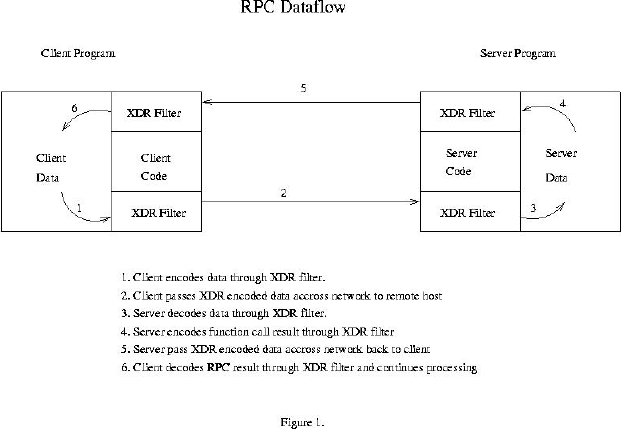
Figure 1. RPC Data Flow
In order to complete our picture of RPC processing, we'll need to review some network programming theory.
In order for two processes running on separate computers to exchange data, an association needs to be formed on each host. An association is defined as the following 5-tuple: {protocol, local-address, local-process, foreign-address, foreign-process}
The protocol is the transport mechanism (typically TCP or UDP) which is used to move the data between hosts. This, of course, is the part that needs to be common to both host computers. For either host computer, the local-address/process pair defines the endpoint on the host computer running that process. The foreign-address/process pair refers to the endpoint at the opposite end of the connection.
Breaking this down further, the term address refers to the network address assigned to the host. This would typically be an Internet Protocol (IP) address. The term process refers not to an actual process identifier (such as a Unix PID) but to some integer identifier required to transport the data to the correct process once it has arrived at the correct host computer. This is generally referred to as a port. The reason port numbers are used is that it is not practical for a process running on a remote host to know the PID of a particular server. Standard port numbers are assigned to well known services such as TELNET (port 23) and FTP (port 21).
Now we have the necessary theory to complete our picture of the RPC binding process. An RPC application is formally packaged into a program with one or more procedure calls. In a manner similar to the port assignments described above, the RPC program is assigned an integer identifier known to the programs which will call its procedures. Each procedure is also assigned a number that is also known by its caller. ONC RPC uses a program called portmap to allocate port numbers for RPC programs. It's operation is illustrated in Figure 2. When an RPC program is started, it registers itself with the portmap process running on the same host. The portmap process then assigns the TCP and/or UDP port numbers to be used by that application.
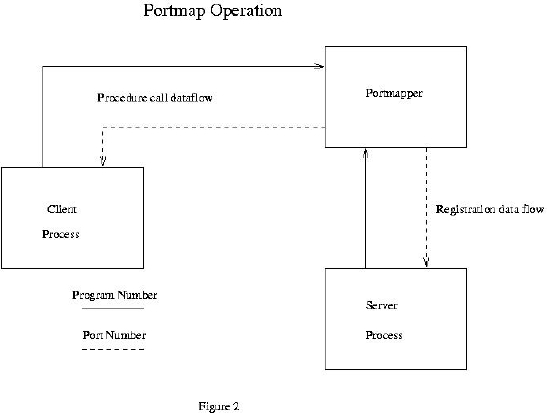
Figure 2. Portmap Operation
The RPC application then waits for and accepts connections at that port number. Prior to calling the remote procedure, the caller also contacts portmap in order to obtain the corresponding port number being used by the application whose procedures it needs to call. The network connection provides the means for the caller to reach the correct program on the remote host. The correct procedure is reached through the use of a dispatch table in the RPC program. The same registration process that establishes the port number also creates the dispatch table. The dispatch table is indexed by procedure number and contains the addresses of all the XDR filter routines as well as the addresses of the actual procedures.
If the discussion of the mechanisms supporting RPC sounds complex, that's because it is. Fortunately, the development of RPC applications can be greatly simplified through the use of rpcgen, the protocol compiler. rpcgen has its own input language which is used to declare programs, their procedures and the data types for the procedures' parameters and return values. This is best illustrated by an example. The source code for an average procedure is shown in Listing 1. If we store this source code in a file called avg.x and invoke rpcgen with the following command:
rpcgen avg.x
Obtain the header file avg.h shown in Listing 2. This file contains all of the function prototypes and data declarations needed for the development of our application. It will also generate three other source files:
avg_clnt.c: the stub program for our client (caller) process
avg_svc.c: the main program for our server (callee) process
avg_xdr.c: the XDR routines used by both the client and the server
To complete the application at the server end, we need code to provide the actual “smarts” required to correctly process the input data. This must be created manually. The code for the sample application presented here is shown in Listing 3. This code takes the XDR decoded array from the client and separates and averages the values. It returns the result which is then XDR encoded for transmission back to the client.
Listing 3. Server Code for Average Application
To complete the application at the client end, the input data must be packed into XDR format, so that it can be sent to the server. The client program is also generated manually and is shown in Listing 4. The Makefile shown in Listing 5 can be used to build the application.
The best way to test the RPC application is to run both the client and the server (the caller and callee) on the the same machine. Assuming that you are in the directory where both the client and the server reside, start the server by entering the command:
avg_svc &
The rpcinfo utility can be used to verify that the server is running. Typing the command:
$ rpcinfo -p localhostgives the following output:
program vers proto   port
 100000    2   tcp    111  portmapper
 100000    2   udp    111  portmapper
  22855    1   udp   1221
  22855    1   tcp   1223
Note that 22855 is the program number of our application from avg.x and 1 is shown as the version number. Since 22855 is not a registered RPC application, the rightmost column is blank. If we add the following line to the /etc/rpc file:
avg 22855rpcinfo then gives the following output:
program vers proto   port
 100000    2   tcp    111  portmapper
 100000    2   udp    111  portmapper
  22855    1   udp   1221  avg
  22855    1   tcp   1223  avg
To test the application, use the command:
$ ravg localhost $RANDOM $RANDOM $RANDOMand the following values are returned:
value   = 9.196000e+03
value   = 2.871200e+04
value   = 3.198900e+04
average = 2.329900e+04
Since the first argument to the command is the DNS name for the host running the server, localhost is used. If you have access to a remote host that allows RPC connections (ask the system administrator before you try), the server can be uploaded and run on the remote host, and the client can be run as before, replacing localhost with the DNS name or IP address of the host. If your remote host doesn't allow RPC connections, you may be able to run your client from there, replacing localhost with the DNS name or IP address of your local system.
The ONC implementation of RPC is not the only one available. The Open Software Foundation has developed a suite of tools called the Distributed Computing Environment (DCE) which enables programmers to develop distributed applications. One of these tools is DCE RPC which forms the basis for all of the other services that DCE provides. Its operation is quite similar to ONC RPC in that it uses components that closely parallel those of ONC RPC.
Application interfaces are defined through an Interface Definition Language (IDL) which is similar to the language used by ONC RPC to define XDR filters. Network Data Representation (NDR) is used to provide hardware independent data representation. Instead of using programmer-defined integer program numbers to identify servers as does ONC RPC, DCE RPC uses a character string called a universal unique identifier (UUID) generated by a program called uuidgen. A program called rpcd (the RPC daemon) takes the place of portmap. An IDL compiler can be used to generate C headers and client/server stubs in a manner similar to rpcgen.
Although the entire DCE suite is commercially sold and licensed, the RPC component (which is the basis for all the other services) is available as freeware. See the references section for more information on DCE RPC.
The sample application presented here is certainly a naive one, but it serves well in presenting the basic principles of RPCs. A more interesting set of applications can be found in the Network Information System (NIS) package for Linux (see the references section). Also, the Linux kernel sources contain an implementation of Sun's Network File System (NFS), an excellent example of the use of RPC applied to the problem of distributed file access.
In addition to distributed data access, RPC can also be used to harness the unused processing power present on most networks. The book Power Programming with RPC, listed in the references section, presents an image processing application that uses RPC to distribute CPU intensive tasks over multiple processors. With RPC, you have the capability to boost the performance of your applications without spending a dime on additional hardware.