Robocar: Unmanned Ground Robotics
The Association for Unmanned Vehicle Systems International (AUVSI) sponsors a yearly robotic vehicle contest. Schools from around the world gather to see whose vehicle will navigate an outdoor course the fastest and the farthest. Vehicles have no prior knowledge of the layout of the course.
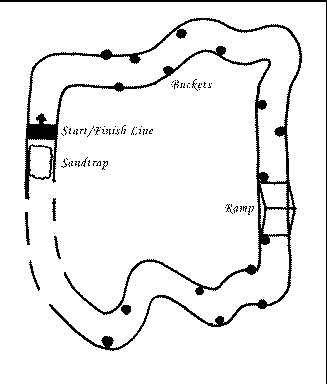
The course track is defined by white or yellow lines painted on the grass, and the robot must stay within these lines. Obstacles of various sizes, sand traps, deep grades and sharp curves occur along the way to keep things exciting. The difficulty increases as the robot progresses down the course. In addition to navigating the pathways, the robot must carry a 20 pound load and cannot exceed a speed limit of five miles per hour. Each robot has three tries at navigating the course, and the winner is chosen based on the time used and distance traveled. Penalties are assessed for crossing lines and hitting obstacles. So far no team has successfully navigated the full length of the course.
This year's contest was held at Oakland University in Rochester, Michigan on May 31st, June 1st and June 2nd. Rules for the 1997 contest can be found on the Web at http://www.secs.oakland.edu/SECS_prof_orgs/PROF_AUVSI/rules97.html.
Figure 1. Diagram of the Race Course
Robocar is the University of Colorado (CU) at Boulder's entry in this contest. Starting with a child's electric car, our team added basic sensing and control equipment as well as two computers running Linux and software specifically designed for the AUVSI contest. Over the four years CU has entered this contest, Robocar has changed significantly. This article documents the various systems of Robocar in this year's incarnation, its software architecture and navigation algorithms.
The basic frame of Robocar is a kid's vehicle, hacked apart—the kind of toy one or two children can sit in and drive. We ripped out the wimpy motors that came with the original toy and replaced them with big, beefy ones with chains and gearing to improve drive power. We substituted computer controls for the steering wheel and pedals and augmented its body structure. Not much remains of the original vehicle except some framework and the outer plastic shell.
An inverted metal “U” was welded to the car body above the former location of the windshield and two cameras were mounted to it. The original windshield was not used because it was too low to the ground and did not provide a large enough field of view. A metal box used for housing various circuits is also attached to the metal “U”.
Batteries fit snugly into the former seating area of the vehicle. Covering the batteries is a wooden board which holds the competition load. Likewise, a wooden platform has been added to the back of the car to carry our main computer, a conventional desktop machine with a big monitor. Additional equipment, including our smaller second computer, is stashed under the hood in place of the original battery.
Overall, the car measures 30 inches wide, 54 inches long and 62 inches high and weighs in excess of 200 pounds. Actually, the car's body has become a huge, heavy hack after three years of adding features. We'll probably rebuild it from scratch next year using lighter materials.
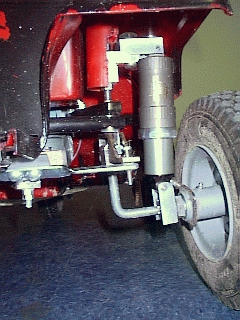
Robocar must withstand a fair amount of stress while traveling across the bumpy course (grass, sand, simulated pavement, wooden ramps). Vibrations need to be dampened to get clean, useful video—try driving down the road while looking through a jiggling video camera some time, and you'll get a fair approximation of Robocar's vision of the world. Besides, we don't want the hard drives bouncing around all over the place; therefore, all four wheels have shocks to help reduce the vibrations, and our mechanically fragile equipment is mounted on foam.
Finally, we replaced the slippery, stiff plastic wheels that came with the car with inflatable rubber tires to improve traction on the grass and the ramps. Robocar plows right through sand traps on these tires. Running with the tires slightly deflated helps absorb shock.
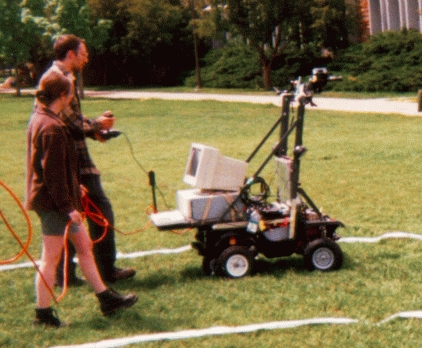
Figure 2. Picture of Robocar practicing. At this time we were using wall power to conserve batteries and a joystick to manually select the motor power. It really is following the lines by itself though. Our practice lines are impossible to miss compared to the more subtle effects of spray paint on grass.
This year, Robocar has large marine batteries that can easily power it for seven or more hours of operation. The batteries are used in pairs and power all the actuators, sensors and computers. These are deep cycle batteries; that is, they are designed to withstand numerous complete draining and recharging cycles. Each 12 volt battery can source 550 amps. Even though each battery lasts a long time, we keep two spare sets on the sidelines for backup. Unfortunately, the batteries are quite heavy—adding an extra 40 pounds each. The weight trade-off is well worth the power gain, which should enable us to climb the ramp that caused us so much grief in previous years.
Figure 3. A close up of one of the shocks
We have two circuits in the car: a 12 volt circuit and a 24 volt circuit. Power for the noisy drive motors and CAN-AMP servo is provided on a separate circuit from the digital devices. Relays switch the drive motors from forward to reverse as well as cut power to the motors in emergencies. The diagram of the electrical system provides more information.
If Robocar should ever go wildly out of control, a quick slap on one of the two emergency stop buttons (one of which is a remote control) will quickly bring it to a halt by disconnecting the motors from the batteries. Even though the car is moving at a mere 5 miles an hour or less, it can still do a lot of damage to objects and people. I have scars to prove it.
Every robot relies on actuators to act upon its world. Robocar has three of these:
Steering control is provided via a CAN-AMP. The steering CAN-AMP is one of three nodes on our CAN (Controller Area Network). The other two are an encoder wheel and the CAN-PC controller card. Servo behavior can be completely controlled; for example, we can tell it to turn a certain distance within a certain period of time and to decelerate gently before it gets there. Two years ago, we used one of these to turn a single camera rapidly from side to side without damage, because of the great number and flexibility of the parameters to the CAN servo.
Motor control is achieved through pulse width modulation (PWM) from a computer to two DC drive motors. These 24 volt motors are extremely powerful and have great torque. One afternoon, we took turns riding on the car, and the motors easily pulled the car and a heavy (185 pound) human passenger up a steep hill. We generate a PWM signal from two cascading counter/timers that receive the same clock signal. The first is set up to periodically generate a rising edge on its output and determines the frequency of the PWM signal. The period of the signal does not change. The output of the first counter/timer is connected to the gate on the second counter/timer. The second counter/timer determines the duty cycle of the PWM signal. A short count on this timer maps to a longer fraction of the PWM period that is high and, thus, to more power being sent to the motor.
Shadow-reducing head lamps are switched with a computer-controlled relay. These lights improve the vision sensors' ability to spot the course boundaries.
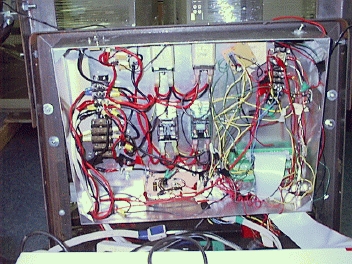
Figure 4. A nasty bird nest which also serves as the wiring for Robocar
To perceive its environment, Robocar needs sensors. We have given it cameras for detecting the track boundary lines painted in the grass, a scanning sonar for obstacle avoidance and an encoder wheel for speed detection. Robocar has some additional sensors for side projects which are not used during the competition.
Vision is supplied from two standard video cameras fed through two Matrox Meteor frame grabbers. We have two different Matrox cards: the Meteor and the Meteor/RGB. Both can read from multiple cameras and grab high-resolution 24-bit color images. The only difference is that the Meteor/RGB can grab frames from a split-RGB source, whereas the regular Meteor cannot. Even though we could plug two cameras into a single Meteor board, we are using two boards to get 30 frames per second per camera. Matrox's Meteor boards are inexpensive, reliable and well supported.
A single Panasonic sonar sensor mounted on top of a Futaba RC servo acts as an obstacle detection device. It scans the area in front of the car, rotating back and forth to cover a wider area. Using a single sonar has the advantage of removing any possibility of cross-talk and of being able to look in any direction. Using multiple statically-mounted sonar sensors would not give us this much flexibility. The Futaba servo, like the drive motors of the vehicle, is controlled using PWM.
An encoder wheel returns data to a speed sensor indicating how far it has turned. Since we know the diameter of the wheel, we know how far it has turned since last we checked. Thus, this sensor can compute our average speed during that time. The sensor's interface to the encoder wheel is through a CAN-PC board on our main computer. Robocar uses this sensor to ensure that it stays under the 5 MPH speed limit.
In addition to being a competition vehicle, Robocar acts as a test bed for Kevin Gifford's Ph.D. thesis, which is to develop an efficient navigation algorithm for (possibly off-world) autonomous rovers. An additional set of sensors has been added for this option: a GPS sensor and a “map” sensor. Using these, Robocar always knows exactly where it is and where it wishes to go; it can also plan the cheapest way of getting there.
The Trimble Series 4000 uses differential GPS and can make extremely accurate measurements—+ or - 10 centimeters—compared to normal civilian GPS. It comes with a base station, a receiver and radio modems. GPS information is supplied over a serial line.
During Kevin's research, Robocar knows about its environment by using a map sensor in addition to the competition and GPS sensors. The map sensor is basically a topological map of the research field. With this knowledge, Robocar can calculate the most efficient path to a set of destination coordinates.
In addition to the above sensors, we have a joystick for manually driving Robocar to and from the course (or around the test field just for fun). Without this, we would have to push or carry the heavy beast around—something we prefer to avoid. The joystick is plugged into a generic sound card on our main machine.
Two networked computers provide the brains for Robocar and the control for sensors and actuators. Debian Linux version 1.2 is installed on both these machines.
The first of these, Highlab, is a Pentium 166MHz with 16MB of RAM and a 1GB disk. The three boards in Highlab for sensor and actuator control are:
An ML16-P analog and digital I/O card made by Industrial Computer Source. The ML16-P is a low-quality, low-cost real-world interface for the ISA bus. It has sixteen 8-bit ADCs (analog to digital converters), two 8-bit DACs (digital to analog converters), eight digital output lines, eight digital input lines, and three 16-bit counter timers. We use this card for PWM motor control, e-stop, reverse and head-lamp relay toggling.
A CAN-PC card made by OmniTech for communicating to their CAN devices (the encoder wheel for speed sensing and the big servo for steering).
Two Matrox Meteor cards used for vision.
Highlab makes the high-level decisions and controls all of the actuators. It also performs vision and speed sensing.
Flea, the second of the two computers on Robocar, is a PC/104 stack. The PC/104 is an embeddable implementation of the common PC/AT architecture. It consists of small (90 by 96 mm) cards which stack together. A PC/104 uses ISA compatible hardware, although the connectors and pin-outs are different. Any software that runs on a regular desktop machine will also run on a PC/104. Its greatest advantage over a desktop machine, besides its compact size, is its greatly reduced power consumption. For more information on the PC/104 standard, see http://www.controlled.com/pc104/
Flea consists of several modules: a motherboard (the CoreModule/486-II from Ampro), an IDE floppy controller (the MiniModule/FI from Ampro), a digital I/O card (the Onyx-MM from Diamond Systems) and an Ethernet card (the MiniModule/Ethernet-II from Ampro). It has 16MB of memory and runs with a single 20MB solid-state IDE drive (the SDIBT-20 from Sandisk).
Since Flea has no video card, it uses a serial terminal as its console. We needed to patch the kernel to gain this ability, as it is not part of the normal kernel distribution. The serial console patch can be located at ftp://ftp.cistron.nl/pub/os/linux/kernel/patches /v2.0/linux-2.0.20-serial-cons-kmon.diff
The Onyx-MM features 48 digital I/O lines, 3 16-bit counter/timers, 3 PC/104 bus interrupt lines and an on-board 4MHz clock oscillator. Flea controls the scanning sonar's servo with this card. Sebastian Kuzminsky's Linux driver for this card can be found at ftp://ftp.cs.colorado.edu/users/kuzminsk/
Flea's task is simple; it turns the servo, pings the sonar and listens for the response. When it has a complete sweep of the arc in front of the robot, it processes and sends the information to Highlab.
This year's software, running under the Linux OS, is significantly improved from last year's, which ran under MS-DOS. Although the MS-DOS system worked fine (we won third, first and fifth place in the previous three years), it was extremely difficult to expand, ugly and monolithic. As soon as Sebastian finished developing Linux drivers for all our unsupported equipment, we completely removed any and all traces of MS-DOS from our systems and rewrote the code from scratch.
Functionality has been modularized into two types of programs: a single arbitrator which makes the decisions and controls the car, and sensors which provide information about the world to the arbitrator. Sensors are derived from a skeleton sensor and are easily created. You write the code to create a suggestion, to interface to the hardware and to link to the sensor library. The arbitrator and the sensors use a common configuration library which makes it easy to parse configuration information from the command line and configuration files.
Since the sensors and the arbitrator can run on any machine on the Robocar network, it is simple to add and remove computers to and from the system as needed. The arbitrator spawns sensors at startup using rsh. A simple command protocol allows communication between the sensors and the arbitrator over the network. The arbitrator can get and set a sensor's configuration, get a single suggestion from a sensor, set a sensor's suggestion rate and kill a sensor. Acknowledgments from the sensors are necessary, since we are using unreliable UDP (User Datagram Protocol) as our networking protocol.
Sensors generate several types of suggestions for the arbitrator: an occupancy grid, the current speed and (for Kevin's research only) a heading. Occupancy grids are just a way of representing world information in a grid format. Our occupancy grids are 6 meters wide and 3 meters high and have ten grid points per meter. The car is centered in the middle at the bottom of the grid. Each point of the grid can be marked with one of three values: good (it is okay for the car to move to that spot), bad (the car should avoid that position) and unknown. Not all sensors provide occupancy grids; those that do are only looking for specific types of “badness”—track boundaries (vision sensors) and obstacles (sonar sensor). In the future, we will probably allow the sensor to use weights of badness instead of a single value, so that the arbitrator can better choose between two “not-so-good” paths. Sensors send suggestions to the arbitrator as fast as they can, at a specified rate or on demand via UDP. These are not acknowledged by the arbitrator and can get dropped if the network gets bogged down. This protects the arbitrator from sensors that send suggestions too fast. Time stamps on the suggestions lets the arbitrator know how old the suggestion is.
The user can configure and debug sensors and the arbitrator from nice menus displayed using curses library routines. The arbitrator itself may wish to configure the sensors; for example, it may wish to alter the suggestion rate for a particular sensor or to change the type of filtering done by a sensor.
After spawning the sensors, the arbitrator waits for each sensor to connect to it and then gathers configuration information from all of the sensors for later use and display. Finally, it falls into a loop. Within the loop, the arbitrator selects from all of the sensor file descriptors and standard input to gather suggestions from the sensors and commands from the user. Using the suggestions, the arbitrator makes a navigation decision and actuates.
We have several navigation algorithms to choose from and can switch among them on the fly. However, we have found that the simplest and easiest one works best. The Robocar needs to make only local decisions and does not need to keep a map of its environment. It just needs to make quick use of the data provided by its sensors.
Rather than looking at all the sensor information separately, the arbitrator merges the suggestions together into one total suggestion. It then looks at the occupancy grid portion of the total suggestion to find badness in relationship to itself. Badness can be either a painted line or an obstacle—it doesn't really matter to the robot which—and must be avoided. The robot looks left, then right to find the left-most and right-most badness. It then tries to steer between the two. If there is badness only on one side, it tries to give the badness wide clearance—at least half the track.
This is one of many algorithms to which we can switch, but it seems to work well and is fairly straightforward. Kevin, of course, uses different algorithms which take into account current and desired position as well as surrounding terrain. Our simple algorithm works well for the competition.
Working on the Robocar project has been a very rewarding and exciting experience. There is nothing quite so pleasant as watching something you have built and programmed move on its own. Switching to Linux has allowed us to improve our robotics software and to use our favorite development tools. We hope to do well in this year's contest as a result. But even if we do not, we will have a good platform for next year and will have learned a little more about building robots and robot navigation.
Kerry Kruempelstaedter can be reached at kruempel@cs.colorado.edu or at http://ugrad-www.cs.colorado.edu/~kruempel/. Since graduation, she has greatly enjoyed working with robotics and is taking the summer off to work on an autonomous aerial vehicle. She spends too much of her life spelling her name to people over the phone.