Linux Out of the Real World
Through the National Aeronautics and Space Administration (NASA), the United States government provides space flight capability to its people; you can rent volume on a Space Shuttle mission and fly a payload into low Earth orbit. Because of the considerable cost involved, in practice, many of the organizations who rent space do so with government grants. One such grant belongs to Bioserve Space Technologies. Bioserve is a sponsored NASA Center for Space Commercialization, operating out of the University of Colorado at Boulder. Here, a group of students (from undergrad through post-doc) and teachers from many engineering disciplines work together to produce payloads that perform various experiments on the Shuttle.
This article describes one such payload, called the Plant Generic Bioprocessing Apparatus (PGBA), and the NASA systems used to communicate with the experiment.
PGBA is a Space Shuttle payload experiment designed to study plant growth and development in microgravity. It flew in the Space Shuttle Columbia, on flight STS-83 on April 4, 1997. The experiment is centered on a small hydroponics plant-growth chamber adapted for use in microgravity. The chamber is fitted with a large number of sensors and actuators, all connected to a 486 PC/104 computer running Linux. This computer monitors and controls a number of environmental conditions within the plant-growth chamber. The data produced is stored locally in the orbiter and transmitted to ground side over an unreliable bidirectional low-bandwidth link provided by NASA. A dedicated ISDN line connects the Marshall Space Flight Center (MSFC) in Huntsville, Alabama with our ground side support equipment in Boulder, Colorado. Here the biologists analyze the data, and we relay it over the Net to the Kennedy Space Center (KSC) in Cape Canaveral, Florida, where a ground-control replica of the experiment mimics the environmental conditions, “on Earth as it is in Heaven.”
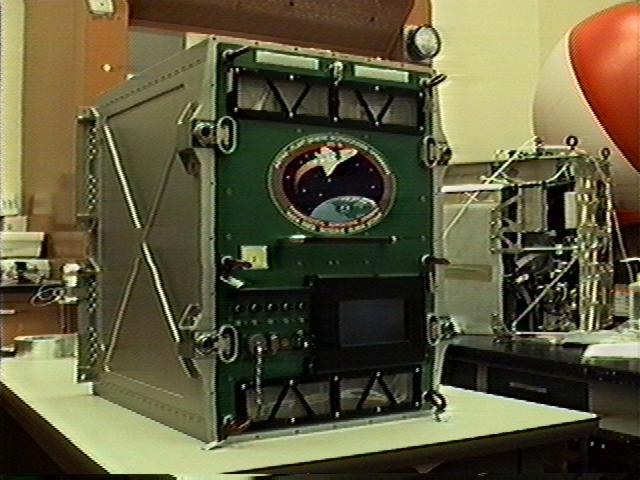
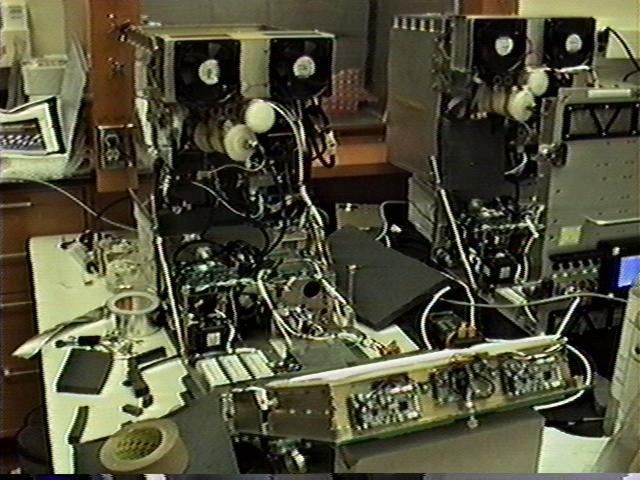
Figure 1. The completed BGBA flight unit, just before transfer to NASA.
The plan was to subject the experiment to several relocations within the orbiter after launch. PGBA was to be launched and powered on in the mid-deck. After two days in orbit it was to be moved to the SpaceLab module, where it would be mounted in the Express Rack and connected to the Rack Interface Computer (RIC) that provides both the uplink and the downlink. Two days before landing, it would be disconnected (cutting its communications with ground side) and moved back to the mid-deck. Each of these moves would require astronaut effort (shutting down, moving and bringing the experiment back up) and a loss of power to the experiment. We could have launched and landed right in the Express Rack, but the moving maneuver would allow NASA to test the techniques and hardware that will eventually be used to move experiment payloads between the Space Shuttle and the International Space Station.
Unfortunately, a hardware failure on the orbiter itself forced an early return after less than 4 days in orbit, instead of the planned 16 days. A fuel cell providing electrical power to the orbiter started to fail, and the mission was aborted to minimize risk to the crew. The fuel cell problem was discovered within the first two days in orbit, before PGBA was scheduled to be moved to the Express Rack. Four days in orbit was not enough time for the effects of microgravity on plant growth to manifest themselves, and from a science standpoint the experiment was considered a complete loss. However, it was not without value, since we now have a flight-tested and known working experiment. NASA is eager to test the Station transfer procedure, and the scientists are eager to get their data. A repeat flight has been tentatively scheduled for early July, 1997—same crew, same vehicle, same payloads, just a new tank of fuel.
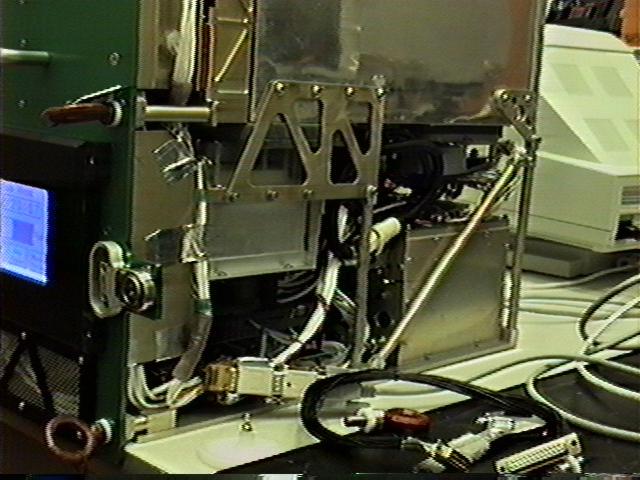
Figure 2. Closeup of the inside of the unit. The little box on the bottom right is the computer
I will describe the payload we designed and the mission we originally planned (the same one we are expecting to complete in July) rather than the aborted mission that we actually flew.
How do you design a computer system to handle this situation? Clearly it is a mission-critical item. If the computer fails, the experiment is lost.
Astronaut time is an incredibly expensive commodity. This has two implications: it is desirable to automate normal operation of the payload as much as possible and not to require maintenance or repair in orbit.
The computer system must operate autonomously for the duration of the mission (on the order of two or three weeks). During this time it monitors and controls the conditions inside the growth chamber, using an array of specialized sensors and actuators. It must also communicate with ground side, both accepting input and providing output. Physically, the computer must occupy a small volume.
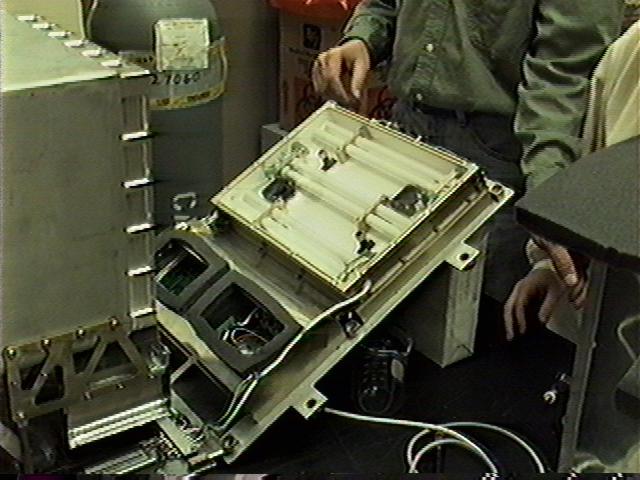
Figure 3. The light box, containing the fluorescent lights, their fans and the two tiny cameras.
Data produced before the move to the Express Rack and after the move back to the mid-deck would need to be buffered on non-volatile storage. Just before the move to the Express Rack and just before we get the payload back after launch, we would need to buffer a maximum two days worth of data.
The solution we decided on is a PC/104 computer running Linux. PC/104 is an “embeddable” (90 by 96 mm, low power consumption) implementation of the common PC/AT architecture. PC/104 hardware is software compatible with ISA hardware, but the connectors and layout are different. This has obvious advantages: all the software that runs on vanilla desktop PCs runs unmodified on PC/104 computers. (Incidentally, the PC/104 Consortium just announced the PC/104-Plus spec, which describes an extension to the regular PC/104 architecture that is software compatible with PCI. For more information on the PC/104 standard, see http://www.controlled.com/pc104/consp1.html.)
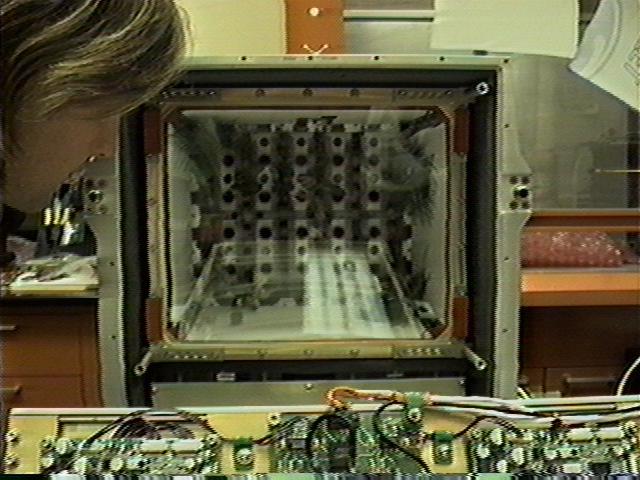
Figure 4. The plant-growth chamber
We chose Linux for “soft” reasons. The job could be done in MS Windows, on a microcontroller or on a Turing machine, but who would want to? The tools and computing environment available to programmers in the more advanced operating systems make life so much nicer.
Last year on STS-77 we flew two payloads with similar computer systems. This year we used Linux, last year we used DOS. The DOS software worked and was functionally almost equivalent to the Linux version. Notably, it lacked image capture, downlink of images and local storage of data logs. It was switched because the DOS version was monolithic, more difficult to understand, debug and expand, and it was difficult to reuse the code.
The motherboard is a CoreModule/4DXi from Ampro with an Intel 486 DX4 100 MHz CPU, an IDE and a floppy controller, two serial ports, a parallel port and a hardware watchdog. The 4DXi ships with 4MB RAM that we upgraded to 16MB. Ampro hardware has in our experience been consistently reliable, well documented and given excellent support.
Figure 5. The flight unit is on the left, the ground control on the right
The payload needs three serial ports: one to talk to the Rack Interface Computer (that provides the uplink and downlink), one to talk to the astronauts (through a touch-screen) and one for connecting a terminal for development on the ground and for resolving any emergencies that may crop up in space. We needed one serial port in addition to the two on the motherboard, so we added an MPC302 card from Micro/sys that provides two additional serial ports and a second parallel port. The MPC302 card supports shared IRQs (interrupt requests)—a big win.
The touch-screen is a GTC-100 from DesignTech Engineering. It is a touch-sensitive LCD screen with a serial port. It accepts high-level text and graphics commands and reports the location of screen presses. Through this device we provide the interested astronaut with detailed information about the experiment, and a menu interface for control and meta-control.
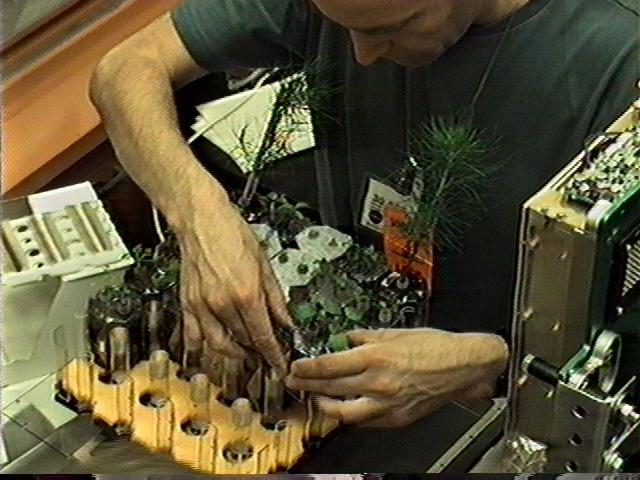
Figure 6. The chief scientist is installing his babies into the root tray
The experiment is monitored and controlled by a number of bizarre gadgets: accelerometers and gas chromatographs, volumetric pumps and porous condensation plates—your regular Sci-Fi gardening tools. These are in turn monitored and controlled by a number of analog and digital inputs and outputs to and from the Linux box. We are using three I/O cards from Diamond Systems: two “Diamond-MM” for analog I/O and one “Onyx-MM” for digital I/O. These cards provide all the I/O required to perform the process automation and monitoring.
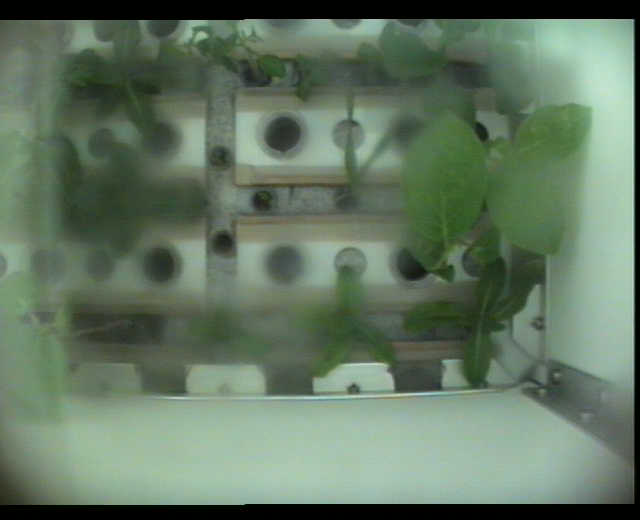
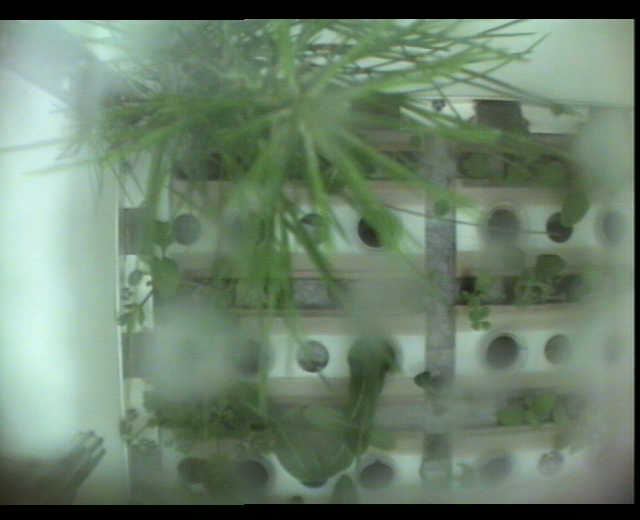
In addition to the numerical data gathered, we are taking periodic pictures of the plants with two miniature video cameras. The cameras are mounted in the “ceiling” of the plant-growth chamber (the side with the lights), and their combined field of view covers the entire “floor” of the chamber (where the plants are). The NTSC video signals feed to an ANDI-FG board from Ajeco. The ANDI-FG has a 3-input frame grabber, a Motorola 56001 DSP and a megabyte of on-board memory. On request, the ANDI-FG delivers to the host CPU a high-quality JPEG-compressed image. Ajeco has been most helpful, providing a Linux driver and excellent technical support.
Plugged in to the IDE controller we have a FlashDrive solid-state disk from Sandisk. We chose to go with a solid-state disk as opposed to regular rotating magnetic media, because our system needs to operate under heavy vibration for extended periods of time. The FlashDrives are more expensive and have low capacity, but they are guaranteed to operate under 1000 G shock and sustained 15 G vibration without damage. We have plenty of persistent storage, although we could easily increase that to several hundred megabytes should we need it by using larger FlashDrives. 40MB is enough disk space for the software we need, plus enough to buffer 5 days' worth of data and images. A normal, successful mission would need only two days' worth, but having the extra space made sense.
Figure 7. The plants on the launch pad
My only complaint about this hardware is that most PC/104 cards (all the cards listed above except for the CoreModule) provide only an 8-bit bus, thereby allowing only the use of IRQs 2-7. The CoreModule, being 16-bit, supports the full range of IRQs. Between our I/O cards and serial ports, we are running out of hardware interrupts.
Absent from the above list of hardware is a video card and a network card. In its production configuration, we run the PC/104 without either of these cards. During ground development when we have physical access to the computer, we use a simple serial terminal for a display, and PPP over a null modem at 115 Kbps for networking.
The ground control uses an Ampro MiniModule/Ethernet-II card, a 16-bit Ethernet interface card based on the SMC 9194. The ground control is on the Net from behind NASA's firewall at Kennedy Space Center and gets data from our ground side support computer in Boulder.
Figure 8. The plants on the launch pad
As to software, the experiment is running a customized installation of the feature-rich Debian 1.2 base, plus a few select additional packages (notably a decent editor). We use version 2.0.27 of the Linux kernel, plus Miquel van Smoorenburg's serial-console patch and a couple of nonstandard drivers we wrote ourselves for the analog and digital I/O cards. The manufacturer-supplied driver for the Adjeco frame grabber is a user-space-only implementation. Last but not least, we have the custom automation/communication software suite.
The data produced by the payload is sent over a serial connection to the Rack Interface Computer. It bounces around on the orbiter for a little while, then is beamed to ground side via a satellite in NASA's Tracking and Date Relay Satellite System (TDRSS, everyone calls them Tetris satellites). The data goes through some other NASA systems (including communications-relay vessels in the Pacific Ocean) and, finally, makes it to MSFC. At MSFC, it enters a machine named (in good NASA style) the “Virtual Remote Users Gateway”, VRUG for short. The VRUG is connected via a dedicated NASCOM line to our Remote Payload Operations Command Center (Remote POCC) in Boulder. The data then goes into a pile of ISDN-to-Ethernet routing hardware and into a network card in our ground side support computer (another Linux machine, used for development of the experiment's software and the analysis of returned data). On its screen, the ground side support computer displays squiggly lines (which the biologists like to look at) and pictures of plants. Another channel going up to orbit from ground side exists using the same hardware interfaces (RIC and VRUG).
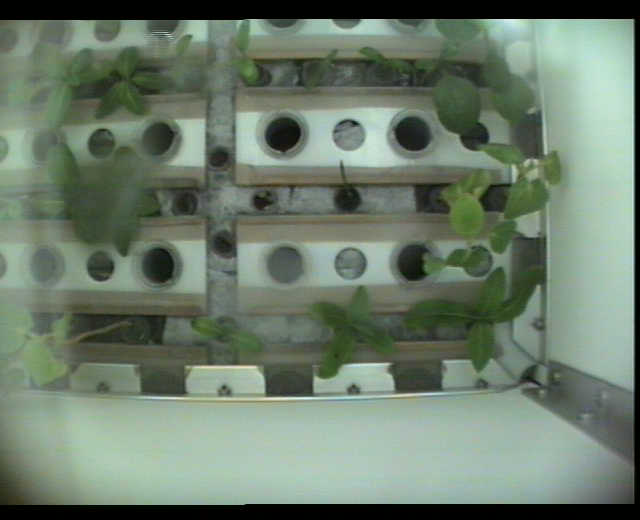
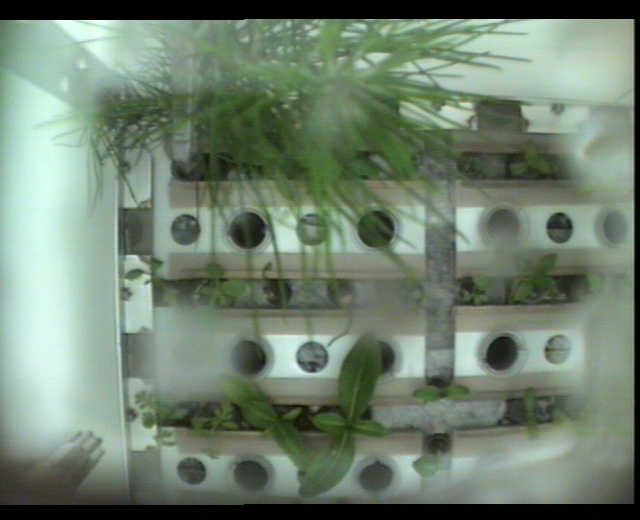
Figure 9. The plants at the end of the mission
The data from the payload describes the conditions in the orbiter. From Boulder, it is sent over the Net to the ground control experiment in Florida. The ground control is similar to the payload in orbit, but it has an Ethernet card instead of the third serial port and a fragile (but cheap) and spacious magnetic hard disk of the garden variety. The ground control produces data of the same form as the orbiting experiment, but with (hopefully) different content. This data is sent back over the Net to the support machine in Boulder for analysis.
An unusual instance of a common problem affects communications with the orbiter. Each TDRSS satellite can see a small portion of the sky: when the limb of the Earth passes between the orbiter and the satellite, line of sight is lost and no data can be sent between them. Several TDRSS satellites are in orbit, and large portions of the orbiter's possible locations are covered, but not all. When no satellites are visible from the orbiter, no communication is possible. This situation is called a Loss Of Signal (LOS). NASA announces the LOSs with high accuracy and long precognition, but they still cause headaches for experimenters. (E-mail your politicians and ask for more Tetris satellites.)
Figure 10. The plants at the end of the mission
NASA does not guarantee the delivery or correctness of data sent through their pipes. I once asked a member of their technical staff how reliable the channel is, and he replied “Oh, I think probably no more than one corrupt or dropped character in a hundred.” Observations made during last year's experiment indicate that the error rate is significantly lower than that estimate.
When you rent volume on the orbiter for your experiment, you can also rent bandwidth to ground side. You must specify the number of bits per second to reserve for your payload, and you are guaranteed no less. You then get a connection to the Rack Interface Computer. The RIC presents a three-wire RS-232 connection: transmit and receive only, no handshaking.
Data generated by the experiment must be encapsulated in little packets in accordance with a specification from NASA. The fields in the header and footer of these packets are used for routing within the orbiter's communication equipment and include a checksum. If the RIC accepts your packet, NASA will do their best to deliver it to your machine at ground side, but no guarantees are made. Data sent back to the payload from ground side is encapsulated in the same packets and go over the same wires. All packets traded between the payload and the RIC contain data that is from or to the ground side support computer, wrapped in RIC packets.
There is no change at the RIC interface, no automated notification from NASA to the payload that a LOS is imminent or occurring. The obvious way to do this notification would be to use the regular RS-232 handshaking lines.
Our Remote POCC is in Boulder, Colorado. At this end of the line, NASA presents a twisted pair Ethernet interface. You connect using TCP/IP to two specified ports on two specified hosts on this network. These computers are collectively called the Virtual Remote Users Gateway (VRUG). The VRUG interface is more complex than the RIC interface.
All communication with the VRUG (in both directions) is encrypted. The computer people at MSFC asked us to identify our operating system, and then supplied us with two object files, containing compiled C-callable functions to encrypt and decrypt data. The data sent over the TCP stream between our computer and theirs is packetized, but using packets different from those used by the RIC. These packets can contain data to and from the orbiter, commands to configure the VRUG interface and “telemetry” data from the orbiter (a standard data set provided by NASA at no extra charge, describing ambient conditions within the orbiter). Checksums are dutifully computed and checked on data going over the TCP link.
Two pairs of processes want to communicate between the orbiting experiment and the ground side support computer. The main control process in the experiment communicates with a recorder/data display/remote control program on the support computer, using several different types of data (events-log, sensor readings, and control-parameter settings going down; control and meta-control commands going up). Another pair of processes mirror directories from the payload to ground side, in order to send data that was buffered before communications were established. Images from the frame grabber are sent using this method.
In this situation, it is natural to want a packet-switching, multiplexing communication system with an interface available to many processes. Since the channel is unreliable, you want some type of validation of received data. The usual networking code is not usable, since there are no packet-drivers for the interfaces NASA presents. In the interest of simplicity and code reusability, we chose to implement a modular user-space communication system.
We wanted the communications interface presented to our communicating processes to be identical on both machines (experiment and ground side support computer). Since these two machines need to talk to different hardware and software interfaces, we abstracted the NASA interfaces from the multiplexer. Between the multiplexer and NASA sits a process that performs the packetizing and unpacketizing they want us to do (possibly fragmenting and defragmenting multiplexer packets) and relays the data. The end result is that the payload and the ground side support computer can communicate in a UDP-like fashion. Multiplexer packets sent are guaranteed to arrive intact and correct or not at all. It's a miniature networking stack in user land.
When the old DOS version of the payload flew in 1996, we rented space in SpaceHab. SpaceHab is a privately owned company that rents a large volume in the Shuttle payload bay and some services (power, communications, etc.) from NASA, and then turns around and rents smaller quantities of volume and services to experimenters. The economic relationship between the three parties (NASA, SpaceHab, experimenter) in this situation defy comprehension by the author. Anyway, SpaceHab provides a significantly more functional communications interface, called the Serial Converter Unit (SCU). Sure, it's still a 9600 bps serial line, but the SCU has (angels sing) flow control.
Sebastian Kuzminsky is an undergraduate in Computer Science and Applied Mathematics at the University at Colorado at Boulder. If space flight work were not so fun and time consuming, he would have been a graduate by now. Questions about PGBA and other Bioserve payloads are welcome. He can be reached via e-mail at sebastian.kuzminsky@colorado.edu.