ISDN and Linux—Surfing at Warp Speed
A typical question on comp.os.linux.* is “Do I need to get an ISDN driver for Linux to make my Bitsurfr/ISDN router work?” There are a lot of misconceptions about the requirements to get connected using Linux and ISDN. This article defines ISDN and explains some of the terms (see Glossary) involved, as well as describing three different ISDN device types and how to get Linux to use them to get on the Net. There is no time like the present to graduate to a 64K or 128K ISDN Internet connection.
ISDN, or Integrated Services Digital Network, is telecommunications technology that provides the end user with a method for connecting to the phone network using digital signals. It was originally designed to replace the POTS system; however, it never caught on (in North America at least) for standard phone use because there are different implementations of the ISDN standard. However, with the advent of the Internet, ISDN is starting to take off as a solution for the average user to get high-speed Internet access. There are other digital connections available such as cable modems and ADSL; however, ISDN is here now and available almost everywhere.
ISDN is delivered as BRI service with two 64K B (data) channels and one 16K D (signaling) channel. Some telcos still only provide one B channel, however, this is becoming rare. BRI lines are typically used by small business and individuals.
For the corporate user with a PBX or an access router, a PRI would be used. A PRI consists, in North America of 23 64K B channels and one 64K D, and in Europe, 30 64K D channels and one 64K D channel. This is the ISDN equivalent to a T1 or E1.
In North America, telcos deliver the ISDN BRI line as a U interface. This is a two-wire link that easily works over the standard pair of copper wires used by analog phone lines. In Europe, telcos typically deliver the line as an S/T interface. This is a four-wire link that is able to connect seven ISDN devices to the same line. The U interface requires an NT1 adapter to switch the S/T interface. Where the S/T interface is delivered, the NT1 resides at the telco's switch. Most ISDN products destined for North America also incorporate the NT1, thereby saving money and desk space.
The big benefit of ISDN is the small call setup time; that is, the time elapsed between when the phone number is dialed and when the connection is completed. This is made possible by the use of out-of-band signaling via the D channel. The D channel signals the telco's switch to make a call and, in less than one second, the connection is made. The POTS service uses in-band signaling. When a modem dials a system, it picks up the line and sends tones or pulses in the same band as the data travels.
ISDN terminal adapter user's guides give you the impression that getting ISDN is difficult. If you ask the right questions, obtaining your ISDN line can be easy. When ordering the line, ask:
Does the BRI have two B channels? (almost always yes.)
What switch type should I tell my TA to use? (In Canada, usually NI-1.)
Is it delivered as a U or S interface? Do I need an NT1? (If you have a line delivered as a U interface you must ensure your terminal adapter has an NT1 built in, otherwise, a separate NT1 is required.)
Check the pricing of ISDN in your area. In some places in the US, Frame Relay connections are cheaper than ISDN. ISDN is typically charged on a per-minute basis as well. For example, Bell Canada's Z@P service charges $1/hour per B channel to a maximum of $50/month per B channel between certain hours.
This is the expensive part of getting ISDN. Typically, a terminal adapter ranges in price from $300 to several thousand dollars depending on the type, features and functionality.
There are three basic types of terminal adapters: ISDN routers, external ISDN modems and internal ISDN network adapters. Most terminal adapters today provide POTS jacks for connecting a standard analog phone device. These jacks give you a place to connect a fax machine or an analog modem.
The type of terminal adapter you buy generally depends on the amount of money you wish to spend. The best device to get depends on your application and budget. An ISDN router is generally easiest to configure and set up, but tend to be a bit more pricey. ISDN modems and network adapters require a bit more work as they require additional software, but tend to be more in the price range of an individual. However, with an ISDN router, it's merely a matter of connecting it to your Ethernet card and you are on-line. ISDN modems and network adapters tend to take a bit more work to get online.
ISDN dial-up accounts tend to be more expensive than a 28.8K connection. This is changing as more and more ISPs convert to access routers supporting both ISDN and 28.8K connections off the same ISDN line. UUNET Technologies (in the U.S.) and UUNET Canada offer ISDN access using this type of technology.
When you call an ISP to get an ISDN account, you need to learn a bit about their service. Ask them what ISDN router they are using. This information can be helpful in tracking down problems should they occur. Not every ISDN router will talk to all other ISDN routers. The Ascend MAX is popular among ISPs. If they permit a 128K 2B account, make sure they support MPPP (Multilink PPP).
Also consider the type of service you need. Most ISPs offer either dedicated or dial-up ISDN. Dedicated services give you a line on the ISP's router for your use only. They typically also allocate you a block of IP numbers with the service. You need a fixed IP number if you intend to pick up SMTP mail over the link. Dial-up situations tend to use dynamic IP assignments, which means you are assigned a different IP number on each call. A few ISPs assign you a single IP number for your use. While this is rare, it is a method allowing pickup of SMTP mail over a dial-up account without using UUCP. How you intend to access the net and for what purpose will determine the type of account you need.
Network Address Translation, or IP Masquarade as it is called by the Linux kernel, is required by a router to provide access to multiple systems to a single dial-up ISDN account. In the case of an ISDN modem or an ISDN Network Adapter, the Linux kernel deals with the translation. If you are assigned a class C block or a point-to-point number by your ISP, address translation is not required.
The most recent ISDN devices feature some form of compression. Their marketing departments will say that compression will lead to increased throughput on the order of two to four times. They claim a 128K line will seem to run at 256K. Don't be fooled. In real live situations, you will be lucky to perceive an increase of 10%. Consider most information the device will be downloading is already compressed, and therefore, cannot be compressed further (or at least very little). JPEG and GIF files from the web are already compressed, and most ftp archives are either zipped or gzipped, tar files. Only text benefits greatly from compression, and text is usually only about 20% of the data on a web page.
Thus, when shopping for an ISDN device, don't place compression high on your priority list.
An ISDN router is the easy way to get connected—enter in a few bits of information into the router's configuration, and you are on the Net. A router is the best method to get a LAN talking to the Internet, as this is a dedicated computer designed to handle the load of passing packets. The only drawback can be the price. For most individual users, an ISDN router will be beyond the reach of their pocketbook. For business, a router is essential for reliability.
To get started, you need to obtain a network card and install it; refer to the Ethernet Mini-HOWTO for details.
The best Ethernet card to use is one with a memory buffer, as it gives the best performance. Most routers come with a twisted 10baseT cable to connect your router directly to your Ethernet card. If you intend to connect more than one computer, an Ethernet hub is required. Avoid 10base2 (coax) cabling, if at all possible, to avoid hassles. It may be cheaper initially, but it can lead to diagnostic and cabling nightmares.
Two ISDN routers I have worked with and found reliable are the Ascend Pipeline 50 and the Farallon Netopia.
The Ascend Pipeline series is well suited for dedicated ISDN applications, as it was originally designed for routing a netblock or a static IP number. The Ascent router supports address translation; something Ascend calls NAT (Network Address Translation). If POTS jacks are required, then consider the Pipeline 75 which is basically the Pipeline 50 with POTS jacks.
The Farallon Netopia is, by far, one of the easiest routers to configure. The Netopia supports dedicated connections and supports Farallon's version of address translation, called SmartIP, for use with dial-up applications. The Netopia comes in a 12-user version as well as a full routing version. Two POTS jacks are available as an option. What makes this router unique is its PC Card (PCMCIA) slot. Insert a PC Card modem, and the router can be dialed into even when the ISDN connection is down. This is very handy for those users who require remote configuration and troubleshooting abilities. The Netopia also includes a scheduler, so that connections can be scheduled for variable times during the week. No other ISDN router I've used has this feature.
The Ascend Pipeline series is the most popular, and most ISPs are either currently using them or have worked with them in the past. The Netopia is newer, and its feature set makes it worth noting. Of the many routers I have worked with, the Ascend and Farallon products have most impressed me.
A fair amount of confusion lies in this area. A typical question on comp.os.linux.networking is “Do I have to include ISDN support to operate my Bitsurfr ISDN modem?” Nope. An ISDN modem is a serial device that connects to the serial port on your PC, “dials” a phone number and translates ISDN data to RS-232 data. The system sees it as a regular modem. You can set up getty to answer incoming calls, and you can dial out with minicom or pppd. ISDN kernel support is neither required nor used. Note that the term “modem” does not really apply to an ISDN terminal adapter, because “modem” implies an analog device which an ISDN TA is not.
The Motorola Bitsurfr Pro is one such ISDN modem. I will discuss its connection to a Linux system in detail, because it has been around for quite some time and works well. It features a 115Kbps serial port and two POTS jacks. Newer ISDN modems may include a 230Kbps or higher serial port and compression (such as the Farallon Netmodem).
The test system for the Bitsurfr Pro was a Pentium 100 with 32MB of memory running Linux 2.0.28. The connection was provided by UUNET Canada and both a dedicated connection as well as a dial-up connection were tested. Both situations worked well with one or two B channels operating. The following procedure outlines setting up Linux to talk to the Bitsurfr Pro over the serial port and configuring pppd to use it.
Connect the Bitsurfr Pro to the system and the ISDN line.
Configure the serial port with setserial as required (e.g., setserial /dev/cua1 spd_vhi hup_notify). See the Serial HOW-TO for details.
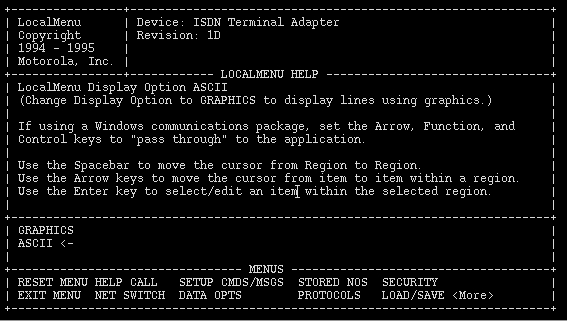
Now the fun part: configuring the Bitsurfr Pro. The Bitsurfr Pro requires a full VT100-compliant terminal emulator to use its local menu. During my testing, I have found only Seyon to work—Minicom did not work for me—run Seyon (i.e., seyon - modems/dev/cua1). Type AT to get the Bitsurfr's attention. Then type AT@MENU. The local menu will appear as shown in Figure 1.
From the NET SWITCH menu, set up the switch type and the SPIDs (i.e., the ISDN phone line numbers). The directory numbers are required only if you intend to dial into the Bitsurfr. The Data SPID and Voice SPID2 should be made the same. Selecting “Port To Configure” selects which SPID to set up. Select “Reset Network Link” after the SPIDs are entered to start the Bitsurfr talking to the ISDN switch. If all goes well, the LS (link status) light will turn solid green. This can take as long as two minutes to occur.
From the CALL SETUP menu, set the B Channel Speed to 64K unless ISDN in your area does not support 64K. Basically, if calls cannot be made, reduce this setting to 56K.
From the PROTOCOLS menu, set “Rate Adaption Protocol” to PPPC.
From the LOAD/SAVE menu, select “Save Total Active Profile” and save it to Profile 0 and Profile 1.
Install pppd.
pppd comes with a sample script in the scripts directory of its source tree. Copy ppp-off to the the /etc/ppp directory; ppp-off is used unchanged.
Refer to Listing 1. Create the scripts as listed in the /etc/ppp directory. These are modified versions of the pppd ppp-on and ppp-on-dialer scripts. The ppp-on script runs pppd and the ppp-on-dialer dials the phone number. The ppp-on-dialer also controls the number of B channels the Bitsurfr uses. Most dial-up ISPs only permit one B channel usage. Check with your ISP for details. For two channels, the Bitsurfr must be told to use MPPP instead of PPP and must be given two phone numbers with the ATD command.
Create an options file as in Listing 2. The debug option is useful for initial testing. Watch your syslog for messages from pppd. The name option is required to identify who you are in the chap-secrets file.
Create the chap-secrets and pap-secrets files. The contents should be the same in most cases. Listing 3 shows an example. The chap and pap-secrets should have the same contents and should list every router on the remote end. In the example, most routers on UUNET's Alterdial POP in Toronto (Canada) are listed. To determine the remote router names, when connecting, monitor the syslog. The names are reported as part of the negotiations. This is an easy way to build a router list. Alternatively, call your ISP and ask for this information. ISDN routers do not issue normal login prompts and rely on chap or pap for authentication. Even if a login prompt were issued, it would not appear through the Bitsurfr's PPP support. All routers are listed twice in reverse order in case bi-directional CHAP or PAP is requested. (Cisco routers tend to default to two-way CHAP.) If you have a dedicated connection, you need list only the one router you are dialing in to; otherwise, you have to list all the routers you may hit in your dial-up connection.
Go on-line by running the ppp-on script. If all goes well, you'll get connected. The DTE (data terminal equipment) light will flash while the Bitsurfr is dialing and glow solid green when the ISDN portion of the link is active. The total time from dialing to authentication is about 2 to 8 seconds depending on the load on the remote routers.
Surf's up! Check the routing table to make sure a default route exists (i.e., run netstat -rn). If it does, ping something on the Internet. Your packets should be returned.
For a dial-up connection, you might want to go one step further and install diald, the Linux dialer daemon, to make your Internet connection automatic when Internet traffic is sensed.
There are a few problems that might occur in getting connected with Bitsurfr Pro. Incorrect SPIDs is the most common problem. Check with your telco for the correct format of the SPIDs. Secondly, a typo in the scripts will cause various weirdness. For example, an error in the phone number in the ppp-on-dialer can cause certain grief. Lastly, if the pap-secrets file is not set up correctly, it will cause authentication problems and failed connects. This error type will be noted in the syslog output from pppd when the debug option is enabled. Obviously, a lot of detail is missing from the above instructions; however, after some experimentation, things should start working. Check the PPP HOWTO for more details, as getting the Bitsurfr working is mostly a fight with pppd.
There are a number of ISDN network adapters on the market. As the Linux kernel advances to 2.2, additional devices are being supported by the Linux built-in ISDN support. I should mention that an ISDN network adapter is not a modem. It does not consume a serial port and thus does not have the speed limitations problems of a serial port. One such ISDN network adapter is the SpellCaster DataCommute/BRI. SpellCaster is a Canadian company that is developing the Linux driver and is targeting the Linux market for their product. The card was reviewed recently in the October 1997 issue of Linux Journal.
An ISDN network adapter is an ideal solution for someone who cannot afford a full-fledged ISDN router and who does not want to be bogged down by a serial port's overhead. ISDN Network Adapters typically have high throughput compared to an ISDN modem. For example, the SpellCaster card uses a 16K memory buffer to transfer data from the ISDN line to the system and so generates fewer interrupts. Also, the card is not limited to 115K of a serial port. A two-B channel connection with an ISDN network adapter is usually at the full 128K speed. Yes, there are now higher speed serial ports; however, any non-intelligent serial card requires the processor's attention more often than an ISDN network adapter.
An ISDN network adapter can also be used to roll your own ISDN router; out of Linux. Linux's firewall support is exceptional. This, perhaps, can give that old 386-40 a new lease on life. An ISDN modem also can be used to roll out a router, however, an intelligent serial card would be required to get comparable performance.
To demonstrate the setup of an ISDN network adapter, I will discuss the installation and use of the SpellCaster DataCommute/BRI. The DataCommute uses the ISDN4Linux support of the 2.x kernels. At the time of this writing, SpellCaster is hard at work on a new driver named Babylon, currently available in beta release. It promises to provide additional functionally and overcome some of the shortcomings of ISDN4Linux. Babylon also promises to be easier to set up as the biggest hurdle in getting the DataCommute to work is understanding the ISDN4Linux operation.
The same test system was used to test the SpellCaster DataCommute/BRI. Both dedicated and dial-up situations were tried again to UUNET Canada's ISDN service. The dedicated setup proved to be very fast. Transfer rates greater then an ISDN router were observed.
Setting up the SpellCaster DataCommute/BRI:
Compile your 2.x kernel with ISDN support. Run make config and say YES to: “ISDN Support”, “Support Synchronous PPP”, “Use VJ-compression with Synchronous PPP” and “Support generic MP”. Compile and install the new kernel.
Download the current driver and the ISDN4Linux support files from the SpellCaster web page (see Resources). The driver is the one named scis not dcbri.
Extract the driver and compile it by typing make in the driver's /src directory. This creates two executable files, scctrl and sctrace, along with the driver module, sc.o. Use scctrl to configure the DataCommute for the correct ISDN switch type and SPIDs.
As root, run make install to install the driver to the /lib/modules directory. Change the setup for your Linux distribution to have the driver load automatically on the next boot and then insert it into memory for this session (e.g., insmod sc.o).
Extract the ISDN4Linux package and compile it by typing make. As root, run make install to install the ISDN4Linux files. This will place ipppd and isdnctrl in the /sbin directory along with other programs. ipppd is the synchronous version of pppd. isdnctrl sets up the ISDN interface and talks to ipppd to control the ISDN link.
Perform the following tasks with scctl as root:
Reset the DataCommute by typing scctl -r. All the lights on the back of the card will go out.
Start the firmware on the card by typing scctrl -g. The top light on the card will flash to indicate the firmware is running.
Program the ISDN switch type by typing scctl -w NI1 (Use your telco's switch type here; type scctl -h to see the available switch types.)
Program the SPIDs and directory numbers:
scctl -c 1 -s 4165551234 -d 5551234\
        - the first channel
scctl -c 2 -s 4165551235 -d 5551235\
        - the second channel
If all went well, the top light on the card will be flashing and the rest of the lights will be on, indicating the card has negotiated with the ISDN switch successfully. Running scctl -u will also show the card's status. The Switch Status will show CONNECTED. Some patience is required, as the negitiation between the ISDN switch and your card can take up to two minutes.
Note that once the card has been programmed for the ISDN switch type and SPIDs, it need not be done again unless new firmware is loaded into the card. Thus, the above is only done once and not every time the system is booted.
Open another VT or Xterm and run tail<\!s>-f<\!s>/var/log/messages. This will give a constant output of the syslog file. ipppd outputs all debug information to the syslog, and it's handy to see what's going on while initially setting up the connection.
Type in the script shown in Listing 4, making the changes to the phone numbers, etc., where appropriate, and save it as isdnsetup. This script sets up the ISDN subsystem and runs ipppd.
Finally, do steps 11 and 12 from the list shown earlier for setting up Bitsurfr Pro.
Assuming everthing has gone well, run:
isdnctrl dial ippp0
to dial up your ISP. If you have configured two B channels, type:
isndctrl addlink ippp0to bring up the second channel. To kill the connection at any time, type:
isdnctrl hangup ippp0Incidentally, the above procedure is by no means the standard for configuring the ISDN subsystem and setting up a connection. With some experimentation in the case where a dedicated link is used, it should be possible to set up the link when the system is booted. Check the man page for isdnctrl for additional information. Be sure to disable the debug feature in the isdnsetup script once everything is working to avoid filling up the syslog file.
There is one more thing to note about using the card. Some PCI systems require that the BIOS be set up to reserve the IRQ and memory space for the DataCommute/BRI; this was true in the case of our test system. Generally, this is in the system setup under some form of Plug and Play menu. Otherwise, this card just works and is well worth the money.
There are three general methods of getting Linux on the Net with ISDN: an ISDN router, an external ISDN modem and an internal ISDN network adapter. The device you choose should be determined by the function of the link, the time limit on getting the link up and the cost of the device.
No matter which option you select, once you have an ISDN net connection, you will never return to 28.8K—it's just too slow!