
Graphical Applications Using MetaCard
A top program is a very useful thing to have on a multi-tasking operating system like Linux. You can use it to keep track of the CPU and memory usage of all programs running on the system and to detect and kill runaway processes. The character-based top program that comes with Linux systems can be improved. Because it isn't aware of the windowing system, it doesn't go to sleep when the window it is running in is iconified. It would also be nice if you could select a process to kill by clicking on it instead of having top type in its process ID.
Fortunately, Linux has a very simple and elegant way to get process information, and so it's easy to develop a graphical application to display this information using a tool like MetaCard. This article will show you how it's done using MetaCard's scripting language MetaTalk. MetaTalk is a very high level language (VHLL) that supports building complete applications with very little effort. The MetaTalk language has an English-like syntax and is very concise. This makes it easy to learn, yet doesn't sacrifice the power and compactness found in other HVLLs such as Perl. It is very readable, so it's easy for non-expert users to figure out what a script does (which can be much more difficult with languages like Perl).
Each process that is running on a Linux system has a directory in /proc. In that directory are several files containing information on the process. To implement a graphical top program, we're most interested in the information in the file named stat, which contains process run time and memory usage information. We'll also use the file named cmdline that contains the command line used to start up that process.
The stat file contains a single line of information with the fields separated by spaces. Details on the format can be found in the proc man page. Information on this page indicates that on a Linux 1.2 system, words 14 and 15 are the user and system run times, respectively, for a particular process. Word 23 is the process size in bytes, and word 24 is the number of 4KB pages currently in RAM for that process.
There are also files in the /proc system that contain information about the whole system. We'll use the /proc/stat file which contains overall system resource usage. We'll need that information to compute the percentage of CPU usage for each process.
Each time the display is to be updated, a program must do the following:
Read the stat file in the /proc directory.
Find all of the subdirectories in the /proc directory.
Read the stat and cmdline files in each of these directories.
Compute the CPU time for the process by subtracting from the last time.
Save the current CPU usage.
Convert the CPU usage into a percentage of total usage.
Build the list of processes and display it.
Schedule a time to redo the update.
The MetaTalk handler that does all of these things is called updatelist and is shown in Listing 1. This handler, like all MetaTalk message handlers, starts with the word on and the name of the message to be handled. The first few lines of this handler declare all the local variables used in this handler. While not strictly necessary, it's a good idea to declare variables to avoid bugs caused by misspelling variable names. To check your scripts, you can set the MetaCard property explicitVariables, which will flag as an error any variable used before it was declared.
The handler then gets the global system time statistics from the file /proc/stat and subtracts the values from the last time the handler was called. The time statistics are then stored in a local variable declared outside the handler, which works like a “static” variable in C. That is, it retains its value like a global, but can only be referred to within the script, so it doesn't pollute the global name space. This variable, like all MetaTalk variables, can be used as an associative array without special declarations. All you have to do is put an alphanumeric string between the [] (square brackets).
Note the expressions of the form “word x of y”. These are called “chunk” expressions and are a very powerful feature of MetaTalk. With them you can access elements of a string individually without having to split up the whole string into an array first. Also note that you can add words together without having to explicitly convert them into numbers first. This saves development time and makes scripts smaller than they would be in lower-level languages.
The readfile function used in the updatelist handler is shown in Listing 2. Like all function handlers, it starts with the keyword function and is used in expressions just like MetaCard built-in functions.
There is one unusual thing about this function. Normally in MetaCard, one would use:
read from file x until eof
because when you specify eof as the terminating condition, MetaCard speeds things up by getting the file size and reading the whole file with a single system call. This doesn't work for /proc files since the stat() system call returns the file lengths as 0 bytes, even though they contain data. Therefore, we must force MetaCard to read the file a byte at a time by specifying empty as the terminating condition.
The readfile function also has to handle the case where the file specified doesn't exist, which can happen if the process exits after the ls command that obtains the directory contents is executed. It also needs to convert nulls (ASCII 0 characters) in the strings to spaces, since some of the files use this character as a delimiter. Note that this requires a scripting language that can handle binary data. MetaTalk has no problem with this, but many other scripting languages do.
The rest of the updatelist handler does steps 2 through 7 in the above recipe. The resulting listing is sorted twice to remedy one of the more annoying characteristics of the character-based top program: the individual processes bounce around the listing unpredictably if they're not using any CPU time. Instead, we'll sort them by process size and then by CPU time which is a more useful way to do it. This is only possible because MetaCard's sort is stable, which means order is preserved on sequential sorts if elements have the same key value.
Finally, the updatelist handler uses the send command to schedule a call back to itself in a few seconds and stores the ID of the timer send creates in a variable. This local variable can be used to cancel the timer using the cancel function. For example, when the application is iconified, we want to stop the processing (See Listing 3).
I snuck in a bit of object-oriented programming in the send command. The message, sent to “me”, is the object whose script is currently executing. The time interval is specified as “the update interval of me”. This object has a custom property named updateinterval that is persistent, which means it's saved whenever the object is saved. That's why you don't see any initialization of this property in these listings; it's data stored with the stack, not the code.
Backtracking a little, before you can write a script, you need to create an object to attach the script to. MetaCard applications are composed of one or more stacks, each of which has one or more cards. The metaphor (inherited from HyperCard) is of a stack of index cards, but you can also think of it as being pages in a book, slides in a presentation or the frames in a movie or video. The stacks are stored as binary files similar to the resource files used on the Mac and Windows. But in addition to object descriptions, data such as the state of buttons and the text in fields is also stored in these files.
The objects are created, sized and positioned using MetaCard's IDE (Integrated Development Environment). To start building a new application window, choose “New Stack” from the File menu (the first card is created automatically with the stack). Then choose tools from the tool bar and draw the fields and buttons you need. See Figure 1 for a screen snapshot of the MetaCard top application.
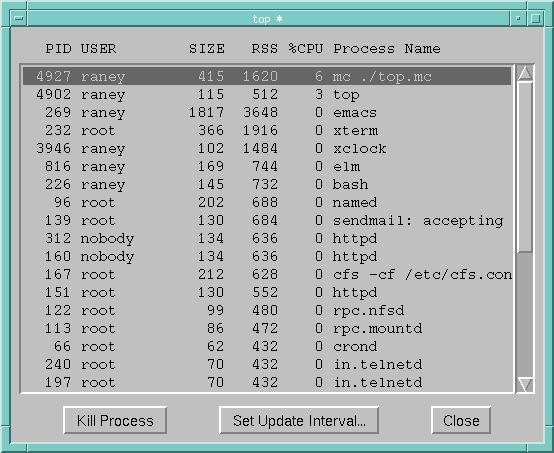
After creating the stack and the controls in it, you can add scripts to the stack, cards and/or controls. Normally each object has its own script, but I've put all of the handlers for the top program in the card script. This means that the mouseUp handler (see Listing 3) is a little unusual, since it gets called through the message-passing hierarchy: messages not handled by an object can be handled by objects higher up in the hierarchy. In this case, a handler in the card script handles messages sent to any of the controls on the card.
Writing one big handler instead of a bunch of small ones usually means you have to figure out which object the message was originally sent to. The target function supplies this information. The target function returns an object that you can get the properties of or send messages to. This mouseUp handler also shows off the MetaCard switch control structure:
The “Kill Process” case is executed when the user clicks on the “Kill Process” button. This section gets the PID of the process from the selected line in field and uses the MetaTalk kill command to kill it.
The “Set Update Interval...” section prompts the user for the new updateinterval value using the ask dialog, verifies that the value is a number and tells the user that it must be if it isn't. The ask and answer dialogs are built into MetaCard and are quick and easy ways to get simple responses from the user. If the new data checks out OK, the handler cancels the current timer and then calls the updatelist handler to restart it.
The “toplist” case will be executed when the user clicks on a line in the main field. This case enables the “Kill Process” button and suppresses updates for 5 seconds, allowing the user time to kill the process before the selection is cleared when the field is next updated.
Listing 4 shows the handlers for the stack-oriented messages, including those sent when the stack opens and closes and is iconified and uniconfied. Remember the goal of having the application go to sleep when it is iconified.
MetaCard doesn't have a constraint-based geometry system, so you must write scripts to handle resizing and repositioning controls when a stack window is resized. The resizeStack message handler that does this geometry management is shown in Listing 2. Using the IDE, I set the stack properties such that the stack is not resizable in width, only in height (since you need to be able to see all fields). So this handler only has to resize the main field vertically and reposition the buttons along the bottom edge of the display. This simple four-statement handler reliably handles the task without triggering the time-consuming trial-and-error phase of development required to get a constraint-based system working correctly.
Running the MetaCard version of top takes about twice as much CPU time as the character-based version (6% vs. 3% on a Pentium 90 running Linux 1.2.13). This is a typical result, since a well-written MetaCard script generally runs 2 to 4 times slower than a comparable C program. Of course, the MetaCard version only took a fraction of time to develop. And because it is so much smaller, it will take far less time and effort to maintain and customize. The character-based top program is written in C and is about 10 times as long. Memory usage for the MetaCard version of top is considerably less than the total of the character-based top program added to the memory needed for the xterm and the extra bash process required to run it.
The real power of this graphical top is that it's easy to modify to suit your needs. You could easily add columns to display some of the other information shown in the character-based top, or change the signal used to kill a process. Since MetaCard has built-in object graphics capabilities, you could even add a graphical display of the resources used by individual processes over time.
You can get the MetaCard top stack from Linux Journal's ftp site, but you'll need to get the MetaCard engine from the MetaCard WWW site http://www.metacard.com or FTP site ftp://ftp.metacard.com/MetaCard/.
Scott Raney (raney@metacard.com) is president of MetaCard Corporation, a vendor of multimedia and GUI development tools based on high-level languages and direct manipulation interfaces.
