
The “Virtual File System” in Linux
The main data item in any Unix-like system is the “file”, and a unique path name identifies each file within a running system. Every file appears like any other file in the way it is accessed and modified: the same system calls and the same user commands apply to every file. This applies independently of both the physical medium that holds information and the way information is laid out on the medium. Abstraction from the physical storage of information is accomplished by dispatching data transfer to different device drivers. Abstraction from the information layout is obtained in Linux through the VFS implementation.
Linux looks at its file system in the same way Unix does—adopting the concepts of super block, inode, directory and file. The tree of files accessible at any time is determined by how the different parts are assembled, each part being a partition of the hard drive or other physical storage device that is “mounted” to the system.
While the reader is assumed to be well acquainted with the concept of mounting a file system, I'll detail the concepts of super block, inode, directory and file.
The super block owes its name to its heritage, from when the first data block of a disk or partition was used to hold meta information about the partition itself. The super block is now detached from the concept of data block, but it still contains information about each mounted file system. The actual data structure in Linux is called struct super_block and holds various housekeeping information, like mount flags, mount time and device block size. The 2.0 kernel keeps a static array of such structures to handle up to 64 mounted file systems.
An inode is associated with each file. Such an “index node” holds all the information about a named file except its name and its actual data. The owner, group, permissions and access times for a file are stored in its inode, as well as the size of the data it holds, the number of links and other information. The idea of detaching file information from file name and data is what allows the implementation of hard-links—and the use of “dot” and “dot-dot” notations for directories without any need to treat them specially. An inode is described in the kernel by a struct inode.
The directory is a file that associates inodes to file names. The kernel has no special data structure to represent a directory, which is treated like a normal file in most situations. Functions specific to each file system type are used to read and modify the contents of a directory independently of the actual layout of its data.
The file itself is associated with an inode. Usually files are data areas, but they can also be directories, devices, fifos (first-in-first-out) or sockets. An “open file” is described in the Linux kernel by a struct file item; the structure holds a pointer to the inode representing the file. file structures are created by system calls like open, pipe and socket, and are shared by father and child across fork.
While the previous list describes the theoretical organization of information, an operating system must be able to deal with different ways to layout information on disk. While it is theoretically possible to look for an optimum layout of information on disks and use it for every disk partition, most computer users need to access all of their hard drives without reformatting, to mount NFS volumes across the network, and to sometimes even access those funny CD-ROMs and floppy disks whose file names can't exceed 8+3 characters.
The problem of handling different data formats in a transparent way has been addressed by making super blocks, inodes and files into “objects”; an object declares a set of operations that must be used to deal with it. The kernel won't be stuck into big switch statements to be able to access the different physical layouts of data, and new file system types can be added and removed at run time.
The entire VFS idea, therefore, is implemented around sets of operations to act on the objects. Each object includes a structure declaring its own operations, and most operations receive a pointer to the “self” object as the first argument, thus allowing modification of the object itself.
In practice, a super block structure encloses a field struct super_operations *s_op, an inode encloses struct inode_operations *i_op and a file encloses struct file_operations *f_op.
All the data handling and buffering performed by the Linux kernel is independent of the actual format of the stored data. Every communication with the storage medium passes through one of the operations structures. The file system type, then, is the software module which is in charge of mapping the operations to the actual storage mechanism—either a block device, a network connection (NFS) or virtually any other means of storing and retrieving data. These modules can either be linked to the kernel being booted or compiled as loadable modules.
The current implementation of Linux allows use of loadable modules for all file system types but root (the root file system must be mounted before loading a module from it). Actually, the initrd machinery allows loading of a module before mounting the root file system, but this technique is usually exploited only on installation floppies.
In this article I use the phrase “file system module” to refer either to a loadable module or a file system decoder linked to the kernel.
This is in summary how all file handling happens for any given file system type, and is depicted in Figure 1:
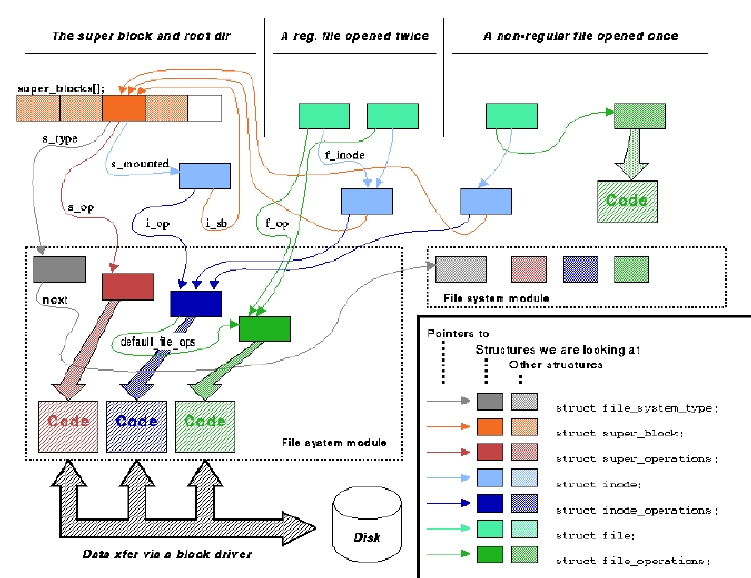
struct file_system_type is a structure that declares only its own name and a read_super function. At mount time, the function is passed information about the storage medium being mounted and is asked to fill a super block structure, as well as loading the inode of the root directory of the file system as sb->s_mounted (where sb is the super-block just filled). The additional field requires_dev is used by the file system type to state whether it will access a block device: for example, the NFS and proc types don't require a device, while ext2 and iso9660 do. After the super block is filled, struct file_system_type is not used any more; only the super block just filled will hold a pointer to it in order to be able to give back status information to the user (/proc/mounts is an example of such information). The structure is shown in Listing 1.
The super_operations structure is used by the kernel to read and write inodes, write super block information back to disk and collect statistics (to deal with the statfs and fstatfs system calls). When a file system is eventually unmounted, the put_super operation is called—in standard kernel wording “get” means “allocate and fill”, “read” means “fill” and “put” means “release”. The super_operations declared by each file system type are shown in Listing 2.
After a memory copy of the inode has been created, the kernel will act on it using its own operations. struct inode_operations is the second set of operations declared by file system modules, and is listed below; they deal mainly with the directory tree. Directory-handling operations are part of the inode operations because the implementation of a dir_operations structure would bring in extra conditionals in file system access. Instead, inode operations that only make sense for directories will do their own error checking. The first field of the inode operations defines the file operations for regular files. If the inode is a fifo, a socket or a device-specific file operation will be used. Inode operations appear in Listing 3; note the definition of rename was changed in release 2.0.1.
The file_operations, finally, specify how data in the actual file is handled: the operations implement the low-level details of read, write, lseek and the other data-handling system calls. Since the same file_operations structure is used to act on devices, it also includes some fields that only make sense for character or block devices. It's interesting to note that the structure shown here is the structure declared in the 2.0 kernels, while 2.1 changed the prototypes of read, write and lseek to allow a wider range of file offsets. The file operations (as of 2.0) are shown in Listing 4.
The mechanisms to access file system data described above are detached from the physical layout of data and are designed to account for all the Unix semantics as far as file systems are concerned.
Unfortunately, not all file system types support all of the functions just described—in particular, not every type has the concept of “inode”, even though the kernel identifies every file by means of its unsigned long inode number. If the physical data accessed by a file system type has no physical inodes, the code implementing readdir and read_inode must invent an inode number for each file in the storage medium.
A typical technique to choose an inode number is using the offset of the control block for the file within the file system data area, assuming the files are identified by something that can be called a “control block”. The iso9660 type, for example, uses this technique to create an inode number for each file in the device.
The /proc file system, on the other hand, has no physical device from which to extract its data and, therefore, uses hardwired numbers for files that always exist, like /proc/interrupts, and dynamically allocated inode numbers for other files. The inode numbers are stored in the data structure associated with each dynamic file.
Another typical problem faced when implementing a file system type is dealing with limitations in the actual storage capabilities. For example, how to react when the user tries to rename a file to a name longer than the maximum allowed length for the particular file system, or when she tries to modify the access time of a file within a file system that doesn't have the concept of access time.
In these cases, the standard is to return -ENOPERM, which means “Operation not permitted”. Most VFS functions, like all the system calls and a number of other kernel functions, return zero or a positive number in case of success, and a negative number in the case of errors. Error codes returned by kernel functions are always one of the integer values defined in <asm/errno.h>.
I'd now like to show a little code to play with VFS, but it's quite hard to conceive of a small enough file system type to fit in the article. Writing a new file system type is surely an interesting task, but a complete implementation includes 39 “operation” functions.
Fortunately enough, the /proc file system as defined in the Linux kernel lets modules play with the VFS internals without the need to register a whole new file system type. Each file within /proc can define its own inode operations and file operations and is, therefore, able to exploit all the features of the VFS. The method of creating /proc files is easy enough to be introduced here, although not in too much detail. “Dynamic /proc files” are so named because their inode number is dynamically allocated at file creation (instead of being extracted from an inode table or generated by a block number).
In this section we build a module called burp, for “Beautiful and Understandable Resource for Playing”. Not all of the module will be shown because the innards of each dynamic file are not related to VFS.
The main structure used in building up the file tree of /proc is struct proc_dir_entry. One such structure is associated with each node within /proc, and it is used to keep track of the file tree. The default readdir and lookup inode operations for the file system access a tree of struct proc_dir_entry to return information to the user process.
The burp module, once equipped with the needed structures, will create three files: /proc/root is the block device associated with the current root partition, /proc/insmod is an interface to load/unload modules without the need to become root, and proc/jiffies reads the current value of the jiffy counter (i.e., the number of clock ticks since system boot). These three files have no real value and are just meant to show how the inode and file operations are used. As you see, burp is really a “Boring Utility Relying on Proc”. To avoid making the utility too boring I won't give the details about module loading and unloading, since they have been described in previous Kernel Korner articles which are now accessible on the Web. The whole burp.c file is available as well from SSC's ftp site.
Creation and destruction of /proc files is performed by calling the following functions:
   proc_register_dynamic(struct proc_dir_entry \
      *where, struct proc_dir_entry *self);
   proc_unregister(struct proc_dir_entry *where, \
       int inode);
In both functions, where is the directory where the new file belongs, and we'll use &proc_root to use the root directory of the file system. The self structure, on the other hand, is declared inside burp.c for each of the three files. The definition of the structure is reported in Listing 5 for your reference; I'll show the three burp incarnations of the structure in a while, after discussing their role in the game.
The “synchronous” part of burp reduces therefore to three lines within init_module() and three within cleanup_module(). Everything else is dispatched by the VFS interface and is “event-driven” inasmuch as a process accessing a file can be considered an event (yes, this way to see things is unorthodox, and you should never use it with professional people).
The three lines in ini_module() look like:
   proc_register_dynamic(&proc_root, \
      &burp_proc_root);
and the ones in cleanup_module() look like:
   proc_unregister(&proc_root, \
      burp_proc_root.low_ino);
The low_ino field is the inode number for the
file being unregistered, and has been dynamically assigned at load
time.
But how will these three files respond to user access? Let's look at each of them independently.
/proc/root is meant to be a block device. Its “mode” should, therefore, have the S_IFBLK bit set, its inode operations should be those of block devices and its device number should be the same as the root device currently mounted. Since the device number associated with the inode is not part of the proc_dir_entry structure, the fill_inode field must be used. The inode number of the root device will be extracted from the table of mounted file systems.
/proc/insmod is a writable file. It needs its own file_operations to declare its “write” method. Therefore, it declares its inode_operations that points to its file operations. Whenever its write() implementation is called, the file asks kerneld to load or unload the module whose name has been written. The file is writable by anybody. This is not a big problem as loading a module doesn't mean accessing its resources and what is loadable is still controlled by root via /etc/modules.conf.
/proc/jiffies is much easier; the file is read-only. Kernel versions 2.0 and later offer a simplified interface for read-only files: the get_info function pointer, if set, will be asked to fill a page of data each time the file is read. Therefore, /proc/jiffies doesn't need its own file operations nor inode operations; it just uses get_info. The function uses sprintf() to convert the integer jiffies value to a string.
The snapshot of a tty session in Listing 6 shows how the files appear and how two of them work. Listing 7, finally, shows the three structures used to declare the file entries in /proc. The structures have not been completely defined, because the C compiler fills with zeroes any partially defined structure without issuing any warning (feature, not bug).
The module has been compiled and run on a PC, an Alpha and a Sparc, all of them running Linux version 2.0.x
The /proc implementation has other interesting features to offer, the most notable being the sysctl interface. This idea is so interesting, and it will need to be covered in a future Kernel Korner.
My discussion is now finished, but there are many places where interesting source code is available for viewing. Implementations of file system types worth examining:
Obviously, the “/proc” file system: it is quite easy to look at, because it is neither performance-critical nor particularly fully featured (except the sysctl idea). Enough said.
The “UMSDOS” file system: it is part of the mainstream kernel and runs piggy-back on the “Ms-DOS” file system. It implements only a few of the operations of the VFS to add new capabilities to an old-fashioned file system format.
The “userfs” module: it is available from both tsx-11 and sunsite under ALPHA/userfs; version 0.9.3 will load to Linux 2.0. This module defines a new file system type which uses external programs to retrieve data; interesting applications are the ftp file system and a read-only file system to mount compressed tar files. Even though reverting to user programs to get file system data is dangerous and might lead to unexpected deadlocks, the idea is quite interesting.
“supermount”: the file system is available on sunsite and mirrors. This file system type is able to mount removable devices like floppies or CD-ROMs and handle device removal without forcing the user to umount/mount the device. The module works by controlling another file system type while arranging to keep the device unmounted when it is not used; the operation is transparent to the user.
“ext2”: the extended-2 file system has been the standard Linux file system for a few years now. It is difficult code, but worth reading for those interested in seeing how a real file system is implemented. It also has hooks for interesting security features like the immutable-flag and the append-only-flag. Files marked as immutable or append-only can only be deleted when the system is in single-user mode, and are therefore secured from network intruders.
“romfs”: this is the smallest file system I've ever seen. It was introduced in Linux-2.1.21. It's a single source file, and it's quite enjoyable to browse. As its name asserts, it is read-only.
is a wild soul with an attraction for source code. He is a fan of Linus Torvalds and Baden Powell and enjoys the two communities of volunteer workers they have attracted. He can be reached at rubini@linux.it.

