
Microstation 95 for Linux

Product: Microstation 95 for Linux
Manufacturer: Bentley Systems, Incorporated
Retail cost: $3995.00
Reviewer: Bradley J. Willson
My first test for any application is the installation process. If I can install the package without reading the documentation, that is a good thing. If I can use the software within minutes after setting up, I consider that another good quality. Finally, if I can use the application without reading the documentation, I consider it a truly intuitive application.
Microstation 95 met or exceeded most of my expectations in each of these three areas.
As a consultant, I get numerous opportunities to fix things, but as a product reviewer, I get to see if I can break something. Microstation survived the “Can I Break It” test and gets four and a half stars for its performance.
Microstation 95 is a commercial-grade CAD application for architectural, engineering, construction, geographic information systems and mechanical design professionals. Microstation 95 provides the 2D and 3D environment tools necessary to design and add detail to a drawing quickly and efficiently. Furthermore, it provides network connectivity for work group environments and a database server with connectivity to numerous Unix- and DOS-based database applications.
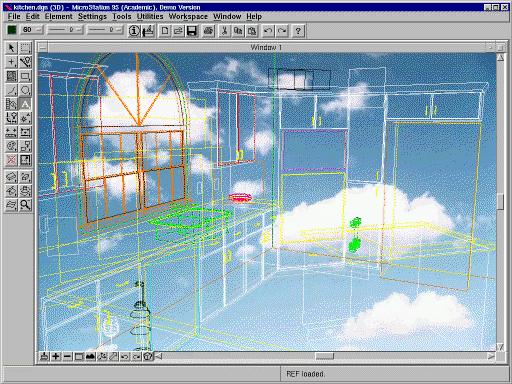
Microstation 95 looks and acts like a typical Microsoft compatible product, with familiar drop-down menus, button pop-up tips and hypertext help. It offers the option of a Windows or Motif-style interface. The Windows option is true to form, even to the extent of using the same names and parameters found in the Windows Control Panel “Colors” option.
I chose the Motif configuration, because it is more flexible than the Windows option. There are no discernible performance or feature penalties for using either interface. Active windows are handled in the same manner as in MS Windows with one notable exception: if one window is too large, it will not arrange the windows to fit the screen, prompting the user to adjust the window size instead.
The toolbox buttons display tool tips, which are helpful because not all of the button graphics are clear as to their function.
Immediately after receiving the Microstation 95 review kit, I loaded the CD and installed the software. Upon executing setup.exe, I encountered an error that had to be resolved before I could continue. Adding a symlink to libncurses.so.1.9.9e fixed the problem, and the installation resumed. The installation prompted me with the customary questions: “Where do you want it?” and “How much do you want to install?”
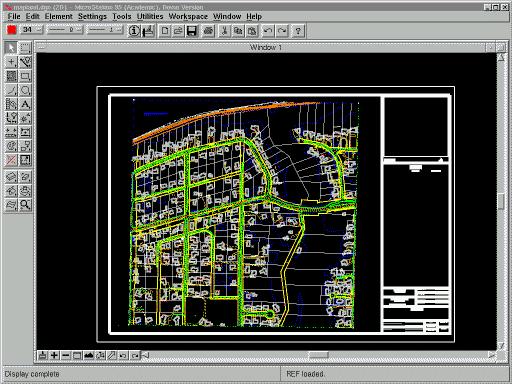
The user preferences and system configuration are taken care of from within the running application. Overall, the installation is fast, easy and straightforward. The process takes about 30 minutes to complete and the package uses a miserly 50MB of the hard drive.
The only documentation provided with the evaluation copy is in the form of the help files and a Microsoft Windows-based sampler CD. This did not present any major problems, because the interface is generally easy to understand. I did call the company's toll-free number to inquire about tech support, only to find that a call to the tech support people would cost me a long-distance call—not what I wanted to hear.
To compare an application like Microstation 95 to mainframe CATIA may seem unfair at first, but in reality, I find Microstation 95 to be more flexible and more agile in its execution. In the short time I had to review Microstation 95, I was impressed with its capabilities, speed and efficiency in comparison to its mainframe cousin.

I chose to use the tutorials to both learn the system and to judge its suitability for the task. I found the examples to be very informative and a great way to push the test envelope. I learned quickly to turn off the automatic save on exit feature, so I could return to the example later and try new torture methods on it.
The true test came when I began rendering the examples. At each level of display, the load requirements increased and the display performance declined. What surprised me was Microstation 95's speed. I am accustomed to waiting several minutes for a simple shading operation in CATIA. I was not expecting to see a complex model rendered in less time, but that's what happened..
The AccuDraw and SmartLine features enhance productivity by producing intelligent elements that are easily placed and modified. Bi-directional associative dimensioning makes detailing fast and easy. CATIA offers similar functions, but Microstation makes them more readily available to the user.
Bentley Systems, Inc. was founded in 1984 by Keith and Barry Bentley. It is a privately held corporation with over 400 employees headquartered in Exton Pennsylvania, Hoofddorp, The Netherlands and South Melbourne, Australia. They maintain a web site at http://www.bentley.com/. Phil Chouinard, Product Manager, Foundation Products, can be reached by phone at 610-458-5000 or e-mail at phil.chouinard@bentley.com.
The review kit states that there are over 200,000 users of Microstation 95 in over 15,000 companies and organizations around the world. They include Boeing, AT&T, American Airlines, Westinghouse Electric Corporation, U.S. Department of Commerce, Union Carbide C & P Company plus numerous other commercial users and government agencies.
The review was performed on an AMD 5x86-P75 133MHz machine with 20MB RAM, running Linux 2.0.0. Display was handled by a Number 9 Vision 330 1MB video card.
Bentley Systems, Inc. also offers Microstation 95 for DOS, Windows 3.1x, Windows 95, Windows NT, OS/2 Warp and PowerPC or Dec Alpha AXP PCs running Windows NT. Microstation 95 will run on 80386 (with a math coprocessor), 80486, Pentium, DEC Alpha and PowerPC processors, with a minimum of 8MB RAM for the DOS package and 24MB minimum RAM for DEC Alpha or PowerPC.
Bradley J. Willson (bc115@scn.org) currently designs and troubleshoots tooling for the Boeing 777 program and fills the chair of chief cook and bottle washer for Willson Consulting Services. His friends understand and forgive his addiction to computer technology, while others wonder how he can stand the countless hours he spends staring at screens. According to Bradley, the secret is attitude—and maybe a mild case of radiation sickness.
