
Visual SlickEdit: A Commercial Editor for Programmers

Manufacturer: MicroEdge, Inc.
E-mail: sales@slickedit.com
URL: http://www.slickedit.com/
Price: $195 US
Reviewer: Larry Ayers
There is no shortage of high-quality free editors for Linux. A commercial editor would have to be quite powerful and easy to use to attract prospective customers in the Linux community, where the tradition of using freely-available software is deeply rooted. Visual SlickEdit, developed and marketed by MicroEdge, fits these two criteria. This editor is cross-platform, with versions available for all three Windows variants, OS/2 and a variety of Unix platforms. Recently MicroEdge released version 3.0 of SlickEdit, which brings several new enhancements to an already powerful editor. The closest free equivalents to SlickEdit are GNU Emacs and XEmacs, so in this review I will use these two editors as benchmarks for comparison.
In contrast to the two Emacs variants, SlickEdit is strictly an X application, although it originated as a character-mode editor. The character-mode console version is still available but is marketed separately.
Visual SlickEdit comes on five floppy disks. The installation is initiated by directly unpacking (using tar) the first disk's contents into a temporary directory, setting execute permission on an installation binary, then running the binary. From this point questions concerning preferred paths are asked, and eventually the option of whether or not to install the uncompiled macro files is offered. These *.e files aren't necessary for normal editor operation but can be installed if a user wishes to modify them. Not installing them will save some disk space.
I consider the choice of installation directories to be a very desirable feature, as each user will most likely have a different partition or directory with enough space. A full installation occupies about 18MB. Network installations are possible with each user sharing a common executable but running the program with personal initialization files and home directories.
The 250-page printed manual supplied with the software is well written and complete, though the well-indexed on-line help system (see Figure 1) offers more than enough guidance while learning to effectively use the editor. About a third of the printed manual is a reference guide to the Slick-C language, which is invaluable for advanced users needing to create new macros and routines.
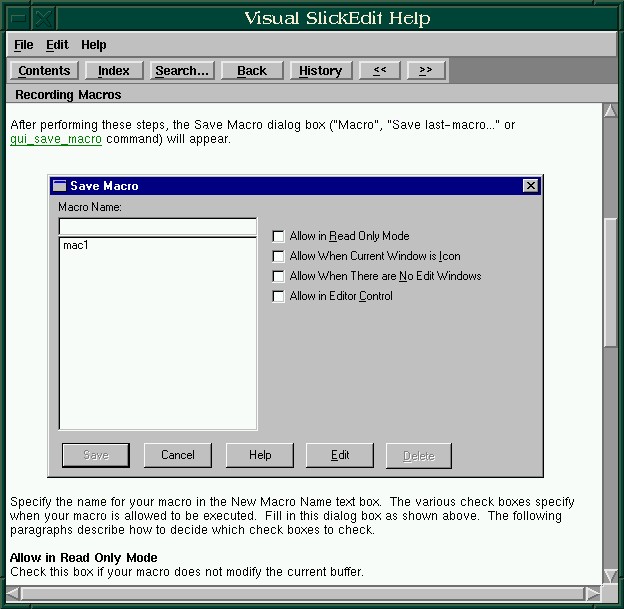
Figure 1. Help Window
The MicroEdge developers have written a new macro programming language for this editor called Slick-C, which is derived from C++. The syntax is very close to that of C++, but the language has built-in features which are useful for building graphical user interfaces. Slick-C is analogous to Emacs LISP in that many of the routines and functions of the editor are implemented as compiled macros which are called as needed by the main executable.
The developers of Slick-C have attempted to address several shortcomings of C++, such as the lack of built-in types. Boolean, string and container types can be useful when developing editing functions, and Slick-C is designed to work with such types. As with any application-specific programming or macro language, the disadvantage is the necessity of learning yet another language if extensive customization is desired. Slick-C is close enough to C++ that the learning curve for C or C++ programmers shouldn not be too steep, but it's still there.
Just as the Emacs LISP *.el files are ASCII text compiled for efficiency into *.elc files, the Slick-C *.e files can be compiled into binary *.ex files. The advantage of a separate macro language is that new routines and functions can be written without the need of a new executable, and macro routines tend to be easier to write and debug than an entire editor with the new functions included.
Clipboard Inheritance is an interesting feature of the language, allowing new code to be added to existing controls without affecting the original. That is, parts of existing dialog boxes can be copied to the clipboard and pasted elsewhere; if new code is added to the original dialog box, it is inherited by its offspring.
A feature which programmers will find useful is called SmartPaste. This is an intelligent, syntax-aware version of the standard editing function. If a block of code is cut or copied and then pasted into another source file, the indentation of the pasted block will automatically match that of the surrounding code. I'm unaware of an equivalent Emacs function, but evidently there hasn't been a strong demand or (I surmise) someone would probably have written one by now.
SlickEdit uses its own versions of several Unix/Linux utilities such as diff, find and grep, among others. This feature would probably be more desirable for users with the Windows or OS/2 versions of the editor. The only advantage under Linux is that the interface is via dialog boxes, and the utilities are optimized for use with the editor. In version 3.0 the traditional Unix regular expression syntax is supported.
Support for a variety of version-control systems is included, and unlike the Emacs editors, various commercial version-control programs are supported, which is an advantage for programmers working in a commercial environment.
The command-line window can be used to enter shell commands as well as native editor commands. The command can be executed in a separate terminal window, such as an xterm, if the output needs to be monitored or if interaction is required. Some basic shell conveniences, such as aliasing and command history, are built into this interface.
Like the various Emacs editors (and few others) SlickEdit has an incremental search command, finding the next match of a search word, phrase or regular expression as it is typed. In most cases, the search finds the desired pattern before it has been completely typed in, speeding up the process.
Most modern Integrated Development Environments, such as Borland's, allow all of the files involved in a programming project to be accessed as a unit. SlickEdit includes this feature. A SlickEdit project includes the working directory, compile/make command lines and a list of pertinent files. Tagging (like Emacs' Etags program) is supported, enabling quick navigation through function definitions and other programming constructs.
The syntax-highlighting support is well done and easy to configure, once again with dialog boxes. Several color schemes are included with the default installation, and they provide good starting points for further modification.
SlickEdit has a number of nicely implemented formatting features, such as the ability to indent or un-indent selected lines with the tab key.
Although this editor has its own file-manager window, the list of most recently accessed files found in the File drop-down menu is very convenient. A few other editors, such as Nedit and FTE, save a similar history of files opened in previous sessions, and it's a time-saving feature if there are certain files which are repeatedly loaded.
Some of the other useful features are:
three-way file merging
hex editing
built in spell-checker and dictionary (not quite as extensive as ispell)
spell-checking can be restricted to only the comments and strings in source files
normally invisible characters such as tabs, spaces and end-of-line characters can be made visible
multiple clipboards with dialog interface
preconfigured support for many languages
C++ and Java code beautifiers
syntax expansion for several languages
file size up to one gigabyte
API Apprentice (help for APIs)
search and replace in multiple files, buffers or directories
multiple-level code folding, allowing comments, functions, etc. to be hidden and revealed at will
easily redefinable Enter, Backspace, Delete, Home and Tab keys
a variety of windowing treatments: tiling (horizontally or vertically), cascading, or a basic MDI interface
SlickEdit is very customizable, rivaling Emacs and XEmacs in the scope and variety of ways the editor can be molded to a user's preferences. The main difference between the Emacs and the SlickEdit approaches is in the user interfaces. SlickEdit makes extensive use of dialog boxes, windows which allow a user to type in preferences or define macros and keybindings. The Emacs approach tends towards editing the various init files, such as ~/.emacs or ~/.xemacs-options, adding entries which load various packages, functions and keybindings. If it weren't for the large corpus of Emacs packages available, most provided with explicit instructions for installation and usage, the SlickEdit method would have a definite edge.
Open a source code file in SlickEdit and (with the default set-up) a variety of windows will appear along with the expected basic view of the file. A narrow vertical project window contains links to every procedure or class (in a C++ or Java file) and clicking on one will scroll the editing window to the corresponding location in the file. This window can also display a list of source files in a project; a file can be loaded into the editing window, then the project window can be toggled so that it will display all procedures or classes in the file. In effect this updated and graphical approach to the “tags” file functionality is familiar to Emacs and vi users. Another available window will display the output of child processes such as compilation.
In keeping with SlickEdit's tendency towards maximum configurability, all of these child windows can be easily customized or disabled via a menu-accessed dialog box. Entirely new toolbars and subwindows can be created and saved within this dialog box, and the visibility of any of the child windows or toolbars can be toggled to suit the user's current needs. These toolbars can be either free-floating or “docked” to a specified edge of the main window (see Figure 2).

Figure 2. SlickEdit Main Window
The drawback I've found with customization of SlickEdit is that there aren't as many configuration packages available, so even though you have nice graphical windows in which to enter your information, in most cases you have to start from scratch. As an example, if you want to have a useful set of hot-keys for the various HTML tags, in Emacs you have a choice of several key-binding packages, such as HTML-Helper-Mode or HM-HTML-Menus. SlickEdit doesn't come with such bindings, so you have to set them up yourself. Version 3.0 does have a useful new feature for HTML-editing: the spell-checker is aware of HTML tags and will ignore them.
The editor can easily be set up to use any of several keyboard emulation packages, such as Emacs, VI or Brief. The default is SlickEdit's own CUA/Windows keymapping. Of course, any and all keys can be remapped to the user's preference. Keyboard macros are easily and conveniently set up via a dialog box and can be saved for subsequent reuse. A macro is automatically translated into the Slick-C language and compiled when it is saved, speeding its subsequent execution.
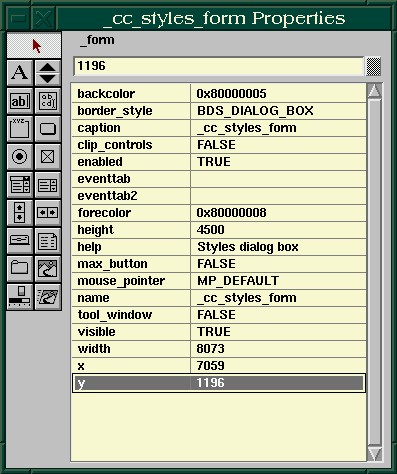
Figure 3. Creation of Dialog Box Screen
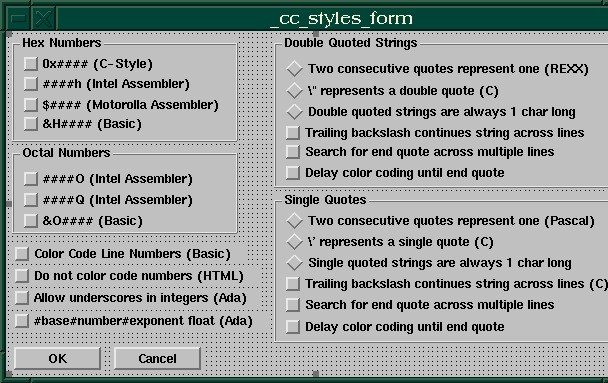
Figure 4. Editing of Dialog Box Screen
One of the most impressive features of this editor is the dialog box editing and creation facility (see Figures 3 and 4). The interface is reminiscent of Visual Basic and allows any of the existing dialog boxes to be changed to suit your preferences. On first exposure, it seemed that this was customization carried to an extreme. Is it really necessary to be able to shift a button or menu in a dialog box to another location in the box or change its font and color? After further experimentation the real value of this feature becomes apparent. The dialog boxes are written in the Slick-C language, and the dialog editor is in effect a visual development environment for the language, specialized for dialog-box creation. Any of the supplied dialogs can easily be edited into an interface for any editing function a user might desire.
This feature could be a time-saver in a development firm employing many programmers; dialog-boxes could be created specifically for the local language and type of project, then propagated to the individual developers' machines.
Any of these same Slick-C commands could be typed in the command-line entry field at the bottom of the editor window, which illustrates the hybrid nature of this editor. The concept of performing tasks via the mouse and dialogs is reminiscent of the Windows and Macintosh interfaces, both of which evolved as alternatives to the spare command-line environment of Unix or DOS. SlickEdit has a foot in each of these worlds, allowing a user either to intermingle the two approaches or ignore one while using the other.

Figure 5. Program Editing Window
I found SlickEdit to be a very responsive editor on my Pentium 120 machine with 32MB of memory. Its memory footprint and loading time are comparable to those of GNU Emacs, and about half of what XEmacs requires. Search and replace operations are quick, and file operations (loading, switching from one buffer to another, etc.) seem to be as fast as can be expected.
MicroEdge maintains a web site for SlickEdit users and prospective customers at http://www.slickedit.com/. Patches for registered users are available there, as well as macros and tips from other users and the MicroEdge developers.
At around $200 US for the Linux version, the price will probably be too steep for many Linux users, especially with so many high-quality free editors available. The program is intended for professional developers, in particular those working in a cross-platform shop. A programmer routinely collaborating on large projects with colleagues using Windows, OS/2 or another Unix variant would find this editor very useful, as project files and macros are compatible across platforms.


