Features of the TCSH Shell
In this article, I will describe some of the main features of TCSH, which I believe make it worth using as the primary log in shell. This article is not meant to persuade bash users to change. I've never used bash, so I know very little about it.
As some of you know, I've created a configuration tool called The Dotfile Generator, http://www.imada.ou.dk/~blackie/dotfile/, which can configure TCSH. I believe that this tool is very handy for getting the most out of TCSH without having to read the manual a couple of times. Therefore, I'll refer to this tool several times throughout this article to show how it can be used to set up TCSH.
The shell is your interface to executing programs, managing files and directories, etc. Though very few people are aware of it, they use the shell frequently in daily work, e.g., completing file names, using history substitution and aliases. The TCSH shell offers all of these features and a few more, which the average user seldom optimizes.
With a high knowledge of your shell's power, you can decrease the time you need to spend in the shell, and increase the time spent on original tasks.
An important feature used by almost all users of a shell is command line completion. With this feature you don't need to type all the letters of a file name—just the ambiguous ones. This means that if you wish to edit a file called file.txt, you may need to type only fi and press the TAB key, and the shell will type the rest of the file name for you.
Basically, one can use completion on files and directories. This means that you cannot use completion on host names, process IDs, options for a given program, etc. Another thing you cannot do with this type of completion is to complete directory names when typing the argument for the command cd.
In TCSH the completion mechanism is enhanced, so that it is possible to tell TCSH which list to use to complete a particular command. For example, you can tell TCSH to complete from a list of host names for the commands rlogin and ping. An alternative is to tell it to complete only on directories when the command is cd.
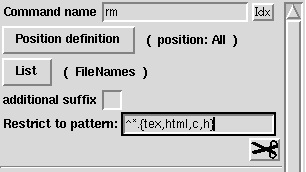
To configure user-defined completion using The Dotfile Generator (TDG), go to the TDG page completion -> userdefined; this will bring up a page which looks like Figure 1.
Figure 1. TDG Completion/Userdefined Page
For the command name, you tell TDG which command you wish to define a completion for. In this example it is rm.
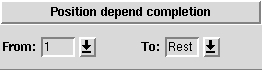
Next you have to tell TDG to which arguments to the command this completion applies. To do this, press the button labeled Position definition. This will bring up a page, which is split into two parts as shown in Figures 2 and 3.
Figure 2. TDG Position Definition Page
In the first part, you tell TDG the position definition that should be defined from the index of the argument to be completed (i.e., the one where the TAB key is pressed). Here you can tell it that you wish to complete on the first argument, all the arguments except the first one, and so forth.
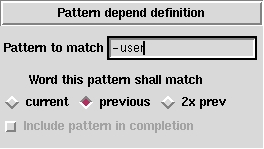
2066f3.gifFigure 3. TDG Pattern Definition Page
The alternative to “position-dependent completion” is “pattern-dependent completion”. This means that you can tell TDG that this completion should only apply if the current word, the previous word or the word before the previous word conform to a given pattern.
Now you have to tell TDG which list to complete from. To do this, press the button labeled List. This will bring up a page where you can select from a lot of different lists, e.g., aliases, user names or directories.
Four of the lists you can select from are Commands, Directories, File names and Text files. If you select one of these, only elements from that directory are used.
There are two ways to specify completion from a predefined list. One is to mark the option predefined list, and type all the options in this list.
This solution is a bad idea if the list is used in several places (e.g., a list of host names). In that case, one should select the list to be located in a variable, then set this variable in the .tcshrc file.
In many cases the list should be calculated when the completion takes place. For example, a list of users located at a given host or targets in a makefile would need to be calculated.
To set up such a completion, first develop the command which returns the list to complete from. The command must return the completion list on standard output as a space-separated list. When this is done, insert this command in the entry Output From Command.
Here's a little Perl command which finds the targets in a makefile:
perl -ne 'if (/^([^.#][^:]+):/) {print "$1 "}'
        Makefile
If this is inserted in the entry, you can complete on targets from the file
called Makefile in the current working directory.
If someone should think I describe TCSH through it only in order
to promote TDG,(s)he should take a look at the following line, which is the
generated code for the make completion:
complete make  'p@*@`perl -ne \
        '"'"'>if (/^([^.#][^:]+):/) \
        {print "$1"}'"'"'Makefile`@'
With user-defined completion, you can restrict the files which are matched for each command. Here are two very useful examples:
Restrict latex to *.{tex,dtx,ins} The latex command will complete only on files ending in the extensions .tex, .dtx or .ins.
Restrict rm to ^*.{tex,html,c,h}.` This means that you cannot complete rm to a .tex, .html, .c or .h file. I've done that a few times, when I wanted to delete a file called important.c~. Since the file important.c existed, TCSH completed only to that name, and... I deleted the wrong file, because I was too quick.
Additional examples can be obtained by loading the export file distributed with TDG. Please note that if you wish to keep the other pages, you have to tell TDG to import only the page completion/userdefined. This is done on the Details page, which is accessible from the reload page.
Configuring the prompt is very easy with TDG. Just enter the menu called prompt. On this page you can configure three prompts:
prompt: the usual prompt, which you see on the command line, where you are about to enter a command
prompt2: is used in foreach, and while loops, and at lines continuing lines ended with a slash
prompt3: is used when TCSH tries to help you, when it meets commands it doesn't know—i.e., spell checking
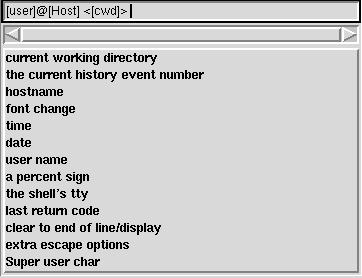
The prompts are mixed with tokens and ordinary text. The tokens are inserted by clicking on them in the menu below the scrollbar, and the ordinary text is simply typed in. When a token is inserted, an indication will be shown in the entry. Figure 4 is an example of how this may look.
Some of the prompts may be positioned in the xterm title bar instead of on the command line. To do this, choose font change and select Xterm.
The history mechanism of the shell makes it easier to type similar commands after each other. To see a list of the previously executed commands, type history.
The following table lists the event specifiers:
!n | This refers to the history event, with index n |
!-n | This refers to the history event which was executed n times ago: !-1 for the previous command, !-2 for the one before the previous command, etc. |
!! | This refers to the previous command |
!# | This refers to the current command |
!s | This refers to the most recent command whose first word begins with the string s |
!?s? | This refers to the most recent command which contains the string s |
With these event specifiers, you can re-execute a command, e.g., just type !!, to re-execute the previous command. However, this is often not what you want to do. What you really want is to re-execute some part of a previous command, with some new elements added. To do this, you can use one of the following word designators, which is appended to the event specifier with a colon.
0 | The first word, i.e., the command name |
n | The nth word |
$ | The last argument |
% | The word matched by an ?s? search |
x-y | Argument range from x to y |
* | All the arguments to the command (equal to ^-$) |
Now it's possible to get the last argument from the previous command, by typing !!:$. You'll often see that you need to refer to the previous command, so if no event specifier is given, the previous command is used. This means that instead of typing !!:$, you need type only !$.
More word designators exist, and it's even possible to edit the words with different commands. For more information and examples, please take a look at the TCSH manual found on-line at http://www.imada.ou.dk/Technical/Manpages/tcsh/History_substitution.html.
It is possible to expand the history references on the command line before you evaluate them by pressing ESC-SPC or ESC-!. (That is: first the escape key, and next the space bar or the ! key). On some keyboards you may use the meta key instead of the ESC key, i.e., M-SPC (one keystroke).
Many operations in the shell work on many files, e.g., all files ending with .tex or starting with test-. TCSH has the ability to type all these files for you, with file patterns. The following list shows which possibilities exist:
* | Match any number of characters |
? | Match a single character |
[...] | Match any single character in the list |
[x-y] | Match any character within the range of characters from x to y |
[^...] | Match elements which do not match the list |
{...} | This expands to all the words listed. There's no need that they match |
^... | ^ in the beginning of a pattern negates the pattern |
*.tex: match all files ending with .tex
^*.tex: match all files which does not end with .tex
xxx{ab,cde,hifj}yy: match xxxabyy xxxcdeyy and xxxhifjyy
*.[ch] or *.{c,h}: match all .c and .h files
An important thing to be aware of is that it is the shell which expands the patterns, and not the program, which is executed with the pattern.
An example of this is the program mcopy which copies files from disk. To copy all files, you may wish to use a asterisk, as in: mcopy a:* /tmp. However, this does not work, since the shell will try to expand the asterisk. Since it cannot find any files which start with a:, it will signal an error. So if you wish to send a asterisk to the program, you have to escape the asterisk: mcopy a:\* .
There are two very useful key bindings which can be used with patterns. The first is C-xg, which lists all the files matching the pattern, without executing the command. The other is C-x*, which expands the asterisk on the command line. This is especially useful if you wish to delete all files ending in .c except important.c, stable.c and another.c. Creating a pattern for this might be very hard, so just use the pattern *.c. Then type C-x*, which will expand *.c to all your .c files. Now it's easy to remove the three files from the list.
When using the shell, you will soon recognize that certain commands are typed again and again. One of the top ten is surely ls -la, which lists all files in a directory in long form.
TCSH has a mechanism to create aliases for commands. This means that you can create an alias for ls -la called la.
Aliases may refer to the arguments of the command line. This means that you can create a command called pack which takes a directory name and packs the directory with tar and gz.
Aliases can be a bit hard to create since you often want history/variable references expanded at the time of use, not at the definition time. This can be done more easily with TDG; go to the page aliases to define aliases. If you end up with an alias you cannot define on this page, but you can in TCSH, please send me e-mail (blackie@imada.ou.dk). For more information about aliases, see the TCSH manual at http://www.imada.ou.dk/Technical/Manpages/tcsh/Alias_substitution.html.
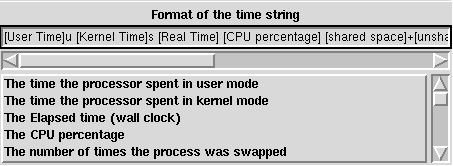
Have you ever needed to know how long a program took to run, i.e., how much CPU it used? If so, you may recognize the output from the TCSH built-in time command:
0.020u 0.040s 0:00.11 54.5% 0+0k 0+0io 21pf+0w
Informative? Yes but... the GNU time command is a bit more understandable:
0.01user 0.08system 0:00.32elapsed 28%CPU (0avgtext+0avgdata 0maxresident)k
0inputs+0outputs (0major+0minor)pagefaults 0swaps
In TDG you can configure the output from the time command on the page called jobs shown in Figure 5.
As you may have guessed, TDG and this article will help you a lot in the use of TCSH, but you may need to read a bit more to get even more out of TCSH. Here are a few references:
The TCSH manual page at http://www.imada.ou.dk/Technical/Manpages/tcsh/top.html
Using csh & tcsh by Paul DuBois, published by O'Reilly & Associates, 1995: http://www.primate.wisc.edu/software/csh-tcsh-book/
The TCSH mailing list at tcsh@mx.gw.comr (to join send mail to listserv@mx.gw.com with body text SUBscribe TCSH your name)
Jesper Pedersen lives in Odense, Denmark, where he has studied computer science at Odense University since 1990. He is a system manager at the university and also teaches computer science. He is very proud of his “child”, The Dotfile Generator, which he wrote as part of his job at the university. In his spare time, he does Jiu-Jitsu, listens to music, drinks beer and has fun with his girlfriend. He loves pets, and has a 200 litre aquarium and two very cute rabbits. His home page can be found at http://www.imada.ou.dk/~blackie/“, and he can be reached at blackie@imada.ou.dk. This article first appeared in Issue 12 of Linux Gazette.