
Relinking a Multi-Page Web Document
There is something magical about writing a web-based document that just doesn't exist with a regular linear document. Something about getting all those links just right and in the right sequence makes a web document come alive. Of course, getting the links just right can be a big job, especially in a document with many pages. I found that out when I tackled my first multi-page document.
I had been writing HTML for several months when an opportunity came to make a presentation at our local Internet Special Interest Group (part of a larger PC users group). At that time, only a few of us were “on the Net”, but many people were interested in what the Internet—and more specifically—what the Web could do for them. I volunteered to give a talk on the basics of HTML and putting together your own web page.
The group met in the library of a local university, and we had a live Internet connection tied into an overhead projector in the room. I decided it would be neat to write a presentation about HTML in HTML. Each web page would be a single slide in the presentation. Links between pages would allow me to move forward (and backward) as the talk progressed.
So I put together about 15 pages of slides and linked them so each page had a next link to the next page and a prev link to the previous page. I put these links at the top and bottom of each page, so there were four links on every page (actually, I had links to the table of contents too, but let's ignore those for the moment). Figure 1 shows how consecutive pages are linked.
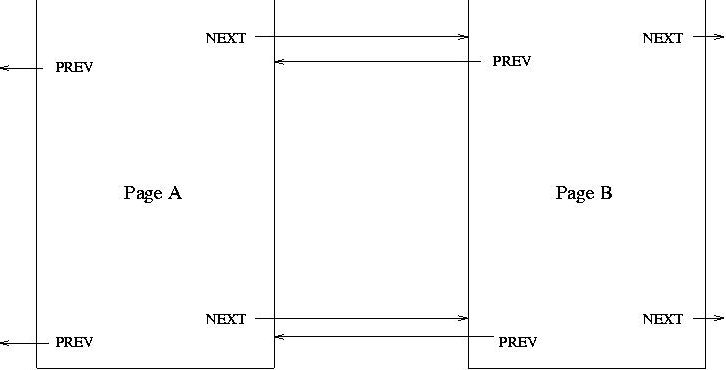
The talk went well, but I saw several places where I could improve the talk. When I started adding pages to the document, I made a very important discovery: inserting pages was a big pain. If I wanted to insert a new page between existing pages A and B. I had to update the NEXT links in page A, update the PREV links in page B, and update both the NEXT and PREV links in the new page. And because I had links at the top and bottom of the pages, there were twice as many links to update. Figure 2 shows the revised links.

Automation to the Rescue
After struggling with manual updates to the pages, I decided there had to be a better way. The relink Perl script was a result of that frustration.
Using relink is simple. First you need a file (called links) containing a list of pages in the order they are to be visited. Omit the “.html” portion of the page name in the links file, relink assumes the files end with that extension.
For example, consider the following (very abbreviated) version of my original HTML presentation. I start with an introduction (intro.html), have a page about anchors (anchor.html) and finish with a conclusion (conclude.html). The links file would contain:
   # Pages for a simple presentation
   intro
   anchor
   conclude
Each HTML page contains a set of links to its next and previous page. For example, the anchor.html file contains the following links at the top and bottom of the page.
   <a href="conclude.html">
      <img src="icons/next.gif" alt="NEXT">
   </a>
   <a href="intro.html">
      <img src="icons/prev.gif" alt="PREV">
   </a>
After reviewing my short document, I feel that I really should
mention URLs and how they work before delving into anchors. So I
write a new page called url.html and wish to add
it to my document. I simply edit the links file
to contain:
   # Pages for an updated, but still
   # simple presentation
   intro
   url
   anchor
   conclude
After running relink with the new page order, the links in the anchor page will now look like:
   <a href="conclude.html">
      <img src="icons/next.gif" alt="NEXT">
   </a>
   <a href="url.html">
      <img src="icons/prev.gif" alt="PREV">
   </a>
Notice the previous link now points to the page about URLs, rather
than the introduction. The links in the other pages are updated in
a consistent manner to support the new page order. Pages can be
added, deleted, or simply rearranged just by editing the
links file and specifying the new order.
How does relink find the HTML links in a web page? It does so by looking for particular patterns on lines containing a hypertext link. relink will scan through an HTML file looking for the pattern /href\s*=/i which matches the letters href followed by zero or more spaces followed by an equal sign. The i at the end of the pattern allows matching without regard to upper and lower case. Lines matching this pattern contain a hypertext link and are possible candidates for updating.
Once a line containing a link is found, a list of link-specific patterns is tested against that line. If a match is found, that hypertext link is updated with information obtained from the links file, and the scanning process continues on the rest of the file. For this process to work, it is important that each hypertext link fit alone on a single line of text. Also, link-specific patterns must be chosen that do not occur normally in the body of the document. If a link-specific pattern should accidently appear on the same line as an unrelated link in the document body, relink will automatically (and incorrectly) update that unrelated link.
I use small GIF files for the next and previous icons, so the link-specific patterns next.gif and prev.gif are good choices for my pages (and since I wrote relink, these are the defaults). You can override these defaults in the links, if your links look significantly different. If there are no unique patterns identifying your links, you can add an HTML comment to the link line and use that as a pattern.
We have seen a few simple examples of a links file in the discussion above. In addition to page order, you can also specify user-defined link patterns using the following line:
link: linkname pattern
The linkname identifies the type of link (next, prev, index, or anything you can think of). The pattern is a string of characters that must appear on every link of that type. You may override the next, prev, toc (table of contents) and up links that relink normally works with, and you may define your own links here.
A table of contents file may be identified using the line:
tocfile: tocname
Links identified with the toc link pattern will generate a link to this file. Unfortunately, relink will not update the table of contents with new page orders, so you have to edit the table of contents manually to keep it up to date. Perhaps a future version of relink can address this problem.
Nested pages can be specified by using a { on a line by itself to start a nested list and a } to end a nested list. The page immediately preceding the nested list is called the parent page. The first and last page of a nested list point to the parent page in there prev and next links. In addition, each nested page will have an up link to the parent page. The next link of the parent page will skip over the nested list to the following page. (We assume that the parent page has explicit links into the nested list.)
And finally, separate lists of HTML files can be specified by using a line of dashes. next/prev links will not cross a line of dashes.
Jim Weirich is a software consultant for Compuware specializing in Unix and C++. When he is not working on his web pages, you can find him playing guitar, playing with his kids, or playing with Linux. Comments are welcome at jweirich@one.net or visit him at http://w3.one.net/~jweirich/.
