Accelerated-X v. 2.1 & Metro-X 3.1.2
Accelerated-X v. 2.1 for Linux
X Inside Corporation
Phone: 303 298-7478
Fax: 303 298-1406
E-mail: support@xinside.com
FTP: ftp.xinside.com
WWW: http://www.xinside.com/
Price: US$99.95
Metro-X 3.1.2
Metro Link Incorporated
Phone: 954 938-0283
Fax: 954 938-1982
E-mail: sales@metrolink.com
FTP: ftp.metrolink.com
WWW: http://www.metrolink.com/
Price: US$99
by Jonathan Gross
I have this recurring dream about XFree86, the free X Window System that comes with Linux. I am sitting in a barren room, with a keyboard and monitor in front of me. I have the manuals for the graphics card and the monitor. I also have a stack of blank paper and a small calculator. I sit in the room and look up numbers in my manuals, spend five minutes calculating and entering a modeline entry, and then restart X. The shadow from the weak winter sun moves across the wall behind me as I work. It is dark in the room when finally I can bring up a display in 1024x768, and I quietly rejoice... only to have the monitor transmogrify from a nice Mag into a Packard Bell.
I've been having this dream for about three years now, and I'm convinced it is the result of an attempt to configure an old version of XFree86 that took about 12 hours one winter day. XFree86, in its infancy, was a menacing nightmare to configure. In recent years, it has gotten easier: probes have been written and configuration scripts have been included to assist users. This has not alleviated the pain as much as I hoped. The appearance of Metro-X and Accelerated-X in the offices of Linux Journal, begging for a review, has turned my worst nightmare into an exercise in rebellion: now I can reconfigure X for the hell of it, in about twenty seconds. Excellent.
The first server I installed was Accelerated-X (AccelX) from X Inside. It comes as a tar archive, split across two floppy disks. The documentation comes in the form of an odd-sized manual and reminders to check the X Inside web site for the most current documentation. This is important, as the documentation that came with the software was a little dated. Accelerated-X requires you to have XFree86 installed already; the system requirements are fairly minimal:
Linux 1.2.13 or later
4MB of RAM
At least 3MB free disk space under /usr
A supported graphics board (see http://www.xinside.com/bd/ for a current list).
To install AccelX, you simply untar the floppies (as root):
cd /usr/X11R6/lib ; tar -xzvf /dev/fd0
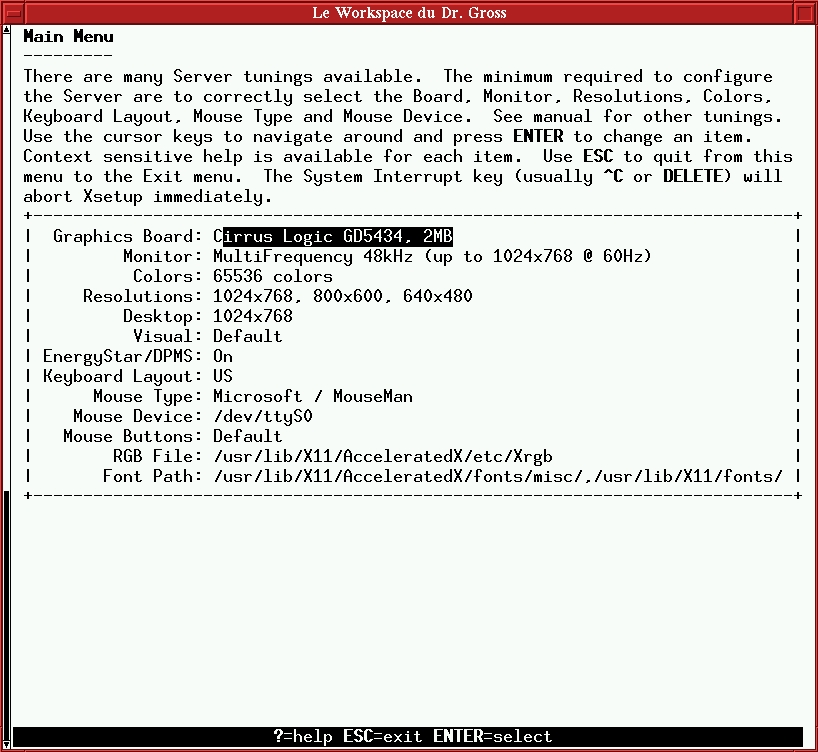
The configuration for AccelX is a very simple console-mode menu system in which, using arrow keys, you select the options that match your hardware (see Figure 1). All options are fairly well documented in the manual. Once I configured the server, I brought it up as a regular user and started up some applications. The one problem I had was with the mouse—a cheap Microsoft Mouse knock-off. I thought that was the trouble, anyway. It turns out that Linux kernel version 2.0.0 introduced a problem with the Async mouse feature of Accelerated X. Async mouse is the feature that allows the mouse to move around the screen even when the X server is busy doing something else—a very useful trick Microsoft has been using for a while on their Windows product. X Inside notified the Linux kernel team and worked with them to correct the problem, so that with the release of the 2.0.26 kernel, the situation was resolved, and the mouse no longer wipes applications right off the desktop, killing the connection between the client and the server.
X Inside offers several optional enhancements, including multi-headed display, Motif, and OpenGL.
Metro-X is a little more full-featured than Accelerated X. It comes out of the box with multi-headed display capabilities and touch-screen support for products from three different manufacturers. It also requires that XFree86 be installed. This comes at the price of 12MB of hard drive space, however. Metro-Link also offers Motif and OpenGL at additional cost. System requirements include:
Linux (no version was specified)
8MB of RAM
12MB of hard drive space
Metro-X comes as a cpio archive spread across three floppy disks, or it can be downloaded via FTP from the Metro Link archive. Installing the software involved moving the tar file from the floppies via cpio, and then running a small installation script which installs the files and begins the configuration.
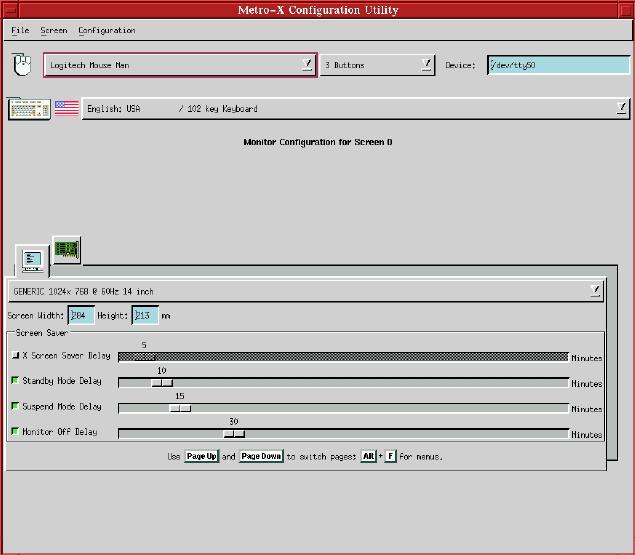
Metro-X brings up the X server in a low resolution to allow a GUI interface, even on an unconfigured machine (see Figure 2). Clicking on the different icons exposes options for different pieces of hardware. Several mouse clicks, and I had things configured. There is also a curses-based setup utility that is very similar to Accelerated X's setup utility in case the X server isn't available.
Before we get to The Chart, I did notice one interesting thing while I was playing around with the two servers. If /usr/X11R6/bin/X is a soft link to an XFree86 server, such as XF86_SVGA, AccelX will move the XFree86 server to X.LINUX. If, however, /usr/X11R6/bin/X is linked to, oh, say, Xmetro (the Metro-X server), then AccelX will turn Xmetro into a link to Xaccel, destroying the Xmetro server. Hmmmm.
Variable | Metro-X | Accelerated X | |
Graphics card Support | 38 manufacturers | 51 manufacturers | |
multi-head | up to 4 displays | Additional Cost add-on | |
Hot-Keys | Yes | Yes | |
Configuration | GUI and curses | curses only | |
System Requirements | 8MB RAM 12 MB HD space | 4MB RAM, 3 MB min HD space | |
Require XFree installed | Yes | Yes | |
touch-screen | Yes | No | |
Documentation | printed, web | printed, web | |
Price | $99 | $99.95 |
I am currently running Metro-X. I have two friends who swear by X Inside. Which server is better sort of depends on your needs. Metro-X has more support for commercial applications, including multi-head display and touch-screen capabilities. Accelerated X supports more graphics cards, making it more likely to suit your hardware.
Bottom line? Check your hardware against both lists, and if both servers will meet your needs, flip a coin—they're both cheaper than a day spent calculating modelines.
The mouse trouble noted in our review of Accelerated X—the mouse flinging applications off the desktop and causing a disruptions to the server connection—have been resolved.
Linux kernel version 2.0.0 introduced a problem with the Async mouse feature of Accelerated X. (This feature allows the mouse to move around the screen even when the X server is busy doing something else—a usability trick Microsoft has been using for a while on their Windows product.) X Inside notified the Linux kernel team and worked with them to correct the problem. With release 2.0.26 of the kernel, the error was resolved.
Jon Gross is a scuba diver, a marine biologist, a writer, a cyclist, a sysadmin, and works for Seattle Software Labs Inc. In his “spare” time, he likes to sleep and cook (not concurrently). He can be reached at jong@seaotter.com.