Using Linux at Lectra-Systèmes
Lectra Systèmes is one of two world leaders in the design and creation of the CAM solution, CAD/CAM and cutting machines, mainly for the footwear and apparel industry. The headquarters of this company are in Cestas, in the suburbs of Bordeaux, France. Five hundred people work here, 150 of whom are in the Research and Development department.
I am in charge of systems development in the R&D Department. The system group does all developments that concern base systems (e.g.,installation procedures, graphic libraries, tools).
Since the 1980s, Lectra has developed its own computers based on Motorola 680x0 processors. The main part of the installed systems (approximately 3000 customers, 80% abroad) uses a mono-task, proprietary operating system, written in 680x0 called MILOS for “Micro Lectra Operating System”.
A few years ago, Lectra started to become interested in database systems requiring the use of a more powerful system that would be multi-task and multi-user. After some teething problems with the Unix-like, the choice turned to implementing Unix System V3.2 for 680x0 architecture. The small team of which I am a member has managed to port the UniSoft sources as well as the X Window System graphic environment.
Lectra then decided to develop a new line of computers based on 68040 processors, much more powerful than the 68030. The operating system used was the Unix USL SVR4.0 version, and another port was made.
Although this task proved to be very interesting, we were persuaded that this computer (named OpenCad) would be the last one designed from scratch by the R&D teams. A few people continued to show interest, but continuing to support a series of computers that were too small to be competitive made it difficult to remain in a hardware market that is a race against power and low prices.
Despite OpenCad's commercial success with our customers, Lectra's management quite rightly decided to launch the development of a completely new range of products utilizing mainly Intel 486 and Pentium architecture, still with a Unix environment and X Window System. The database applications which use many resources would, on the other hand, be targeted to SUN SPARC architecture.
After some comparative tests between the different versions of Unix on the PC, it was decided to use Linux, which proved to be sturdy, have high performance, and the right price. Also, having the sources of the system available proved to be advantageous, as we use many special peripherals for which the adaptation would be much more difficult on a Unix machine.
Having chosen the system, we now needed to adapt Linux to an industrial solution. It is quite clear that Unix (and, therefore, Linux) is slightly more difficult for a final operator to use. This adaptation must be done in two stages:
at the installation procedure of the final product, as it is not possible to expect a technician (a customer) to know how to install Slackware
at the user interface, so that the administration of the station base (network, users, access rights) and the specific functionalities of Lectra are easily accessible by someone who is not necessarily a computer scientist
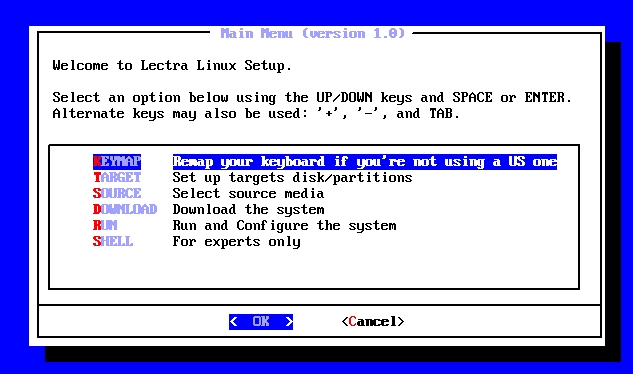
The Lectra distribution uses the same principles as other distributions—two boot floppies and a CD-ROM. The installation screens use dialog-0.3, which has proved to be extremely simple and powerful when it comes to creating a series of installation screens. The main Lectra Linux installation window can be seen in Figure 1.
Figure 1. Lectra Linux Installation Main Menu
The main advantage when choosing Linux in this domain is that it has the possibility of creating an extremely precise installation procedure (i.e., only what is required is installed), and it is therefore very quick. The current Lectra Desktop version takes less than 10 minutes to install on a Pentium 120. In comparison, the same desktop version on a Solaris system takes nearly an hour, as it is necessary to install the Solaris CD first, followed by Solaris patches, and then the Lectra Desktop.
The different packages are managed as ISO-9660 files (with Rock Ridge extensions) from a Linux structure using the mkisofs program. The ISO images are then written on the master CD using a PC under Microsoft Windows.
The first graphic applications under MILOS had a very spartan look, due to the weak performances of the graphic controllers at that time (beginning of the 1980s). The screens, although graphical, could manage only 16 colours, and moreover, they did not use multiple windows. Hastened by competition, in 1990 Lectra decided to develop the graphic interfaces to a multi-window system facilitating the operator's work for basic operations, such as launching applications or working with files. This tool, called OpenPartner, was initially developed for the MILOS target using a low level owner library (similar to Xlib calls). The structure of the interface seemed very similar to that of the Xt/Intrinsics Widgets hierarchy.
The port of OpenPartner to the Unix environment comes with the addition of the administrative functions of the station by a privileged user, in particular:
Adding and removing Lectra packages
The network management (adding/removing stations, NFS mount management)
Serial lines and modem management
Printer management
Licenses and Lectra applications management
User management, in particular the applications authorised for each one
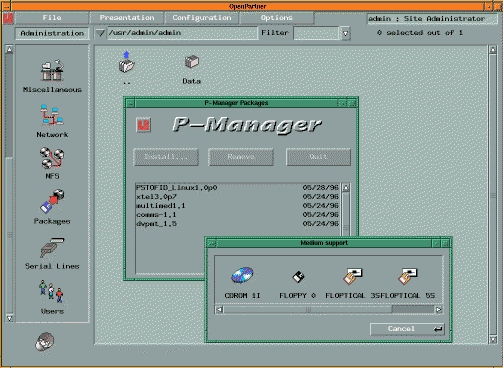
Figure 2 is an example of the main window in the OpenPartner environment with the package management utility, P-Manager.
Figure 2. OpenPartner with the Package Management Utility P-Manager
One of the important tasks was to develop a printer management system that could be extended and was easy to use. Even while supporting Unix, we have to admit the print system on MS Windows or even MacOS is much clearer and easier to use than on our favourite operating system. Furthermore, all the printers currently on the market are supplied with their own Windows or MacOS driver.
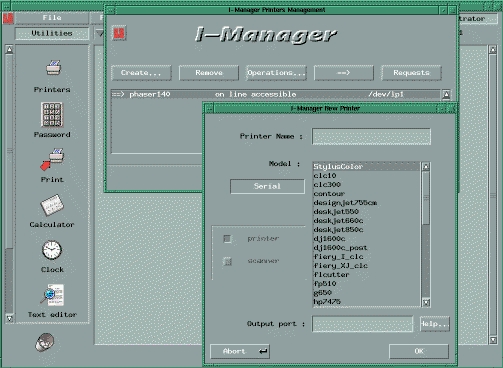
Our print system (operating customer/server) uses the Ghostscript program which manages different types of printers (PCL, PostScript, raster) on varied connections—serial line, Centronics, network, SCSI. A graphic tool integrated in OpenPartner, I-Manager, is used to select only the printer characteristics that are actually used. The list then appears in the print selector of Lectra applications.
The applications are intended for industrial professionals in apparel. The garment is designed in various stages and corresponds to different trades. One of the characteristics of the apparel industry is the use of sub-contractors and delocalisation. Various stages of the apparel might be realised by the apparel maker, yet production could be sub-contracted to another country. Some countries deal only with the design or the production, and supply several major brands.
The result of this situation for a company like Lectra is that it is absolutely essential to design open software, as very few customers will buy a complete series, and it is therefore necessary to know how to communicate with competing software.
Another important constraint is to support lots of languages, such as Japanese, Chinese or Russian, by using tools such as the Asiatic front-end-processor under X11.
On first approach, we can expect the following stages when designing a garment.
The designer has to create a garment model, like an artistic drawing. His/Her work is mainly based on the choice of shapes, colours, and types of fabrics that can be used. The advantage of having a data processing tool is clear. Other than the possibility of working on an “electronic sheet”, the software enables the pattern maker to import fabric motifs in an electronic form or even by using a scanner, to file the suggestions of different collections, and to make fabric simulations in 2D or 3D.
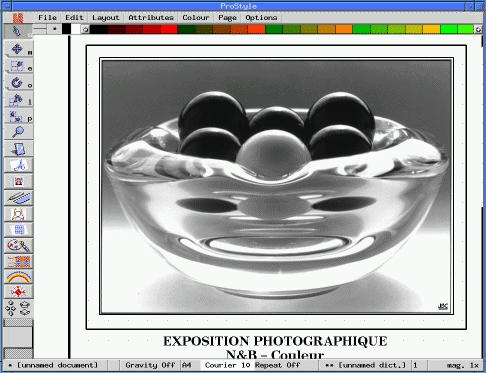
The ProStyle software offers all the above functions on a high performance Linux PC (Pentium 120 with Diamond Stealth S3-968 graphics board, 16 million colours). Sublimation printouts are also available. The software also works with the Silicon Graphics architecture.
The pattern makers must create the pattern of the garment, i.e., the plan with quotation, from the information given by the designer. He/She must also manage the different sizes, or grading, available. The information in this phase is one of the most interesting with the marker (see below) as it has a high turnover—the number of patterns produced.
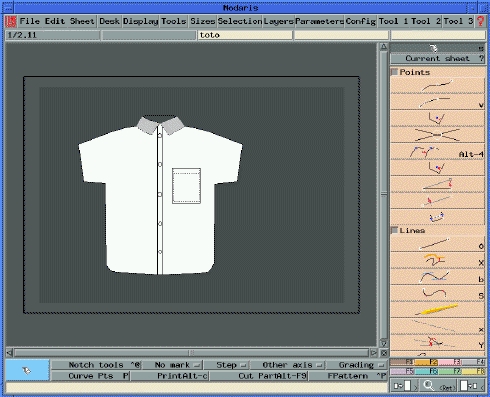
Figure 5 is a view of the initial screen of the Modaris application, designed for the pattern maker.
The marker maker must optimise the material use, i.e., the piece of fabric called width, depending on the list of pieces given by the pattern maker. The quality of the work of a marker maker is expressed in the efficiency of a marker, which corresponds to the material quantity used in relation to the material loss. A good marker has an average efficiency of 85%, meaning 15% of the material is lost. A gain of a few tenths of a percent in production can have important economic consequences when it concerns costly materials like leather and high quality fabrics.
The Diamino software working on Linux/PC has a semiautomatic marker, making work easier for the marker maker as it facilitates positioning the piece. It also has a new automatic marking module (which marks all the pieces on the width without any manual intervention), the performance of which today is nearing 2% of that of a professional marker.
With the current PC architecture, it is now possible to obtain such a result at a very attractive price, whereas only a few years ago, the existence of an efficient module for the automatic marker was impossible due to material costs.
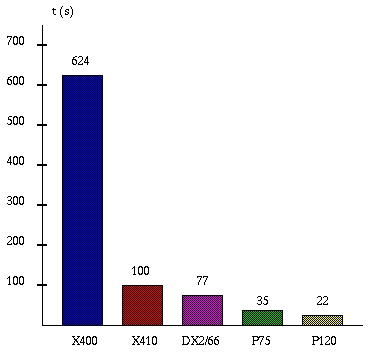
Figure 6 shows the evolution of the automatic marker making performances depending on the architecture used (time in seconds). The old Lectra X400 and X410 computers are based on the 68030 and 68040 processors operating under System V R4. The three PCs—DX2/66, Pentium75, Pentium120—used Linux kernel version 1.2.13.
Figure 6. Relative Performance of Automatic Marker Software on Various Platforms (time in seconds)
The cut of the pieces can be done by hand or with a cutting machine, which has a better turnover advantage. In some cases, one does not cut the pieces, but just plots the shapes on a paper support to give to the sub-contractor.
The previous range of products from Lectra required the purchase of a computer per plotter or cutter, as the MILOS operating system of the computers was mono-task; in other words, the plotters and cutters were run by serial channel.
The new VigiPrint software developed under Linux controls about ten plotters simultaneously, giving a cost savings that should not be ignored when considering the configuration, together with much more facility in controlling the plot by managing the plotters on the same screen. The number of cutters managed by the software is limited to only one for safety reasons—the operator must be attentive to any blade break or other anomaly. The cut is made either with a blade (most common), a high pressure water jet (2000 bars), or a laser beam.
The Lectra suite of software, MasterLink and StyleBinder, enables managing all the data manipulated by the previous trades. In this way, it is possible for a given product to define the production follow-up folders which are filed in the relational databases. These databases make it possible to file various elements of a previous collection and re-use them in a current collection.
Below is a screen from the StyleBinder software under Linux.
The main problem is the integration of new peripherals, since the PC world is literally in the hands of Microsoft. Some peripheral manufacturers, mainly small manufacturers, are attentive to the Linux evolution and collaborate easily when designing drivers. The large companies are much more difficult to convince, and they often hide behind the imperatives of “marketing strategy”, refusing to supply the information required. Generally they refuse to accept any solution other than Microsoft, especially when it concerns technical support, since the development teams are rarely directly accessible in such structures.
However, the problems encountered are limited in number:
The MATROX Millennium board which was not supported by XFree86 because MATROX requires a non-disclosure agreement before they will release the technical information required. This situation is a hindrance for us, since the Lectra applications use specific peripherals, e.g., graphic tablets, miniature keyboards, ultrasound pens, which mean the X server must be altered to manage the “input extensions”. Our choice is therefore limited to boards based on S3 circuitry, like Diamond and #9.
Lots of storage peripherals connected via a parallel port can't be used with Linux, as each port is unique to each manufacturer and the information and protocol used are extremely difficult to obtain. Therefore, we use SCSI peripherals and internal drives on floppy port (ftape).
The Linux installation on the PC Notebook is sometimes difficult due to the special graphic circuits not supported by XFree86.
Other subjects have caused us, and in some cases are sometimes still causing us, a few worries:
The absence (at the moment) of a Microsoft Windows emulator at a professional level is a serious problem since our customers sometimes need to use documents from MS Windows to integrate them into our applications. The next software release of this type will be a boost for the generalisation of Linux as a desktop solution.
The swap management of Linux 1.2.13 does not seem quite as good as some other versions of Unix (such as SunOS-4.1.3). It appears the swap operating on Linux 2.0 has improved greatly.
The Lectra environment uses the SCSI interface intensively (for some top-of-the-line printers and scanners), and we have corrected a few bugs in the Linux SCSI driver. The corrections forwarded to the Linux developers seem to be integrated in the 2.0 kernel.
The experience of the new Lectra range shows it is possible to build an industrial solution under Linux. The system is stable and powerful. It is possible to gather a wide range of information thanks to the Internet, which has proved to have the highest performance in technical support. Having system source code makes it possible to develop more functions more easily (e.g., material drivers or individual protocols, specific file systems).
The new orientations announced during the last Linux congress in Berlin (improvement of the Virtual File System, optimisation of the EXT2 file system, the Wabi MS Windows emulator, multi-processor support, adoption of Linux by Digital) assures us Linux has acquired much industrial maturity.
Furthermore, the choice of a PC platform allows us to offer customers industrial and administrative applications on the same machine.
The opinions expressed in this article are those of the author and not of the Lectra-Systemes company.