
Tcl/Tk with C for Image Processing
To start an implementation in C from scratch for an image processing (or manipulation) program is a difficult task. It is necessary not only to develop an internal data structure, but also to write the filters for reading and writing the available graphic formats. The interface design and implementation is also difficult, due to the need for dealing with issues such as color allocation, quantization and so on. In this article, we'll show you how Tcl and Tk can help you in dealing with these problems easily. However, it should be noted that some operations on images are computationally intensive, making the use of Tcl prohibitively expensive. So we'll use a mixture of Tcl and Tk with C, and get the best of both worlds.
In Linux Journal #10 (February, 1995) Matt Welsh wrote a nice article describing a way to use Tcl/Tk as a front end for C programs using pipes to and from a wish process. While this method has many advantages, e.g., straightforward implementation and memory saving when using static libraries, it does present some limitations:
First, since your program is “split” into two different processes, the sharing of resources is not an easy task.
Second, all communication is done through the pipes, imposing an extra burden on the system.
In this article, we approach this problem using Tcl/Tk as an extension to the core program, and show some of the advantages of solving it in this manner.
We'll start by writing a small program to do a special dither (half-toning) for creating a special effect that applies only to a selected sub-rectangle of an image.
The described technique transforms vertical strips of colored pixels into a vertical strip of black and white pixels, where the average intensity best approximates the original average. Also, all black pixels are grouped in the center. (This effect has been used in the entertainment industry for some time now.) See Figure 1. The following sections describe the necessary steps for accomplishing this effect.
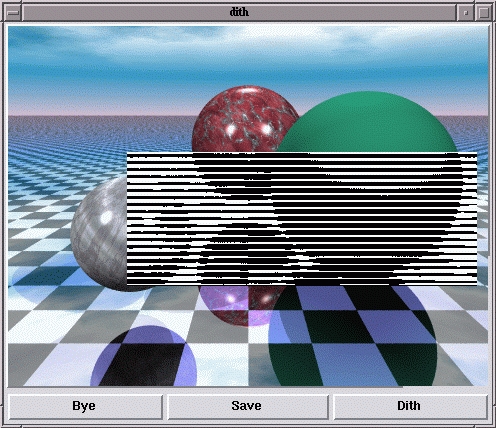
Figure 1. The typical appearance of the program after the dithering of one rectangular region.
The very fabric of our program is based on the image primitive, which first appeared in Tk version 4.0. The idea is to create an “image object” with an associated command, just like any normal widget.
Images can be of two different types: bitmaps and photos. While bitmaps deal only with foreground and background colors, photos treat true-color objects, automatically quantizing for the available number of colors in the display. Let's focus on the “photo” type, which was implemented by Paul Mackerras based on his earlier “photo widget”.
A command for creating an image object named “picture” with the image in the file “mickey.gif” would be:
image create photo picture -file mickey.gif
After its creation we can easily do some operations. For example, to get its dimensions:
set pic_wid [image width picture]
set pic_hei [image height picture]
You can also create a second image, and copy a section of the first one into the second:
image create photo pic_piece
pic_piece copy picture -from 0 0
        [expr $pic_wid/2] [expr $pic_hei/2]
During the copy you can use the Tk options
subsample or zoom to reduce
the image or enlarge a portion of it. The copied portion can be
placed anywhere inside the destination image.
It is possible to specify the size of the color cube of a given image (you can even explicitly impose it to be gray-scale), its gamma correction and some other nifty things. Check out the photo man page for details.
A good way to both see the image and allow some manipulation is to treat it as a “canvas object”:
canvas .c
pack .c
 .c create image 1 1 -anchor nw -image picture
                -tags "myimage"
After creation, you can draw and manipulate any canvas object you wish just as if it were floating upon myimage. Just remember to keep the image as the “lower” object, so that you'll always be able to see everything else. This positioning can be accomplished by giving:
.canvas lower myimage
Let's make a small distinction between two kinds of C-Tcl/Tk applications: those which act like a shell (wish, for example) and those which use the Tcl/Tk extension in a predetermined way.
If you want to create another “instance” of wish with some extra commands you have created, you should read the man pages concerning Tcl_Main and Tcl_AppInit.
If your program uses Tcl/Tk only for the interface, and it is not intended to be used in a “shell-like” fashion, the approach is slightly different. I recommend you grab the nice demo program tkHelloWorld.tar.gz (see Sidebar) to use as an example.
Basically, your program has to implement the following four steps:
Initialize Tcl and Tk.
Create the Tcl commands responsible for calling your C routines.
Ask Tcl to evaluate an “interface description” file.
Let Tk control the main flow of the program.
In the C code shown in Listing 1, the comments identify exactly which of the four steps is being done.
From this point on, we wish to use C programming only for some critical functions, since the main flow and control of our application is handled by Tk.
If you are interested in the myriad ways you can call a C routine, read TCL and the TK Toolkit by John K. Ousterhout, Addison-Wesley, 1994.
Essentially your C function must have a prototype like the following:
int
C_func_name (ClientData cd, Tcl_Interp *interp,
             int argc, char **argv);
and you must register it by:
Tcl_CreateCommand (interp, "Tcl_func_name",
        C_func_name, (ClientData *) NULL,
        (Tcl_CmdDeleteProc *) NULL);
Then, whenever Tcl encounters the command
Tcl_func_name, it will call your routine, which
will receive the Tcl parameters just as main
receives the argc and argv
arguments from the shell, i.e., argc will be the
number of words and argv will be the “vector of
strings”.
We want our C routine to process an image called image_name under Tk. The immediate solution would be to pass the color of each pixel (the photo widget has this option) again and again until the image is complete. While this program was running, we could go out for lunch, visit a few friends, have dinner and see a movie. However, there is a better way to accomplish the goal. From C, we ask Tk to take care of it. First, we have to define:
Tk_PhotoHandle      image;
Tk_PhotoImageBlock  blimage;
Then call the following functions in sequence:
image = Tk_FindPhoto ("image_name");
Tk_PhotoGetImage (image, &blimage);
The image is in blimage, which is a structure
defined in tk.h as:
typedef struct {
  unsigned char *pixelPtr;
  int width;
  int height;
  int pitch;
  int pixelSize;
  int offset[3];
} Tk_PhotoImageBlock;
All color information comes in unsigned characters (values between
0 and 255). The pixelPtr is the address of the
first pixel (top-left corner). The width and
height define the image dimensions, while
pixelSize is the address difference between two
horizontally adjacent pixels, and pitch is the
address difference between two vertically adjacent ones. Finally,
the offset array contains the offsets from the
address of a pixel to the addresses of the bytes containing the
red, green and blue components.
Using the above definitions allows different representations of the image; for example:
Define a point with a dimension of three bytes, one for each color component. Then the pixelSize is 3, the offset 0, 1 and 2 and the pitch three times the width.
Think of the color image as three planes (images), one for each color. Then the pixelSize is 1, the offset is 0, width*height and 2*width*height. Finally, the pitch is equal to the width.
The colors of a given pixel can be obtained with three simple C macros:
#define RED(p,x,y)  ((p)->pixelPtr[(y)*(p)->
pitch + (x)*(p)->pixelSize + (p)->offset[0]] )
#define GREEN(p,x,y) ((p)->pixelPtr[(y)*(p)->
pitch + (x)*(p)->pixelSize + (p)->offset[1]])
#define BLUE(p,x,y)  ((p)->pixelPtr[(y)*(p)->
pitch + (x)*(p)->pixelSize + (p)->offset[2]])
You call the macros giving the address of the block structure explained above as the first parameter, and the x and y coordinates (where 0,0 is the upper-left corner) of the pixel as the second and third. For an optimized program, it would be much faster to use address differences to determine the position of the next pixel from the current pixel, i.e., its neighbor.
The complete C code for this program is in Listing 1, and the Tcl code is in Listing 2.
Figure 2 is a snapshot of the program in action.

Figure 2. An Example of all possible output clusters, when the vertical size is five. The criterion of choice is the nearest average.
The program can be downloaded from: ftp://ftp.impa.br/pub/visgraf/people/siome/lj/ljdither.tgz.
When Tcl/Tk calls a function in C, it can still receive interface events, such as button presses or slider movements; however, it cannot run the associated scripts (or C functions) bound to these events, since for the moment the C function controls the flow.
A good example is a mass-spring simulator, where the C function has a loop doing the simulation and canvas drawing. It would be wonderful to be able to change the constants during the simulation, or even abort it before the pre-determined time. This option is also needed in long Tcl scripts. The solution in both cases is to use the update command from time to time in order to process user input.
From the update man page:
The update command with no options is useful in scripts where you are performing a long-running computation but you still want the application to respond to user interactions; if you occasionally call update, user input will be processed during the next call to update.
A powerful combination is achieved by letting Tcl/Tk deal with the interface and C with the critical tasks of a program.
A lot of useful extra widgets can be found on the Internet for using sound (see tkSound), moving objects and so on. The principle for integration of these widgets is the same—you can create a new wish-like shell, or use the new available functions together with come extra C code of your own.
Another good package is Tix, which is included with many Linux distributions. It adds many wonderful widgets to Tk, and has an object-oriented approach to building new “mega-widgets”.
I hope you find this article useful, and have a nice hack.


