X-CD-Roast: CD Writer Software
X-CD-Roast is a fully X-based CD writer program. It is a front end for the command-line utilities cdwrite and mkisofs. X-CD-Roast therefore reduces the task of creating your own CDs to a few simple mouse clicks instead of a long study of any command-line parameters.
The newest version of X-CD-Roast (0.96a in August 1997) provides the following features:
point and click X11 interface
automatic IDE and SCSI hardware setup
copying of ISO-9660 CDs, non-ISO-9660 CDs (like Mac or Sun CDs), Mixed-Mode CDs and Audio CDs.
mastering of ISO-9660-data CDs
creation of audio CDs
quick CD-to-CD copying (no need for a CD image saved on hard disk)
soundcard support
At this time, it is not possible to create or copy multi-session CDs with X-CD-Roast. You also cannot master a CD without creating a CD image on a hard disk; you must provide the disk space for the data and for the mastered CD-image. Therefore, you need approximately 700MB times two of free disk space when creating a 650MB CD. Version 0.96a supports only a very limited set of CD writers. The next major update to 0.97 will include the cdrecord program which will handle most writers on the market. Non-SCSI writers will not be supported in the near future.
Prior to the installation of X-CD-Roast you should check whether you satisfy all system requirements.
First, the basic steps when burning a Data-CD: The copying is very simple: first, an image of the original-CD is created on a free hard disk partition (called “image” or “image partition” from now on). This image contains every byte of the original CD and can therefore be up to 650MB in size. Now, you can do a verification run to compare the contents of the image with the original CD. This enables you to track down any read errors that might have damaged the image. The next step is to copy that image back to a CD-Recordable, a process called “burning”. At this point you can choose whether to simulate the burn process (the writer goes through all the motions and processes, but the write laser is off) or to do the real thing. I recommend that you do your first tests using the simulation mode—it could save you a few CD-Recordables.
Audio and mixed-mode CDs (CDs with one data track and additional audio tracks) can be copied as well, but this takes more effort. Each track of the original CD is read into a single file and saved onto the image partition. These tracks can now be written in any sequence you like, and you can also read tracks from more than one CD and so create your own “best-of” audio CD.
If you want to create a CD with your own files, you must first “master” the data. Collect all the files you wish to have on CD in a single directory tree mounted on your system. X-CD-Roast then converts this directory tree into a ISO-9660 CD image. Remember, this image will occupy about the same amount of space on your hard drive as your data to burn does. So, to master 600MB of data, you must have about 1.2GB of space. Finally, you burn this image on to a CD-Recordable.
In this section I briefly explain how a CD-Recordable and a CD writer work. This information is not necessary to use X-CD-Roast, but it can help you to understand the process.
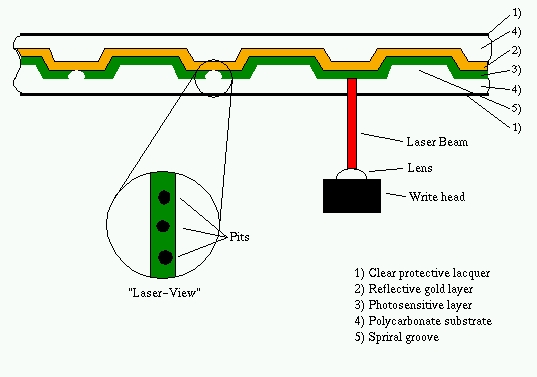
The most common types of CD-Recordables are those with 63 and 74 minutes audio runtimes or 553MB and 650MB data capacities. The structure of a pressed “silver” CD is quite similar to a CD-Recordable. A pressed CD is built from a polycarbonate layer in which the information is pressed as pits. The sequence of “pit” or “not-pit” represents the data on the CD. After the press process, the layer is laminated with aluminum (giving it the silver look) for better reflection of the reading laser of a CD-ROM drive.
On the writable CD, the polycarbonate substrate, has a spiral groove that helps the laser stay on course during burning and playback. On that substrate a thin gold layer is laminated to provide the best possible reflection to a reading laser. Over the gold layer is a photosensitive dye layer, and over that is a clear protective lacquer. While you use a weak laser to read a CD, you need more power to write. The laser beam heats the photosensitive layer and creates a kind of hole that shows us the gold layer. When you read such a CD-Recordable, the holes in the photosensitive layer can be interpreted as “pits”, making it possible to read such a CD with all common CD-ROM and audio players. However, the “pits” are not as sharp as on a pressed CD and can cause troubles on a few older CD-ROM drives, which report occasional read errors, while others perform flawlessly.
Some recommended precautionary measures when dealing with CD-Recordables:
Label only on pre-marked label side using a soft, felt tip marker.
Don't use stickers.
Store only in cool and dark places.
At the time of this writing (August 1997) version 0.96a is the newest version of X-CD-Roast. You can download it from http://www.fh-muenchen.de/home/rz/xcdroast/. On this web page you will also find the complete documentation and further information. You can also get X-CD-Roast from ftp://sunsite.unc.edu/pub/Linux/utils/ and its mirrors. More detailed information about installation and usage can be found in the X-CD-Roast README file. In this article I discuss only the basics.
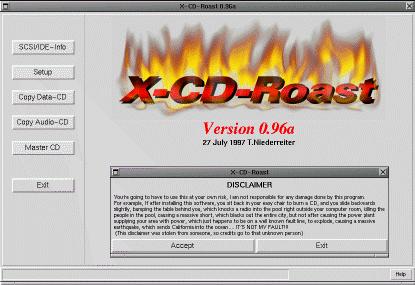
At this point, I assume that you have installed X-CD-Roast and connected all your necessary hardware correctly. Now start X-CD-Roast as root, and you will be prompted to specify your hardware settings.
In this menu you specify all the hardware X-CD-Roast needs, including your CD writer, the hard disk partition that will store any CD images, your sound device and so on.
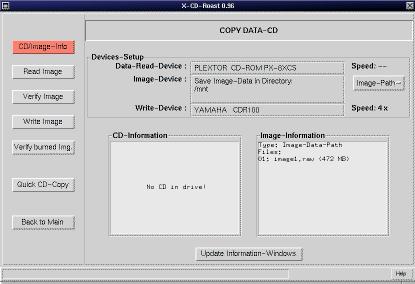
A screen shot showing an example setting for the CD devices is shown in Figure 3. You can always use your CD writer to read data or audio from a CD. It's not necessary to use an additional CD-ROM drive as shown in Figure 3.
Use the Copy menu to copy pure data CDs. A data CD is a CD containing only one track written in a certain file system. Usually the file system ISO-9660 is used, but a few special file systems like those from Sun or Apple can also be used. X-CD-Roast is able to copy such a CD independent from the file system by doing a byte-to-byte copy.
First, X-CD-Roast dumps the entire contents of a original CD to the image partition on the hard disk. It is done in this way:
cat /dev/sr0 >/dev/sdb4
Note that any existing file system on that image partition is overwritten by the CD image. Then, the image is burned to a CD-Recordable using the cdwrite utility.
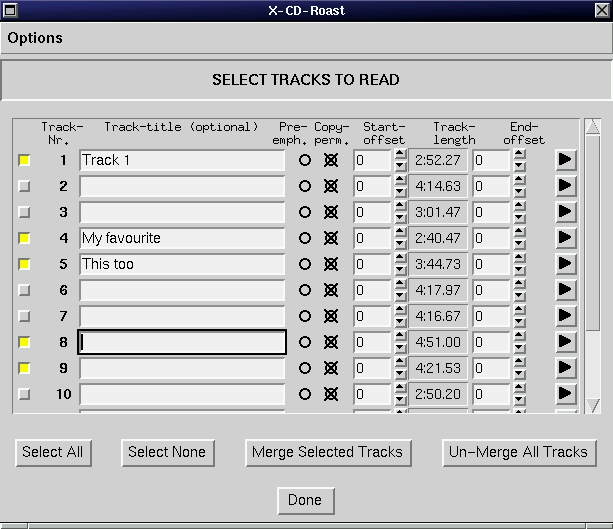
When you wish to copy an audio CD (a music CD) or a mixed-mode CD (a CD that contains one data track and some music tracks), you must copy each track to a single file. X-CD-Roast is equipped with a built-in player so you can listen to each track via a sound card. You can read audio tracks in any sequence and from as many CDs as you wish, as long you keep in mind that only about 74 minutes (or 63 minutes) fit on one CD-Recordable.
The reading of raw audio data from a CD is quite complicated. X-CD-Roast does not simply play a track and record it simultaneously via a sound card, but it does get the audio data via the SCSI bus. X-CD-Roast includes a program cdda2cdr which uses the generic SCSI interface to request the audio data from a CD-ROM drive (or the CD writer) and saves it raw to a file. After you have finished reading in audio tracks, all audio files are burned with the cdwrite utility to the CD-Recordable.
Additional information about the generic SCSI interface can be found in the SCSI Programming HOWTO at ftp://sunsite.unc.edu/pub/Linux/docs/HOWTO/SCSI-Programming-HOWTO.
If you have a CD-ROM drive as well as a CD writer connected, you can speed up the process of copying a data CD considerably. Put the original CD in the CD-ROM drive and a CD-Recordable in the CD writer, and X-CD-Roast will simultaneously read from the CD-ROM drive and write to the CD writer. Thus, there is no need for an image partition, and the time to copy a CD is halved. On the other hand, this procedure can be quite risky. If your CD-ROM drive provides the writer with the data too slowly, you can experience buffer problems that result in a wasted CD-Recordable. For this reason the CD-ROM should be twice as fast as the CD writer. Use this feature with caution.
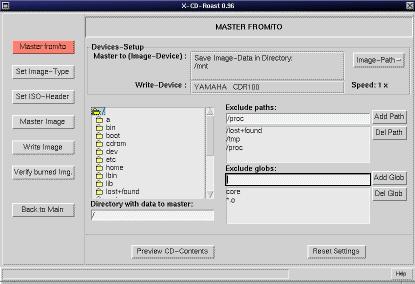
If you want to create a CD using your own data, you have to master the data. First you provide a directory tree that contains all the files you wish to burn on a CD-Recordable. This tree can be about 650MB large and mounted anywhere in your file system. (It can even be on a NFS-exported directory.) Now, tell X-CD-Roast how to master the data (see Figure 6) and specify a volume label and, then, start the master process. All your files to burn are now converted into an ISO-9660 CD image that can be burned on the CD as the last step.
X-CD-Roast calls the utility program called mkisofs to do the master job. How long the master process takes depends on the speed of the hard disk, the speed of the processor and the available memory. A 650MB image can be created within 10 minutes on a fast Pentium, but a slower computer can take up to several hours to do the same task. For more detailed information on mkisofs, please consult the man page for this program.
There you have the rudimentary basics of X-CD-Roast. Keep in mind that X-CD-Roast is just a front end to a lot of utilities, and at this time, is quite limited compared with the command-line interface of those utilities. I will be developing new versions to add new features such as multi-session on most writers, bootable CD-support, mastering without image-creation on a hard disk and more. Please also check out cdrecord, which can be found at ftp://ftp.fokus.gmd.de/pub/unix/cdrecord. It is command-line based, but supports a lot of CD writers. A future version of X-CD-Roast will use cdrecord instead of the older cdwrite.
For more information about CD writing under Linux, consult the documentation for X-CD-Roast, cdwrite, mkisofs and cdda2wav. I thank all of the great people who put a lot of effort into coding the basic utilities X-CD-Roast uses. Keep up the good work.
An older version of this article was first published in the German language Linux Magazine, Issue 11, November 1996.