
Using Linux with Programmable Logic Controllers
When solving control system problems for the “real world”, a toolkit approach to problem-solving often leads to quicker and more robust solutions. This is one of the reasons we are using Linux on commercial Intel-based machines at the DuPont-Northwestern-Dow Collaborative Access Team (DND-CAT) at the Advanced Photon Source (APS). The APS (see http://www.aps.anl.gov/) is one of three third generation synchrotron X-ray sources that will provide the world's most brilliant source of X-rays for scientific research. The DND-CAT (see http://tomato.dnd.aps.anl.gov/DND/) is a collaboration formed by the DuPont Company, Northwestern University, and the Dow Chemical Company to build and operate scientific equipment at the APS to study industrial and academically interesting problems in chemistry, biology, materials science and physics. Linux (like all Unix systems) is designed around the toolkit paradigm. The tools which run under Linux provide an excellent framework for building user interfaces (e.g., Netscape, Java, Tcl/Tk, expect, World Wide Web daemons), running calculations (e.g., C, C++, FORTRAN, Perl, pvm) and interacting with external devices (GREAT access to serial devices, cards in the backplane, and of course, TCP/IP).
However, while there are efforts to equip Linux with real-time capabilities, it is not a “real-time” operating system. In addition, using commercial personal computers for control applications is a mixed blessing at best. While the systems are powerful, readily available and inexpensive, they also come with a limited number of slots on the backplane and the machine usually must be physically close to the process being controlled or monitored. This can be problematic in situations where the process takes place in a harsh environment that might cause the hardware to fail (e.g., high radiation areas, high vibration, etc.). These are important factors in the design of an entire control system. However, they are only problems if we expect Linux to provide the entire solution to the control problem rather than one tool in a toolkit approach.
At the DND-CAT, we have been designing systems that use programmable logic controllers in conjunction with Linux PCs to provide low cost automation and control systems for scientific experimental equipment.
Programmable logic controllers (PLCs) are the unsung heros of the modern industrial revolution. Long before IBM and Apple were churning out computers for the masses, factories were being automated with computerized controllers designed to interface with the “real world” (i.e., relays, motors, temperatures, DC and AC signals, etc.). These controllers are manufactured by many companies like Modicon, Allen-Bradley, Square D and others. In his booklet, History of the PLC, Dick Morley, the original inventor of the PLC, notes that the first PLC was developed at a consulting company, Bedford Associates, back in 1968. At this time, Bedford Associates was designing computer-controlled machine tools as well as peripherals for the computer industry. The PLC was originally designed to eliminate a problem in control. Before the digital computer, logic functions were implemented in relay racks where a single relay would correspond to a bit. However, relays tend to be unreliable in the long term and the “software” was hard programmed via wiring.
System reliability could be improved by replacing the relays with solid state devices. This had the advantage that the system was maintainable by electricians, technicians and control engineers. However, the “software” was still in the hard wiring of the system and difficult to change. The alternative at this time was using one of the minicomputers being developed, like the PDP-8 from Digital Equipment. While more complex control functions could be implemented, this also increased the system complexity and made it difficult to maintain for people on the factory floor.
Morley designed the first PLC to replace relay racks with a specialized real-time controller that would survive industrial environments. This meant that it had to survive tests, such as being dropped, zapped with a tesla coil and banged with a rubber mallet. Designed for continuous operation, it had no on/off switch. The real-time capabilities were—and for the most part still are—programmed into the unit using ladder logic.
Ladder logic is a rule-based language; an example is given in Figure 1. The line on the left side of the diagram shows a “power rail” with the “ground” for this rail on the right hand side (not shown). The rules for the language are coded by completing “circuits” in ladder rungs from left to right. In the diagrams, “||” corresponds to switch contacts, and “()” corresponds to relay coils. Slanted bars through the contacts and coils denote the complement. The “X” switch contacts are mapped to real binary input points, the “Y” relay coil contacts are mapped to output points, and the “C” contacts/coils are software points used for intermediate operations. In the example, closing X0 and C0 or opening X0 and C0 will energize the C10 coil thereby closing the C10 contact. The C10 contact activates Y0 and turns off Y1.
While this graphical style of programming may be strange for someone accustomed to programming in C or FORTRAN, ladder logic makes it easy for non-programmers to write useful applications. Most PLCs have a large set of functions, including timers, counters, math operations, bit shifters, etc. They have a wide variety of input and output devices, including binary and analog inputs and outputs, motor and temperature controllers, relay outputs, magnetic tachometer pickups, etc. The number of input and output points depends on the type and size of the PLC, but can range from less than 10 for a micro-PLC to over a thousand for one of the higher-end PLCs. The PLC market has grown over the years and has been affected by the computer revolution. Today, there are a number of high quality, inexpensive PLCs on the market. PLCs from the same vendor can often be networked together. In some cases, a lower-end PLC can be built for less than $500.00.
In our applications, we have used Linux computers as interfaces between the PLC and the outside world. Our main purpose for this was to use tools like Tcl/Tk and the World Wide Web (WWW) through the Common Gateway Interface (CGI) to control processes in the PLC. The software used to program our PLCs is Microsoft Windows-based. Consequently, by having Linux and Windows partitions on the same hard disk, we can toggle back and forth between MS Windows, where we program the PLCs, and Linux, where we program and use the operator interface.
The real-time operating system inside PLCs is relatively simple compared to a complex system such as Linux. Consequently, those portions of the control process which require extremely high reliability can be programmed into the PLC, leaving Linux available for other tasks.
We are using the PLC Direct line of PLCs (see http://www.plcdirect.com/) for our applications. In order to prove the reliability of the Linux and PLC Direct combination, we collaborated with the UNICAT (A University-National Lab-Industry Collaborative Access Team; see http://www.uni.aps.anl.gov/) to set up a test system using a Linux-based web server connected to a PLC Direct 405 PLC. Communication with the PLC is through a multidrop, packet-based, master/slave protocol that runs over a serial link. Using the PLC Direct documentation, we implemented this protocol using Don Libes' expect program over the Linux serial ports, making the Linux system the master. This gave us the capability to “peek” and “poke” into the PLC memory map. CGI scripts call the expect program to provide access to the Web.
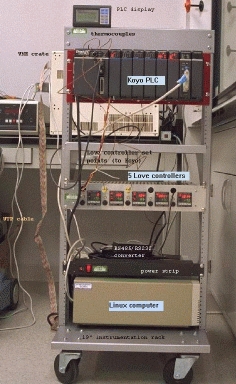
Photo of the DND-CAT/UNI-CAT Linux/PLC Test Stand
Net surfers were allowed to close output points and read input points on the PLC through the WWW interface between March 1995 and July 1996. A photo of that test stand is shown in Figure 2. The PLC monitored digital inputs from the 5 Love controllers, which measured the temperature in the PLC CPU and closed a contact if the temperature went above a preset value.
In addition to the demonstration, we have used the Linux/PLC combination in three project areas: a simple shutter for a synchrotron X-ray beamline, a personnel safety system for an analytical X-ray machine, and an equipment protection system using a high intensity X-ray beamline at the Advanced Photon Source.
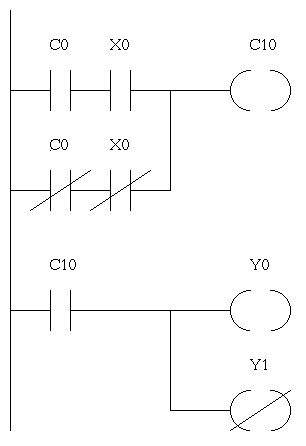
Simple Ladder Logic Diagram
Our simplest application with the PLC and Linux involved interfacing a commercial X-ray beam shutter to our Linux data collection computer. The hardware for the X-ray shutter is controlled by two relay-actuated solenoids. When we program the PLC, we allocate two ranges of control relays to act as an interface between the PLC and Linux. The program in Figure 1 demonstrates this. The Linux program that would set C0. X0 is attached to a hardware switch and provides an external input to the system. The X0 and C0 combination simulate a three way switch, and Y0 and Y1 actually operate the relays on the shutter. A program on the Linux side can read C10 to monitor the shutter status. With the interface between the PLC and Linux defined through control relays, the actual control process is divided up between the two different machines.
Our second project used the PLC as a state machine to monitor a radiation enclosure for an X-ray generator and X-ray tube. Since this was a safety device, we enabled the PLC's password function to lock the program into the PLC CPU. If for some reason we forget the password, the CPU must be sent back to the manufacturer for reset. The PLC monitors twelve door contact switches, switches from an operator panel, X-ray shutter positions, water flow interlocks for the X-ray tube, as well as providing a buzzer and a fail safe lamp to notify the operator the X-rays and shutter are on. The PLC also provides enable signals for the X-ray generator and the X-ray shutter.
While the main purpose of the PLC is to protect the operator, the PLC doesn't have a very good way of notifying the operator of what has failed should the X-ray interlock trip. This is where Linux comes in. Using CGI scripts, we wrote web pages that allow the operator to query the PLC state using a browser. To prevent unauthorized access to the equipment (only trained people can use this equipment), we provided a watchdog signal between Linux and the PLC. An authorized user logs into the Linux system and runs a protected daemon which starts the watchdog timer in the PLC. The Linux daemon must continuously restart the watchdog to keep the X-ray system enabled, and the daemon disables the system when the user logs out. Linux keeps track of all of the accesses to the system and sends e-mail to the X-ray generator custodian whenever an access occurs. Thus, the Linux system acts as the data collection computer for the instruments attached to the X-ray generator.
Our last project is an equipment protection system for an X-ray synchrotron beamline at the Advanced Photon Source. In this case, the PLC is monitoring over 70 input points from water flow meters, vacuum system outputs, and switches from vacuum valves. Based on the status of these systems, the PLC sends an enable or disable signal to the APS which permits them to deliver the high intensity X-ray beam to our equipment. Serious equipment damage can occur if the APS delivers beam when the systems are not ready. In this case, we use Linux as a data logger as well as an operator interface. Every few minutes, Linux polls the PLC to log system status.
The PLC itself keeps a log of significant events in nonvolatile memory in the event of power failures. In order to keep the PLC in sync with the Linux logs, we use the Network Time Daemon on the Linux end and once a day reset the real-time clock in the PLC. In addition to the PLC, Linux processes are monitoring other devices, like vacuum gauges, through a multiport serial card. If a system failure occurs, our scientists and engineers can either log into the Linux system and run expect scripts to diagnose the problem or use a browser and interact with the Linux/PLC combo via the Web. At this point, the operator has complete control over enabling and disabling processes in the PLC.
In this application, the interface with the World Wide Web is extremely important. Scientists travel to synchrotron sources from all over the world to conduct experiments. When the facility is operational, it runs twenty four hours a day. If our PLC were to shut the equipment down, it is important to be able to diagnose the fault, and if possible, return the equipment to operational status as quickly as possible. By using the World Wide Web, we provide our scientists and engineers with diagnostic tools they can use from anywhere using commonly available interface software. I personally have been able to monitor system status in our PLCs at my desk at work, my apartment in Chicago and a cyber-cafe in London.
In general, we have found combining programmable logic controllers with Linux to be a cost effective and robust method for providing specialized control systems at the DuPont-Northwestern-Dow Collaborative Access Team. As we build our instrumentation, we continue to find new applications for this combination. We have several more projects in the works, including using the PLCs to construct intelligent controllers for specialized machines and using Linux to interface with them. We also plan to implement the PLC Direct slave protocol under Linux to allow the PLC to send data directly to Linux daemons, so the PLC does not need to be polled.
I would like to thank Pete Jemian of the UNI-CAT for collaborating on the prototype system and for the photo in Figure 2.
The DND-CAT Synchrotron Research Center is supported by the E.I. Du Pont de Nemours & Co., The Dow Chemical Company, the State of Illinois through the Department of Commerce,and the Board of Higher Education Grant IBHE HECA NWU 96 and the National Science Foundation Grant DMR-9304725.
Reference to specific products does not constitute a commercial product endorsement.
Libes, Don. Exploring Expect, (0'Reilly & Associates, Inc.) 1995.
Morley, R.History of the PLC, R. Morley Inc. Milford NH.
Quintana, J.P.G., and Jemian, P. Design Criteria for Beamline Protection Systems at the Advanced Photon Source, Synchrotron Radiation Instrumentation Conference 1995 (in press).
John Quintana (jpq@nwu.edu) is an assistant research professor in the Department of Materials Science and Engineering at Northwestern University and is working at the DND-CAT facility at the Advanced Photon Source. In his little spare time, he enjoys aikido, kaledeioscopes, hiking with his wife and petting puppies at the animal shelter. If you have any questions or comments, he can be reached by email or by post at the DND-CAT, Building 432/A003, 9700 South Cass Avenue, Argonne, IL 60439, USA.
