
NEdit
Here is something new. Not vi, not emacs, not just a wrapper for some hackneyed old Motif widget. With a sparse but sufficient keyboard command set and full regular expression substitutions, NEdit has the best mouse integration I've seen yet in a Linux editor, free or otherwise.
Weighing in at a little over a megabyte for the static-linked Motif binary, NEdit starts up slower than the last editor I wrote about, xvile, but much faster than emacs or xemacs. Scrolling is fast, and command execution shows no perceptible delay.
It's easy to learn, economical on keystrokes due to its excellent mouse support, and not too difficult to customize using X resources; featuring multiple undo/redo, NEdit earns very high marks from me.
NEdit handles both rectangular and linear regions selected by the mouse. With rectangular regions, you can:
Select
Resize
Drag the region or a copy of it
Lay region over destination text
Shift text in the destination out of the way
Extend or shrink region in any direction
No command or function keys are used for any of these—just mouse clicks, drags, and CTRL, ALT, and SHIFT chording. Many other operations are available via command keys, mostly CTRL- or ALT- modified, including:
Cut or paste to cut buffer
Left-justify region
Replace region with typed text
Delete
Regular expression substitution
Run region through command line filter
Unlike some other editors, rectangular regions are not bound on the right by the shortest line in the region. Likewise, when you move a rectangular region, you can move it as far to the right as you like.
Most things you can do with rectangular regions also work with linear regions, which start some place in a line and incorporate all intervening text until some place in another line. In fact, you can convert between linear and rectangular regions while working with them, just by pressing or releasing the CTRL button.
Linear selection is supported by an xterm, so you may paste text such as command line dialogues, listings of files, and so on, from an xterm directly into a NEdit window. This saves me a great deal of time when filing bug reports and writing release notes.
Motif secondary selection is present also, in both linear and rectangular flavors. This provides some very nice features.
Dragging mouse Button 2 or Button 3 (depending on your flavor of Motif) underlines text; when you release, the underlined text is moved or copied to the location of the I-beam cursor. The position of the SHIFT key chooses move or copy.
If there is a primary selection at this time, the secondary selection replaces it or, if you hold ALT when you release the selection mouse button, it is exchanged with the primary selection. The varieties of secondary selection are great for moving sentences around in a paragraph, re-ordering the clauses of a C language switch statement, or inserting text from one editor window to another.
These mouse-based capabilities alone save me perhaps 80% of the keystrokes I'd use in vi for similar text manipulation tasks.
As is customary under Motif, if you select some text, then begin typing, the typed entry replaces the selected text. This provides the handiest way to delete blocks of selected text, using the backspace key.
Mark Edel writes:
The world of GUIs under Unix is a clash of cultures. Unix is all about flexibility and programmability. Modern GUIs are all about uniformity and standards. Finding middle ground is not easy. I'm proud that NEdit can satisfy users who want to change everything (“I want my backspace key to invoke this awk script, and I want all of my buttons blue”) as well as those who want to use it right out of the box and learn at their own pace.
Menus and Dialogs don't automatically make good GUIs. Quality really means working hard to make the program clear, efficient, consistent, modeless, and error-proof. A good GUI under X, for example, must devote a lot of code to basic stability, because critical infrastructure components are not fixed: window management, keyboard focus policy, colors, fonts, key bindings, to name a few.
NEdit is a work in progress and appears to have some memory allocation problems. I've had several segmentation violations while running it, and the file selection box sometimes loses its state entirely during a long run with many files open, requiring exit and restart before it becomes useful again. These problems have not been severe or frequent enough to prevent me from making daily use of NEdit for some months now, in preference to several other more stable but less usable editors.
It is possible the problems I've observed originate with the Motif to which my copy was linked.
Release 4.0.2 may be out by the time this article reaches press, with some bug fixes and perhaps one or two new features. [It is. Dan says that 4.0.2 is mostly a bugfix release, though syntax colorization is being actively worked on, and an alpha version of colorizing NEdit is available from ftp.fnal.gov—Ed.]
The default key bindings under Linux required some tinkering to get them to where I wanted them, with the Backspace key deleting to the left of the cursor, the Delete key deleting right, and the Insert key toggling between insert and overstrike modes. This and other customizations were accomplished using only the information available from the help button, however, without resorting at all to the man page.
The user who is accustomed to syntax highlighting won't find it here, though Mark Edel informs me dynamic syntax highlighting is a frequently requested feature. There is a working prototype of this, with continuous incremental re-parsing, on the fly. The syntax highlighting, and also a more complete macro capability, are targeted for release early in 1997.
About 95% of the ongoing work on this editor is performed by Mark Edel. He's willing to incorporate volunteers, who have greatly aided the project with many bug fixes and help with porting NEdit to most flavors of Unix. However, he writes:
Volunteers are certainly appreciated, with a couple of minor caveats. It is very important to keep the NEdit interface simple, and code that goes gonzo on obscure features faces certain rejection.
He also indicates that the cross-platform nature of this editor makes robust code difficult for many volunteers to write, often requiring rewrite by the core developers before it can be incorporated into the main distribution.
At this point, volunteers are being actively sought to provide emacs bindings for menus and translations, and several ancillary tools, such as ctags and call tree browsers.
Keypad support is good, with the Insert, Delete, Home, End, Page Up, Page Down and arrow keys all doing reasonable things.
Ever struggle with some editor's notion of how a C comment block should look? Seems like nobody gets it quite right, and nobody handles all the oddball cases. Now, with NEdit, I can take a typical function header as in the illustration, and with just a few mouse clicks and keystrokes convert this into a much neater form.
In the first figure, I've selected a region to justify. The width of the selection gives the resulting width, with portions of lines to the right folded in. As you can see, there are tear-off menus, and almost everything you need to learn or remember about this editor is shown there.
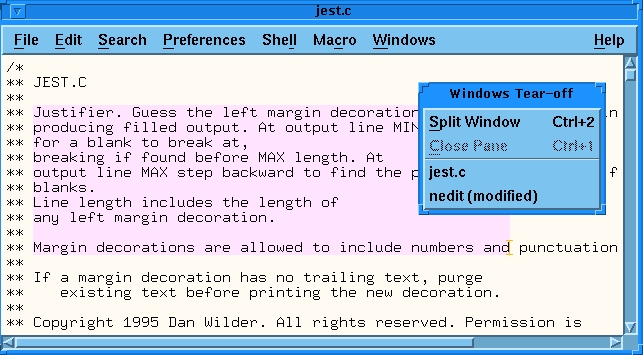
Figure 1. Selecting a Region in a C Comment Block
The second figure shows the text after justification. One justified block has been dragged, and a linear selection is shown, as I am about to hit the Backspace key to delete it.
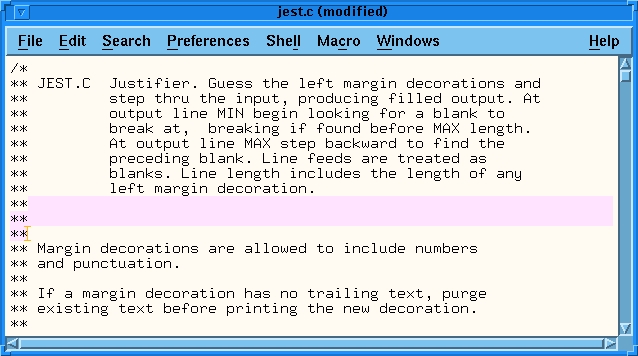
Figure 2. After Justifying the Region
Ctags are supported. Vertical and horizontal Motif scrollbars are present. Windows may be split, and multiple windows may be opened into different files. Regular expression support includes full egrep regular expressions, though find and replace are the only actions available on regular expression matches. Undo-redo extends to the beginning of session, even through file saves.
Vi users will appreciate that the ESC key mostly does nothing. After a while you get over punching ESC constantly, and at that point you might remap the key to something useful.
Some nice touches for programmers allow you to select the line number in an error listing from a compiler shown in an X window, then go to NEdit and locate that like number with just a CTRL-E. “Search” likewise allows searching for text selected in some other window. “Tag” search likewise will pick up a selection from another window. So will ''file open'', in which you select text containing a file name, then open that file using CTRL-Y.
Fairly detailed customizations including key rebinding, and some scripting may be accomplished using X resources. Minimal macro support is available with the current version (4.0.1). Shell escapes may be used to run scripts on the edit text.
Of near-production quality editors I've used, NEdit is the easiest to learn. This is partly because the keyboard command set is sparse, and partly because the menu bar at the top gives the keyboard accelerators for most of the common actions. After you've looked an action up several times in the pull-down menus, you may remember the keyboard accelerator and not need the menus. On-line help is well indexed; terse, but complete. For the most part, neither novice nor expert need refer often to the very excellent and detailed man page.
NEdit is available under GPL as source or static linked Motif binary from: ftp://ftp.fnal.gov/KITS/pub/NEdit/v4_0_1/. Building from source requires Motif libraries, not at present available as freeware. NEdit is on the LessTiff test suite, and so it should be one of the first large applications to run under this free Motif workalike.
Two discussion groups are NEdit_discuss and NEdit_announce, available by sending e-mail to mailserv@fnal.gov containing either subscribe nedit_discuss or subscribe nedit_announce in the text. To unsubscribe, send e-mail to mailserv@fnal.gov with either unsubscribe nedit_discuss or unsubscribe nedit_announce in the body of the e-mail.
Dan Wilder is a computer-literate young man who lives in Seattle, Washington. He devotes his spare time to collecting text editors and Eiffel compilers, and taking care of his mother-in-law's small apple orchard. Dan may be reached by e-mail as dan@gasboy.com.

