
Writing a Mouse-Sensitive Application
The Linux text console is more than a bare terminal. One of its most important features is the availability of a mouse device. In addition to supporting selection, the mouse can be used to interact with user programs. If your computer runs the gpm server your programs can easily benefit from mouse availability under both the Linux console and xterm, and run without complaint under other environments.
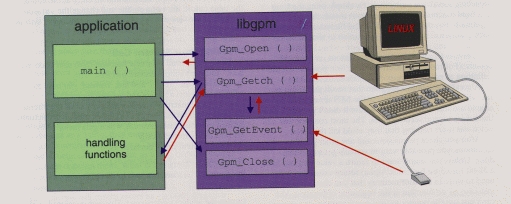
Figure 1. An application using libgpm
The main difference between a conventional text program and a mouse-sensitive application is the way they process input—while the former reads from stdin and writes to stdout, the latter must multiplex input from different sources—we can call it an “event-driven” application. I will consistently use “program” to refer to a stdin-driven process and “application” to refer to an event-driven one.
The gpm client library is meant to allow programmers to easily turn a program into an application by changing only a few lines of original source code. Alternatively, it offers complete support to developers designing an application from scratch. Portability is a major issue here, because you can be tempted to build a nice full-featured application for the Linux console, which reveals itself as completely unusable when you remotely log in to your PC from within an xterm or a bare vt100. Some care must be taken to avoid this, since a networked Linux computer can easily be used from a tty which has nothing to do with its own console.
The internal structure of a console application is represented in Figure 1, which outlines what changes required in the original program so it can respond to mouse events. As you can see, all mouse support code could be hidden in a separate module, and mouse-related code in the main body of the source is limited to the following calls:
Gpm_Open() The open function should be called before reading any input. It is used to connect to the daemon's socket and performs all the setup needed to get back events from the gpm daemon.
Gpm_Getc() Any call to getc() and to getch() should be replaced by the Gpm_-prefixed function. The replacement code manages multiple inputs and dispatches mouse events as needed—more on this later.
Gpm_Close() Before exit()ing, the mouse connection should be closed. This call may be omitted, though it isn't nice to do so.
When writing portable code, these few modifications could be masked out as suggested in the code fragment below. Its role is to define function names which are independent of mouse availability. Such preprocessor-specific code would better reside in a header file, to avoid ugly #ifdefs in the actual source. The approach of choice is to hide Gpm_Open in local_mouse_init, because setting up is more than a function call; conversely, local_mouse_close is a syntactic place holder.
Any other code referring to the mouse can be put in a different source file from the general application code. A correct Makefile (possibly through autoconf) can easily choose which files need to be compiled and which preprocessor defines are needed, without cluttering the code with #ifdef/#endif.
#ifdef CFG_MOUSE<\n>
#    define local_wgetch(w) Gpm_Wgetch(w)<\n>
     extern int local_mouse_init(void);<\n>
#    define local_mouse_close() Gpm_Close()<\n>
#else<\n>
#    define local_wgetch(w) wgetch(w)<\n>
#    define local_mouse_init()  /* nothing */<\n>
#    define local_mouse_close() /* nothing */<\n>
#endif
Choosing a good connection with your mouse device is tricky. The problem is getting the best event resolution while avoiding excessive of context switches. Some simple applications need to be told of only button-press events and can leave cursor-drawing to the server program; more complex applications, on the contrary, might want to be told of any single movement of the mouse, as well as button-press and button-release.
The Gpm_Open function gets as an argument a structure identifying the type of connection requested. The type of connection in turn is characterized by event masks—bitmaps identifying event types. With gpm, two mask are required—the mask of events you want to get and the mask of events you want to be handled in the default way.
The double mask is useful, because the default way is known. In particular, since you know that mouse motions cause the cursor to be drawn, you may often leave motion events to the default management, thus relieving your application of most of the work of handling the mouse.
In addition to event masks, the connecting application must specify two “modifier sets”, that is, sets of keyboard modifiers, such as shift, control, meta (alt) and so on. Within the gpm server, keyboard modifiers are used to multiplex applications on a single console. It is handy to be able to paste selected text in a mouse-sensitive application, while an application taking complete control of the user's pointer would irritate most of the customers.
Each gpm client is asked to specify a “minimum set” and a “maximum set”. The client specifically asks not to be informed about mouse events with less than the minimum set or more than the maximum set of attached modifiers. The minimum set will be 0 for most clients. The gpm-root menu drawer is a client with non-0 minimum mask. This gives selection mouse-only events when there is no other client. Thus, when running Emacs, you can use the Emacs mouse facility (by loading the library t-mouse.el, within the gpm distribution) and have access to selection and gpm-root; the lisp package accepts mouse-only and alt-mouse, the gpm-root server gets ctrl-mouse, and the internal selection mechanism gets any other events. Within this scheme, selection is a catch-all, as if it had an infinite maximum-modifiers mask.
Gpm_Open, then, keeps a stack of connection masks, so you can reopen the connection to modify your mask and get back to the previous behaviour on the next Gpm_Close invocation. This feature can be used to either increase or decrease the amount of events you get. Emacs, for example, disables event reporting in this way when it is stopped, to allow you to use selection normally with your shell. An application drawing a menu, by contrast, can only reopen the connection to get motion events while the menu is kept down. This stack-like feature is managed in the client library, so that misbehaving applications can't lock up the server.
To test library features without loosing your youth in a compile-execute-understand-recompile loop, the mev program is distributed along with the gpm server. This tool is based on the idea of xev, the X event reporter. mev reports any event it gets on the current console, and you can specify on the command line the event and modifier masks to be used. Thus, mev can help in testing your connection parameters before you hardwire them in your application. Mev can also demonstrate use of the connection stack by getting push and pop commands from standard input.
Though mev was originally designed as a test case to debug the gpm server, it is now quite useful in itself and I use it as the engine for the emacs library.
After connecting to the server, the application must respond to both keyboard events and mouse events. To ease this, libgpm offers replacement functions for getc and its relatives, but the application designer is not forced to use them.
Programmers who want to autonomously manage the two input channels must invariably use the select() system call, unless the application puts the input files in non-blocking mode and keeps polling them. Polling can be wise if your application takes a long time to do its job, and you want the user to be able to regain control with a single key or mouse press. A good example of this technique is to be found in the Netscape WWW browser.
Many screen-oriented applications, on the contrary, spend most of their time waiting for user input, and could well benefit from the functions in libgpm. Externally, Gpm_Getc() and its relatives behave just like the originals when keyboard events are received; internally, they can receive mouse events and handle them through a user-defined function.
These input procedures, as you can imagine, are built around select(). This is the only way to relieve the user from using select in the application body. When stdin is reported as readable, the original getc function is called; when the mouse connection is readable, Gpm_GetEvent() is called.
Applications can invoke Gpm_GetEvent() by themselves if they need to, but you must remember that Get_Event is based on a read() call, and thus is blocking. The normal gpm input functions (usually Gpm_Getc) in libgpm invoke Gpm_GetEvent only when there is data to read. The getc-replacing function then delivers the event to a mouse-handling function specified by the application. Note that Gpm_GetEvent() is only in charge of reading the event from the current source and does not deliver the event to the mouse-handling function.
The user function in charge of handling mouse events—let's call it “mouse handler”---is registered by the user in a global variable before invoking the input functions, and its invocation doesn't interfere with the running Gpm_Getc() invocation. Be careful, however, that the input function is waiting for the handler to complete; long-running tasks don't fit into the mouse handler well.
More often than not, the mouse is simply used as a shortcut for the keyboard: for example, clicking on a menu-button is like pressing f1, clicking on a listbox item is like entering its highlighted letter, pressing the button outside an active menu is like issuing the esc key, and using the scrollbar is like pressing the arrow keys many times. Application design is greatly simplified if the mouse can return keys to the input subsystem—the dual input mechanism is again joined into a single input stream, greatly reducing the amount of status information to be managed.
Within libgpm, this behaviour is enforced by the return value of the mouse handler. The handling function returns an integer value which gets interpreted in the following way:
EOF This value is used to signal a fatal error and will cause the input function to return the same value to the caller.
0 A zero return value means that the input function should go on as before, without returning to the caller. The event is considered eaten by the handler and no key-press is simulated.
Anything else Any other value is considered a “simulated” keystroke character, and is returned to the caller. Note that these values are not limited to ASCII characters—any integer value can be returned.
Before returning a fake key, the input functions set a global variable, which signals that the key is not a true key press; before returning a keyboard-generated character, the flag is cleared. Applications are free to use or ignore this information. Personally, I have never used it.
Note that the ability to return any integer value is powerful and is perfectly compatible with the libc environment, because getc() returns an integer by definition. Return values exceeding a character range can be used to encapsulate mouse activity into a generic “event” integer entity, and the same switch construct in the main loop can handle any input the application gets.
Using the fake-key capability, any mouse event can be packed in an integer value to be interpreted later in the main loop of the application. Personally, I prefer to interpret the event inside the mouse handler and return to the caller only a integer belonging to a small set of actions.
The mouse handler can also register its intent to return more keys, so it may be called without waiting for a new mouse event. Thus, a scrollbar can easily be implemented in the mouse handler by returning to the caller the right number of arrow key presses.
Smart use of the fake-key mechanism can greatly ease the design of a complex application, with negligible computational overhead. In practice, you must be careful when you write mouse-handling code which can't fit the fake-key mechanism; you must be sure that a user sitting on a vt100 tty without any pointing device won't loose control of the application by falling into a state which is unrecoverable without the mouse. It is best if the unfortunate mouseless user can exploit your application in full despite limited input capabilities.
Typically, a smart program allows itself to be temporarily stopped or offers the user the option of spawning a shell. This ability is often overlooked during program development, because programmers tend to concentrate on the application itself, rather than on escaping from it. Before giving away tty control, any mouse-sensitive program should release the mouse to avoid stealing events from a user trying to run the selection mechanism within a shell environment. The preferred way to release the mouse in this case is to invoke Gpm_Open with connection parameters indicating that all events are passed along to the next service. When the program resumes the user focus, it can simply Gpm_Close to restore the previous event masks. If the application forgets to release the mouse before releasing the tty, weird things happen.
Usually mouse-sensitive applications manage the screen using curses or the compatible ncurses library. [See page ?? for an introduction to ncurses—Ed] From the point of view of mouse handling, this doesn't make much difference. You need only to call Gpm_Getch() or Gpm_Wgetch() in place of the getc or getchar. These replacement functions take the same arguments as the original curses calls.
From the mouse-handling point of view, the only difference between a full-featured curses application and one using normal tty is in the possible subdivision of the screen into different windows. Using a single mouse handler makes management non-trivial if the screen is split into multiple windows. The scenario is dealt with by the so-called high level library, which is a simple yet effective set of functions to manage a stack of “regions of interest”, easing the dispatch of events to multiple recipients.
The high-level part of the gpm library offers entry points to a centralized data structure responsible for delivering events to multiple mouse handlers.
In practice, a double linked list of ROIs (regions of interest) is maintained, and each ROI is responsible for handling events for a specific user function with specific “clientdata”. Each region is identified by its rectangular limits and by minimum-modifier and maximum-modifier sets. Thus you can choose to deliver events to different windows, according to either the event position or the modifiers used, in a way similar to the multiplexing of applications on a single console described earlier.
When you use a windowed interface, you can take full advantage of the high level library by creating one or more ROIs associated with each curses window. In addition to events happening in the ROI, the handler associated with a region will get “enter” events when the mouse cursor enters the region and “leave” events when it leaves. This means that a single mouse motion can generate multiple callbacks to help keep a consistent screen state without needing a huge set of global state variables.
Unfortunately, the high level library has been available only since gpm version 1.0. If you have an older version of gpm you would do best to upgrade. Lack of the high level library was the main reason that gpm's version numbers were 0.x for such a long time.
Within the X Window System, terminal applications are run within xterm, and xterm is the only usable tty you can find on most workstations—usually workstations are terribly slow and unusably hostile before X-Windows is started.
Fortunately, xterm is able to report mouse events, made up of escape sequences, which are reported to the client application through the same channel as normal data.
Unfortunately, the range of events it is able to report is severely limited. Moreover, because events are reported through the same stream as keyboard events, all the nice design of multiple input channels breaks, and any application which wants to sense mouse and keyboard events independently fails.
Fortunately, using Gpm_Getc() and friends works quite well, as you can check by running mev under an xterm.
If you consider ever running your application under an xterm, you must be sure to not depend on a full event reporting. Specifically, you won't be informed of any motion or drag events, and button-release events won't specify which button of a set has been released. This means, in practice, that if you need precise reporting of a double-button press, your application will not work properly under xterm.
I strongly urge you to be careful; if the application can only run under the Linux console, it is of limited use, and you'll surely swear at yourself sooner than you may expect. If, on the contrary, the application is able to run under xterm, it is better exploiting the ability to (at least) invoke buttons by a simple mouse press, rather than forcing the user to use keyboard-only interaction.
And what if the environment is not a Linux computer? A pair of good design choices and a small investment of your time can make you a proficient user of the autoconf package, and your application can easily adapt to the following environments:
A Linux machine with gpm installed. This is the best environment, and the application will be compiled with full support, under both the console and xterm. When invoked within a mouseless tty, the application will run in keyboard-only mode without needing runtime conditionals.
A Linux machine without gpm. If the application is distributed in binary form, the gpm library will silently detect lack of the server and will run in keyboard-only mode on the console. Under xterm everything will work. If the application is distributed in source form, and thus can't link in the gpm library, the following case will apply.
Another Unix-like operating system. The application will compile with xterm support built in, because autoconf will include gpm-xterm.c in the set of files to be compiled. This source replaces the most useful functions you find in libgpm (that is, the open, close, and getc functions) and Gpm_Repeat(), a support function used to provide event repetition while the button is kept pressed. The concept of “mouse handler” will still work.
A non-Unix operating system. It seems like a lost battle... You have to include a lot of conditionally compiled code anyway. Are you sure you need a mouse-sensitive application? In any case, it will be no harder than making any application portable between significantly different operating systems.
The code excerpts in Listings 1 and 2 include the the relevant parts of configure.in and Makefile.in used to create the “portable” sample application distributed within the gpm package. They are reproduced here to give an idea of how easy it is to set up a portable compilation environment. In fact, you needn't be an autoconf expert to set up such an environment, because a little documentation and good amount of cut and paste can easily work.
This configure.in checks if Gpm_Repeat is found in libgpm and selects whether libgpm is linked in or gpm-xterm.c should be compiled. Note that the high-level library, though not managed in this configure.in, is independent of the low-level mechanisms, thus it can be included in the portable application as well.
Gpm_Repeat is a software aid to repeating events on a timely basis up to button release. It works also under xterm and is used here as a test because it appeared only when the library and server were quite stable. I presume you don't want to link your application with libgpm 0.01, in the unfortunate case that some early alpha tester has one lying around on his or her hard drive.
Before you actually start coding, however, it is worth understanding the pros and cons of mouse programming using libgpm, and being warned against common pitfalls.
If you need to write a friendly interface, using libgpm is really difficult compared to writing a Tk script. If your interface is going to run on a powerful workstation, you are better off running X-Windows and Tk. Moreover, it is completely portable—free Macintosh and MS Windows ports of Tk are in development.
If your application will run on a general-purpose workstation which does not run X-Windows, you should take into account the trend to upgrade existing hardware. Thus, if your application is a medium- or long-term project, you might be better off to start with Tk anyway.
But then, what applications need libgpm, if the author himself discourages its use? As a simple rule, I suggest writing text-only applications when you need to support the whole range of Linux computers. System management tools are good candidates for libgpm—remember that Linux-1.2 still runs happily with 2MB of RAM and 10MB of disk.
Another field which could benefit from a simple mouse-sensitive front end is the field of embedded systems and dedicated machinery. For example, an inexpensive Linux box can be used as an NFS (Network File System) or WWW server for a small company, and usage reports will be queried by novice users. Avoiding X-Windows and writing a gpm-based interface is a win here.
If I've not discouraged you from using libgpm, go for it, but remember to pay attention to portability, simplicity, and the user's proficiency.
Portability is a major issue when developing a Unix application. Particularly, remember to build a tty-independent application—this means you must always provide a keyboard alternative to mouse events. There are hundreds of tty types, and you can't force a user to use the Linux console. Besides, a user might need to drive your application in “unsupervised mode” through stdin.
Another important issue is keeping it simple: don't depend on things like pressing two buttons at once, for example, which won't work under xterm.
Finally, remember that the user must feel the mouse. You should redraw the mouse cursor (possibly by means of Gpm_DrawPointer) after each write to the screen. This is important because users tend to use the mouse for selecting text, and using a mouse-sensitive application in the same way as selection can make for disasters.
The gpm package is available by ftp from sunsite.unc.edu/pub/Linux/system/Daemons/gpm-1.06.tar.gz. Sometimes small improvements don't get to sunsite, because I don't want to fuss up the maintainer. The very latest release is always available from iride.unipv.it/pub/gpm/gpm-1.06.tar.gz.
The source package includes a full info file and a PostScript manual describing the library much more thoroughly. A sample portable application is included as well.
The package is also distributed in binary form (but with the full documentation) with Slackware. If you have had the Slackware distribution through floppy disks, you may want to get the source; otherwise it is in the cdrom. Recently, I've also heard a proposal to “debianize” gpm, so it may appear in the Debian distribution in the near future.
For any question not answered in the documentation, feel free to contact me.
Listing 1. Simple configure.in for a Mouse-Aware Application
dnl configure.in for sample gpm client
dnl This will only run with autoconf-2.0. or later
AC_INIT(rmev.c)
AC_PROG_CC
AC_PROG_CPP
CFLAGS="-O"
LIBS=""
dnl look for libgpm.a; if found assume to have
dnl <gpm.h> as well. Gpm_Repeat is only present
dnl after gpm-0.18
AC_CHECK_LIB(gpm, Gpm_Repeat,[
    GPMXTERM=""
    LIBS="$LIBS -lgpm"],[
    GPMXTERM="gpm-xterm.o"
    if test "-uname-" = Linux
      then AC_MSG_WARN("libgpm.a is missing or old")
    fi
    ])
dnl subsitute @GPMXTERM@ in Makefile
AC_SUBST(GPMXTERM)
Listing 2. Simple Makefile.in for a Mouse-Aware Application
# simple Makefile.in - autoconf will
# replace any @symbol@ with the right value
# include standard stuff
srcdir = @srcdir@
VPATH = @srcdir@
CC = @CC@
CFLAGS = @CFLAGS@
LDFLAGS = @LDFLAGS@
LIBS = @LIBS@
prefix = @prefix@
OBJS = rmev.o @GPMXTERM@
TARGET = rmev
all: configure Makefile $(TARGET)
$(TARGET): $(OBJS)
    $(CC) $(CFLAGS) $(OBJS) $(LDFLAGS) \
               -o $(TARGET) ($LIBS)
clean:
    rm -f *.o $(TARGET) config.*
### rules to automatically rerun autoconf
Makefile: Makefile.in
    ./configure
configure: configure.in
    autoconf
    configure
distrib: clean
    rm -f config.* *~ core
    autoconf
    rm -f Makefile
Alessandro Rubini (rubini@ipvvis.unipv.it) is taking his PhD course in computer science and is breeding two small Linux boxes at home. Wild by his very nature, he loves trekking, canoeing, and riding his bike. He wrote gpm.

