Installing the Xaw3D Libraries
After months of being stuck in my CLI (Command Line Interface) mode, I finally broke down and installed X11R6 on my Linux machine. It's nothing to write home about, really, just a 386/40 which three years ago was state of the art. Oh well. At least I have graphics and can finally see the neat pictures on the Star Trek: Voyager WWW site. It also gave me a chance to put my mouse to work after it collected months of dust.
Taking the defaults that XFree 3.1.1 gave me, I found myself inside fvwm and its Motif-like interface, wishing that other programs also had a Motif-like interface. Motif has many advantages, but the drawback is that it costs money that many of us don't have (yet). One of the features that Motif provides is a 3-D interface for buttons and other portions of a window known as widgets. These widgets are designed such that the developer of the software determines what widgets to use and how they work, and the end user is allowed to change how the widgets are displayed. This is similar to the way that X without Motif works now.
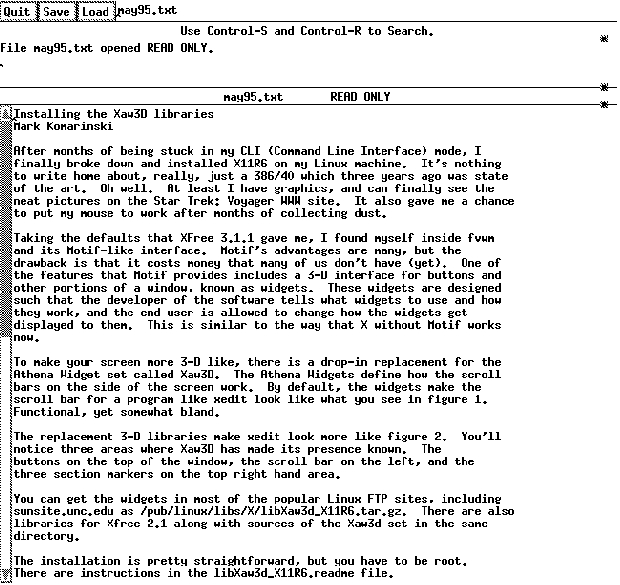
To make your screen more 3-D like, there is a drop-in replacement for the Athena Widget set called Xaw3D. The Athena Widgets define how the scroll bars on the side of the screen work. By default, the widgets make the scroll bar for a program like xedit look like what you see in Figure 1. Functional, yet somewhat bland.
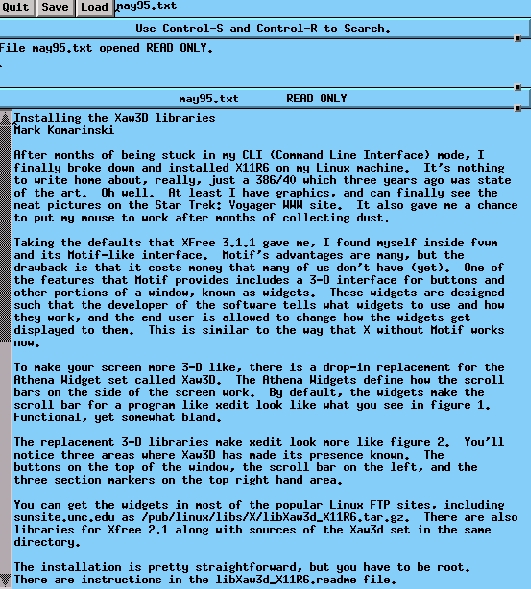
The replacement 3-D libraries make xedit look more like Figure 2. You'll notice three areas where Xaw3D has made its presence known. The buttons on the top of the window, the scroll bar on the left, and the three section markers on the top right-hand area.
You can get the 3-D widgets in most of the popular Linux FTP sites, including sunsite.unc.edu as /pub/linux/libs/X/libXaw3d_X11R6.tar.gz. There are also libraries for Xfree 2.1 along with the Xaw3d sources in the same directory.
The installation is pretty straightforward, but you have to be root. There are instructions in the libXaw3d_X11R6.readme file. Tar and uncompress the libXaw3d_X11R6.tar.gz file with:
tar -zxvC / -f libXaw3d_X11R6.tar.gz
then update the shared libraries:
ldconfig
The -C tells tar to untar in the root directory. Since the tar file contains the directory structure to put the libs in usr/X11R5/lib, the -C / will place the file in the correct directory without having to move it all around. Note that this will replace the libXaw.so.6.0 file that already exists there, so you may want to back it up. The ldconfig will update the file links for you, so you don't need to make the common mistake of erasing the library by using the ln command incorrectly.
Once this library is installed, this will only affect dynamically linked libraries. There are other packages available in the same directories as above that provide the libraries for statically-linked programs, should you need them: Most users probably won't.
The next time you start X-Windows, you'll notice changes in the scroll bar and other widgets that normally use the Xaw set. You can also make changes to the appearance of these widgets, using the ~/.Xdefaults file to configure Xaw.
You can use the *shadowWidth resource to change how each widget displays itself, and you can see the results of your changes by merely saving the file to ~/.Xdefaults and then starting up a new program that uses scroll bars or buttons that are statically linked. Two good examples for this are xterm and xedit.
The *Label*shadowWidth resource defines the depth of the label widgets to make them appear 3-D. You can add a shadow by setting this number, for example, to 2.
One of the best ways, however, to figure out what each widget does is to borrow someone else's configuration. Michael K. Johnson was kind enough to provide me with a copy of his .Xdefaults, and I've made my own revisions, which are shown in Figure 3.
! For Xaw3d! gives everything that Motif look to it. Sort of.*background: LightSkyBlue*Form.background: grey90*TransientShell*Dialog.background: bisque3*Command.background: gray80*Menubutton.background: gray80*ScrollbarBackground: gray60*Scrollbar*background: gray70*Scrollbar*width: 16 *Scrollbar*height: 16*Scrollbar*shadowWidth: 2*Scrollbar*cursorName: top_left_arrow! You can change the above to all kinds of icons, including gumby.! Find out what icons are available by looking in! /usr/include/X11/cursorfont.h - be sure to strip off the XC_*Scrollbar*pushThumb: false*ShapeStyle: Rectangle*beNiceToColormap: false*shadowWidth: 2! The above defines all shadowwidths to 2. *Label*shadowWidth: 2! The above overrides the definition from a few lines above for Label! widgets.*SmeBSB*shadowWidth: 2*highlightThickness: 0*topShadowContrast: 20*bottomShadowContrast: 40! The above two lines define how the shadows appear on the top and! bottom of the widgets. The higher the number, the lighter it is. This! particular setting makes the top and left sides darker than the! bottom and right sides. Figure 3. File .Xdefaults
Pulldown menus can have the *SmeBSB*shadowWidth resource set, which will change the display of pull-down menus.
For more help on how the resources or Athena Widgets work, look at the man pages for the various standard X applications (such as xterm or xedit).
Mark Komarinski graduated from Clarkson University (in very cold Potsdam, NY) with a degree in computer science and technical communication. He now lives in Troy, NY, spending much of his free time working for the Department of Veterans Affairs where he is a programmer.