
Untangle's Multi-Functional Firewall Software
Most reviews are based on trying a product and running it through hypothetical situations to see how it performs. In the case of my Untangle review, I had an emergency for which I needed a Web filter ASAP. I'm the technology director for a K–12 school district in Michigan, and our proprietary Web filter quit working. In order to meet federal requirements for Internet filtering, I had to have a working Web filter, and I had to have it before the next morning—thus, my full-blown, production-level review of the Untangle product. Hopefully, my all-night installation and configuration marathon is beneficial to you.
At its core, Untangle is a Linux distribution designed to filter and manage network traffic. It can act as a transparent bridge functioning between a router and network, or it can work in router mode, both filtering and routing at the same time. I tested Untangle in transparent bridge mode, but if used as a router, it supports load balancing from multiple WAN links (for additional cost).
Untangle is a free product that offers premium commercial options. Although it's obvious the company wants to sell those premium products, the free features are surprisingly robust. (See the sidebar for a comparison of free features vs. commercial add-ons.) For my test, I activated most of the free features and started a 14-day trial of the premium Web filter.
Free Features vs. Commercial Add-ons
Free modules:
Web Filter Lite
Spam Blocker
Virus Blocker
Spyware Blocker
Phish Blocker
Attack Blocker
Ad Blocker
Intrusion Prevention
Protocol Control
OpenVPN
Router
Firewall
Reports
Captive Portal
Premium modules:
Live Support
Configuration Backup
Directory Connector
Policy Manager
Branding Manager
Web Filter
Kaspersky Virus Blocker
Commtouch Spam Booster
WAN Balancer
WAN Failover
Bandwidth Shaping
Web Cache
Installation is done similarly to any other Linux distribution. The steps were very simple and mostly automatic. My server was a standard rackmount Dell machine, and all hardware was detected and configured correctly. After initial installation, all configuration is done via Web browser. Interestingly, the Untangle server installs the X Window System and a browser, so configuration can be done directly on the server. I found it more convenient, however, to configure it remotely.
When you first log in to the configuration page, you're presented with a graphical representation of an empty server rack. As you add services, they visually fill this “rack” on your screen (Figure 1). Each service is represented as a service on the virtual rack and can be turned on or off by clicking on a virtual power button. I'll admit it seemed a bit silly at first glance, but after a while, I found it rather logical and easy to use. (It also made it easy to turn services off, which was required as my production day started. More on that later.)
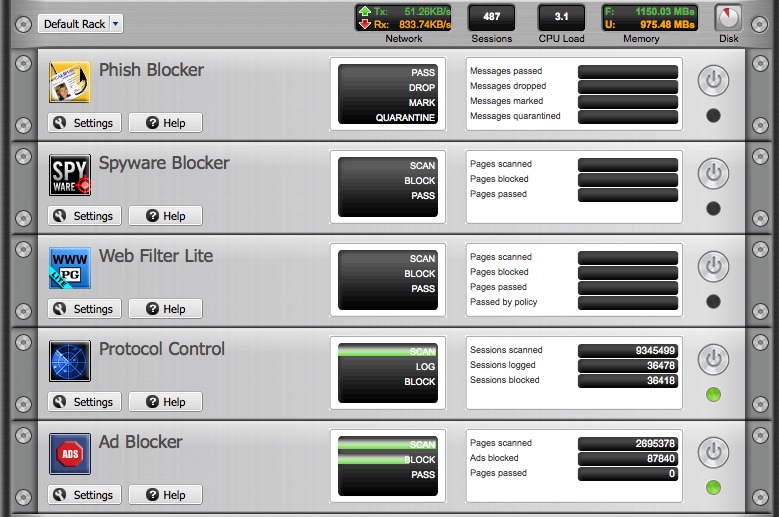
Figure 1. Adding services fills a “rack” on your screen.
The configuration pages for most services are similar in design. Figure 2 shows the configuration window for the Spyware Blocker module. Although I wish many of the modules had more configuration options available, Untangle provides a decent set of configurations with a very sensible default setting for most features. The biggest frustration I had with Untangle was its extremely limited authentication integration. Although the server apparently will authenticate against a Microsoft Active Directory, I don't have AD in my network. The only other authentication option is to use a Radius server, which quite frankly I haven't had on my network since we hosted dial-up networking. The inability to communicate via LDAP or Open Directory forced me to use Untangled in anonymous mode. That was fine for my emergency situation, but it would be a major hurdle for permanent adoption in my network.
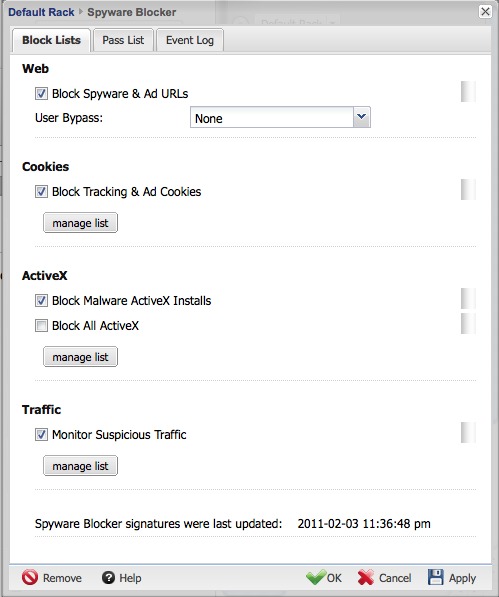
Figure 2. Configuration Window for the Spyware Blocker Module
I've been using Linux routers and Web filters for more than a decade. I've never seen a system with so many filtering features that is so easy to configure. I was particularly impressed with the Protocol Control module. Although not 100% accurate, it did a really good job of stopping traffic based on packet type. For example, in the first hour of school, Untangle found and blocked a student from running bittorrent on our network. The torrent traffic was running on a random port, but Untangle was able to identify and block the traffic. The system-wide Ad Blocker module also was nice, since blocking ads on Web sites helps kids focus on their work. (The moral ramifications of blocking Web ads in a school district are, of course, up to the reader, but the ad blocker works very well.)
The free Web filter (or “lite” version) is very basic. It includes a few categories and does not block SSL traffic. Although it might be sufficient for a home user trying to block accidental porn surfing, it certainly isn't robust enough for a K–12 school district. The premium Web filter, on the other hand, seems to be on par with other commercial Web filtering solutions. Pricing is based on concurrent users, but based on the pricing for 500 workstations, the cost was comparable or lower than other products. Because I was unable to authenticate Untangle with my user accounts, I can't attest to how fine-grained access control is, but the configuration appears to be adequate for tiered access. That's important for us, as staff and students have different access rights.
I've already mentioned the limited configuration options for user authentication. Unfortunately, that's not the only problem with authentication. Untangle works in transparent mode only. By that, I mean it intercepts traffic as it passes through the bridged network ports, but it doesn't act as a proxy. I find using a proxy (one that is configured on the browser and is assigned to connect via proxy server) is a very efficient way to manage Web filtering. Although transparent mode is convenient, it also breaks SSL connections, requiring some fancy hacking to block filtered SSL sites. Don't get me wrong, Untangle does a really great job of hacking, but if it had actual proxy support, it would be simpler to support SSL traffic. Plus, I wouldn't have to reconfigure 500 workstations that currently have proxy settings in the browser!
The only other frustration I had with Untangle was its system requirements. Although my single Xeon CPU is a few years old, with just the Web filter module active, my CPU was pegged at 100% usage most of the day. When I turned on the other modules, like Protocol Control, Ad Blocker, Spam Blocker and so on, my entire network slowed to a crawl. I do have a rather busy network, and I realize protocol analyzation is very CPU-intensive, but I was surprised at how quickly my 2.8GHz Xeon CPU became overloaded. Still, with enough horsepower, I fully expect my network would not slow down. Just be aware that Untangle's awesome features come at a CPU premium.
Untangle has an amazing number of features. Some of them seem a little redundant (like the Spyware Blocker and the Phish Blocker), but it's nicer to be overprotected rather than underprotected. The reports are searchable and quite visually appealing (Figure 3). I find myself looking at the daily reports that arrive in my e-mail inbox to look for trends and troublesome client computers. If authentication were a bit easier to configure, those same trends could be identified by user as well.
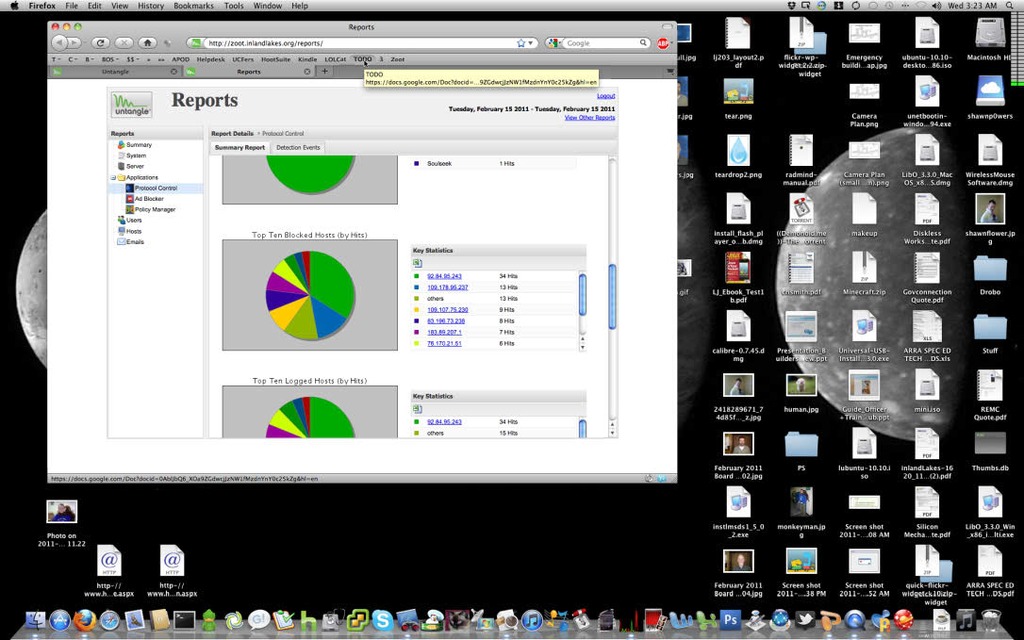
Figure 3. Untangle's Searchable and Visually Appealing Reports
One of the best parts of being forced to use Untangle in a production environment is that I was able to identify its major weaknesses for my purposes very quickly. I'm happy to say that the company seemed very willing to hear my concerns, and the developers were given my feedback immediately. In fact, I wouldn't be surprised if some of my concerns are addressed by the time this review is printed. I'm always encouraged by a company that listens to criticism. Hopefully, that criticism will be put to good use in future editions of Untangle.
I'm always hesitant when companies provide a small portion of their product for free and charge for premium features. Thankfully with Untangle, the free offering is extremely generous and sufficient for what many users would want. The premium features are truly valuable, and the pricing is fair. There are some situations that make Untangle the wrong choice for your network, and unfortunately for now, I am in that situation. Until Untangle works out additional authentication schemes and provides direct proxying, I can't implement it as my main Web filter. I will admit, however, that even though I'm not using Untangle as my Web filter anymore, I did leave it in place to filter P2P traffic and block ads.
I'm very impressed with Untangle and would recommend it to others. With its very robust set of free features, many users won't need to pay in order to meet their needs. For more information and a free download, check out www.untangle.com.
Shawn Powers is the Associate Editor for Linux Journal. He's also the Gadget Guy for LinuxJournal.com, and he has an interesting collection of vintage Garfield coffee mugs. Don't let his silly hairdo fool you, he's a pretty ordinary guy and can be reached via e-mail at shawn@linuxjournal.com. Or, swing by the #linuxjournal IRC channel on Freenode.net.
