
New Projects - Fresh from the Labs
There have been plenty of GUI front ends for Wine over the years, and to be honest, I've hated pretty much all of them. However, this one has turned me around, and I recommend it to you as well.
To quote the Web site: “Q4Wine is a Qt4 GUI for W.I.N.E. It will help you manage Wine prefixes and installed applications.” Also according to the Web site, Q4Wine includes the following general features (and more):
It can export the Qt color theme into Wine color settings.
It can work with different Wine versions easily at the same time.
It's easy to create, delete and manage prefixes (WINEPREFIX).
It's easy to control Wine processes.
It supports autostart icons.
It provides easy CD image use.
You can extract icons from PE files (.exe, .dll).
It provides easy backup and restore for managed prefixes.
It includes Winetriks support.
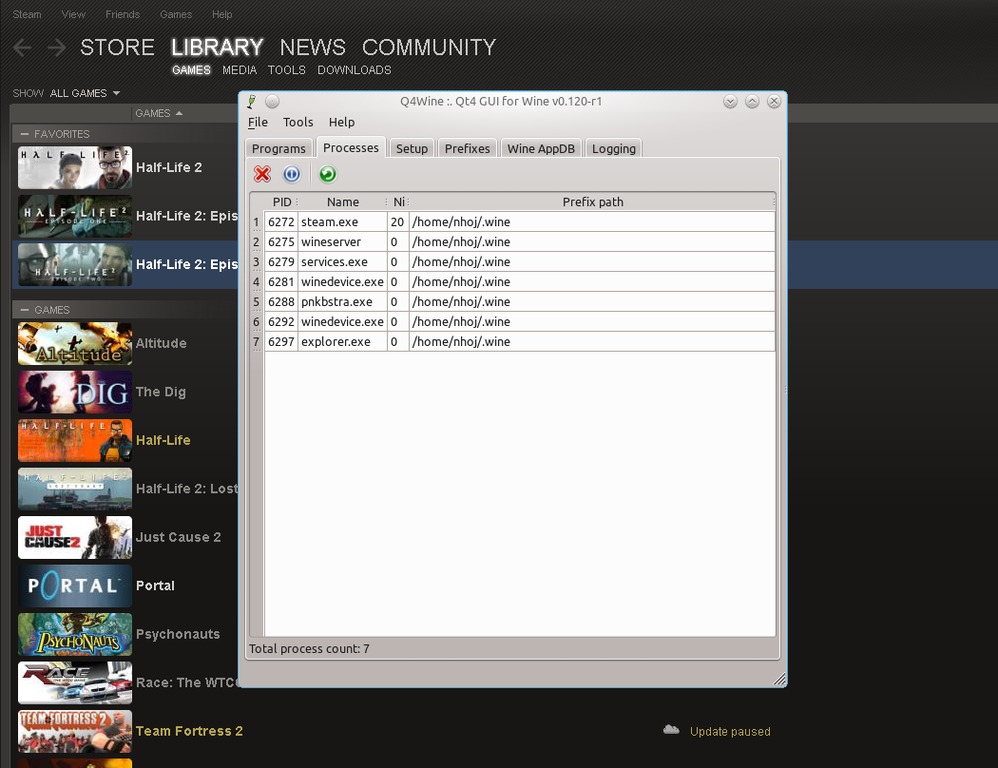
A key feature of Q4Wine is its Processes tab, which acts as a built-in system guard for misbehaving programs, but only for Wine-specific programs—simple, but very clever.

Q4Wine's real talent lies in letting you define Wine settings for one program without affecting the whole system.
Installation
Binaries are provided for Debian, Ubuntu, Fedora, FreeBSD, Gentoo, openSUSE, openmamba and Slackware, as well as the usual source tarball. For those running with the source, the documentation says you need the following libraries:
sudo
wine
>=sqlite-3.5.6
>=which-2.19
>=icoutils-0.26.0
>=qt-4.4.0
>=qt-sql-4.4.0 (note: qt-sql might have sqlite driver support)
>=qt-gui-4.4.0
>=qt-core-4.4.0
>=qt-network-4.4.0
>=qt-dbus-4.4.0
wget
FuseISO is listed as an optional dependency, but I thoroughly recommend it. I also had to install qt4-qmake and libqt4-dev.
Grab the latest tarball, extract it, open a terminal in the new folder, and enter the following commands:
$ mkdir build
$ cd build
$ cmake -DCMAKE_INSTALL_PREFIX=/usr ..
$ make
If your distro uses sudo:
$ sudo make install
If your distro uses root:
$ su
# make install
To run the program, enter:
$ q4wine
Usage
Before you can begin using Q4Wine, you'll be taken through a first startup wizard. You'll be asked where the paths are for four Wine components, with the first three most likely filled in already, and the last, wine libs, empty, needing to be defined. This was /usr/lib32/wine on my system, which is perhaps left empty for 32-/64-bit reasons?
Next is a similar screen for System utils paths (which thankfully come pre-filled with defaults), followed by another page of settings also pre-filled, but feel free to tweak them if you know what you're doing. Network settings are next, followed by a very important step: a quick mount profile.
This allows you to mount or unmount without root privileges, and hopefully, it will let you eject a disc during multi-CD installations. FuseISO was the default choice with my installation (although I deliberately chose to install FuseISO for this purpose), but those without it may choose from sudo or gui sudo.
Now that you're in the main GUI, look under the Setup tab. The Current prefix: drop-down box gives you the brilliant option of choosing between Wine versions if you have multiple versions installed.
If you click on the Programs tab, you're presented with a series of default system programs, including wordpad, winecfg, explorer and so on. The important thing for me, however, was the eject program, which let me get through Valve's two-disc installation of The Orange Box, on which I previously got stuck on disc one (either I couldn't eject it before, or couldn't get disc two to read). So any Half-Life fans out there may want to give this a go if you've also been having trouble.
Now, let's move on to actually adding programs.
Still under the Programs tab is a current prefixes list, which under my new installation was pretty spartan. I added a games folder by right-clicking in the left pane and then clicking New. This brings up a dialog box prompting you to enter a new directory name. Type in a name and click OK.
Now that you have a new folder, click on this folder, and in the right pane, right-click and choose New. This adds a new icon, but first brings up a window with a slew of options; this is where some of the clever stuff lies.
The first two sections are pretty basic: the General section is where you tell Q4Wine where the program is, and the Icon options is where you give the icon a name and description. Thankfully, the General section has a Browse button for both the program and working directory fields, which saves you from having to enter these paths manually. For those advanced users who want to add some arguments to the command, a specific field is provided here.
One of my favorite parts is the Virtual desktop section at the bottom of this tab. Here you can choose whether to have no virtual desktop at all, or you can select from specific resolutions in the drop-down box. This option is a piece of genius, as you don't have to go into winecfg and pick different settings every time you run another program.
Go into the Override DLL tab, and you can choose specific DLLs to override the default options, whether native or built-in. This option will be familiar to anyone who's done this in winecfg, but with the added benefit of applying a DLL override to just one program, without affecting the rest of your system.
Back in the main screen, there's a Wine AppDB tab. Those who are new to Wine may not realize there's a vast database on the Wine Web site of Windows applications and how well they run under Wine. The aging Web site and its database always has been somewhat cumbersome, but this tab lets you skip the middleman and search the database from within the Q4Wine itself.
A fear of mine when it comes to GUI front ends is that you can't always terminate an errant program the way you can with a basic terminal. The Q4Wine team has been extremely canny in that they've included a Processes tab, where you have a system-monitor-style interface, but only with Wine-specific processes. This is a game-changer for me.
Wine has many extensions based around it, but until now, they've mostly been obscure projects that one had to seek out. Q4Wine integrates the important extensions, and by the look of things, it will continue to integrate more of these projects and extensions as they emerge. I know that other GUIs have done this sort of thing in the past, but Q4Wine really has the best interface.
I've been using Wine for about a decade now, and I've seen many GUIs come and go. Either they've been too rudimentary in their features and interface, or they've been slow and clunky, making one give up on the whole process. Q4Wine is none of these. It's sleek, quick, intuitive and packed with features. I'll no longer stick to a terminal and do these things manually. In fact, I just made a Q4Wine desktop shortcut. I'm converted.
In a world of ever-expanding code, it's easy to become sloppy, with lines of redundant code or inelegant design coming into play. Thankfully, deheader steps up to the plate—a simple tool that can save coders a great deal of time.
According to the Web site: “deheader analyzes C and C++ files to determine which header inclusions can be removed while still allowing them to compile. This may result in substantial improvements in compilation time, especially on large C++ projects; it also sometimes exposes dependencies and cohesions of which developers were unaware.”
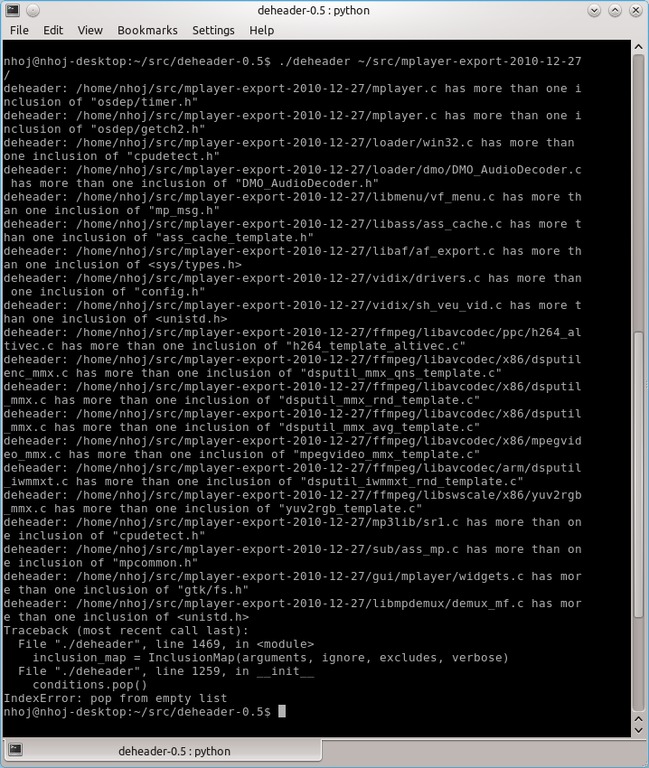
deheader scans code for redundant header inclusions. Here's some output from the MPlayer Project, for instance.
Installation and Usage
As far as packages go, at the time of this writing, the only thing available was a source tarball. But, fear not. No compiling is necessary, and because there's no real mention of library requirements, I'm guessing most distros will run it off the bat, assuming they have Python.
Download the latest tarball from the Web site, extract it, and open a terminal in the new folder. Then, it's simply a case of running:
$ ./deheader path-of-files
If the given path is a directory, deheader scans all the files within. Give it some time to process, and eventually a list of all the unnecessary headers appears on-screen. For instance, I chose to analyze the now ten-year-old MPlayer code, a project that would unavoidably have a lot of legacy code and loose ends simply from being around for such a long time.
If you're ready to take things further, add a switch of -r, and the unnecessary headers are removed from the files. If you want to do some test compiling, use the -m switch. As an example, here's a command I ran against the MPlayer code:
$ ./deheader -r ~/src/mplayer-export-2010-12-27/
Those are the basics; refer to the documentation for more information.
As you can see, deheader is a very simple-to-use program with an elegant design. This ideal of coding elegance is manifest in deheader's results. It should save a great deal of compilation time and highlight coding foibles that likely would have remained unnoticed. Although it's still sitting around in tarball source form, hopefully it will make its way into distro repositories soon.
Projects at a Glance
Razercfg (bu3sch.de/joomla/index.php/razer-nextgen-config-tool)
Fans of the hard-core gaming company, Razer, no doubt will want to look up this project. According to the Web site: “This is the next-generation Razer device configuration tool bringing the Razer gaming experience to the free, Open Source world. This utility is supposed to replace the old deathaddercfg utility. The tool architecture is based on razerd, which is a background dæmon doing all of the low-level privileged hardware accesses. The user interface tools are razercfg, a command-line tool; and qrazercfg, a Qt4-based graphical device configuration tool.”
And, according to its Freshmeat entry: “Supported devices are the Razer DeathAdder mouse, the Razer Krait mouse, the Razer Lachesis mouse, the Razer Copperhead mouse and the Razer Naga mouse.”
GAdmin-Antivirus (freshmeat.net/projects/gadmin-antivirus)
I've always been put off by Clam antivirus's command-line interface (I just don't get it), so a GUI front end would be brilliant. Thankfully, it seems numerous front ends exist, and hopefully, I can cover one or two in the coming months. Details on this project, however, are scarce, although I'd like to try it anyway. According to its Freshmeat entry: “GAdmin-Antivirus is a fast-and-easy to use GTK+ front end for Clam antivirus. Multiple scan sets can be scheduled to run at specific times via cron. Each of these scan sets can contain multiple directories to be scanned.”
Brewing something fresh, innovative or mind-bending? Send e-mail to newprojects@linuxjournal.com.
John Knight is a 26-year-old, drumming- and climbing-obsessed maniac from the world's most isolated city—Perth, Western Australia. He can usually be found either buried in an Audacity screen or thrashing a kick-drum beyond recognition.
