
Virtual Security: Combating Actual Threats
The barriers between physical and virtual are disappearing rapidly in the data center. With virtualization's myriad benefits and the emergence of cloud computing, many shops are virtualizing their server and desktop systems at a breakneck pace. In this great migration to the virtual, admins face new security challenges in the transition that require a much broader knowledge of the enterprise. Couple these new challenges with the ease of access users now have to build their own virtual resources, and you quickly can find your environment in a state of “virtual sprawl”. The good news is that by following a few simple guidelines and utilizing a defense-in-depth strategy, you can minimize your risk whether you're deploying a new virtual infrastructure or just trying to manage sprawl.
In the course of this article, I discuss several high-level security concerns when deploying a virtual environment. In each area of concern covered, I offer basic guidance for dealing with the issues, and when possible, I offer technical solutions to address the associated risks. In keeping with a big-picture view, I don't provide detailed instructions for the specific solutions presented. The vastness of the product space and the limited format of this article also prevent me from delving into every solution available. Although I attempt to stay vendor-neutral, not every vendor offers a product or solution to address each security concern presented here. In those instances, I briefly look at those products/solutions that are available.
To keep this discussion focused, I won't delve into any esoteric arguments about type 1 or type 2 hypervisors, nor do I discuss the merits of para-virtualization versus hardware translation/emulation. I also stick to products that use a Linux-based hypervisor (including Linux KVM). The use of the term host in this article refers to the underlying physical system with direct access to the hardware. The term guests refers to those virtual machines (VMs) that run an instance of an OS on top of the host virtualization software or hypervisor.
The first area to consider is physical security. Virtualization is all about separating the hardware from the OS, but VMs still run on a piece of iron. As such, you can use the same best practices for hardening physical hardware to secure your virtual host. Use common-sense controls like placing locks on your racks and servers and securing keyboard-video-mouse consoles. Be aware of operational factors, such as power, cooling and cabling. As virtualization consolidates systems to achieve higher hardware efficiency, your host servers become hotter and draw more power as they are utilized more. Always make sure your data center has adequate power and cooling to maintain your systems' basic operations.
If building your host servers from scratch, properly size your systems before deploying them. Several vendors provide excellent sizing guides to do just this (Figure 1). Although these baselines may not be an exact representation of your final deployment, they are a good way to approximate your hardware needs. When thinking about hardware, keep performance and redundancy at the forefront. An overtaxed system is easier to penetrate, manipulate and deny access to. As a general guideline, install surplus storage and memory, because those are the typical bottlenecks on hosts. Buy as many of the fastest high-capacity disks you can afford. More disks usually mean more IOPS. You also should have an enterprise-grade array controller running your drives. Consider using a RAID level that has both a stripe and uses parity, such as RAID 10, 5 or 50. Memory should be fast and large in quantity. With excess storage and memory, you create a cushion against undersizing.
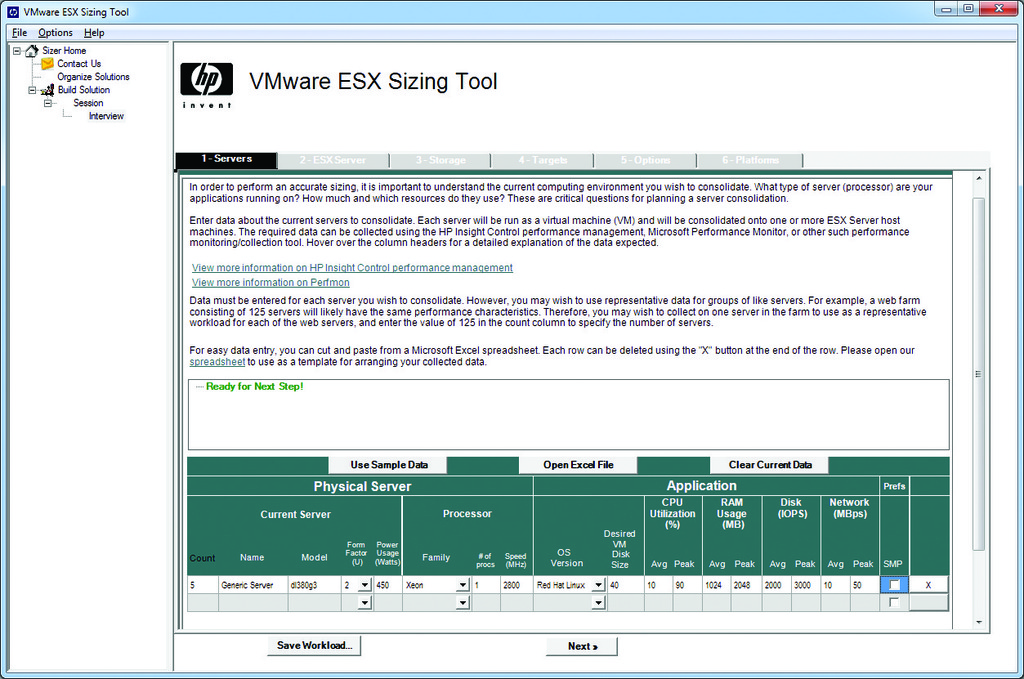
Figure 1. HP's ESX Sizing Tool
Consider using a separate physical network from your production network for your hosts. This reduces chatter on your other segments and makes it easier to secure the segment assigned to your hosts and their guests. When using networked or shared storage to store your VM's data files and virtual disks, use another dedicated segment to separate and streamline storage-related traffic.
In terms of redundancy, try to follow the old adage of “buy two of everything”. Look for cost-effective redundant options for your host systems, such as redundant power supplies and multipathed or teamed network ports. Storage also should be highly redundant. Consider the number of disks needed for each type and how many disk failures can be tolerated when selecting your RAID level. If using network storage, look into redundant options for your NAS/SAN/shelf. This can give you the ability to hot-failover VMs during system failure using tools like VMware's vMotion and Storage vMotion.
Always make sure you take regular backups of your host systems. Although technology such as vMotion can make host backups seem trivial, backups still are vital to your disaster recovery options. Backing up a host typically entails running an operation from a command-line interface. In VMware, this is done from the virtual Command-Line Interface (vCLI) using the vicfg-cfgbackup.pl command. In XenServer, the command is xe host-backup. Because KVM runs on the Linux kernel, you simply can back up the kernel using normal methods.
Several options are available for backing up guests. At the data level, guests are made up of one or more files that contain a guest's configuration and virtual disks, so it is quite viable simply to back up those files on the host or wherever they might be stored. The downside to backing up guests this way is that the guest has to be powered down. You can avoid this problem with a variety of dedicated backup solutions that use snapshot technology to back up running guests. There are impressive offerings from Symantec (Backup Exec) and Veeam for VMware deployments. For XenServer environments, there is Alike by Quorum Systems (Figure 2). If you have a mixed environment with multiple hypervisor types, consider Arkeia's Network Backup, which can back up all of the major vendors' systems with the exception of Linux KVM. Linux KVM users have limited options, but one popular technique for backing up running guests involves taking a snapshot of a guest volume using LVM and then syncing the resulting snapshot file to another disk on a remote server. If you are unable to back up the guest's virtual data/disk files or take a snapshot, you always can use traditional backup methods to back up the guest OS.
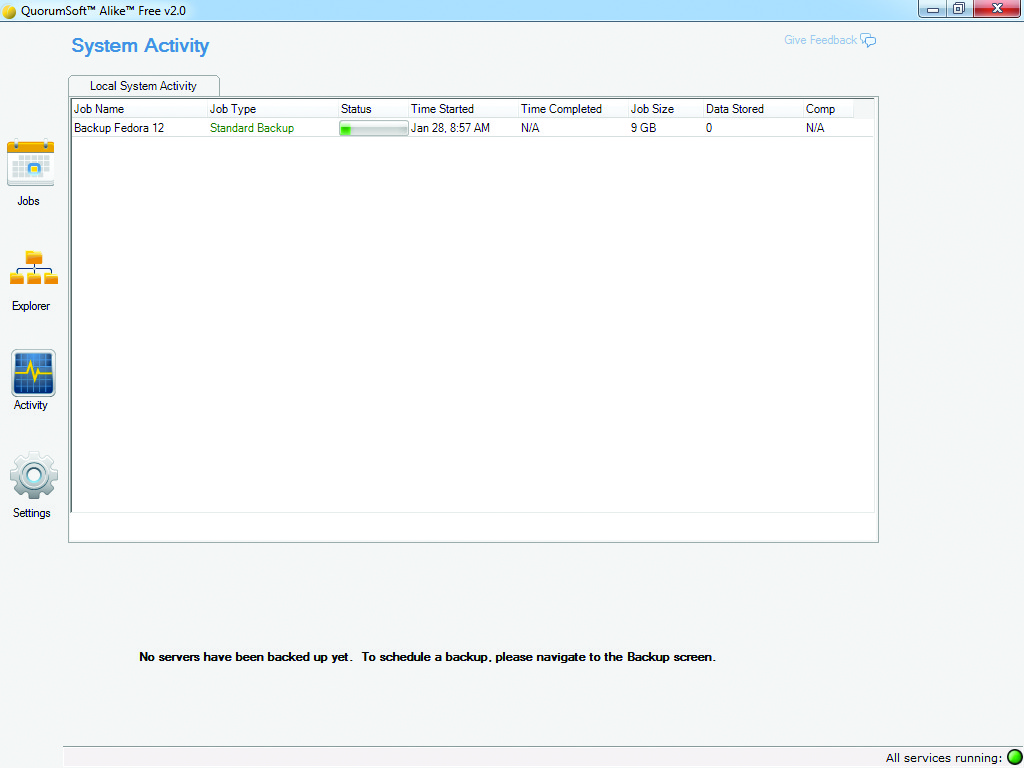
Figure 2. Running a Quick Backup for a XenServer Guest Using Alike
Next up is the hypervisor. The hypervisor is the virtualization software (or layer) that controls communication between, and access to, the hardware and the guests. It usually is composed of a streamlined distribution of an operating system run from either internal or external storage and typically is segmented into its own special partition. With the exception of Microsoft's Hyper-V, hypervisors usually are a flavor of Linux. In the case of Linux KVM, it is actually a Linux kernel module, but I treat it as a hypervisor.
As much as the hypervisor is the heart of the virtualization, it also is a big juicy target. This was a major concern with virtualization early on, and it continues to be so. If you can exploit and control the hypervisor on a host, you can control every guest it controls. The primary factors in determining the hypervisor's security are its size and complexity. Fortunately, the current trend sees vendors reducing their hypervisor's footprint to an operationally minimal size, which reduces the threat surface. Regardless of size, the hypervisor still is software, and just like any critical piece of software, it is imperative that you patch it regularly.
In addition to patching, make sure to allocate your hardware resources appropriately on the host. This means setting limits/ceilings on your guest's hardware utilization. As a best practice, set limits on memory and processor utilization, or if you want to go further, set limits on network traffic. This ensures performance baselines are met across your guests and reduces the threat of DOS attacks or unintended hardware spikes bringing down the host or other guests. You can set these limits through most of the available management GUIs (Figure 3), or in the case of KVM, you can use cgroups.
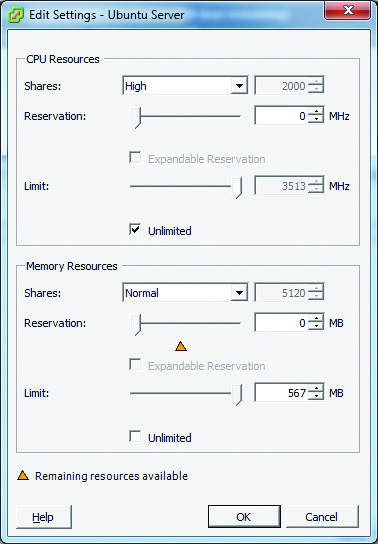
Figure 3. Limiting Utilization with Resource Allocation in VMware
When using any management GUIs that access your hosts, make sure to evaluate and develop a policy regarding access to them before providing access to users. Follow a least-privilege model for permissions, and when possible, use an external authentication source. Also consider using role-based access controls (RBACs) if they are available for your solution (Figure 4). RBACs provide granular control over operation-specific permissions, such as the ability to create new guests or move guests between hosts.
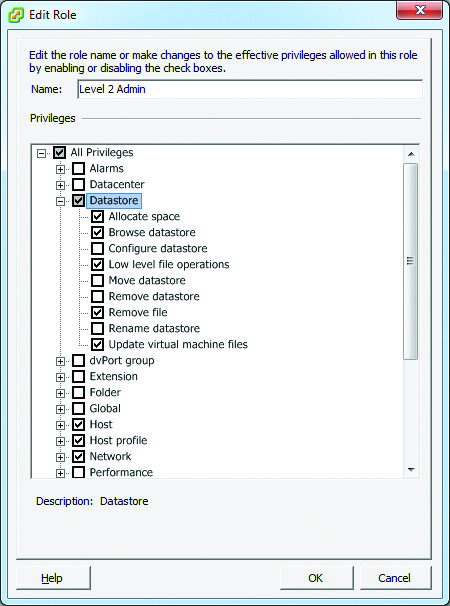
Figure 4. RBAC in VMware vSphere
Securing your guests may be the easiest part of the process. You can use many of the same practices to secure your guests as you would a physical box. These practices include regular patching, using an antivirus, implementing host- (guest-) based firewalls and locking down unneeded services. If deploying a large number of VMs at once, consider using a common template to deploy your VMs. This standardizes your builds and makes securing and managing them easier. If you are deploying a specific application with its own set of security best practices (for example, Apache or MySQL) to a guest, follow those as well. Next, determine the criticalness and/or sensitivity of your guests, and, if necessary, place them in different security domains. It is quite possible to mix guests in different domains on a single host. It's also possible to segment your guests onto different host-specific or physical networks (more on this in the next section of this article).
In addition to any application controls, consider using some form of mandatory access control at the guest level, such as sVirt for KVM. sVirt uniquely labels guest processes running on the host to identify them to the hypervisor. This provides a framework for admins to determine which guests and/or processes are authorized to communicate with the hypervisor (see the sVirt sidebar). If you plan to provide remote access to your guests' OS, determine how your clients and/or admins will do so. Will they use SSH, VNC or remote desktop? Once you have settled on a remote access method, be sure to use a least-privilege model and follow any best practices for locking down your specific solution, such as using nonstandard ports and using certificates.
sVirt
To verify that sVirt is in use, use virsh list to see the VMs that are running. Then, dump the VM's XML file using virsh dumpxml, and look for svirt in the label:
[root@systemname ~]# virsh list
 Id Name                 State
----------------------------------
  5 jbxp4                running

[root@systemname ~]# virsh dumpxml jbxp4 | grep label
 <seclabel type='dynamic' model='selinux'>
  <label>system_u:system_r:svirt_t:s0:c335,c384</label>
  <imagelabel>system_u:object_r:svirt_image_t:s0:c335,c384</imagelabel>
 </seclabel>
Once your hosts and guests are in place, regularly monitor your virtual environment. Doing so minimizes incidents of configuration errors or host/guest failures, unauthorized creation of new guests. There are many ways to monitor your virtual environment, but the best is to combine the internal OS logging on your guests with tools provided by your virtualization product (Figure 5). There is also a budding market of third-party products, such as Reflex Systems vWatch, which has extended monitoring capabilities, such as the ability to monitor for change controls and guest software/asset inventorying.

Figure 5. Viewing Events in XenCenter
Also keep an eye on performance. Even with resource allocation in place, hosts can spike due to overpopulation or hardware failures. Most vendors' management GUIs have some form of performance monitoring. Open-source users can use virt-manager for KVM or Convirt to monitor performance on KVM and Xen systems (Figure 6). With reliable knowledge of your host utilization, you can plan future hosts better and improve your ability to consolidate, which in many cases, means improving ROI.
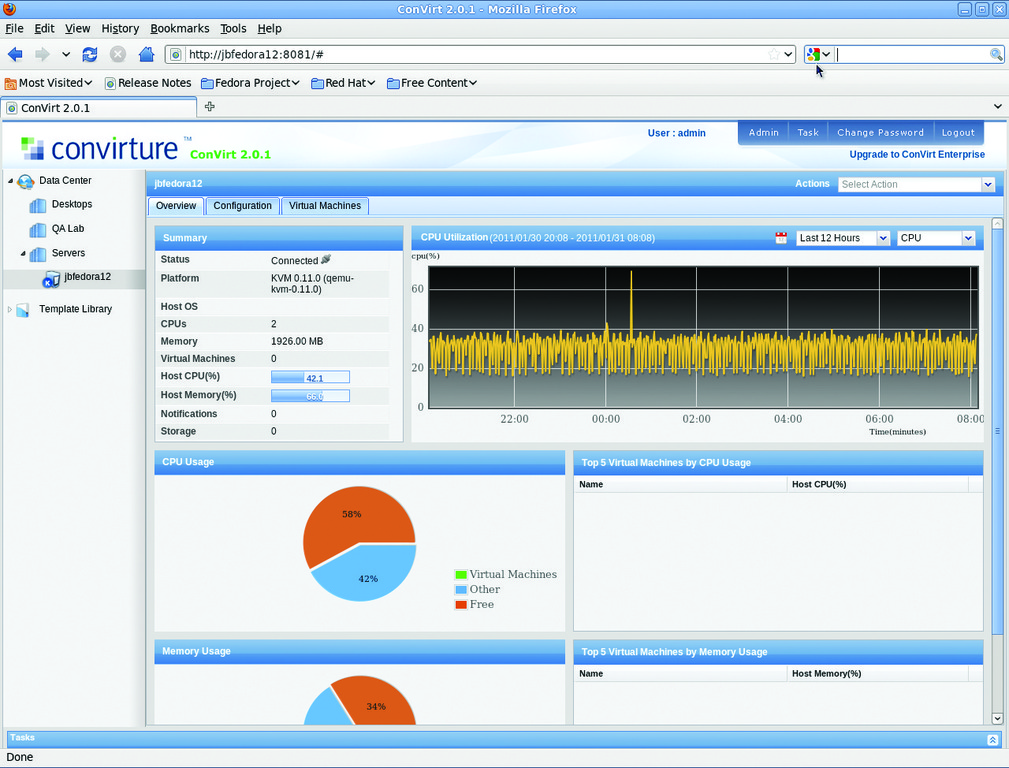
Figure 6. Viewing a KVM Host's Performance Data in Convirt
It always is good practice to automate your systems to alert you to failures or outages. This logic extends to virtual environments as well. Redundancy is great, but if a failure is not acted on in a timely fashion, it can cost you further time and money. Alerts also may help you with any service level agreements (SLAs) and compliance issues (such as PCI, Sarbanes-Oxley and so on). A number of management tools have alerting built into them, but it also is easy to integrate SNMP and other monitoring protocols with a solution like Zenoss to keep an eye on your virtual environment.
The last area to secure is networking. Securing your virtual networking environment can be divided into two parts: securing management interfaces and guest networking. In most scenarios, the host utilizes one network interface card (NIC) as a management interface and shares the remaining port(s) between the guests. Any management interfaces should be placed on a separate physical network from any network your guests will use. If you are using a proprietary management client, limit access to the client install files and make sure you use some method of authentication or role-based access control (both mentioned earlier). If you are managing a Linux-KVM based system, follow the normal recommendations for securing SSH.
When it comes to networking guests, you have two basic options: bridging with NAT or using a virtual switch. Bridging is simple and quick to set up, but it is less secure and only masquerades the guest's virtual NIC as the host's NIC. Using a virtual switch gives you more flexibility in networking your guests. The default configuration on most solutions is to use a single default virtual switch for all guests that is uplinked to one of the host's NICs. Now, most solutions even have the ability to use VLANs on their virtual switch. The process of VLAN-ing involves labeling a client NIC with a unique ID so it communicates only with other computers that use the same VLAN ID. VLANs on a virtual switch can exist solely on the host or span other guests and devices on the physical network (Figure 7).
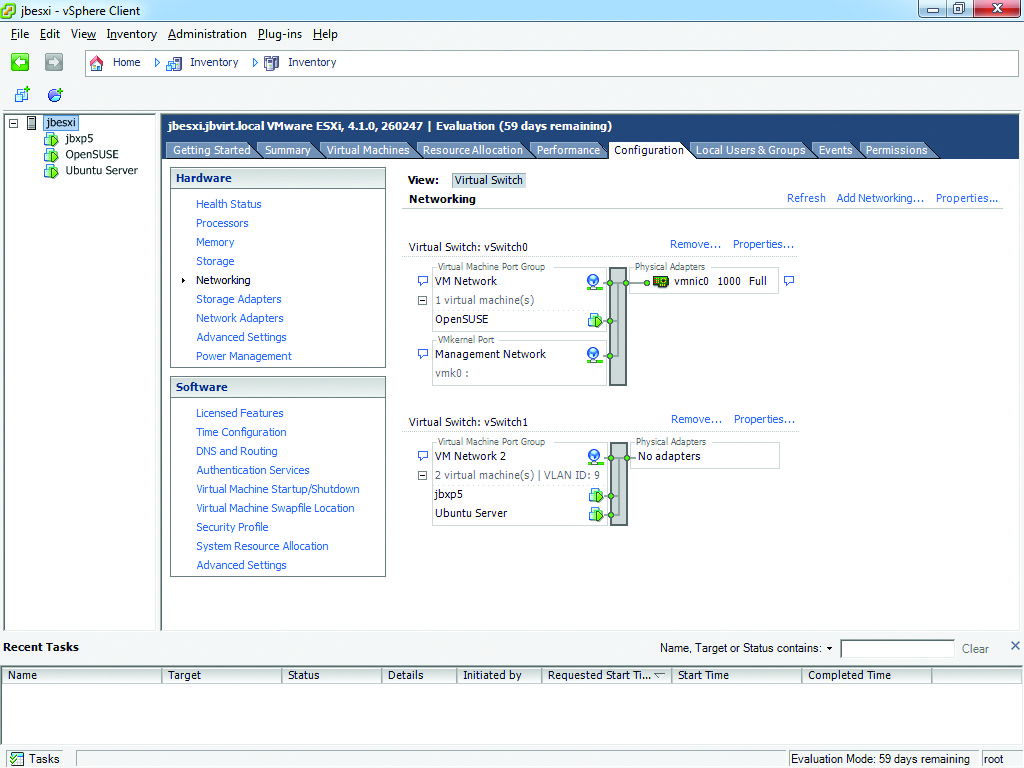
Figure 7. VMware's Highly Flexible Networking Options
Although VLANs provide an additional security layer to the virtual network, they are limited to layer 2 (switching) functions. Because of this, vendors have developed products to provide additional protection at a virtual layer 3 (routing) and above. Vyatta's vRouter and vFirewall act as a networking layer between the hypervisor and its guests to provide layer 3 protection for VMware, XenServer and KVM systems. VMware also has developed similar functionality with its vShield technology and the resulting products. When you can extend layer 3 functionality to your virtual environment securely, you can deploy guests safely as edge or even public-facing devices.
Additionally, be sure to monitor virtual network activity. You can monitor external traffic leaving the host using traditional sniffing, IDS and packet capture methods. Things get a little more difficult when you try to sniff interhost or interguest traffic, as the hypervisor makes very different types of network-related calls between guests from what it would with other devices on a network. As a result, traditional methods of sniffing won't work. However, products that can sniff this traffic, like Network Instruments' Observer, are beginning to pop up. Observer can sniff virtual traffic inside the host and redirect it to a physical port for analysis by an IDS, IPS or other external monitoring system.
In this short overview, you can see that securing a virtual environment from every angle requires a lot of work and knowledge. Just like any other new technology, there is a learning curve for administrators. If you add the fact that not all of the technology is fully mature, the curve becomes steeper and the risks greater. Don't be hesitant to embrace virtualization though. For now, it seems to be the future of the industry, so we probably will all have to take the plunge. If you educate yourself about the technology and its limitations, and keep abreast of current trends, you'll be just fine. As you progress in knowledge and experience with virtualization, you will find it easier to identify those areas at risk of exposure and take the appropriate precautions. The recommendations made here are a good start. If you follow them, you should be able to minimize your risks and rest a little bit easier when deploying your virtualized solutions.
Resources
KVM: www.linux-kvm.org
Xen: www.xen.org
Citrix (XenServer): www.citrix.com
VMware: www.vmware.com
Quorum (Alike): www.quorumsoft.com
Symantec: www.symantec.com
Veeam: www.veeam.com
Arkeia: www.arkeia.com
Reflex Systems (vWatch): www.reflexsystems.com
Convirt: www.convirture.com
Vyatta (vRouter and vFirewall): www.vyatta.com
Network Instruments (Observer): www.netinst.com
Jeramiah Bowling has been a systems administrator and network engineer for more than ten years. He works for a regional accounting and auditing firm in Hunt Valley, Maryland, and holds numerous industry certifications, including the CISSP. Your comments are welcome at jb50c@yahoo.com.
