
Live-Fire Security Testing with Armitage and Metasploit
Your boss calls you into her office. You stare at the fake mahogany panels that line her wall. She strikes a match and asks, “Did you see the news? Criminals broke into our competitor's network. Embarrassing.” She lights her cigar and demands, “I want you to test our network and tell me that we're safe!”
Many are finding themselves in this position. The Payment Card Industry Data Security Standard requires a penetration test each year. Sarbanes-Oxley, FISMA and HIPAA demand an annual security review. Because of these pressures, many organizations are looking at penetration testing.
A penetration test is a step beyond a vulnerability assessment. A vulnerability assessment pairs missing patches and configuration errors with vague threat descriptions. A penetration test requires exploiting vulnerabilities to learn how an attacker may get access to key systems and files.
By following this article, you'll evaluate your security posture using the same process skilled attackers follow. You'll learn how to perform reconnaissance, exploit hosts and maneuver deeper into your network. To do this, you'll use Armitage and Metasploit.
Metasploit is an open-source exploit development framework owned by Rapid7. Armitage is one of the interfaces available for Metasploit. Armitage makes it easy to launch exploits and conduct post-exploitation steps once you have access to a host.
Use BackTrack Linux to follow this article. BackTrack Linux includes Metasploit and its dependencies. Update your Metasploit installation to get the latest version of Armitage:
cd /pentest/exploits/framework3
svn update .
To start Armitage:
/etc/init.d/mysql start
./armitage
Click Start MSF when the GUI comes up. Armitage will execute Metasploit in the background and connect to it.
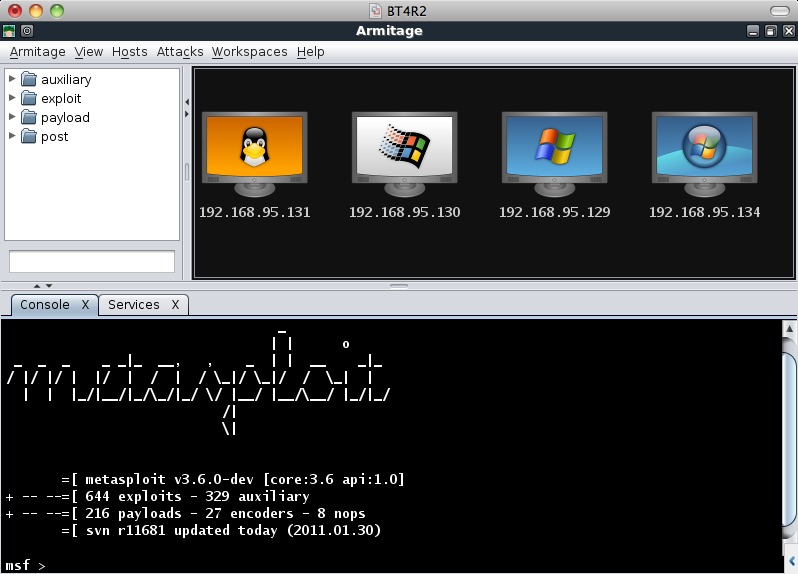
Figure 1. Armitage User Interface
Figure 1 shows the Armitage user interface; it has three parts. The top-left is the module browser. Use this browser to search for and execute any of Metasploit's modules. The top-right is the targets area. Armitage displays your hosts here. The bottom is the tabs area. Armitage opens each shell, console and browser in a separate tab.
Attackers perform reconnaissance to learn your network configuration. Accurate information allows them to execute targeted attacks. Use reconnaissance to learn how attackers see your network. Attackers want to know which hosts are on your network, which ports are open and what software you're running.
Nmap is a popular reconnaissance tool. It scans your network to report open ports and service banners. Nmap also guesses host operating systems using irregularities in TCP/IP packet headers. Click Hosts→Nmap Scan→Quick Scan (OS Detect) to scan your network. Once the scan is complete, Armitage populates its targets area with your hosts. Click View→Targets→Table View to display your hosts in a table if you have a lot of hosts.
Right-click a host and select Services to see the results of your scan. Armitage displays the open ports and service banners in a new tab. Highlight multiple hosts to display your scan results in one tab. Figure 2 shows a scan of my network.
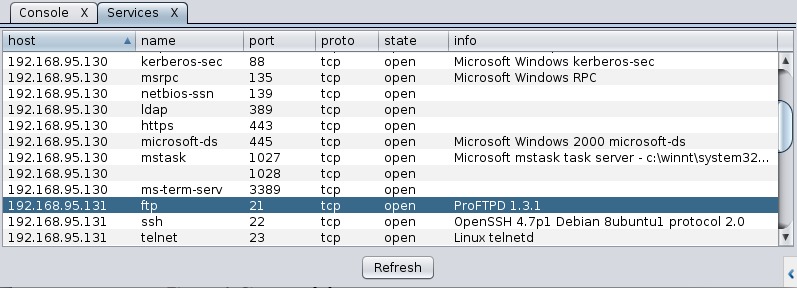
Figure 2. Network Services
Execute the reconnaissance step from both inside and outside your network. Outside reconnaissance will show you how attackers see your network. You'll learn what your firewall blocks and which services display too much information to anonymous users.
It's time to exploit your network. You need to match your hosts and services against Metasploit's 640+ exploits. The next sections in this article discuss automatic, semi-automatic and manual ways to do this. You also will learn how to launch password-guessing and client-side attacks.
I recommend using your inside scans for this phase of the penetration test. You should assume attackers will get inside your network perimeter. I also recommend attacking hosts from inside your network perimeter. This will better show what attackers can do. I justify these recommendations in the pivoting section.
Armitage's Hail Mary feature uses your scan results to launch exploits automatically. Go to Attacks→Hail Mary→by port. Armitage finds, filters and sorts exploits into an optimal order. Armitage then launches these exploits against each of your hosts.
At the end of this attack, Armitage lists the compromised hosts and the successful exploits. This attack is noisy, and some exploits may crash a service before the correct exploit reaches it. However, this attack requires little skill to run. Try this attack from outside your network to see what your intrusion-detection system finds.
Use Attacks→Find Attacks→by port to get exploit recommendations. Armitage creates an Attack menu (Figure 3) for each host with relevant exploits. These are the same exploits launched by the Hail Mary attack. Right-click a host in the targets area to reach this menu.

Figure 3. Attack Menu
Armitage organizes each Attack menu by exploitable service. On my network, I have a Windows XP SP2 host. To exploit it, I right-click the host and navigate to Attacks→smb→ms08_067_netapi. This opens the launch dialog shown in Figure 4.
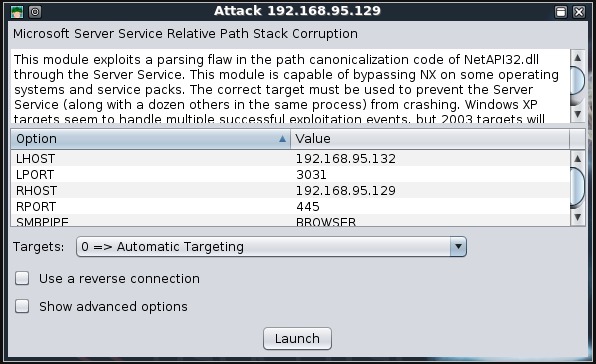
Figure 4. Exploit Launch Dialog
The exploit launch dialog has a table of preconfigured options. Double-click any value to edit it. Click Show advanced options to see other options. Most of the time you don't need to change these. Click Launch to run the exploit against your target. If the attack succeeds, your target turns red with lightning bolts around it (Figure 5).

Figure 5. Compromised Host
Exploiting services is a risky business. You're introducing input into your applications that executes flawed code paths. When possible, you should test nonproduction systems. If you must test against a production host, it helps to understand Metasploit's exploit rating system.
Metasploit rates each exploit as poor, normal, good, great or excellent. Excellent rated exploits use simple command injection flaws. These are the safest and most reliable exploits. Exploits rated great are reliable memory corruption exploits. These may crash your system, but it's extremely unlikely. Exploits rated good and below have more risk associated with them, and they're less reliable. Armitage's Hail Mary and exploit recommendation features use exploits rated at the great and excellent levels only. You can change this through Armitage→Preferences.
Metasploit rates some exploits as manual. These exploits need extra information, such as a user name and password, to launch. Manual exploits are not available using the automatic and semi-automatic approaches.
Manual exploitation requires matching your devices and services to Metasploit modules. This step requires some preparation. Create an inventory of your network devices and the software running on each host.
Type each software package and device into the search field below the module browser. Press Enter to execute the search. If you know a Linux host is running ProFTPD 1.3.3, type ProFTPD into the search field. Armitage displays all matching modules in the module browser.
Highlight hosts in the targets area to preconfigure the module's RHOSTS option. Double-click a module to open its launcher. Click Launch to run the attack.
You sometimes will see auxiliary modules in your search results. Figure 6 shows a search for Cisco. This search reveals auxiliary modules to scan for known authorization bypass vulnerabilities and access configuration files using SNMP. Pay attention to the auxiliary modules. They offer a lot of attack value.

Figure 6. Cisco Modules
The manual exploitation approach is the best way to learn what capabilities Metasploit has against your network. This approach requires more time and skill to get access, but it's also more thorough.
Metasploit also has modules to run a dictionary-based password-guessing attack against most services. Search for _login in the module browser to find these modules. To attack SSH, highlight several hosts in the targets view and double-click the ssh_login module.
Metasploit gives you a lot of flexibility for executing password-guessing attacks. Set the USERNAME and PASSWORD options if you want to try one user name and password. Set USERPASS_FILE to a file with “username password” entries on each line. Or set USER_FILE and PASS_FILE to attempt access using every user name from USER_FILE with every password from the PASS_FILE.
Metasploit comes with several user name and password word lists. On BackTrack, they're located in /pentest/exploits/framework3/data/wordlists. Double-click a file-expecting option name (for example, PASS_FILE) to set the option using a file-chooser dialog. Click Launch to begin the password-guessing attack. Armitage displays the attack's progress in a new tab.
Metasploit stores successful logins in its database. Go to View→Credentials to see them. You can use these credentials to log in to a host as well. Right-click a host, select Login, and choose the service to log in to. If the login yields a session, the host turns red with lightning bolts (just like a successful exploit). A session is an active shell or agent that you can interact with.
Password-guessing attacks are an important part of a penetration test. You should verify that common user name and password combinations do not give access to your network resources. Also, guessed credentials make other attacks possible. For example, the snmp_login module might find a community string that an attacker uses to write a new configuration file to your Cisco device.
To use exploits and launch password-guessing attacks, attackers need network access to your services. A configured firewall will stop many attacks. However, attackers are not out of options. Determined attackers will use client-side exploits and social engineering to get inside your network's perimeter.
Go to Attacks→Browser Attacks→multi→java_signed_applet to launch a cross-platform client-side attack. This attack starts a Web server with a malicious Java applet. The applet asks visitors to grant the applet full rights to their local system. Disguise this applet as a neat game, and you may get access to a lot of hosts.
Use Attacks→Evil Files→windows→adobe_pdf_embedded_exe to generate a PDF file with an embedded executable that connects back to Metasploit. This attack asks users to take an action that runs this embedded executable. Most users are unaware of the security risks with opening a PDF file.
Click Attacks→Browser Autopwn to start a Web server that will use the browser fingerprint of each visitor to send an exploit. If you e-mail every user in your organization with this link, how many hosts would you compromise?
I recommend testing these client-side attacks on your workstations and seeing what's possible. User education is the best defense against these attacks. Consider demonstrating these attacks at your next training event. Users who can recognize attacks will add to your security posture.
One compromised host allows attackers to attack your network from the inside. Metasploit's pivoting feature allows you to bounce your attack traffic through a compromised host. Pivoting makes client-side attacks very dangerous.
Pivoting works like a router within Metasploit. You choose a network and set a compromised host as the gateway. Metasploit uses these routes for all of its attacks and scanning modules. Right-click a compromised host and navigate to Meterpreter→Pivoting→Setup to configure this feature. Armitage shows a green line between pivot hosts and their known targets (Figure 7).
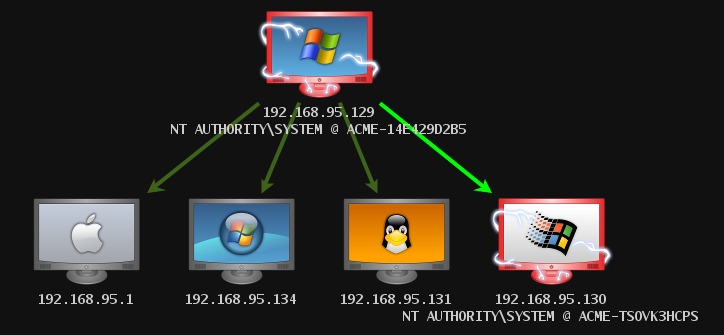
Figure 7. Targets with Pivoting
Metasploit has a built-in proxy server. Use this if you want to use an external tool, like Firefox, through the pivots you have set up. Go to Armitage→SOCKS Proxy to launch this feature.
Post-exploitation is what happens after access. A successful attack gives you shell access on non-Windows hosts. Successful Windows exploitation gives you access to Meterpreter.
Meterpreter is a powerful post-exploitation agent built in to Metasploit. Meterpreter runs from the memory of the process you attacked. Through it, you can browse and download files, view processes, take screenshots, log keystrokes, run privilege escalation exploits and interact with a command shell.
Armitage provides an intuitive interface for much of Meterpreter's functionality. Figure 8 shows the file browser. Right-click a compromised host and navigate to the Meterpreter menu to explore these functions.
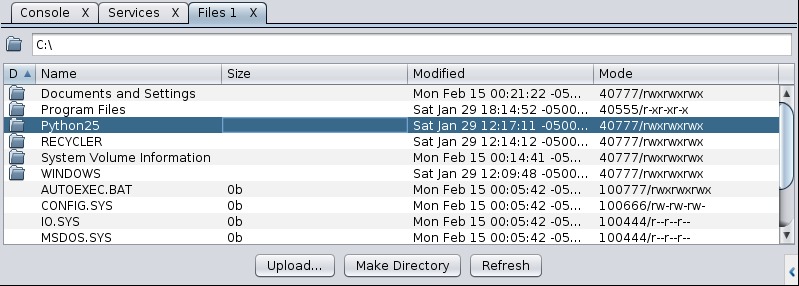
Figure 8. File Browser
Meterpreter is powerful, but Armitage has a few tricks for shell access too. Right-click a compromised host and navigate to the Shell menu. Select Interact to open the command shell in a tab. Use Upload to upload a file using the UNIX printf command. Choose Disconnect to close the session.
After post-exploitation, you'll want to compromise more hosts. Pass the hash is a technique for further compromising a Windows network.
Windows hosts do not pass your network credentials in the clear. Rather, they use a challenge-response scheme to generate a hash. Windows uses this hash to authenticate you on the Active Directory domain. Windows hosts cache and re-use hashes to authenticate to other hosts on the network. This saves you the trouble of retyping your password when you access a file share. Attackers use stolen hashes to get access to other hosts on your active directory domain.
Dumping cached hashes requires local administrator access. Use Meterpreter→Access→Escalate Privileges to try several local exploits to increase your privileges. Go to Meterpreter→Access→Dump Hashes to steal the local cached credentials.
Now you need targets. Use the auxiliary/windows/smb/smb_version module to find other Windows hosts on the Active Directory domain.
Go to Attacks→Find Attacks to generate an Attack menu for each host. Highlight several Windows hosts, right-click, and use Attacks→smb→pass the hash. Armitage lets you choose which set of credentials to try. Pick a pair and click Launch. You've passed the hash. Each successful login will give you a Meterpreter session.
Patches exist for Metasploit's Windows privilege escalation exploits. Attackers who compromise a patched system don't have to stop though. They may scan for an unpatched host, exploit it and then carry out these steps.
Earlier, I defined a penetration test as a way to learn how attackers may get access to key systems and files. I suspect you did not find a working exploit for your key servers. Before you conclude your network penetration test, I'd like you to think like an attacker for a moment.
Attackers will use social engineering and client-side attacks to get a foothold. Attackers then will try to exploit a workstation to collect hashes. Using pass-the-hash, your patched Windows systems are no longer safe. What happens if attackers access your workstation, install a key logger and download your SSH keys? One vulnerable host can lead to a total compromise of your otherwise secure assets.
In this article, I've shown you the techniques attackers use against your network. You learned how to scan your network, exploit hosts and carry out post-exploitation actions. You also learned how to maneuver deeper into your network using the pass-the-hash technique. The next step is to apply what you have learned.
I recommend that you download the Metasploitable virtual machine. Metasploitable has many services you can exploit for shell access and information. Attack Metasploitable to become familiar with Armitage and Metasploit before you start your first penetration test.
Resources
BackTrack Linux: www.backtrack-linux.org
Metasploit: www.metasploit.com
Documentation for Armitage: www.fastandeasyhacking.com
Metasploitable Virtual Machine: blog.metasploit.com/2010/05/introducing-metasploitable.html
Raphael Mudge is the developer of Armitage. He lives in Washington, DC. Contact him at www.hick.org/~raffi.
