
Coming Soon to Linux Desktops
Linux is great for people who like having choices. For example, if you want to use a graphical desktop, there are many from which to choose, including XFCE, LXDE, Fluxbox, Openbox and Enlightenment, not to mention the two most popular desktops, GNOME and KDE. See Shawn Powers' article for more information on other desktop options (page 48).
KDE version 4.0 was released in January 2008, but GNOME hasn't had a major version update since 2.0 was released in 2002. Quite a few incremental updates have been made to GNOME, and until recently, the GNOME Project had planned to release version 3.0 in September 2010. At the time of this writing, the release has been pushed to March 2011.
When KDE 4.0 was released, it was a major change from KDE 3.5. Although KDE 4.0 was labeled a stable release, it actually was intended for developers and early adopters. Much of the functionality from KDE 3.5 had not yet been re-implemented. KDE 4.0 felt like a huge step backward, and it was widely criticized as being incomplete. GNOME 3's delayed release may be an attempt to avoid a similar situation.
When I started using Linux, I came from the world of Windows and preferred the KDE desktop because it seemed more familiar. I initially was excited to see the new KDE 4.0. But after the upgrade, I soon became disgusted with the mess I now had on my system. So I installed GNOME and was quite happy with it. Not only did it work, but also my PC ran faster with GNOME than it did with KDE 4.0.
I haven't completely ignored KDE 4 since then. I've occasionally installed it on a test system and tried it out. KDE 4.1 seemed generally usable, and by the time 4.4 was released, it actually seemed pretty good. But for my production systems, I've stuck with GNOME and have been quite happy with it.
Now, GNOME is close to releasing a major upgrade to GNOME 3, which uses GNOME Shell to display the application windows and other objects. Will this be another fiasco like KDE 4? I don't think so. Based on what I've seen so far, I think GNOME 3 will be a solid release.
But, that's not all that's coming. Canonical is charting its own path and developing a different desktop called Unity for its next version of Ubuntu. Unity is already Canonical's desktop for Netbooks—is it suitable for laptops and PCs?
Although it has not been released officially, GNOME Shell has been in the repositories for a while now. You can install it and get a preview of what's coming in GNOME 3.
According to the GNOME Project Web site, “Our goal in designing GNOME Shell is to provide a consistent, self-teaching user interface based around the day-to-day tasks of the user.” Let's take a look and see how GNOME plans to accomplish that.
Instead of the two panels in GNOME 2, GNOME Shell has a single panel at the top of the screen. It contains some of the items you're familiar with, such as the clock and notification icons. But instead of the three menus, now there's a single button named Activities. Next to the Activities button is the name of the currently running application. This eventually will contain the application menu and options, such as close, open a new window and options specific to that application.
When you click the Activities button, the full screen switches to the Activities overview mode. You also can invoke the Activities overview by pressing the Super key on the keyboard, or Alt-F1, or just by moving the mouse pointer to the upper-left corner of the screen. I hope GNOME offers an option to disable that last choice, because I found it way too easy to activate the overview unintentionally while working on my laptop.
The Activities overview takes the full screen, and it shows all the ways that users can switch from doing one activity to another. It displays a preview of all the windows that are open, on all the workspaces in use. It also shows a list of favorite applications, applications currently running, places (favorite directories and connected devices), and the 20 most recently used documents. There's also a Search box at the top left; if what you're looking for isn't immediately visible, simply start typing part of the application name or description.
I love workspaces. I tend to leave a lot of applications open as I switch from one task to the next, and it's nice to be able to group the windows into a workspace so I can look only at the programs I'm currently using.
GNOME Shell lets you create workspaces as needed. When you're in the Activities overview, you'll see a small plus sign at the lower right. Click the plus sign to create a new, empty workspace. While still in the overview, you then can drag windows from the other workspaces into the new workspace. Drag an application icon into a workspace to launch the program in that workspace. You also can create a new workspace and launch a program in that workspace by dragging the application icon onto the new workspace plus sign icon.
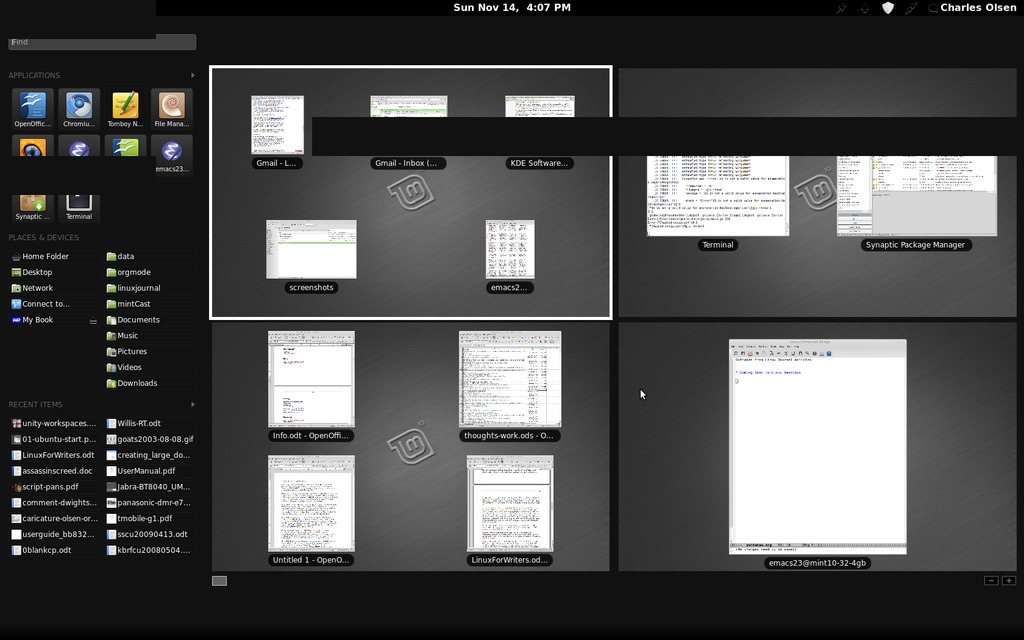
Figure 1. The GNOME Shell Activities Overview with Four Workspaces
In GNOME 2, switching to a running application in another workspace often meant switching to the appropriate workspace, then selecting the program you want. In GNOME Shell, the Activities overview shows all workspaces and previews of all windows in each workspace. I can go directly to the workspace and application simply by clicking the window in the overview.
Pressing Alt-Tab displays all applications that are open, even if they're not in the currently selected workspace. A vertical separator bar separates the programs in the current workspace from those in other workspaces. You can select any program in the traditional way, by pressing the Tab key and releasing Alt when you get to the desired application, or you can use the mouse to click the application you want.
A new function that is not implemented yet is that Alt-` (the key above the Tab key on US-layout keyboards) will switch between windows of the same application. Some applications do this now with Ctrl-F6, but that takes two hands and is not consistent across all applications. Using Alt-` will be much easier and feel more natural.
As you use Alt-Tab to cycle through open programs, programs with multiple windows open will be grouped in one icon. If you pause while that icon is highlighted, a preview of the open windows will appear below the icon. You also can get the preview immediately by pressing the down-arrow key. You then can select the specific window by using the left- and right-arrow keys.
Customizing your favorite applications is easy. Use the Search box to find the application you want to add, then simply right-click the icon and choose Add to Favorites. To remove favorites you don't need, right-click the icon and choose Remove from Favorites.
The Places section of the Activities overview shows the items in the Places section in Nautilus. Simply add or remove items in Nautilus to customize the Places in your Activities overview.
The plan is that GNOME Shell will put a bigger emphasis on applications than the separate windows of the application. When you switch to the Activities overview, applications with multiple windows open will be represented by a single icon. In GNOME 2, you see an icon in the panel for each open window, and sometimes you have to guess which is the window you want.
In GNOME Shell, you can right-click on the application icon to see a list of open windows. You can select the specific window you want or open a new window. This wasn't working properly in the GNOME Shell I was running, so I wasn't able to test it.
The Search box will search not only application names and descriptions, but also through the names of recent documents and system customization commands.
When you're in the Activities overview with the small window previews, you can zoom the preview of a particular window without selecting it by pointing to it with the mouse and rolling the mouse scroll wheel upward. Scroll down with the wheel to zoom back out.
Several of the functions still work the way you're used to from GNOME 2. Alt-F2 still brings up a command line where you can enter a single command. The Esc key will escape from anything, such as the Activities overview, the Search within the overview, and the Alt-F2 command line. You still can switch to a different workspace using Ctrl-Alt-Right or Ctrl-Alt-Left, and you can move the current window to another workspace by pressing Ctrl-Alt-Shift-Right and Ctrl-Alt-Shift-Left.
GNOME Shell offers a new way to look at your desktop and activities, without making a radical break from the previous version on GNOME.
It would seem ideal for Ubuntu's April 2011 release to include GNOME 3. However, Mark Shuttleworth has announced that Canonical will be taking a different direction and the next release of Ubuntu will feature Unity as the desktop.
According to Shuttleworth, the Canonical folks spent quite a bit of time analyzing screenshots of a couple hundred desktop configurations from the current Ubuntu and Kubuntu user base to see what people used most. They also wanted to identify things that were not needed in a lightweight environment.
They found that most users have between three and ten application launchers on the panel for quick access to their most-used programs. The new interface would follow that example and make a few applications instantly accessible, while still making it easy to get to everything else.
They also focused on getting the best use out of screen real estate. Unity initially was designed for Netbooks, where the screens were usually wide but not very tall. Now laptop and desktop monitors are moving to more of a wide-screen format. They realized they needed to be very conservative in using the vertical space.
Finally, they wanted the interface to be finger-friendly. Touchscreens are becoming more common, and Canonical wants Ubuntu to be ready.
This research and these decisions were the basis of Unity in Ubuntu Netbook Edition 10.10. And, according to Shuttleworth's announcement, Unity will be the default desktop for future editions of Ubuntu.
Rather than the traditional panels at the top and bottom of the screen, Unity conserves vertical real estate by moving the bottom panel to the left side of the screen. This panel also is widened to make it more touch-friendly. It will show a few icons for instant access to selected applications, and it also will display icons for all applications currently running. Programs currently running are shown with a small indicator on the left side of the icon. The application that has the focus has an additional indicator on the right side. A single touch or click is all that is needed to launch a favorite application or switch to another program that's already running.
The three-menu design of traditional GNOME has been replaced with a single global menu that you invoke by clicking a button on the left panel. The titlebar, including the Close/Minimize/Maximize buttons of the currently selected application, is rendered in the top panel.
When you open the global menu, the top panel displays a search field and the following application categories: All Applications, Accessories, Games, Internet, Media, Office and System. Initially, the All Applications choice is selected, and the screen is a mess with the icons for all installed applications on the display.
You can narrow it down by choosing one of the categories, so that only a few icons are displayed. Or, you can click the search field and type part of the application's name or description. This displays not only installed applications that match the search text, but also any matching applications available in the repository. Click the icon of the available program to launch Software Center with that application already selected. If you want the app, just click the Install button.
The result of all this is a display that has saved a significant amount of space and is optimized to use one application at a time. This is how most people work; you may have other applications running at the same time, but normally you interact with one application at a time.
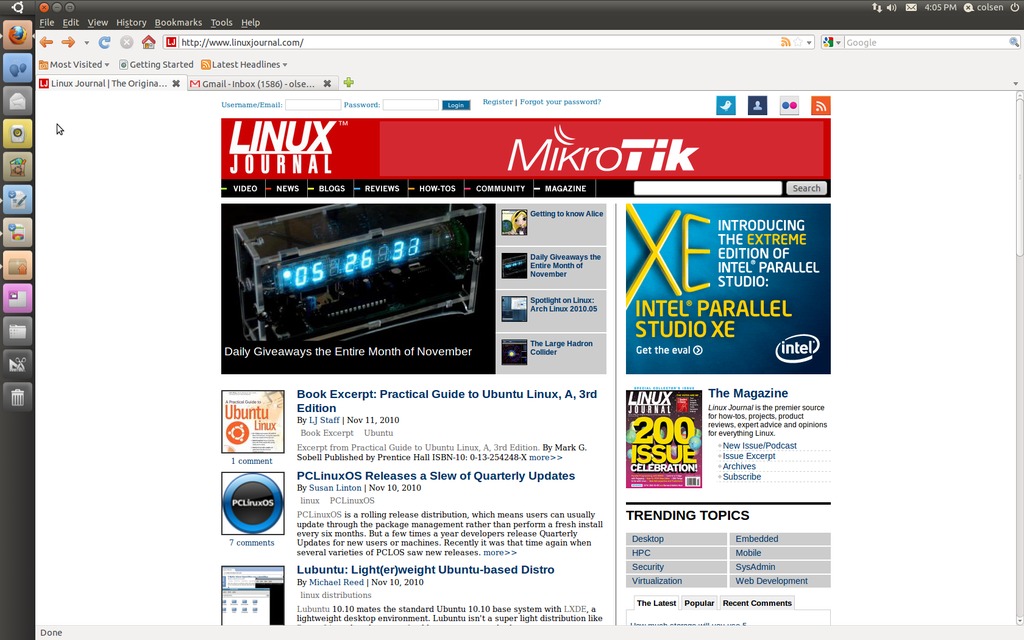
Figure 2. The Unity Desktop with Firefox Maximized
Unity is available now, in Ubuntu Netbook Edition and as a PPA you can install in the Desktop Edition. (See sidebar for install instructions.) Shuttleworth said, “I'd very much like to get feedback from people trying it out on a Netbook, or even a laptop with a wide screen.”
Not all of these features described here are fully implemented, but they should be by the time Ubuntu 11.04 is released. Other things seem unfinished too. I couldn't find a way to make any changes, for example, to customize the launchers on the left panel. Presumably, this will be corrected by the time it's released.
And, if you don't like Unity? Don't worry; you still can install standard GNOME or one of the other desktops from the repository.
Both GNOME Shell and Unity are quite usable today in their current forms. We're not going to see the kind of problems and uproar that occurred when KDE 4 was released. The changes going into the creation of GNOME Shell and even Unity are far less ambitious than the changes that created KDE 4.
Unity also is a shell for GNOME, although it's completely separate from GNOME Shell. Unity and Gnome Shell essentially are opposite ends of the spectrum. Unity is designed for a simple environment where people tend to do one thing at a time, and Gnome Shell is designed for a more complex environment where users are doing multiple activities simultaneously.
Personally, I really like GNOME Shell on a desktop or laptop PC. My impression is that Unity will be a good choice for small touchscreens, but I'd rather have GNOME Shell or even GNOME 2 on a larger display.
But, that's just my preference. If you want something different, your ideal setup is only a few clicks away.
Try Them Yourself
GNOME 3 and Unity are not ready for release, but you can get a preview and see where the projects are at the moment. Because they are unfinished, they are not recommended for use in a production environment.
GNOME 3 is easy—just use the package manager to install gnome-shell.
Once the package and dependencies have been installed, you can activate it with the command:
gnome-shell --replace
To install Unity, you need to add a Personal Package Archive. Open a terminal, and enter the command:
sudo add-apt-repository ppa:canonical-dx-team/une
Enter your password when prompted, and apt will add the PPA and import the key.
Then, update your software list:
sudo apt-get update
To install Unity, type:
sudo apt-get install unity
Once Unity is installed, the next time you log in, the interface will default to Ubuntu Netbook Edition. (Ubuntu Desktop Edition still is available, of course.)
Charles Olsen has been working in IT help-desk and technical training for more years than he will admit. He is one of the hosts of mintCast, a podcast by the Linux Mint community for all users of Linux. You can find mintCast at www.mintcast.org or, if you must, via iTunes.

