
Is Your Personal Area Network Giving You the BlueZ?
Bluetooth has been around for a while now (it originally was conceived in 1994 by Ericsson as a replacement for RS-232), and many of us have been enjoying the benefits of wirelessly connecting mice, keyboards, headphones, mobile phones, printers, PDAs and other devices over short distances.
Under Linux, these benefits are provided by one of two Bluetooth implementations: BlueZ and Affix. The former has become the accepted standard provided by most of the popular distributions and is the one I discuss here.
In BlueZ releases prior to version 4, the various Bluetooth services (called profiles) are implemented in separate dæmons, each with its own configuration. The PAN profile, providing personal area networking services, is implemented in the pand dæmon, dial-up networking in the dund dæmon, service discovery in the sdpd dæmon and so on. In BlueZ v.4, all of these are incorporated into one server process called bluetoothd. This change has led to a certain amount of confusion among users, so the aim of this article is to try to clarify the situation somewhat by looking at the way the PAN profile works in BlueZ v.4.
The PAN profile provides three ways of connecting Bluetooth devices in a network capable of carrying general-purpose protocols and services over TCP/IP. Such networks are known as piconets, because they are limited to a maximum of seven nodes and the short distances covered by Bluetooth transmissions (up to ten meters). These are PANU, Group Ad Hoc Network (GN) and Network Access Point (NAP) configurations. The PANU<--->PANU network is the wireless analogue of a Ethernet crossover cable between two computers. The PANU<--->GN network operates just like a Wi-Fi ad hoc setup where one node acts as the master node connecting up to six client nodes in an isolated private network and the PANU<--->NAP provides network infrastructure connectivity in the same way that a 802.11 Wi-Fi access point does for Wi-Fi clients. The NAP can serve six client nodes in the same manner as the GN master but also connects them to an existing network infrastructure. The NAP service is the most useful of the three connection patterns and subsumes the other two. So, if you can get NAP working, it is relatively straightforward to achieve the other configurations by omitting certain steps in the NAP setup.
The Bluetooth dæmon loads all the required kernel modules (the lsmod command should show bluetooth, rfcomm, btusb, llc, sco, bridge, bnep, stp and l2cap running) and creates a bridge-host interface called pan0. The bnep protocol provides Ethernet services over the Bluetooth l2cap connection and a separate bnep interface is created on demand for each remote device that connects (bnep0, bnep1...bnepN). bnep interfaces automatically are bridged to the pan0 interface that serves as an IP proxy for them. Thus, only the pan0 interface requires IP configuration. Once you have paired a remote Bluetooth device with the Linux box and discovered the BlueZ NAP service and connected/authenticated to it, all that remains is to provide IP configuration for the connected devices and the required infrastructure network connectivity. This is the part that has bamboozled many a keen BlueZman. Here, I consider two solutions: a bridged setup and a routed setup.
In many ways, the bridged solution is the simpler of the two. There are fewer steps involved, and it means that your NAP and your remote Bluetooth devices become part of your existing IP network/subnet. However, if you don't have an existing private network/subnet because your Linux box connects straight to your ISP (say via an Ethernet cable to an ADSL router) or your Linux box connects to your existing private network/subnet via an 802.11 Wi-Fi connection, the routed solution is the only way to go. You need a private IP subnet from which to allocate addresses to your remote BT devices, but you can't bridge to this via a wlan0 (802.11 Wi-Fi) interface because layer 2 of the wireless device is not available to the kernel bridging facilities. Without a bridge, you will require a separate IP network/subnet, routing and routing information, but luckily, this is not too hard to arrange.
Let's assume you have BlueZ 4 installed. If not, use your distribution's installation software to install it. You will need version 4 of the BlueZ and BlueZ-libs packages. The BlueZ kernel modules are incorporated into the 2.4 and 2.6 kernels. Another useful tool is provided by the gnome-bluetooth package in the form of a BT panel applet that allows control from the desktop, allowing you to pair devices and set service discovery. KDE provides a similar tool, kbluetooth. Start the Bluetooth dæmon in the normal way, and execute the bluetooth-applet from a shell. Enable Service Discovery in the bluetooth-applet, and introduce a remote BT device into range. You now should be able to discover the BlueZ-NAP service from the remote device. If you are not using the GNOME or KDE desktop, device pairing and service discovery are available through the hciconfig and hcitool utilities that are part of the BlueZ package.
If you are following this solution, I will assume you have a single ISP-assigned, routable IP address that provides your Internet connectivity (Figure 1). Your local private network (say 192.168.0.0/24) uses Network Address Translation (NAT) provided by your router to access the Internet through your ISP connection, and the Linux box on which you want the BT connectivity connects to the private network via an eth0 interface to an Ethernet switch. All that being true, you are only three steps away from your bridged NAP solution:
Make your eth0 interface part of the pan0 bridge.
Configure the pan0 interface for IP.
Provide IP configuration for remote BT devices.
You can achieve step one by use of the brctl command:
brctl show (display any extant bridges - should show pan0)
brctl add pan0 eth0 (add the eth0 interface to the pan0 bridge)
brctl showmacs pan0 (show which interfaces are bridged)
You can use ifconfig to achieve step 1 temporarily:
ifconfig pan0 192.168.0.123 netmask 255.255.255.0
 ↪broadcast 192.168.0.255 up
Use your distribution's network management tools to create a permanent configuration, and choose IP values to suit your own private network topology.
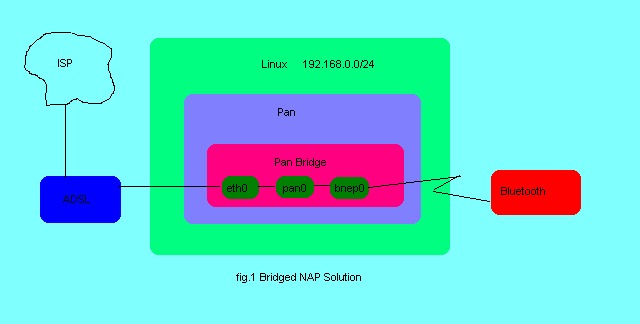
Figure 1. Bridged NAP Solution
The neatest solution for step three is to run a small DHCP service. If you already run DHCP for your own private network, you just have to make sure that the configuration covers any remote BT devices you might connect in addition to the clients already connected. The pan0 interface also can get its IP configuration in this way. If you don't already run DHCP, now could be a good time to start! It isn't difficult to set up a simple service, and it reduces the amount of general, routine manual configuration.
Below is a simple dhcpd.conf file sufficient to serve our PAN:
# small DHCP config for bluetooth PAN
ddns-update-style none;
authoritative;

subnet 192.168.0.0 netmask 255.255.255.0 {
range 192.168.0.10 192.168.0.100;
option domain-name-servers 192.168.0.1;
option domain-name "bluetooth.net";
option routers 192.168.0.1;
option broadcast-address 192.168.0.255;
default-lease-time 600;
max-lease-time 7200;

host btmobile {
hardware ethernet 74:e7:71:ac:d0:34;
fixed-address 192.168.0.9;
}
}
The subnet declaration should correspond to your local private network topology. The range declaration specifies a pool of IP addresses that can be assigned dynamically. The options specify DNS servers (this could be your ISP's nameservers), default gateway (the NAT router) and other common IP parameters. The host declaration allows you to assign fixed IP addresses to known (by MAC address) devices. Place this file where your DHCP server expects to find it, and start the server by the method appropriate to your distribution.
Needless to say, your remote BT devices and the pan0 interface should be configured to get their IP configuration via DHCP. Once all this is in place, your NAP should be active a few seconds after you connect/authenticate your BT device to the Linux box.
For the routed solution, you need to create a separate network/subnet for your PAN and route packets between this and the existing private network/ISP-connected machine. In this configuration pan0 will be the default gateway device and also provide the DHCP service for the PAN. Thus, pan0 will require a static IP configuration and its DHCP service will be separate from any other DHCP and dedicated to the PAN. For clarity, let's use the 10.0.0.0/24 private IP network range for this purpose. This time, there are four steps to get your routed PAN up and running:
Configure pan0 with static IP information.
Configure and run DHCP for the PAN.
Turn on IP forwarding to route packets between pan0 and wlan0/eth0.
Enable NAT on the wlan0/eth0 interface.
Then:
ifconfig pan0 10.0.0.1 netmask 255.255.255.0
 ↪broadcast 10.0.0.255 up
Use your system tools to make permanent settings.
Below is a small DHCP configuration for the routed PAN:
# small dhcp config for bluetooth PAN
ddns-update-style none;
authoritative;

subnet 10.0.0.0 netmask 255.255.255.0 {
range 10.0.0.10 10.0.0.100;
option domain-name-servers 192.168.0.1;
option domain-name "bluetooth.net";
option routers 10.0.0.1;
option broadcast-address 10.0.0.255;
default-lease-time 600;
max-lease-time 7200;

host btmobile {
hardware ethernet 78:e7:d1:ab:d5:6f;
fixed-address  10.0.0.5;
}
}
Alter the DNS information as necessary.
pan0 should be configured and up and running before you start the DHCP service. The next step involves enabling IP forwarding so that packets are routed between pan0 and your existing interface (wlan0/eth0).
In older systems, IP forwarding is enabled by echoing a value of “1” into the appropriate system file:
echo 1 > /proc/sys/net/ipv4/ip_forward
In more recent systems, this is achieved by editing /etc/sysctl.conf:
# Controls IP packet forwarding
net.ipv4.ip_forward = 1
The setting also may be available in your distribution's firewall configuration GUI tool. If none of these methods work on your system, consult your distribution's documentation.
Finally, you need to tell the kernel netfilter software to “masquerade” (NAT) PAN packets through the wlan0/eth0 interface. You may be able to do this using your distribution's firewall configuration GUI tool (the IP forwarding setting may be available here too). If not, it can be achieved using the iptables command:
iptables -A POSTROUTING -t nat -o wlan0 -j MASQUERADE
Substitute eth0 for wlan0 if you are using the routing option because your Linux box connects directly to your ISP and your eth0 interface has an ISP-assigned, routable IP address (Figure 2).
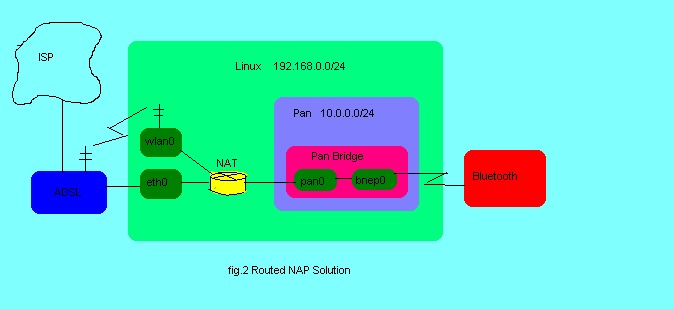
Figure 2. Routed NAP Solution
If all has gone well up to this point, your NAP service should be active a few seconds after you connect/authenticate your remote BT device. You should, for example, be able to ping the device from your Linux box. If IP is not yet running, you can use l2ping <MAC-ADDRESS> to ping the remote device.
BlueZ v.4 does not appear to provide separate configurations for GN and PANU modes of PAN operation, but this is of no consequence because, as was noted above, these are subsumed by the NAP mode. If you only want to connect remote BT devices to your Linux box, and do not require access to the local network or Internet, you simply can omit step 1 from the bridged solution and either employ the DHCP configuration from the routed solution or manually set IP parameters for pan0 and your BT devices.
In fact, Bluetooth is supposed to implement the draft Link-local Autoconfiguration Protocol (variously known elsewhere as Avahi, Bonjour, Rendezvouz and APIPA), so you could try using this for IP configuration instead of running a DHCP service. However, I had no joy with this approach under BlueZ v.4, so I leave it as a potential solution for those of an experimental nature. I would be happy to hear that this facility is alive and well in the BlueZ package if anyone succeeds where I have failed.
For those who want to retain the old ways of configuring and running the Bluetooth facilities, the development team has provided a legacy implementation in the form of a package that contains the separate dæmons as provided in BlueZ 3.x. This package is called Bluez-compat and should satisfy the change-resistant among you. Michael Schmidt (see Resources) has produced a useful how-to document covering the legacy formats.
I am always very reluctant to criticize developers of free and open software. It is all too easy to forget or take for granted the enormous amount of dedicated work that goes into projects like BlueZ and to moan and gripe over minor bugs and missing features. On the whole, I have nothing but admiration for these wonderful people. But, if I could just gently and humbly raise one point, it would be that the documentation for BlueZ seems very thin on the ground. In fact, that's what motivated me to write this article in the first place (for example, there is no man page for the /etc/bluetooth/main.conf file). Anyway, let's hope this is a temporary glitch in an otherwise unblemished record of developmental excellence.
Resources
How to Set Up Common PAN Scenarios with BlueZ's Integrated PAN Support, by Michael Schmidt: bluez.sourceforge.net/contrib/HOWTO-PAN
Personal Area Networking Profile, Version 1.0: www.bluetooth.com/SiteCollectionDocuments/PAN_SPEC_V11.pdf
Dr Chuck Elliot is Principal Lecturer in Networking & Information System Security at Sheffield Hallam University and a Red Hat Certified Engineer.
