
Put the World in Your Pocket with Marble
Have you ever wondered what it would be like to have the whole world at your fingertips? How about cradling it in a single hand, putting it in your pocket and taking it with you wherever you go? With KDE's Marble Virtual Globe on your mobile phone, you can do just that.
Yes, you now can run Marble on a smartphone that supports Nokia's Qt framework. That could be useful, the next time you are arguing with a friend about which is farther north: London, England, or London, Canada. However, you could answer that kind of question using a mobile Web browser, or you even could use your phone to call someone and ask. At first glance, having a virtual globe on your phone seems like little more than a fun gimmick—something to play with and impress your friends. But if you look a little deeper, you will find that Marble can do much more than plug the gaps in your geography knowledge. It can help you find yourself and guide you home.

Figure 1. Marble's mobile version puts the world at your fingertips.
Marble has long been KDE's virtual globe application, providing satellite, atlas and OpenStreetMap mapping of the world. Since its 0.10 release last August, Marble has included route-finding capabilities, so you can enter two locations and have Marble calculate a route and provide step-by-step directions. However, with version 1.0, released in 2010, Marble's navigational capabilities and optimizations for mobile devices have really come of age. Combined with a suitable smartphone, this gives you a completely free navigation system—free software and free map data.

Figure 2. You easily can use a smart phone running Marble as an in-car satellite navigation device.
So, how can you use Marble to turn your phone into a personal navigational device? In principle, you can run the software on any device that supports Nokia's Qt toolkit. In practice, most testing is done on Nokia N900s running Maemo, and packages are available for this platform. Marble also will run fine on MeeGo when the first MeeGo-powered phones appear. In the view of lead developer Torsten Rahn, “It would be really cool to see Marble prepackaged for more platforms, such as Symbian, Android, WinCE and others.”
Get Marble on Your Nokia N900
Most testing of the mobile version of Marble is done using Maemo on Nokia's N900 smartphone. Packages are available to make installation easy.
To get the mobile version of Marble, simply point your phone's Web browser to the Marble Web site (edu.kde.org/marble), navigate to the Download section and scroll down to find the Maemo packages.
Click on the Maemo package, and when it has downloaded, the Maemo package manager should open. You just need to make a few more clicks to confirm that you want to add the Marble software catalog, and then Marble will be ready to use. You also will find that the Marble software catalog enables you to install the marble-maps package that gives you access to additional maps, such as satellite imagery, if you want to try something different from the default OpenStreetMap maps.
If you want to be able to calculate routes without an Internet connection, you also should install monav-routing dæmon, which also is part of the Marble software catalog in the Maemo package manager.
Once you have Marble installed, you just need an excuse to play with it. Imagine that your employer calls you at home one morning and wants you to to travel to a client's office a couple cities away. Over breakfast, fire up Marble on your mobile phone, enter your current location or let Marble find it using GPS, enter your destination and wait for Marble to query a range of routing services before presenting you with a set of options, the best selected by default. If you want to avoid a road you know is particularly busy in the morning, you can choose one of the alternative routes or set an additional via point to avoid it. If you need to pick up your suit from the dry cleaning shop on the way, you can add that to the route too.
When you are happy with your journey plan, just use your home wireless network to download the maps for the entire route before you hit the road. That way, you won't have to use more expensive mobile network bandwidth on the journey. Then, you can flick Marble into guidance mode, sit back in your car and watch as Marble tracks your progress along the route and provides step-by-step directions and relevant maps. While you travel, you will see that Marble displays a progress bar to warn you of the next turn (it counts down from 1,000m). You can check the icon that shows you the direction of the next turn and know that if it is grayed out, the next turn is still more than 1,000m away. Check the step-by-step text instructions for further guidance. You also get to see the overall distance to the destination and can toggle between guidance and map mode that enables you to pan and zoom the map manually. Remember also to keep your eyes on the road.
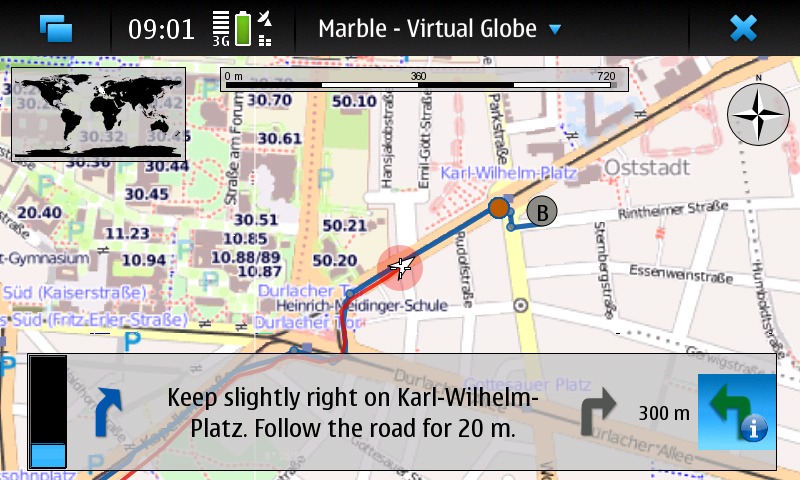
Figure 3. Marble's customized guidance mode interface shows only the information you need: the next turn and when to expect it.
You might be tempted to play with Marble's routing just for the fun of it, while racking up big mobile data bills to download all the map data. So, it's fortunate that Marble allows you to download map data for planned journeys at a convenient time, such as when you are within range of your home wireless network. According to developer Dennis Nienhüser, “Marble 1.0 allows you to download map data along the route, which keeps the download amount significantly lower if you're interested only in the route part.” This can cut data downloads by 85–90%. You even can work out routes entirely off-line. Marble can download a set of off-line maps to do vehicle routing all around the world.
Of course, other navigation solutions exist for mobile devices. Some, such as Navit, Mappero, ModRana and MoNav, even are free software. However, Marble has a few special features. Marble makes use of a range of existing algorithms and Web services, and as Dennis explains, the approach Marble takes is to “query the available ones in parallel and choose the best result”. However, there is more to it than just fetching results: “many of the services can only calculate routes between two points, while Marble supports an arbitrary number of via points—therefore, we need to split up requests and combine the results, and all of that is transparent to the user”. Marble also adds enhancements to the step-by-step driving instructions: “We generate them ourselves, as that allows us to translate them in all languages supported by KDE software—no other project has that huge a number of supported languages.”
Dennis explains that there are other advantages to using a selection of alternative back ends: “Since we query multiple routing back ends in parallel, Marble ranks the results, eliminates duplicates and then shows the remaining routes on the map. The best is active, but you can easily switch to one of the alternative routes.”

Figure 4. Marble's route finder can help you plan long journeys by car.
Marble for smartphones also gains from its close relationship to its desktop cousin. You easily can explore and plan your journey with Marble on your home computer with a big screen and fast Internet connection and then transfer it to your mobile phone. Simply export a file from the computer to the phone and then open it in the mobile version of Marble. In fact, you can import route data from any application supporting the standard KML format. The mobile version of Marble does, however, have plenty of differences from the desktop version. For a start, the mobile version does not depend on the KDE platform, so none of the KDE libraries are needed for installation. This makes the application download only a few megabytes, but it does mean that the KNewStuff interface—with which you may already be familiar if you use KDE software on the desktop—is not available to install add-ons, such as new maps.
Making the software simple to use is one of the developers' main goals. Much of the technology needed has developed independently of Marble, but Marble draws it all together and presents it to the user via a consistent and easy-to-use interface. For Dennis, the major challenge has been “integrating the different back ends and coping with their strengths and limitations, ideally without the user knowing”. This is the key: “hiding power behind a simple user interface”.
In the best traditions of free software, Marble makes use of a whole load of existing routing solutions rather than re-implementing everything itself.
Addresses and current locations are located on the globe using a combination of the Nominatim Web service (for OpenStreetMap address search), GeoIP Web services to link IP addresses to locations and a local database shipped with Marble. Nominatim also is used to convert positions to addresses, as is Gosmore, which is an optional runtime dependency.
Marble works out routes by taking advantage of the OpenRouteService, YOURS Web service, Routino and the aforementioned Gosmore and Monav as optional runtime dependencies.
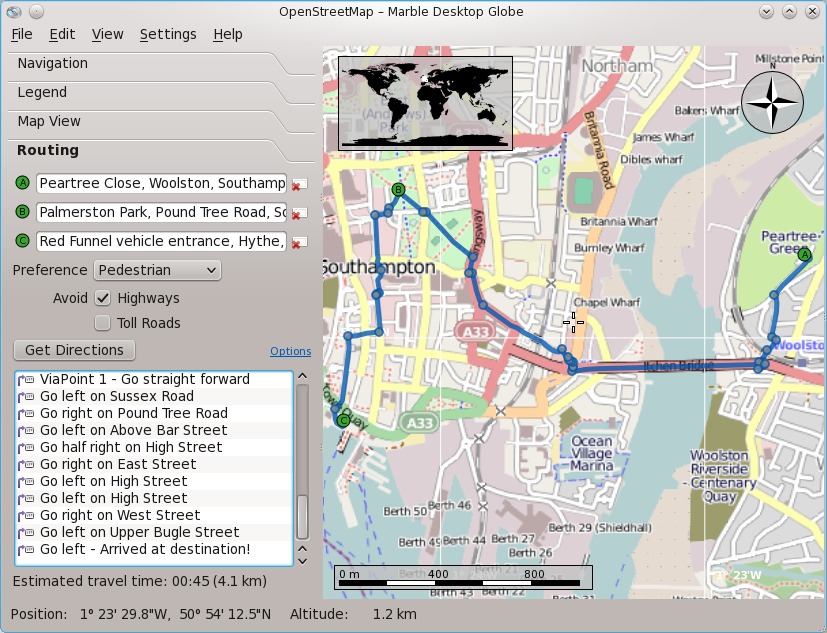
Figure 5. Large-scale OpenStreetMap data makes finding the best walking routes around your home city easy too.
Of course, free software also is about contributing things back, and Dennis is excited about Marble's routing instructions implementation becoming useful for other projects. “It is used by the YOURS implementation on OpenStreetMap, which has good chances to be included on the main OpenStreetMap site at some point. That would mean that some part of Marble, and the efforts of the KDE translators, would be used by the OpenStreetMap project itself—a nice way for KDE to contribute.”
Plenty more is coming in the future. Being able to plan a route and following it is useful, but what about being able to take your phone out when you run or cycle and have Marble record your route so you can upload it to your home computer and see where and how far you went? Dennis thinks it can be done: “Technically, we're just 20 lines of code away from that. It's mainly missing currently because we didn't find a nice place in the user interface yet.”
Other future enhancements include integration of off-line address search, greater optimization for different transport types—for example, improving the selection of different routes for cycling and driving or choosing the fastest versus the shortest route. Voice instructions, one of the major features missing from Marble on a smartphone when compared to a dedicated satellite navigation system, also will be added using text-to-speech technology.
Torsten also is excited about the future use of OpenGL, recently demonstrated by Marble developer Bernhard Beschow. Adding OpenGL support will make it possible to move rendering of the maps from pure software to make better use of the graphics processors found in modern smartphones. Torsten believes that “OpenGL is important for the mobile use case in terms of CPU and battery usage—we hope that OpenGL support will start to appear in summer 2011.”
Implementing all these features, of course, will take a lot of hard work, and not just from developers: “We need more people to help us: with promotion, with documentation and, of course, through coding.” As Marble depends heavily on free data sources, such as those integrated in the OpenStreetMap Project, it also benefits from contributions to the stock of free geographical data by governments, individuals and companies. In particular, Torsten would like to see more aerial imagery released under free licenses. Dennis has similar views: “Any data that is commonly tagged in OpenStreetMap will be useful if it can be imported automatically in some way. Satellite maps would be awesome to have as well in more detail.”
Marble became well known as an educational desktop globe along the lines of Google Earth. After all, it was developed as part of the KDE Education Project. However, Marble's 1.0 release, part of KDE Software Compilation 4.6 released earlier in 2010, has brought both its navigational features and mobile interface to maturity, and the developers now prefer to say that Marble is the free software that lets you “explore the world and find your way”.
Even when work on Marble first started, Torsten's goals were ambitious: to produce a map widget that would “become for geo-browsers what KHTML/WebKit is for Web browsers”. The aim always was very much more than just the production of an educational globe. Torsten explains: “We took the education focus as a starting point, and since then, we have explored more and more use cases and have widened our scope.”
Marble also has found a place in many other applications, from scientific mapping and weather-tracking applications to photo management, sensor data visualization and even Linux distribution installers. It goes beyond Earth too, with map data for the moon and solar system planets available for download.

Figure 6. If you get bored with planet Earth, there are plenty of other worlds to explore.
For Dennis, the development of Marble into a mobile navigation system has fulfilled a long-felt need: “My wish to use a free navigation assistance goes back quite some years. I started to look into open-source navigation solutions, but the software available at that time wasn't really capable of what I wanted.” Nonetheless, he began contributing to Marble. “Once I had an N900 and heard that there was a Marble port for the N900 already, the idea pretty much was there.”
So, what is Marble now, an educational desktop globe or a personal navigational tool? For Dennis, the answer is easy: “To me, they are not contradictory—it is both, and even more.”
Resources
Marble: edu.kde.org/marble
Navit: www.navit-project.org
Mappero: maemo.org/downloads/product/Maemo5/maemo-mapper
ModRana: maemo.org/packages/view/modrana
MoNav: wiki.openstreetmap.org/wiki/MoNav
OpenStreetMap: nominatim.openstreetmap.org
Gosmore: wiki.openstreetmap.org/wiki/Gosmore
OpenRouteService: openrouteservice.org
YOURS: wiki.openstreetmap.org/wiki/YOURS
Routino: www.routino.org
Stuart Jarvis is a scientist and member of KDE's Marketing Working Group. Lacking a Marble-capable smartphone, he spends a lot of time getting lost in unfamiliar places.
