
SOGo—Open-Source Groupware
More than two years have passed since I last wrote about SOGo for Linux Journal. Since then, the project has matured greatly and now is being used successfully in tons of large-scale deployments. SOGo's strengths are really about scalability; component re-usability (IMAP, LDAP, SMTP and database server); compliance to standards, such as CalDAV and CardDAV; and excellent interoperability with popular applications, such as Mozilla Thunderbird, Apple iCal/Address Book and Microsoft Outlook. The latter is supported through a close collaboration between the SOGo and OpenChange Projects.
Since my last article, there have been more fluctuations in the world of open-source groupware, including:
CalDAV and CardDAV protocols have gained major popularity, and extensions, such as Collection Synchronization for WebDAV and CalDAV Scheduling Extensions to WebDAV, are making those finally usable in large-scale enterprise environments.
Mozilla Messaging finally released Thunderbird 3 with a greatly improved Mozilla Lightning extension.
Zimbra gained tons of popularity, but Yahoo sold it to VMware for a major loss.
OpenGroupware.org, Open-Xchange, Citadel, Kolab, eGroupWare and Bedework are fading away.
Chandler and Bongo virtually died.
Apple is actively integrating open standards in its calendar and address-book applications.
DAViCal and OpenChange have emerged as great solutions to consider.
Funambol has positioned itself as the favorite synchronization middleware.
The first incarnation of SOGo appeared with v1.0 in March 2009, and versions up to 1.3.2 quickly followed. This article presents the current state of SOGo, its integration capabilities with desktop and mobile clients and provides simple instructions to get a workable installation quickly.
Installing SOGo is very easy, as packages are available for a variety of GNU/Linux-based distributions, such as Red Hat Enterprise (and CentOS), Debian and Ubuntu. An Ubuntu-based virtual appliance also is available, which provides a complete out-of-the-box testing environment of SOGo. Here, I provide high-level installation and configuration instructions. For more in-depth instructions, look at the official SOGo documentation, which covers everything, including instructions for desktop clients and mobile devices.
SOGo leverages virtually every part of your infrastructure. It makes use of the following:
Your LDAP server for authentication, public address books and groups extraction.
Your database server to store events, tasks and contacts. A database server also can be used for authentication and shared address books. MySQL, Oracle and PostgreSQL are supported.
Your IMAP server to store/retrieve e-mail. When available, SOGo also makes use of advanced capabilities, such as IMAP ACLs, Sieve, shared folders and more.
Your SMTP server to send e-mail.
Your HTTP server to proxy requests to the SOGo server and perform SSL encryption.
Of course, when you do not have such components in your environment, best-of-breed ones can be used from the free and Open Source community. SOGo will literally transform those loosely coupled components into a single and coherent groupware solution, which then can be accessed from your favorite Web browser or from a variety of desktop and mobile clients.
Assuming you have an Ubuntu 10.04 LTS installation and you prefer MySQL, let's proceed with the installation of SOGo and its dependencies. First, add SOGo's repository to your APT sources list, and resynchronize the package index files from their sources:
% sudo su -
% echo 'deb http://inverse.ca/ubuntu lucid main'
  ↪>> /etc/apt/sources.list
% apt-get update
Then, install SOGo, its dependencies, Apache and MySQL:
% apt-get install sogo sope4.9-gdl1-mysql apache2 mysql-server
If you get Apache startup errors after the installation, ignore them. Next, create the SOGo database and the required user:
mysql -h localhost -u root -p
mysql> CREATE DATABASE sogo CHARSET='UTF8';
mysql> CREATE USER 'sogo'@'localhost' IDENTIFIED BY 'secret';
mysql> GRANT ALL PRIVILEGES ON sogo.* TO 'sogo'@'localhost';
SOGo's database will be used to store events, tasks, contacts and user preferences. To keep this installation as simple as possible, let's also use MySQL for user authentication. To make this work, create a database table holding user information, and add three test users all with the same MD5-encrypted password (“secret”):
mysql> USE sogo;
mysql> CREATE TABLE sogo_users (c_uid VARCHAR(10) PRIMARY KEY,
 ↪c_name VARCHAR(10), c_password VARCHAR(32),
 ↪c_cn VARCHAR(128), mail VARCHAR(128));
mysql> INSERT INTO sogo_users VALUES ('alice', 'alice',
 ↪MD5('secret'), 'Alice Thompson', 'alice@acme.com');
mysql> INSERT INTO sogo_users VALUES ('bob', 'bob', MD5('secret'),
 ↪'Bob Smith', 'bob@acme.com');
mysql> INSERT INTO sogo_users VALUES ('chris', 'chris', MD5('secret'),
 ↪'Chris Cooper', 'chris@acme.com');
In a read-world environment, your database table probably would be much more complex than that. It also might be a database view on your existing information, and in many cases, an LDAP server will be used for authentication and user information retrieval instead. SOGo supports multiple authentication sources, so you also could have an LDAP server for authentication used together with an SQL view on your CRM contacts that would be exposed as an address book to all your SOGo users.
Next, let Apache proxy requests to SOGo. Because SOGo is not a fully compliant HTTP server, you should use Apache (or any other HTTP server) in front of it by enabling some required modules:
% a2enmod proxy
% a2enmod proxy_http
% a2enmod headers
Once enabled, you must configure SOGo so that it uses your newly created MySQL database. Again, in this example, let's not configure the Web mail part of SOGo to keep the configuration as simple as possible. Nonetheless, if you do have a working IMAP server installation (Cyrus IMAP Server and Dovecot are recommended), it will work out of the box if SOGo and your IMAP server use the same authentication source.
Proceed with SOGo's configuration under the “sogo” user. This is very important as the sogod dæmon will run under the sogo user, so the preferences created by the defaults utility must belong to the sogo user:
% sudo su - sogo
% defaults write sogod SOGoTimeZone "America/Montreal"
% defaults write sogod SOGoMailDomain "acme.com"
% defaults write sogod SOGoLanguage English
% defaults write sogod SOGoUserSources '({canAuthenticate = YES;
 ↪displayName = "SOGo Users"; id = users; isAddressBook = YES;
 ↪type = sql; userPasswordAlgorithm = md5; viewURL =
 ↪"mysql://sogo:secret@127.0.0.1:3306/sogo/sogo_users";})'
% defaults write sogod SOGoProfileURL
 ↪'mysql://root:secret@127.0.0.1:3306/sogo/sogo_user_profile'
% defaults write sogod OCSFolderInfoURL
 ↪'mysql://root:secret@127.0.0.1:3306/sogo/sogo_folder_info'
% defaults write sogod SOGoAppointmentSendEMailNotifications NO
% defaults write sogod SOGoLoginModule Calendar
% exit
Finally, modify the /etc/apache2/conf.d/SOGo.conf configuration file to use localhost with no SSL. So replace the following:
RequestHeader set "x-webobjects-server-port" "443"
RequestHeader set "x-webobjects-server-name" "yourhostname"
RequestHeader set "x-webobjects-server-url" "https://yourhostname"
with:
RequestHeader set "x-webobjects-server-port" "80"
RequestHeader set "x-webobjects-server-name" "localhost"
RequestHeader set "x-webobjects-server-url" "http://localhost"
Then, restart Apache and SOGo:
% /etc/init.d/apache2 restart
% /etc/init.d/sogo restart
If you want to use an IP address or a real DNS name to access SOGo, you must adjust this accordingly. The "x-webobjects-server-url" value will become the official URL to access your SOGo system. Now, from the same machine on which you performed the above steps, open your favorite Web browser and access http://localhost/SOGo. You should be able to log in with any of the three users created above.
Through the standard CalDAV and CardDAV protocols, SOGo supports desktop clients, such as Mozilla Thunderbird, Apple iCal and Apple Address Book, very well.
Mozilla Thunderbird, combined with the Lightning calendar extension, is the preferred client to use with SOGo. Version 2 and 3.1 of Thunderbird are supported. Thunderbird is the preferred desktop client as SOGo's Web interface shares most of its look and feel and functionality with Thunderbird. Moreover, two extensions can be installed together with Lightning to perfect the integration: the SOGo Connector and SOGo Integrator extensions. The former adds more capabilities to Thunderbird (such as CardDAV support, CalDAV ACL and so on), and the latter adds features that are vertical to SOGo (such as calendars, address-book sharing capabilities and automatic discovery, preferences synchronization and more).
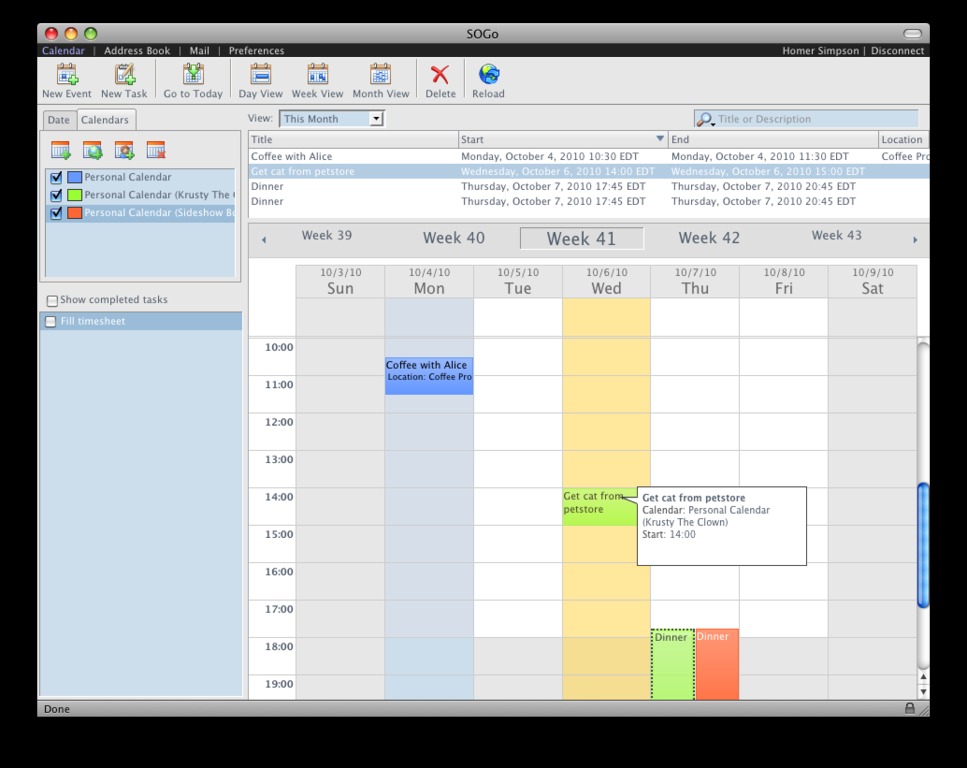
Figure 1. SOGo Web Interface

Figure 2. Mozilla Thunderbird
Using the SOGo Integrator extension requires editing one file in the extension file subtree to specify where the SOGo server is located. This is done by hand. In an enterprise environment, this step is required only once per release, because the updates are expected to propagate automatically. Uncompress (using a ZIP or jar tool) the SOGo Integrator XPI, and locate the extensions.rdf file. This file is used for locating the extension update server and the SOGo server (let's consider those to be the same for the moment). There is a line starting with a Seq tag and with an attribute named isi:updateURL. Replace the host part of that URL with the SOGo server to which you want to connect, which again should be identical to the x-webobjects-server-url. For example, one would replace the following:
<Seq about="http://inverse.ca/sogo-integrator/extensions"
 ↪isi:updateURL="http://sogo-demo.inverse.ca/plugins/
↪updates.php?plugin=%ITEM_ID%&version=%ITEM_VERSION%&
↪platform=%PLATFORM%">
with:
<Seq about="http://inverse.ca/sogo-integrator/extensions"
 ↪isi:updateURL="https://sogo.acme.com/plugins/
↪updates.php?plugin=%ITEM_ID%&version=%ITEM_VERSION%&
↪platform=%PLATFORM%">
if the SOGo server is accessible from https://sogo.acme.com/SOGo. Once you are done modifying the configuration file, save your changes and reconstruct the XPI. As for the extension update server, it can be configured to install or uninstall Mozilla Thunderbird extensions automatically. You also can push Thunderbird settings to all your user base. Installation and configuration is documented in the “Mozilla Thunderbird—Installation and Configuration Guide”.
On Mac OS X, if you prefer Apple's closed-source applications, you easily can use Apple iCal 3 and iCal 4 with SOGo. All features will be available, including calendar sharing and delegation, due to SOGo's excellent compatibility with the CalDAV protocol and its implementation of some Apple-specific extensions. Since Mac OS X 10.6, it's also possible to use Address Book with SOGo through the CardDAV protocol in order to access your contacts. When you combine those two applications with Apple Mail, a cohesive environment is created with collaboration possibilities with other users on other platforms.
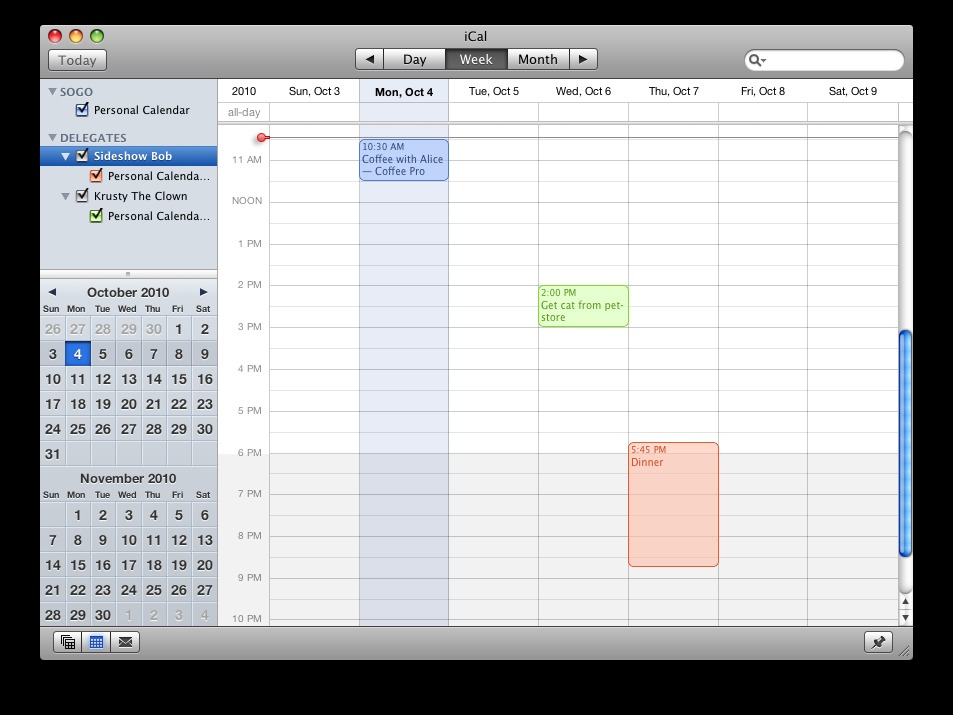
Figure 3. Apple iCal 3
The popularity gained by the CalDAV and CardDAV quickly exposed fundamental flaws in both protocols, and the Collection Synchronization for WebDAV and CalDAV Scheduling Extensions to WebDAV were created to eliminate those. The former introduces a token-based approach to DAV resources synchronization. So, instead of letting the DAV client ask for the ETag of every single item in a collection to see what has changed on the server, the client actually sends a sync token and gets in return the references of changed items from a collection. This makes the whole synchronization process of large calendars or address books very fast.
The second extension actually moves all the scheduling logic required in calendaring applications (inviting attendees, checking availabilities and so on) to the server. This avoids client-side implementation bugs and reduces client-to-server communications, which can be slow on high-latency connections.
SOGo implements those two extensions quite nicely, and Mozilla Lightning supports both while Apple iCal limits itself to CalDAV Scheduling Extensions to WebDAV.
To provide SOGo connectivity options to Microsoft Outlook users, SOGo makes use of the OpenChange Project. The project was founded in 2003 by Julien Kerihuel in the context of his EPITECH Innovative Project. Tightly integrated with Samba 4, the OpenChange solution is divided into three subprojects:
libmapi: a client-side library that can be used in existing messaging clients (Evolution, Akonadi, Mailody and so on) and offers native compatibility with Exchange server.
mapiproxy: a transparent gateway/proxy used to accelerate the communication between Outlook clients and an Exchange server.
OpenChange Server: a full implementation of the Exchange protocols that features pluggable storage providers.
The third subproject is what really interests us here. SOGo developers have created a storage provider for OpenChange that makes use of SOGo libraries in order to reuse all the business logic associated to address books, calendars and e-mail management. Microsoft Outlook communicates directly and natively to OpenChange (because it behaves like any Microsoft Exchange server), which in turn uses the SOGo storage provider to access all the information SOGo handles.
This makes SOGo a real, transparent Microsoft Exchange replacement, because it does not force Outlook users to use costly and hard-to-maintain MAPI connectors, which often are limited in terms of functionality. A proof of concept was released in October 2010 with many capabilities for e-mail, contacts, events and tasks. The project is being worked on actively, and by the time you read this article, a well-working version should be available for public consumption.
Samba, being vastly popular in numerous organizations and its ambitious rewrite to become an Active Directory-compatible Domain Controller, might eventually position a Samba 4, OpenChange and SOGo combo as a turnkey solution for lots of organizations requiring well-integrated directory services, file and printing services and a collaboration solution on top of it.
Although the Web interface or desktop client applications will satisfy most users, the high popularity of mobile devices, the increasing mobility of users and the need to access events, tasks, contacts or e-mail from everywhere can't be neglected by any groupware solution.
Through its Funambol connector, SOGo can synchronize events, contacts and tasks fully with any SyncML-capable device. The Funambol Project is composed of a SyncML server and clients for devices with no built-in SyncML support, such as Research in Motion BlackBerry, Microsoft Windows Mobile, Symbian S60 or Google Android. The server part, which is a middleware, can reuse all data from SOGo using the Funambol SOGo Connector. All those free components enable billions of SyncML-capable devices to synchronize to the SOGo platform.
The Funambol middleware is a self-contained Java application. Installation is as easy as downloading Funambol Server, the Funambol SOGo Connector and creating the sync sources. Full instructions are provided in the “SOGo—Installation and Configuration Guide”.
Apple iPhone users can configure their phones to use CalDAV and CardDAV and have access to their calendars and address books whenever they want. On Google Android-based devices, it also is possible to use the freely available Hypermatix CalDAV client to access calendar information from SOGo.
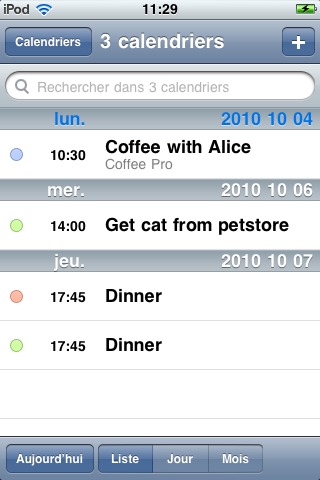
Figure 4. Apple iPhone OS 4
Configuration instructions for mobile devices are available in the “Mobile Devices—Installation and Configuration Guide”.
As discussed in this article, the industry is moving toward open standards, such as CalDAV and CardDAV, to support collaborative applications, which SOGo supports well. Hopefully, this trend will continue, if not improve.
The native compatibility SOGo offers to Outlook users using OpenChange will be a major step in dislodging Microsoft's biggest enterprise lock-in—Exchange.
SOGo is not a finished product, and it will continue to evolve. Developers actively are improving the OpenChange and Exchange integration, implementing more Apple extensions, such as file attachments for meetings, as well as adding scripting capabilities to SOGo. The virtual appliance for SOGo, called ZEG for “Zero Effort Groupware”, is a good way to try the sogo application and download it.
Resources
SOGo and Its Documentation: www.sogo.nu
OpenChange: www.openchange.org
Hypermatix CalDAV Client for Android: www.hypermatix.com/products/calendar_sync_for_android
Collection Synchronization for WebDAV: tools.ietf.org/html/draft-daboo-webdav-sync-03
CalDAV Scheduling Extensions to WebDAV: tools.ietf.org/html/draft-desruisseaux-caldav-sched-08
Funambol: www.funambol.com
Ludovic Marcotte (lmarcotte@inverse.ca) holds a Bachelor's degree in Computer Science from the University of Montréal. Currently, he's having fun at Inverse, Inc., an open-source IT consulting company located in downtown Montréal that specializes in the development and deployment of PacketFence and SOGo.

