
Large-Scale Web Site Infrastructure and Drupal
When Twitter experiences an outage, users see the infamous “fail whale” error message, an illustration of twit-birds struggling to hoist a sleeping cartoon whale into the air along with the words “Too many tweets! Please wait a moment and try again.” It happens so often, Twitter has a much-heralded illustration for it. Not too long ago, many readers may remember Facebook going down for days at a time. True, those sites are dealing with extraordinary levels of traffic, but smaller sites often face the same problems. How come? First, Web sites are no longer a collection of static pages. Nowadays, Web sites combine social-networking features with highly customized content for individual users, meaning most pages have to be assembled on the fly. Second, content is changing—rich media, on-line advertising, video, telephony. There's more than text forcing its way through the pipe, and network traffic only continues to grow. Addressing this tandem of complexity and load is the bane of many growing social-media Web sites' existence. What follows are some clever ways to address this whale of a problem.
Surprisingly, the solutions to most scaling problems are frequently the same, regardless of the technology upon which the site was built. Lullabot (the parent company of this article's authors) is a Drupal development company, meaning that most of our experience is centered around the typical LAMP stack (Linux, Apache, MySQL and PHP), although most techniques are universal, and some of the most advanced performance software is platform-neutral.
One of the main factors in scaling a Web site is, of course, the hardware (Figure 1). System administrators always can throw more hardware at a problem and solve it at least temporarily, if they have the resources to do so. Quite a few services can be put in place before this needs to be done, and developers can selectively optimize the application by reducing or optimizing queries. Nevertheless, when it comes to sheer numbers of users and bandwidth over a short amount of time, there almost always comes a point where it's necessary to include hardware in the mix. That's why it is important to have your hardware infrastructure planned in a way that it rapidly can scale upward on a traffic spike, and back down when your traffic recedes.
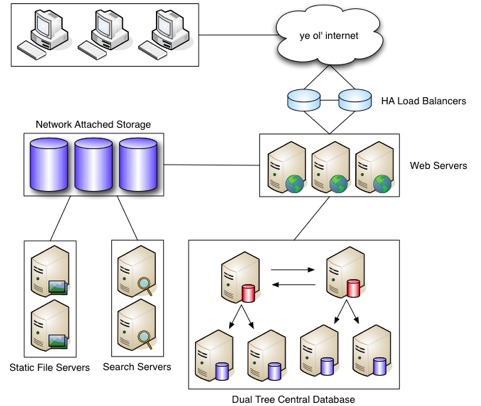
Figure 1. Hardware Stack
A typical setup, whether virtual or dedicated, usually includes multiple Web servers, multiple database servers and sometimes even separate caching servers, all behind a load balancer that distributes traffic between machines. Depending on its processor speed and the amount of available memory, a Web server or database often can double as the caching server, because caching services usually require less resources than Apache or MySQL.
Although distributing traffic across multiple Web servers, or Web heads, can be a quick win, it can introduce problems with managing file uploads. If requests are being distributed round-robin by the load balancer, a user may upload a file on one server but then be switched to a different Web server after the upload, which doesn't have the newly uploaded file. To solve this problem, a file server also is added into the mix. The file server is usually some form of NAS (Network Attached Storage) or an NFS (Network File System) mount that allows the application to share files between machines. Each Web head will have a copy of the application stored in the Web root, but when it comes to the files that are uploaded or changed often by the users of the application, an NFS mount connects all the servers to a shared file location.
The other main factor in scaling a Web site is, of course, the software (Figure 2). To scale effectively, high-traffic Web sites require some flavor or flavors of caching. Caching mechanisms are not mutually exclusive, and most high-profile sites combine several. Most types of caching seek to reduce the amount of disk access necessary to render a page or compile higher-level languages into bytecode so they're faster to run—the closer to machine language the better.
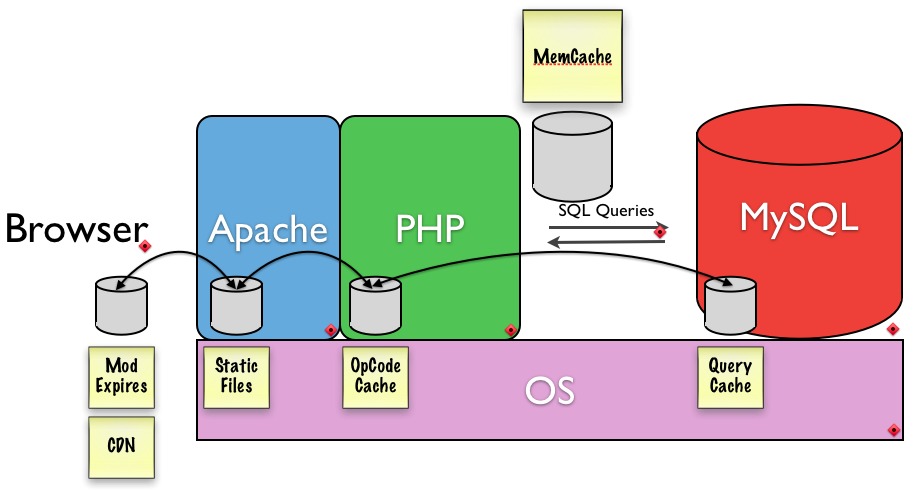
Figure 2. Software Stack
APC (Alternative PHP Cache) and other opcode caches save the Web server from having to read, parse and compile PHP files on every request. APC is a free, open-source opcode cache and is pretty much the standard. It will come built in with PHP 6, but there are many different ones that perform differently.
Modern content management systems, like Drupal, can make a plethora of database calls on every page request. Because calls to the database hit the disk, it is often a bottleneck. Memcached is a service that allows entire database tables to be stored in memory, dramatically speeding up queries to those tables and alleviating strain on the database. It behaves as though it were a giant hash table and serves this data out of memory. Memcached is free, open source and in use by a ton of high-traffic sites. Memcached is installed alongside MySQL on the database server in most typical setups. However, the database server needs to have a lot of RAM available if Memcached and MySQL are sharing this critical resource. There are occasions when Memcached is actually placed on its own server, completely decoupled from the database server, which precludes Memcached from using too much of the database server's memory.
Varnish is an excellent high-performance, HTTP accelerator. The technical term for Varnish is a “reverse proxy cache”, meaning that it handles the requests when you visit a Web site. If Apache were a physician, Varnish would be the triage nurse. After each anonymous page request is made, Varnish makes a copy of the page in an ultra-fast storage so that the next time the page is requested, it returns it immediately, circumventing a bootstrap of Apache, PHP, MySQL, Memcached or any other technologies your Web site may require to serve pages. If Varnish doesn't have a copy of the file or page being requested, it will send the request on to Apache. And, it's really a huge win if you're going to be serving static content.
Search is resource-intensive. Optimizing search will contribute to overall site performance and is a great process to outsource to another box. Solr can help ease an over-burdened Web server. Solr is a project from the Apache Foundation that takes the power of Lucene, a fantastic indexer and searcher, and exposes it as a Web service. Using HTTP POST and GET requests, you can feed documents to Solr for indexing and issue queries for searching. In Drupal, the Views module serves as a visual query-builder and handles search. With Views 3, in Drupal, you can plug in Solr to handle the search heavy-lifting instead of having Drupal hit MySQL for this, alleviating a load on your database server best left to a document indexer like Lucene.
Apache's MaxClients setting is a limit on the number of simultaneous requests that can be served. If this limit is reached, users have to wait until a child process is freed up until they can connect. If this number is increased too much, however, there is a risk that the Web head will run out of memory. There's a standard formula for figuring out what this setting should be based upon the RAM available to the machine:
formula: RAM/Average Apache Memory Size in Use = # max clients
example: 2GB/20MB = 100 MaxClients
Apache's mod_expires setting controls the HTTP header information for anything served through Apache to your machine. If a resource has been cached on a user's computer, this setting can tell any subsequent request to that resource if it has expired and needs to be downloaded again. It's a good idea to have this turned on for text/HTML header types:
<IfModule mod_expires.c>
  ExpiresActive On
  ExpiresDefault A1209600
  ExpiresByType text/html A1
</IfModule>
The KeepAlive setting is a way to tell Apache to keep an HTTP connection alive for a period of time so that it can be reused. This has been shown to result in an almost 50% speed increase in latency times for HTML documents with many images. Turn this on and set the KeepAliveTimeout to 2 seconds:
KeepAlive On
KeepAliveTimeout 2
MySQL is the most widely used database for Drupal, although Drupal 6 also supports Postgres. Drupal 7 has an object-oriented database abstraction layer that allows drivers to be written for many other database systems. There are some key things to keep in mind within MySQL's configuration that can help optimize your application for performance.
MySQL has a built-in query cache that is turned on by default. Make sure to afford a liberal amount of memory to this cache:
[mysqld] query_cache_size=32M
Once your application is built, it's a good idea to log slow queries for a short amount of time to get a list of queries that are taking a long time and can be examined with an EXPLAIN and then optimized:
log-slow-queries = /var/log/slow_query.log
long_query_time = 5
#log-queries-not-using-indexes
MySQL's EXPLAIN command is a great way to find out exactly what a particular query is doing in order to get some clues as to why it may be taking a long time to evaluate and return a result. One of the key things to look at is the number of rows that EXPLAIN tells you it had to search through. This may indicate that one of your tables, bursting at the seams, is a good candidate for a new index.
Taking a look at the following query, we see there are three fields that could have an index placed upon them in order to reduce the number of rows that a query has to search through in order to find the desired result:
...
FROM node node
WHERE node.status = 1
AND node.type IN ('story')
ORDER BY node.created DESC
The status, type and created fields are key to this query's result and can be indexed so that they are seen as a group:
mysql> ALTER TABLE node ADD INDEX (status, type, created);
Table locking can be a performance headache. By default, Drupal's MySQL database tables are all set to MyISAM. Because MyISAM locks the entire table down during a query, high traffic may cause MySQL errors when a certain table is unavailable or locked. If you start seeing these errors, look at which tables are giving the error and evaluate whether they should be set to InnoDB instead. InnoDB does row locking instead of table locking. When evaluating, look to see if the table has any auto_increment fields, and keep in mind that converting this table may cause slow-downs on INSERTs, as InnoDB does a full table lock on INSERTs to avoid key duplication.
Static variable caching is a quick-and-easy win in PHP. Here is an example of a simple function with a simple query to the database:
function taxonomy_get_term($tid) {
  return db_fetch_object(
    db_query('SELECT * FROM {term_data} WHERE tid = %d', $tid)
  );
}
This function can be given a simple static variable, so that if this function happens to be called more than once on a page load, it can skip over the call to the database and serve the result out of this static cache:
function taxonomy_get_term($tid) {
  static $terms = array();
  if (!isset($terms[$tid])) {
    $terms[$tid] = db_fetch_object(
      db_query('SELECT * from {term_data} WHERE tid = %d', $tid)
    );
  }
  return $terms[$tid];
}
Drupal is a content management framework that Lullabot uses to build high-performance Web sites on top of this infrastructure. Drupal is built with PHP as its primary programming language and has a ton of user-contributed modules freely available to extend its functionality. It has been compared to LEGOs because of this, and because the quality of modules vary, it's a good idea to do full code reviews of any modules that are selected for inclusion into any platform build. If an existing module already does mostly what is needed, it should be reviewed to make sure static variable caching is utilized, queries are optimized and general coding standards are being used.
Regularly contribute patches back to modules when a module is found lacking in any of these areas or if any general bugs are found through the module's issue queue, which can be found on the same page where you download the module. Performance reviews also are a good idea once a site is built to ensure that queries are optimized and not run more than once per page load. The Devel module is a great resource for this, as it will give you stats on page load times, memory usage and can display every query executed on any given page load.
Beyond the regular LAMP configuration optimizations, caching techniques, and hardware infrastructure are some general Web development best practices available within Drupal that not only can reduce loads on various servers, but also make it easy to have some of your data structures in code that can be version-controlled to keep track of changes and to help with the deployment process of said changes. The first, and relatively new, paradigm of “exportables” is twofold, in that it gives you a way to read a data structure from code instead of the database, and it also can be deployed to different environments and reused.
Exportables started with the Views module by Earl (merlinofchaos) Miles who wanted a way to help debug the problems that his module users might encounter. So, he created a way for users to export the view they created into a readable data structure that he then could put on his own machine to help him debug. This not only had the awesome side effect of being able to share these “view recipes” with other users, but it also evolved into a method where the structure could replace what was read from the database and help increase the performance. Exportables then was extrapolated into a library dubbed Ctools (for Chaos Tools) and used for the Panels module. Other people started catching on and implementing exportables for their modules, and now there are a whole slew of modules that use the Ctools Exportables for this purpose.
This eventually led to a module called Features that provides a UI to choose the various exportable data structures within a Drupal installation and wrap them up into a custom “feature” module, which then can be shared. These features can be simple configuration options or complex features requiring many other contributed modules in order to provide feature-rich enhancements for any Drupal Web site. Not only can it be used to share such features, but it also has become an important part of the deployment process in creating modern Drupal Web sites.
Another tool that has recently matured and become a necessity to any professional Drupalite is Drush. Drush stands for Drupal Shell and is a way to control your Drupal Web sites through the command line. Not only does it provide powerful commands to manipulate your Web site quickly, but other modules can provide integration with Drush as well, creating their own commands related to working with their particular module. For example: the Features module provides commands to Drush that allow you to list, update and revert any feature modules quickly that are part of a Drupal installation's codebase. The Backup and Migrate module provides integration to allow you to create SQL backups of your Web site quickly with a simple command. Some modules even provide commands to work with Drupal and Git! So, not only does Drush allow you to work with your Drupal site quickly, but you also don't have to load a huge page through Apache to do so.
And, of course, no professional Web site would be complete without revision control. Lullabot has used CVS (Concurrent Versions System), SVN (Subversion) and, most recently, made the move to Git. But no matter what you use, it's important to have a backup of your work and versioning for teams working on the same project. The merits of versioning your code are many. Working on a high-performance Web site usually takes many people, so version control becomes a necessity.
Jerad Bitner has been using Drupal since the nightmare upgrades from 4.6 to 4.7 (that's early 2005, if you're asking). He started out as a Technical Illustrator with C/S Group and worked for three years with Photoshop, Illustrator, AutoCad and Macromedia products as well as PHP. When it came time to replicate a platform across the different locations of the company, Jerad found Drupal and hasn't looked back since.
Nate Haug adds a dash of design to Lullabot. He received degrees in both a Fine Arts and Computer Science from Truman State University, creating the perfect bridge between the technical and aesthetic. Detail is his obsession, so if you know what you want, Nate will deliver your desire.


