
VLAN Support in Linux
It's no surprise that Linux makes a great router and firewall. A lesser-known fact is that you also can use Linux as an Ethernet bridge and VLAN switch, and that these features are similarly powerful, mature and refined. Just like Linux can do anything a PIX or SonicWall can do, it also can do anything a managed VLAN “Smart Switch” can do—and more.
Why VLAN?
When you hear the term VLAN, large-scale corporate or campus networks might come to mind. Easing the burden of maintaining these types of networks was one of the primary reasons VLAN technology originally was developed.
VLANs allow network topology to be rearranged on demand—purely in software—without the need to move physical cables. VLANs also allow multiple separate layer-2 networks to share the same physical link, allowing for more flexible and cost-effective cabling layouts. VLANs let you do more with less.
Take the example of a large spread-out network with multiple LANs and data closets. Without the benefit of VLANs, the only way you can move a device to a new LAN is if it's accessible in the same data closet (where the device connects) as the old LAN. If it's not, you have no option other than pulling a new cable or physically moving the device to a location where the new LAN is accessible. With VLANs, however, this is a simple configuration change.
These are the types of benefits and applications that usually are associated with VLANs, but there are many more scenarios beyond those that are useful in all sized networks, even small ones.
Because VLAN switches historically have been expensive, their use has been limited to larger networks and larger budgets. But in recent years, prices have dropped and availability has increased with brands like Netgear and Linksys entering the market.
Today, VLAN switches are cheap (less than $100) and are starting to become commonplace. I suspect that in a few more years, it'll be hard to find a switch without VLAN support, just like it's hard to find a “hub” today.
In this article, I give a brief overview of 802.1Q VLAN technology and configurations and then explain how you can configure Linux to interface directly with VLAN topologies. I describe how a VLAN switch can help you add virtual Ethernet interfaces to a Linux box, saving you the need to buy hardware or even reboot. I also look at solving some of those small-scale network annoyances. Do you think your Linux firewall has to be located near your Internet connection and have two network cards? Read on.
The purpose of VLAN (Virtual LAN) is to build LANs from individual ports instead of entire switches. A VLAN config can be as simple as groupings of ports on a single switch. The switch just prevents the ports of separate groups (VLANs) from talking to each other. This is no different from having two, three or more unconnected switches, but you need only one physical switch, and it's up to you how to divide the ports among the “virtual switches” (three ports here, eight ports there and so on).
When you want to extend this concept across multiple switches, things become more complicated. The switches need a standard way to cooperate and keep track of which traffic belongs to which VLAN. The purpose is still the same—build LANs from individual ports instead of entire switches, even if the ports are spread across multiple switches and even multiple geographic locations.
IEEE 802.1Q
Although various manufacturers initially created other proprietary VLAN formats, the prevailing standard in use today is 802.1Q. In a nutshell, 802.1Q provides a simple way for multiple VLAN switches to cooperate by attaching VLAN-specific data directly to the headers of individual Ethernet packets.
IEEE 802.1Q is an open standard, which means, theoretically, that all compatible devices can interoperate regardless of manufacturer. Linux VLANs are based on 802.1Q, and almost any switch that advertises “VLAN” will support this standard.
You can think of VLAN switches as a natural evolution of Ethernet devices, with its ancestors being the switch and the hub. The fundamental difference between a switch and a hub is that a switch makes decisions. It won't send packets to ports where it knows the destination MAC can't be found. Switches automatically learn about valid port/MAC mappings in real time as they process packets (and store that information in their “ARP cache”).
A VLAN switch adds another condition on top of this. It won't send packets to ports (the “egress port” or sink) that aren't “members” of the VLAN to which the packet belongs. This is based on the VLAN ID (VID) of the packet, which is a number between 1 and 4096.
If a packet doesn't already have a VID, it is assigned one based on the port on which it arrived (the “ingress port” or source). This is the Primary VID (PVID) of the port. Each switch port can be a member of multiple VLANs, one of which must be configured as its PVID.
The VID is stored in an extra 4-byte header that is added to the packet called the Tag. Adding a Tag to a packet is called Tagging. Only VLAN devices know what to do with Tagged packets; normal Ethernet devices don't expect to see them. Unless the packet is being sent to another VLAN switch, the Tag needs to be removed before it is sent. This Untagging is done after the switch determines the egress port.
If a port is connected to another VLAN switch, the Tags need to be preserved, so the next switch can identify the VLANs of the packets and handle them accordingly. When a packet has to cross multiple switches in a VLAN, all subsequent switches rely on the VID that was assigned to the packet by the first switch that received it.
Note:
In the case of a VLAN with only a single switch, no Tagged packets should be sent or received. However, it's still useful to think of the Tagging and Untagging as occurring:
Packet arrives and is Tagged according to the PVID of the ingress port.
Egress port is determined based on the VID in the Tag.
Packet is Untagged and sent.
All packets start out as Untagged when they enter the network, and they also should always end as Untagged when they leave the network and arrive at their destination. Along their journey, if they cross a VLAN network, they will be Tagged with a VID, switched according to this VID by one or more VLAN switches, and then finally Untagged by the last VLAN switch.
If you've been keeping track, you know there are three things you need to configure for each port of each switch:
Member VLANs (list of VIDs).
PVID (must be one of the member VLANs).
Whether packets should be left Tagged or Untagged when sent (egress).
With one or more switches, you can achieve any VLAN topology by selectively configuring the above three settings on each port.
A VLAN switch is really just a normal switch with some extended functionality. Before you can have a VLAN switch, you first need to have a normal switch. Fortunately, Linux already has full support for this—it's just not called “switching”.
The functionality that makes Linux what you would think of as a “switch” is called bridging, a more specific and accurate term, because it's based on the official bridge standard, IEEE 802.1D.
For all practical purposes, switches and bridges are the same thing. Switch is a loose term coined by the industry that means different things for different products (for example, $10 switches usually don't fully support 802.1D, while $500 switches usually at least support 802.1D, plus lots of other features).
An 802.1Q VLAN switch is really a VLAN bridge, because 802.1Q as a standard just extends 802.1D (all devices that support 802.1Q must also support 802.1D). Technically, VLAN bridge is the correct terminology, but very few people would know what that means.
In order to use bridges in Linux, you need a kernel compiled with CONFIG_BRIDGE and the userland package bridge-utils. I suggest you also add the ebtables kernel options and userland tool.
Think of each Ethernet interface in your system as a one-port switch. An Ethernet interface already performs the same basic functions as a switch—forwarding packets, maintaining an ARP cache and so on—but on a single port without the need or capability to decide to which other port(s) a packet should be sent.
Linux's bridging code elegantly plugs in to and extends the existing functionality by letting you define bridges as virtual Ethernet interfaces that bundle one or more regular Ethernet interfaces. Each interface within the bridge is a port. In operation, this is exactly like ports of a switch.
The userland tool for administering bridges is brctl. Here's how you would set up a new bridge comprising eth0 and eth1:
brctl addbr br0
brctl addif eth0
brctl addif eth1
ip link set br0 up
Once you run these commands, you'll have a new Ethernet interface named br0 that is the aggregate of both eth0 and eth1. For typical usage, you wouldn't configure IP addresses on eth0 and eth1 anymore—you would now use br0 instead.
The best way to understand how this works is to imagine br0 as a physical Ethernet interface in your box that's plugged in to a three-port switch on your desk. Because br0 is plugged in to one of the ports, this would leave the switch with two remaining ports—eth0 and eth1 are these two switch ports (Figure 1).
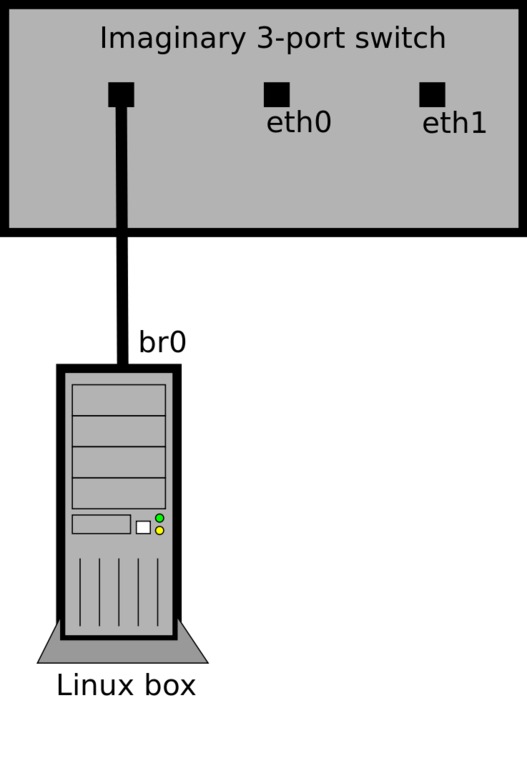
Figure 1. Imaginary Three-Port Switch Created by a Bridge
Packets will pass between the interfaces/ports, the bridge will learn and maintain an ARP cache, and like a switch, it will decide to which ports each packet should be forwarded.
But, unlike a normal switch external to your system, you own and control all of the ports. You now can use any and all of the tools available under Linux to create the ultimate managed switch!
Because you still have access to the underlying Ethernet interfaces, you can do things like sniffing with tcpdump or snort on ports individually. Using the ebtables package, you can filter the Ethernet packets that pass through your switch with the same control and precision as iptables for IP packets.
Topics such as ebtables are beyond the scope of this article, but see the ebtables man page and Web site (see Resources).
VLAN support requires a kernel compiled with CONFIG_VLAN_8021Q and the vlan userland package (I suggest you also enable CONFIG_BRIDGE_EBT_VLAN so you can match VIDs in ebtables rules).
Use the vconfig tool to create virtual VLAN interfaces based on the combination of a physical Ethernet interface and a specific VLAN ID. These interfaces can be used like any other Ethernet interface on your system.
Run the following commands to add a new interface associated with eth0 and VID 5:
vconfig add eth0 5
ip link set eth0.5 up
This will create the virtual interface eth0.5, which will have the following special VLAN-specific behaviors:
Packets sent from eth0.5 will be Tagged with VID 5 and sent from eth0.
Packets received on eth0 Tagged with VID 5 will show up on eth0.5 as normal (that is, Untagged) packets.
Only packets that were Tagged with VID 5 will arrive on the virtual VLAN interface.
The biggest difference between Linux and an off-the-shelf VLAN switch is that Linux can participate as a host on the network rather than just forward packets for other hosts. Because the Linux box itself can be the endpoint of network communications, the configuration approach is different from that of a typical VLAN switch.
Instead of setting VLAN membership for each port, each port/VID combination gets its own virtual eth interface. By adding these interfaces and optionally bridging them with physical interfaces, you can create any desired VLAN configuration.
There is no per-port PVID setting in Linux. It is implicit based on to which VLAN interface(s) the physical ingress interface is bridged. Packets are Tagged if they are sent out on a virtual VLAN interface according to the VID of that interface. Tagging and Untagging operations happen automatically as packets flow between physical and virtual interfaces of a given bridge. Remember that the PVID setting is relevant only when forwarding packets that were received as Untagged.
With a typical VLAN switch there is only one bridge (the switch itself), of which every port is a member. Traffic segmentation is achieved with separate per-port ingress (PVID) and egress VLAN membership rules. Because Linux can have multiple bridges, the PVID setting is unnecessary.
These details are simply convention; the effective configurations are still the same across all VLAN platforms. It sounds more complicated than it actually is. The best way to understand all this is with some real-world examples.
Let's say you have a Linux box with a single physical interface (eth0) that you want to join to three existing VLANs: VIDs 10, 20 and 30. First, you need to verify the configuration of the existing switch/port into which you will plug the Linux box. It needs to be a member of all three VLANs, with Tagging on for all three VLANs. Next, run these commands on the Linux box:
ip link set eth0 up
vconfig add eth0 10
ip link set eth0.10 up
vconfig add eth0 20
ip link set eth0.20 up
vconfig add eth0 30
ip link set eth0.30 up
You then can use eth0.10, eth0.20 and eth0.30 as normal interfaces (add IP addresses, run dhclient and so on). These will behave just like normal physical interfaces connected to each of the VLANs. There is only one physical interface in this example, so there is no need to define a bridge.
Let's say you want to use the Linux box in the above example to connect a non-VLAN-aware laptop to VLAN 20. You'll need to add another physical interface (eth1), and then bridge it with eth0.20. I'm naming the bridge vlan20, but you can name it anything:
brctl addbr vlan20
ip link set vlan20 up
brctl addif vlan20 eth0.20
ip link set eth1 up
brctl addif vlan20 eth1
Now eth1 is a port on VLAN 20, and you can plug in the laptop (or a whole switch to connect multiple devices). Any devices connected through eth1 will see VLAN 20 as a normal Ethernet network (Untagged packets), as shown in Figure 2.
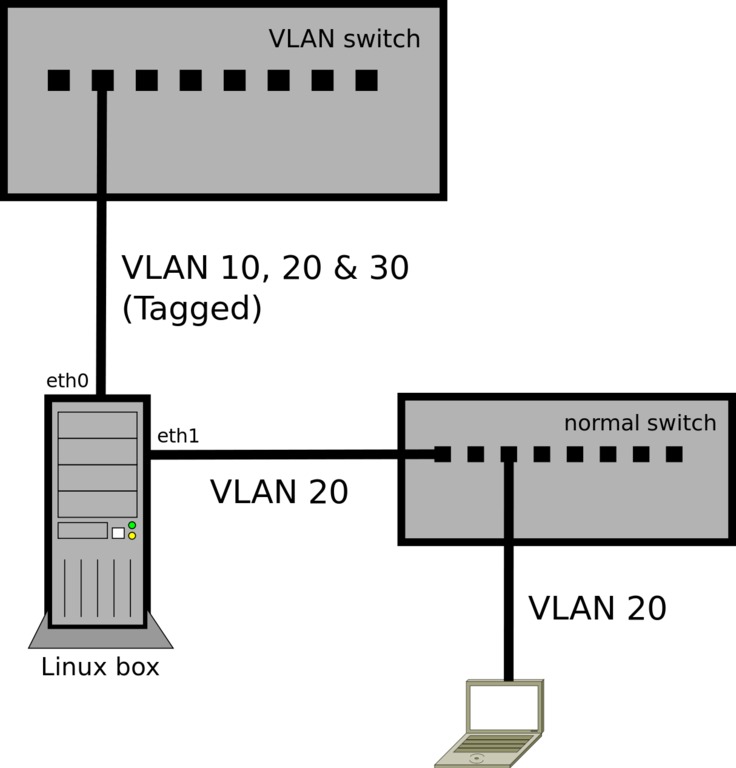
Figure 2. Extended VLAN Configuration
The implied PVID of eth1 is 20 because it's bridged with that virtual VLAN interface. You're not creating any VLAN interfaces on eth1 (such as eth1.20), because you don't want it to send or receive Tagged packets. It's the bridge with eth0.20 that makes eth1 a “member” of the VLAN.
As with any bridge config, you'll also need to stop using eth0.20 as a configured interface and start using vlan20 in its place.
The typical configuration of a Linux box as a firewall/gateway is to have two physical interfaces, with one connected to the Internet router (public side) and the other connected to the internal LAN switch (private side), as shown in Figure 3.
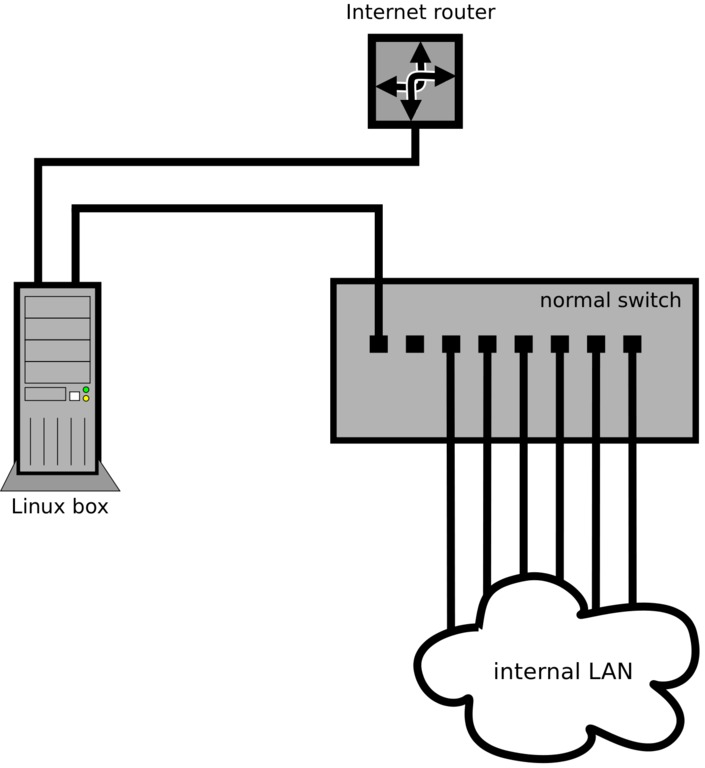
Figure 3. Typical Dual-Interface Firewall Configuration
But, what if the Internet router and switch/patch panel are inside a wiring closet where there is no room to install a Linux box, and every possible location to put it has only a single jack/cable?
VLANs make this no problem. Instead of installing the Linux box physically in between the public and private networks, you can install a small off-the-shelf VLAN switch, configured with two VLANs (VIDs 1 and 2).
Configure one port as a member of both VLANs with Tagging on. You'll plug the Linux box in to this port. This should be the only port configured with Tagging, because it's the only port that will talk to another VLAN device (the Linux box). Every other port will be set to Untagged.
Configure another port of the switch as a member of VLAN 2 only (Untagged, PVID set to 2). You'll plug the Internet router in to this port.
Leave the rest of the ports on VLAN 1 only (Untagged, PVID set to 1). These are the ports for all the hosts on the private network. If there are more hosts than ports, you can plug in another switch or switches (non-VLAN) to any of these VLAN 1 ports to service the rest of the hosts.
The Linux box needs only one physical interface (eth0). Run these commands to configure the VLANs:
ip link set eth0 up
vconfig add eth0 1
ip link set eth0.1 up
vconfig add eth0 2
ip link set eth0.2 up
Just like in the first example, you now would configure your IP addresses and firewall normally, using eth0.1 as the interface on the private network and eth0.2 as the interface on the public network (Figure 4).
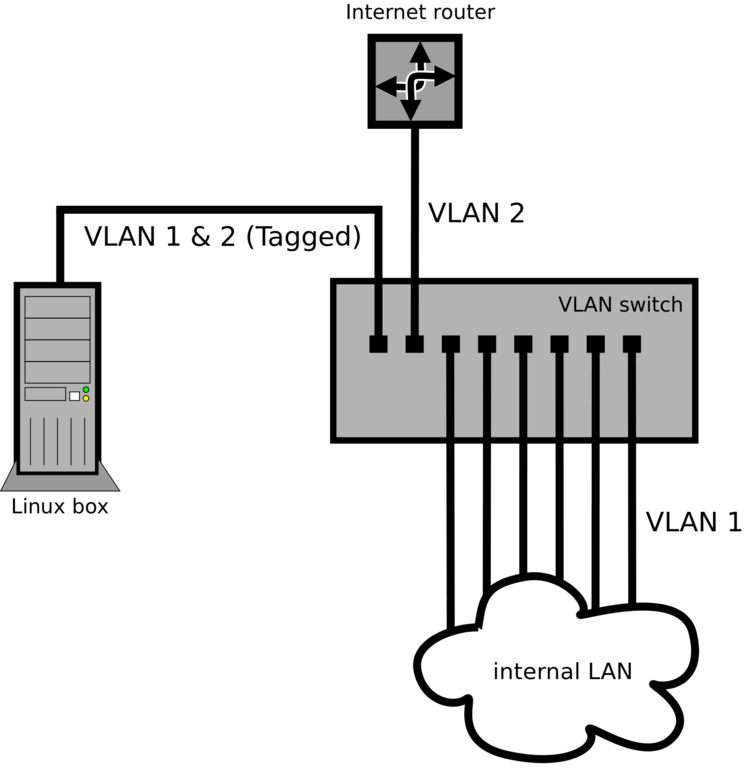
Figure 4. Single-Interface Firewall Configuration with VLANs
As in the first example, because there is only one physical interface in the Linux box, there is no need to define a bridge.
The VLAN switch ports in this example are acting like interfaces of the Linux box. You easily can extend this concept for other applications and scenarios. Using a 24-port VLAN switch, you could have the equivalent of 23 Ethernet interfaces in a Linux box if you created 23 separate VLANs. The 24th port would be used to connect the Linux box to the switch and would need to Tag all the packets for the 23 VLANs.
You can use tcpdump to see Tagged and Untagged packets on the wire and to make sure traffic is showing up on the expected interfaces. Use the -e option to view the Ethernet header info (which shows 802.1Q Tags) and the -i option to sniff on a specific interface. For example, run this command to show traffic for VLAN 10:
tcpdump -e -i eth0.10
You should see normal traffic without VLAN Tags. If VLAN 10 contains more than a few hosts, you should at least start seeing ARP and other normal broadcast packets (like any switched network, you won't see unicast packets not addressed to your host/bridge).
If the eth0.10 VLAN interface is working correctly above, you should see the Tagged 802.1Q packets if you look at the traffic on the underlying physical interface, eth0:
tcpdump -e -i eth0
If you run this command at the same time as the eth0.10 capture, you should see the Tagged version of the same packets (as well as packets for any other VLAN interfaces set up on eth0).
Resources
802.1Q VLAN Implementation for Linux (vlan package): www.candelatech.com/~greear/vlan.html
bridge-utils: www.linuxfoundation.org/collaborate/workgroups/networking/bridge
ebtables: ebtables.sourceforge.net
IEEE 802.1Q-2005—Virtual Bridged Local Area Networks: standards.ieee.org/getieee802/download/802.1Q-2005.pdf
IEEE 802.1D-2004—Media Access Control (MAC) Bridges: standards.ieee.org/getieee802/download/802.1D-2004.pdf
Henry Van Styn is the founder of IntelliTree Solutions, an IT consulting and software development firm located in Cincinnati, Ohio. Henry has been developing software and solutions for more than ten years, ranging from sophisticated Web applications to low-level network and system utilities. He is the author of Strong Branch Linux, an in-house server distribution based on Gentoo. Henry can be contacted at www.intellitree.com.

