HTML: A Gentle Introduction
HyperText Markup Language (HTML) is a simple language for representing document format styles and links to other documents or media types, such as images or sound recordings. HTML can be used to create documents which contain styles such as underlined or bold-faced text. It can also be used to mix text, images, and sounds into a single document, the individual elements of which may be located on geographically distant systems around the world.
HTML is designed to create documents for the World Wide Web and it helps determine what is displayed when you are browsing documents with your favorite WWW browser. You can use it to create your home, or welcome page or to create a research document, article, or book. This document can then be viewed locally or made accessible for viewing by other Web surfers through the use of a WWW server, such as NCSA's or CERN's httpd daemon. This article introduces you to HTML basics so you may get started creating your own HTML documents.
You can use your favorite text editor to create an HTML document. The document will be composed of text, which will be displayed directly to the user, and markup tags, which are used to modify the appearance of the text or to incorporate images or sounds as part of the document. Tags are also used when referencing other documents or different locations within a document. Document references are called hypertext links or simply “links”.
A tag for indicating the start of a particular format is represented as a tag name enclosed in a pair of angle brackets. To indicate the termination of a format, the tag name is prefixed with a /. For instance, <I>Italics</I> would display the word “Italics” in italic format. Let's examine a simple HTML document.
<HEAD>
<TITLE>Sample Document</TITLE>
</HEAD>
<BODY>
<H1>A Sample HTML Document</H1>
Here is some <B>Bold text</B>,
and here is some <I>Italic text</I>.
</BODY>
This makes use of a few basic tags. The text between the <HEAD> and </HEAD> tags is the document header. The header contains a <TITLE> tag which indicates the start of the document title tag and is terminated by a </TITLE>. The title usually isn't displayed as part of the document text by most browsers, but instead is displayed in a special location. For instance, Mosaic displays the title in the title box at the top of the browser window.
After the header is the body of the document, which is contained between the <BODY> and </BODY> tags. Inside the body the <H1> represents the start of a first level document heading. There are six levels of headings. Each increase in level results in a decrease in the prominence with which a heading is displayed. For instance, you might want to use an H1 heading for displaying the document title in the document text, and then use H2 for subheadings.
This is probably a good time to mention that tags are case-insensitive. Thus <TITLE> and <title> are the same tag; however, I will continue to capitalize document tags for clarity.
Physical format styles are used to indicate the specific physical appearance with which to display text. The following is a list of physical format tags:
- <B>text</B>
Displays text in bold face.
- <I>text</I>
Displays text in italics.
- <U>text</U>
Displays text underlined.
- <TT>text</TT>
Displays text using a typewriter font.
The problem with physical formats is that there is no guarantee that a particular browser will display the text as expected. A user may modify the fonts that a browser uses, or the browser may not even have the specified font style available. For instance, if a text mode browser is used to display a document, it is unlikely that italic text can be displayed at all. To avoid the ambiguity associated with the display of physical formats, you may use logical format tags. In fact, it is usually recommended that you use logical format tags, in preference to physical format tags, wherever you can.
I've already introduced you to one logical format. The H1 through H6 heading styles are logical formats for headings. If physical heading styles existed in HTML, you would have to specify a particular font and font size for each heading (for example, 30-point Courier). Following is a list of some of the more common logical format styles:
- <CITE>text</CITE>
Used when text is the title of a creative work such as a book.
- <CODE>text</CODE>
Used when text is a piece of computer code.
- <EM>text</EM>
Display text with emphasis.
- <SAMP>text</SAMP>
Used when text is a piece of sample output.
- <STRONG>text</STRONG>
Display text with strong emphasis.
Of particular note, it is better stylistic practice to use the EM logical style in place of the italics physical style, and to use the STRONG logical style in place of the bold physical style.
Carriage returns and white space are usually ignored in HTML. This is done because different browsers have different display capabilities. Where one browser might be able to display 100 character lines, another might not. This presents a problem when it is necessary to have a forced break, such as between paragraphs. Special tags were created so that an author could force a break in a document. Following is a list of tags which can be used to force a break in a document:
- <P>
Force a paragraph break.
- <BR>
Force a line break.
- <HR>
Force a line break with a horizontal rule.
As a general note, it is best to use break commands, as well as other HTML directives in ways that keep your document device independent. The browser your readers use might format documents with different line lengths. If you use a BR directive at each line break found in a paper document you were converting into HTML, a browser might insert additional line breaks as well. This could result in a choppy-looking document, probably with alternating long and short lines.
Notice that these break tags don't have an associated closing tag. For instance the <BR> doesn't have an associated </BR>.
If you do want to display something exactly as it is typed, HTML provides a tag for preserving the format of preformated text. The <PRE>text</PRE> directive instructs a browser to display text exactly as it is typed in the document. Once again, keep in mind that characteristics of some browsers may make it difficult for them to display the text in the exact format you expect.
HTML provides for bulleted and numbered lists. Following is an example of HTML code which will generate a bulleted or unnumbered list of items:
<UL>
<LI>Apples
<LI>Oranges
<LI>Pears
</UL>
The <UL> tag indicates the start of an unnumbered list. Each item in the list is preceded by an <LI> tag to indicate the start of a new item in the list. Note that the <LI> tags don't have closing tags, and that when displayed, each list item will be separated by a carriage return.
To change this list to a numbered list, just change the <UL> and </UL> tags into <OL> and </OL> tags. A numbered list will display each item in the list preceded by a number instead of a bullet.
Another type of list is a definition or description list. Following is a snippet of HTML code demonstrating how to code a definition list:
<DL>
<DT>Apple
<DD>A red colored fruit
<DT>Orange
<DD>An orange colored fruit
</DL>
A <DL> tag begins a definition list, and a </DL> tag ends the list. The <DT> indicates a term to be defined, while a <DD> indicates a term definition. When the browser formats the list, each term and definition will be on a line by itself: the term is usually left justified with definition indented directly beneath it.
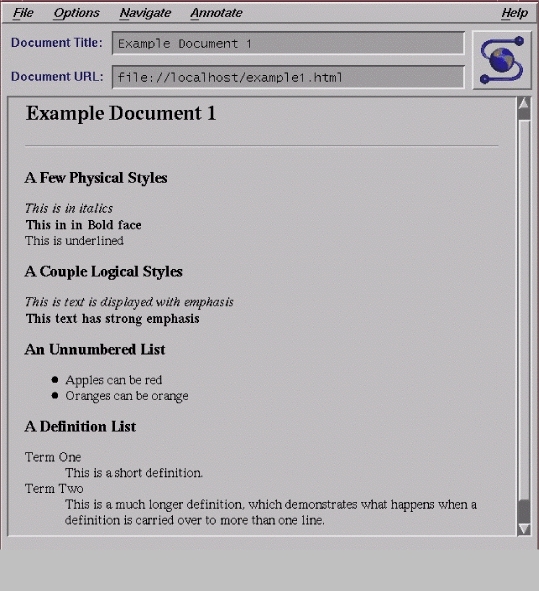
Let's look at an example document which contains many of the text markups which I just explained. The HTML source for the example document is listed below, and the formatted document, as displayed by Mosaic, as I have configured it, is shown in Figure 1, below.
<TITLE>Example Document 1</TITLE>
</HEAD>
<BODY>
<H1>Example Document 1</H1>
<HR>
<H2>A Few Physical Styles</H2>
<I>This is in italics</I><BR>
<B>This in in Bold face</B><BR>
<U>This is underlined</U><BR>
<H2>A Couple Logical Styles</H2>
<EM>This is text is displayed with
        emphasis</EM><BR>
<STRONG>This text has strong emphasis</STRONG><P>
<H2>An Unnumbered List</H2>
<UL>
<LI>Apples can be red
<LI>Oranges can be orange
</UL><P>
<H2>A Definition List</H2>
<DL>
<DT>Term One
<DD>This is a short definition.
<DT>Term Two
<DD>This is a much longer definition, which
demonstrates what happens when a definition is
carried over to more than one line.
</DL>
</BODY>
Note a few interesting things about how the browser displayed this document. Text marked up to be underlined is not displayed as underlined. This demonstrates one of the dangers of physical styles—some browsers may not support, or may not display a physical style as expected. Also, note that italic text looks like emphasized text and bold text looks like strong text. Notice the use of BR and P break tags, and the display of a multiline definition.
Uniform Resource Locators, or URLs, are designed to provide a standard format by which to point to a file. The file may exist on any network-accessible machine the browser has access to, and files may be accessed using a variety of protocols. The general form for a URL is: protocol://host.domain[:port]/path/filename
The protocol indicates how the browser should communicate with the host it is requesting a file from. Probably the most common protocols are http, file, gopher, and ftp. The http protocol indicates that the browser should contact the server using the hypertext transport protocol, which is used by servers designed to serve HTML documents. The file protocol is used to retrieve a file from a local directory. Many browsers also support an ftp protocol for retrieving non-local files using anonymous ftp. The gopher protocol is used to retrieve documents from a gopher server.
The host.domain is the host and domain name of the remote server to contact in order to retrieve a document. If the document is on the local system, you can create a partial URL that does not specify the host.domain. To do this, you would omit the //host.domain from the URL. Following the host.domain is the optional (as indicated by the “[ ]” characters, which should not be entered) port to connect to in order to retrieve a document. This option is often omitted since most remote services will be provided at a well-known port on the remote system. For instance, the http protocol is commonly found on port 80, while gopher is found on port 70. When omitting the port, omit the “:” character as well.
The path is used to indicate the directory location of the desired document. The filename specification indicates the name of the file on the server where the document is stored.
As an example, if you wanted to view the document foo.html, which you know is located in directory /docs/ on the server remote.host.name, you could use the URL:
http://remote.host.name/docs/foo.html
Your browser would then display the foo.html document. It is worth noting that many browsers will use the file extension to help determine how to display a document. For instance, .html is commonly used for html documents and .text is used for text documents. For this reason, it is usually a good idea to append a standard extension to your documents to help ensure that they will be displayed properly. You may want to refer to the documentation on your browser to determine what file extensions are supported, although many browsers are now referring to the mailcap file to help determine the interpretation of a particular extension.
Why do we care about URLs? URLs are used to make references to image, sound and other media files that you may want to include or have a hypertext link to. URLs are also used to create links to other documents. Let's look at an example of how to include an inline image in a document.
<IMG SRC="http://remote.host.name/gifs/foo.gif">
The IMG tag has an attribute, a specification which indicates a particular characteristic about a tag. In this case, the SRC attribute indicates the image the tag refers to. Assuming that your browser is capable of displaying inline GIFs, foo.gif would be displayed along with the text of the document containing the IMG reference. Remember to use proper file extensions for image references. A browser will use the extension to determine how to properly display an image. For instance, .gif is used for GIF images while .xbm is used for X bitmaps.
To create a hypertext link to another HTML document you might use the following HTML directive:
<A HREF="http://remote.host.name/docs/foo.html">Foodocument</A>
This is an example of an anchor. An anchor is specified using an A tag, which typically has an HREF attribute. Unlike the IMG tag, an anchor has to be terminated with a </A>. In this example, “Foo document” will be displayed in the documents as a hypertext link, or anchor, to foo.html. Many browsers will display this anchor using colored text or some other indication that the text represents a link. When the reader selects such an anchor, the browser will attempt to retrieve the document specified by the HREF attribute.
Hypertext links may also point to images which are viewed using an external viewer or to sounds which are played when the link is selected. An image can be used as a link instead of using text. The following code demonstrates how to do this:
<A HREF="http://remote.host.name/docs/foo.html"></A>
<IMG SRC="http://remote.host.name/gifs/foo.gif"></A>
In this example an IMG tag is used as the anchor for foo.html. This effectively makes the inline foo.gif an anchor a user selects. Anchors which are images present another problem. How is a text mode browser going to present an image, and if it can't present the image, how is a user going to select the link? Fortunately, HTML provides an additional attribute for the IMG tag. The ALT attribute can be used to specify a text string as an alternate to displaying the image. This can be done as follows:
<IMG SRC="http://remote.host.name/gifs/foo.gif" ALT="FOO">
The ALT attribute is also useful to provide a method a text browser can use to display an inline logo, or some other image that isn't necessarily a hypertext link.
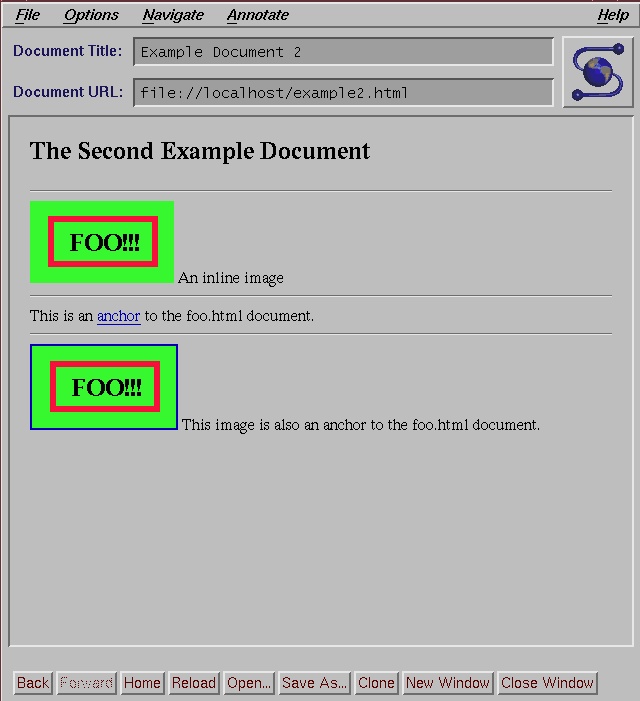
Now let's look at a second example document which contains inline images and anchors. The HTML source for the second example document is presented below. Figure 2 shows how Mosaic might display this document.
<TITLE>Example Document 2</TITLE>
</HEAD>
<BODY>
<H1>The Second Example Document</H1>
<HR>
<IMG SRC="http://remote.host.name/gifs/foo.gif"> An inline image
<HR>
 This is an <A HREF="http://remote.host.name/docs/foo.html">
anchor</A> to the foo.html document.
<HR>
<A HREF="http://remote.host.name/docs/foo.html">
<IMG SRC="http://remote.host.name/gifs/foo.gif" ALT="FOO!!!"></A>
This image is also an anchor to the foo.html
document.
</BODY>
Notice how the anchor, anchor, is embedded in the text of the document, as are the inline images. Further, the document text is aligned at the bottom of the image. This can be changed by using the ALIGN attribute of the IMG tag. Here is an example which aligns the text with the center of the image:
<IMG ALIGN=middle SRC="http://remote.host.name/gifs/foo.gif">
top and bottom are also valid options for the ALIGN attribute.
This article is only designed to give you an introduction to HTML. HTML includes other logical styles which were not covered, and provides methods for displaying special characters. HTML can be used to construct a form which users fill out and through which they can interact with a server. In short, there are many more avenues to explore than I have space to introduce you to in this article. Enjoy making your own WWW waves with HTML!
Eric Kasten has been a systems programmer since 1989. Presently he is pursuing his Masters in computer science at Michigan State University, where his research focuses on networking and distributed systems. Well-thought-out comments and questions may be directed to him at tigger@petroglyph.cl.msu.edu. You may also visit his home page at petroglyph.cl.msu.edu/~tigger.