
Hack and / - Temper Temper
If loving Linux ever became a crime and I were hauled into court, I think the prosecution's argument would go something like this:
Your honor, I need to submit only two pieces of evidence to make my case. First, I present Exhibit A: a stack of Linux Journal magazines of which the defendant is a columnist.
And your second piece of evidence?
Your honor, the defendant's refrigerator is powered by Linux.
(The audience gasps.) Order! I've heard enough! Guilty!
I can't help it. I mean, why wouldn't you power your fridge with Linux if you had the chance? In my case, we recently purchased a new fridge for our house, which meant our spare fridge was headed for the garage where I would use it for beer fermentation. Fridges are well-insulated, and it seemed ideal for the task at hand, but the problem I ran into was that the built-in thermostat for the fridge would go up to only around 45–50°F at its warmest. To ferment ales, I needed to maintain temperatures between 60–72°F.
When most people convert fridges to ferment beer, they purchase a purpose-built device from their local brew shop. Essentially, you plug your fridge in to the device, plug the device in to the wall, and then set the analog thermostat on the device to your desired temperature. A temperature probe goes into your fridge, and when it gets too warm, the fridge is powered on. These devices range from around $70 to more than $100, depending on whether they are analog or digital, and I almost bought one until I realized I could do the same thing with an old Linux laptop, a couple pieces of hardware and a few scripts.
If you are into home automation at all, you are familiar with the X10 suite of home automation gadgets. Essentially, you can connect lamps and appliances to different X10 gadgets and then power them on with a remote control. There's even a remote control that connects to a serial port, so you can control everything from a computer. Linux has a program called bottlerocket that works great with X10 serial port controllers, and I had used one to control my DSL modem for many years, but that's something for another column.
So, I had a laptop and could control the fridge power, but I still needed a thermometer that worked under Linux and was relatively cheap. I discovered a great little USB-powered thermometer made by a company named TEMPer. It's small, cheap (less than $15 shipped), supports temperatures between –40°C and +120°C, and with a little effort, it works under Linux. It turns out many Linux administrators are using these devices to monitor temperatures in their data centers.
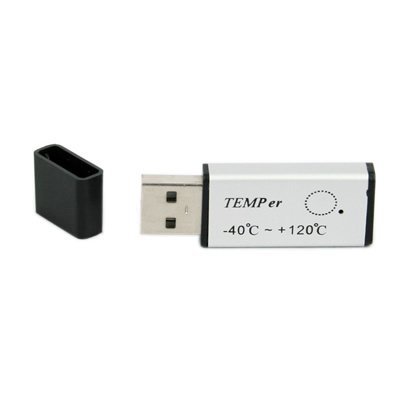
Figure 1. TEMPer USB Thermometer (photo from the Amazon product page)
Apparently, the older versions of this thermometer showed up as a USB-to-serial interface; however, the newer models, including the one I bought, show up as a USB Human Interface Device when you plug it in:
Apr 16 14:44:33 muriel kernel: [11601.992205] usb 1-1:
 ↪new low speed USB device using uhci_hcd and address 2
Apr 16 14:44:33 muriel kernel: [11602.182910] usb 1-1:
 ↪configuration #1 chosen from 1 choice
Apr 16 14:44:33 muriel kernel: [11602.188481] usb 1-1:
 ↪New USB device found, idVendor=1130, idProduct=660c
Apr 16 14:44:33 muriel kernel: [11602.188529] usb 1-1:
 ↪New USB device strings: Mfr=0, Product=2, SerialNumber=0
Apr 16 14:44:33 muriel kernel: [11602.188563] usb 1-1:
 ↪Product:  PCsensor Temper
Apr 16 14:44:35 muriel kernel: [11604.090148] usbcore:
 ↪registered new interface driver hiddev
Apr 16 14:44:35 muriel kernel: [11604.119323] input:
 ↪PCsensor Temper as /class/input/input7
Apr 16 14:44:35 muriel kernel: [11604.140885] input,hidraw0:
 ↪USB HID v1.10 Keyboard [ PCsensor Temper]
 ↪on usb-0000:00:07.2-1
Apr 16 14:44:35 muriel kernel: [11604.170151] input:
 ↪PCsensor Temper as /class/input/input8
Apr 16 14:44:35 muriel kernel: [11604.188677] input,hidraw1:
 ↪USB HID v1.10 Device [ PCsensor Temper]
 ↪on usb-0000:00:07.2-1
Apr 16 14:44:35 muriel kernel: [11604.188931] usbcore:
 ↪registered new interface driver usbhid
Apr 16 14:44:35 muriel kernel: [11604.188980] usbhid:
 ↪v2.6:USB HID core driver
At first I thought I could get the temperature from this thermometer through some /proc or /sys interface, but unfortunately, the thermometer is more proprietary than that. The Linux community is resourceful though, and a quick search turned up a number of guides on how to pull the temperature from Linux (see Resources for the most helpful guide I found). Essentially, you need to install a few custom Perl modules, including a special one created just for this device that depends on Perl 5.10, so you need a relatively new distribution for this to work (I used the latest stable Debian release).
I've always considered Debian as the distribution with the most packaged CPAN modules, but even it didn't have many of the modules I needed for the TEMPer thermometer, so I had to install them from scratch. I'll warn you in advance, this process is a bit tedious, and it reminded me of what it was like to install programs on Linux more than a decade ago. It's amazing how much we take the hard work of package maintainers for granted. At least the first dependencies I had (headers for libusb and a build environment to compile the Perl modules) were available with packages:
$ sudo apt-get install libusb-dev build-essentials
Next I needed to install a few Perl modules with the cpan program. What you'll find is that many of these modules have their own set of dependencies, so when you are prompted to install dependencies, just tell the cpan program “yes”. Also, the first time you run cpan, you might have to go through the initial setup program. If so, just accept the defaults, and you should be fine. Here are the different cpan commands you need to run in order to install the various modules:
$ sudo cpan Bundle::CPAN
$ sudo cpan ExtUtils::MakeMaker
$ sudo cpan Inline::MakeMaker
$ sudo cpan Device::USB
$ sudo cpan Device::USB::PCSensor::HidTEMPer
Next I downloaded a Perl script from www.cs.unc.edu/~hays/dev/bash/temper/temper_mon.pl and made it executable. When run, the script will print the temperature from the thermometer. In my case, I modified it so it output in Fahrenheit instead of Celsius:
#!/usr/bin/perl

use 5.010;
use strict;
use warnings;
use Carp;
use Device::USB;
use Device::USB::PCSensor::HidTEMPer::Device;
use Device::USB::PCSensor::HidTEMPer::NTC;
use Device::USB::PCSensor::HidTEMPer::TEMPer;
use lib;
use Device::USB::PCSensor::HidTEMPer;

my $pcsensor  = Device::USB::PCSensor::HidTEMPer->new();
my @devices   = $pcsensor->list_devices();

foreach my $device ( @devices ){
   say $device->internal()->fahrenheit();
}
I stored the script in /usr/local/sbin/temper_mon.pl and ran it a few times to make sure it output the correct temperature. Then I connected the thermometer to a USB extension cord that was long enough to reach inside the fridge.
The final step in the process was to write a script that would pull the temperature and control the power to my fridge based on whether it was within the proper maximum and minimum temperature ranges I had set. I decided to separate the max and min by two degrees so that the compressor wouldn't kick on too much. I also wanted to write the results to a log so I could monitor how well the fridge maintained the temperature. Plus, I thought it would be cool to ssh in to my laptop from anywhere in the world and check on the temperature.
When I first set this up, the weather was cool in the evenings, so I discovered that my fridge would dive down way below the minimum! My solution was to buy a $15 electric heating pad from the drugstore, connect it to another X10 outlet, and put it in the bottom of the fridge. I figured the heat would be gentle enough to maintain the temperature at night without the risks that a proper space heater would have. I set up the script so that it would turn on the heater only if the temperature dipped down one degree below the minimum. I saved my script in /usr/local/sbin/temper.pl:
#!/usr/bin/perl

use 5.010;
use strict;
use warnings;
use Carp;
use Device::USB;
use Device::USB::PCSensor::HidTEMPer::Device;
use Device::USB::PCSensor::HidTEMPer::NTC;
use Device::USB::PCSensor::HidTEMPer::TEMPer;
use lib;
use Device::USB::PCSensor::HidTEMPer;

my $pcsensor  = Device::USB::PCSensor::HidTEMPer->new();
my @devices   = $pcsensor->list_devices();
my $temp_min  = 71;
my $temp_max  = 73;
my $logfile   = '/var/log/temper.log';
my $time      = localtime();
my $temperature;

foreach my $device ( @devices ){
   $temperature = $device->internal()->fahrenheit();
}

open LOG, ">> $logfile" or die "Can't open $logfile: $!\n";

# B4 = Fridge power, B5 = Heater power

# turn on heater if I'm 1F below the low temp
if($temperature < ($temp_min - 1)){
   system('br --port /dev/ttyS0 B5 ON');
   print LOG "$time\t$temperature\tHON\n";
}
elsif($temperature < $temp_min){
   system('br --port /dev/ttyS0 B4 OFF');
   system('br --port /dev/ttyS0 B5 OFF');
   print LOG "$time\t$temperature\tOFF\n";
}
elsif($temperature > $temp_max){
   system('br --port /dev/ttyS0 B4 ON');
   print LOG "$time\t$temperature\tCON\n";
}
else{
   print LOG "$time\t$temperature\t\n";
}

close LOG;
The way the logic of the script works, it allows the temperature to drop or rise naturally while the compressor or heater is on, respectively. It changes the power state of my X10 devices with the br command only when the temperature is outside the preset ranges. I set this script to run every minute with cron, and because I log all of the power states, it's easy to watch the temperature float between extremes. I did a bit of tuning at the beginning with the various ranges, and with the current script, the temperature floats between 1°F below the minimum temperature and 1°F above the maximum temperature, which is good enough for me. If I wanted more accuracy, I always could set $min and $max to be closer to each other.
Since the system has been in place, I've been able to maintain the temperature successfully for the first batch of beer I put in the fridge. If you look closely at Figure 2, you can see the little thermometer on the right-hand shelf. Even though my laptop is old, it has plenty of horsepower to spare, so eventually I will graph all of the temperature data and serve it out over Apache. If Bill were here, I'm sure he'd tell me to tweet the temperature.
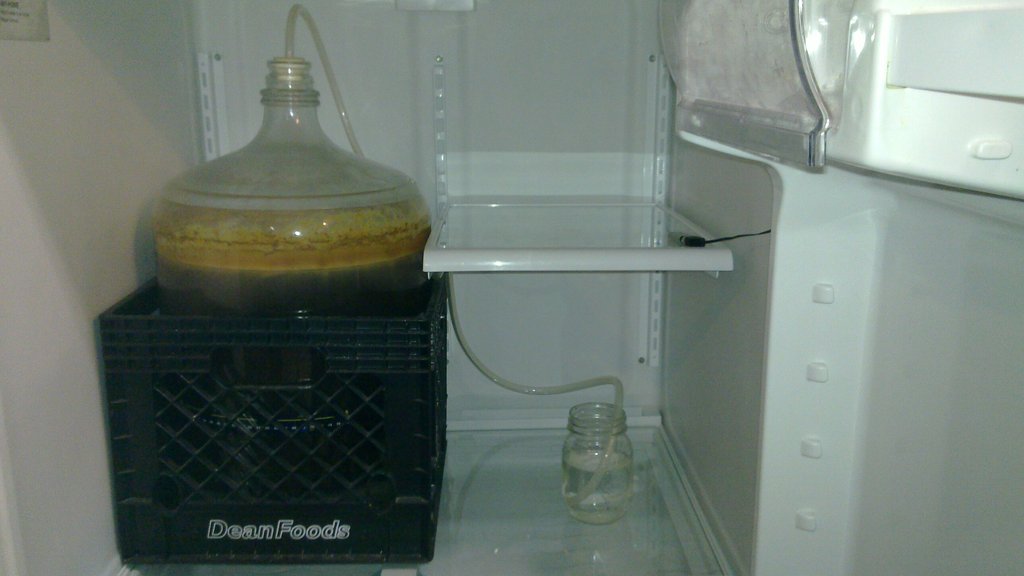
Figure 2. A West Coast-Style Red Ale in My Linux-Powered Fridge
Resources
Guide to TEMPer Support under Linux: https://wwwx.cs.unc.edu/~hays/archives/2010/03/entry_25.php
One of Many Places to Buy the Thermometer On-line: www.amazon.com/TEMPer-USB-Thermometer-w-Alerts/dp/B002VA813U
TEMPer Thermometer CPAN Module: search.cpan.org/dist/Device-USB-PCSensor-HidTEMPer
Kyle Rankin is a Systems Architect in the San Francisco Bay Area and the author of a number of books, including The Official Ubuntu Server Book, Knoppix Hacks and Ubuntu Hacks. He is currently the president of the North Bay Linux Users' Group.


