
Economy Size Geek - Adventures in Scanning
Like many geeks, I dream of a paperless office. I don't know when that phrase first came into use, but a quick scan around both my home and work office convinced me it's still a long way off. To add insult to injury, the fax machine as a means of business communication seems to be a zombie technology that refuses to die. All too often when I deal with businesses, they cheerfully tell me to fax something to a number they provide. That is all well and good, but because I made the switch to VoIP (Voice over IP), which does not support faxing, I am forced to make trips to the local Kinko's more than I would like to admit. Time has moved on, and a number of businesses now will accept a PDF file with scanned versions of the documents. This fills me with both joy and terror. I'm happy I don't have to find a landline with a fax machine, but I'm terrified of scanning under Linux. I haven't done it in a very long time (years), mostly because my experience was so bad and frustrating, I resolved to leave it as one of those things I cannot do under Linux.
You already may have a scanner lying around, but I didn't. I searched the Internet where all roads led to the SANE (Scanner Access Now Easy) Web site, so that's where I started. SANE is the main clearing house for information related to scanners and scanning. It has a big list of devices that shows how well they are supported, but the list is less helpful than it looks, primarily because it focuses on listing all the scanners that are known to work, including many that are no longer manufactured. I spent a lot of time trying to find a scanner that was both on the list and available from Amazon.com. I then found the best path was to go to the Ubuntu forums and search for recommended scanners. If you use another distribution, check its forum or assume that if it works for Ubuntu, it will work with any other modern distribution (although that's not always a safe bet). My main criteria were size (smaller the better), USB (is there another interface now?) and cheap (less than $100).
After some searching, I found recommendations for the Epson v300 and the Epson v500. On Amazon.com, the v300 was available for $89, and the v500 was $165. I am sure the v500 is awesome, but given that I mainly wanted to use it for documents, I didn't think I needed to pay double. I was a little confused because the scanner is called a photo scanner, but the dimensions showed that it could scan a full sheet of standard letter paper. It even has a hinge so you can scan from a book.
I hooked up the scanner to the computer. I'm not sure what I expected to happen, but nothing did. I realized I needed something actually to use the scanner. It turns out that the word scanner means security scanner a lot more often than image scanner. This made locating software a little more difficult. I found out that I already had packages for sane and xsane installed. xsane is the graphical front end to the SANE library, and it gives you a GUI to control your scanner. Because it was already installed, I started with xsane. Right off the bat, I hit a problem. By default, xsane connected to /dev/video0, which is my Webcam.
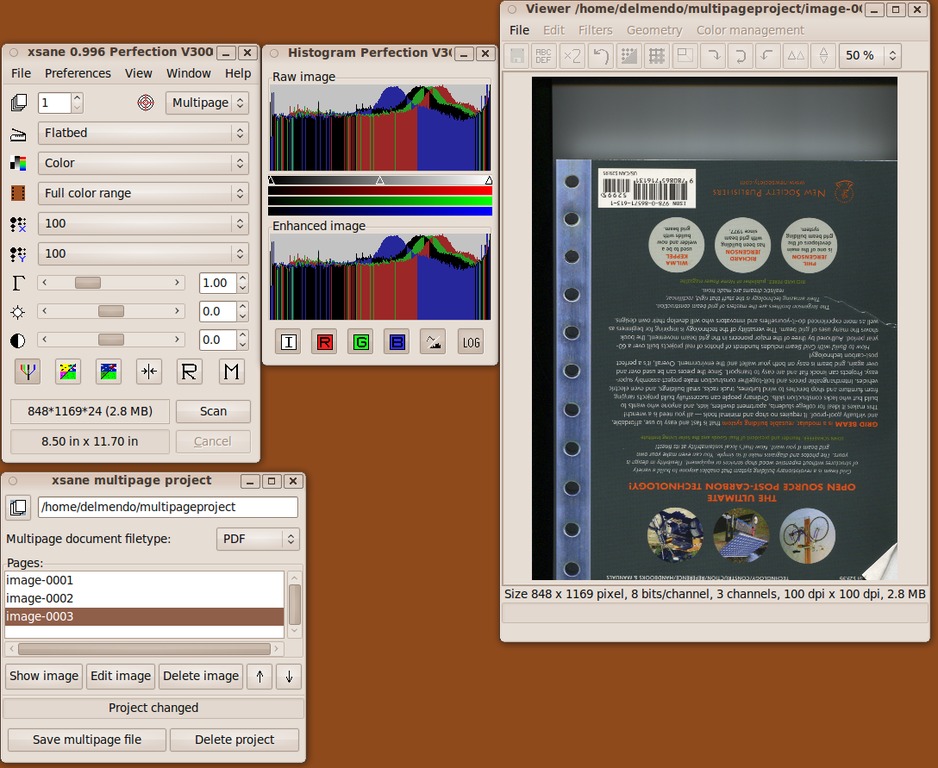
Figure 1. xsane
After a little more research, I ended up at Avasys. It provides drivers and a software utility for talking to my new scanner. I had to download a 64-bit deb for iscap and esci-interpreter. I clicked on Image Scan! for Linux, and the program told me it wasn't able to talk to the scanner. I was beginning to have flashbacks to the last time I tried using a scanner. Remaining calm, I power-cycled the scanner and tried the application again. This time, it started up without complaint. I was able to click Scan, and a scan of a book cover showed up. I was able to scan to several different file types: TIFF, JPEG, PNM, PNG and PDF. I was a little disappointed that the PDF option didn't allow me to store more than a single page in the file.
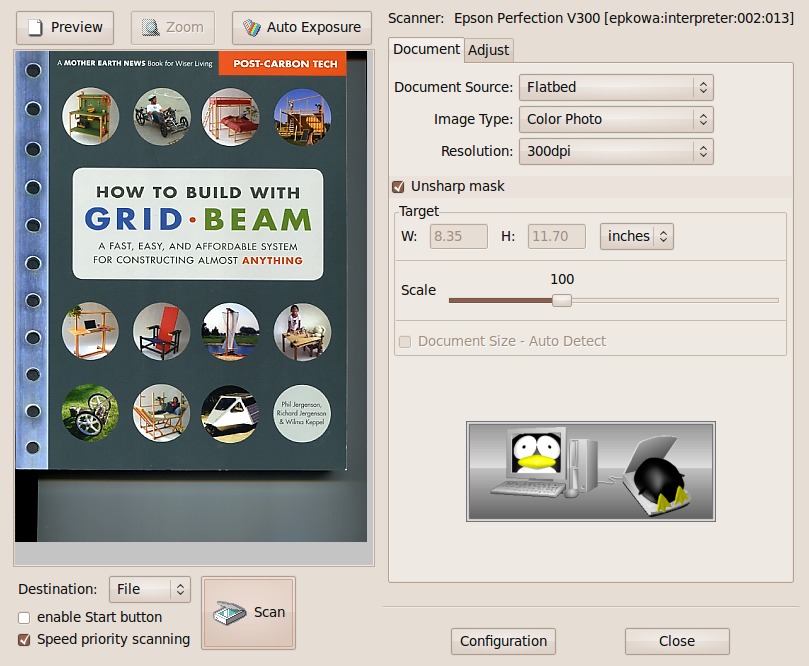
Figure 2. Image Scan!
As a bonus, the driver package I installed fixed the problem with xsane. Now when it starts, it gives me the option to choose my Webcam (weird) or my scanner. This also solves the problem of not being able to scan multiple pages into a single PDF, because xsane has that feature. The key is to change xsane into multipage mode before I start scanning. This allowed me to scan several pages and save them as a single PDF.
I am running Karmic (9.10), but by the time this article is printed, Lucid (10.4) will be released. Simple Scan is being included as part of the release. Simple Scan is a new scanning tool focused on making scanning, in a word, simple. Because it currently is available as part of a PPA (Personal Package Archive), adding it to my system was easy:
sudo add-apt-repository ppa:robert-ancell/simple-scan
sudo apt-get update
sudo apt-get install simple-scan
The first time I tried Simple Scan, it failed. That was a bit frustrating, but it was my own fault. I had xsane open at the same time. It turns out that each application claims ownership over the device. Once I closed xsane, Simple Scan worked like a champ. It really is simple, and it can do photos or text. Plus, it made making a multipage document as easy as just continuing to scan. xsane gives you incredibly fine-grained control. There probably are situations where I would be glad it includes a histogram of the image, but when all I am trying to do is sign a contract, scan it and e-mail a PDF, Simple Scan fits the bill.
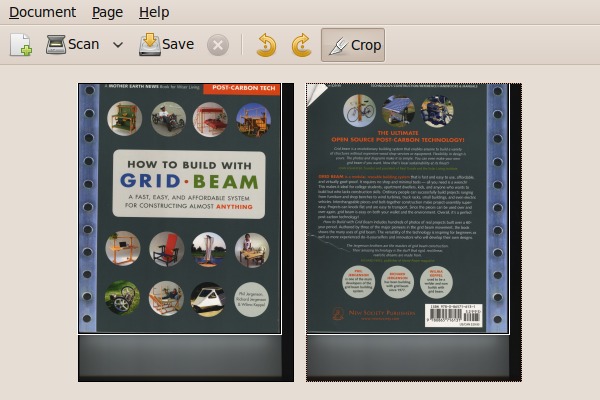
Figure 3. Simple Scan
One word of warning before I move on. After spending some time using Simple Scan, I hit a problem. Simple Scan depends on the convert command from ImageMagick to make a multipage PDF from a series of scans. On Karmic, this results in a segmentation fault. I was able to locate a bug report confirming that this problem has been resolved for Lucid, but not for Karmic. There are three options: upgrade to Lucid, pull in only the Lucid packages, or pull in an updated ImageMagick from Raimar Sandner's PPA (see Resources). Long term, I plan to upgrade to Lucid. For now, I just used Sandner's PPA to pull in a fixed version. I was able to confirm that this works.
After having such a pleasant experience getting my scanner working, I realized I was up for more of a challenge. At my office, I have an HP LaserJet 3055. It's one of those multifunction copier, scanner, fax and printer machines. The v300 scanner I used at home was connected directly to my Linux box. In the case of the HP, I have to connect over the network. Will it be as simple to set up as the single-function Epson?
At first, I wasn't sure where to start. There didn't seem to be any tools to detect the scanner on the network. Then I realized I had already been through this process. Step one with the scanner is finding out whether special drivers exist. In this case, the key phrase is “HP Linux Imaging and Printing” system, or HPLIP for short:
sudo apt-get install hplip-gui
Once that is done, I needed to run hp-toolbox to configure the network printer. This provides a handy icon in the GNOME alert bar that lets you select actions for the multifunction printer. By choosing Scan, it automatically starts xsane. I found the configuration under Preferences in the HP system tray application to change it to Simple Scan as the default application. For some reason, it refused to find the HP scanner when I launched it from the system tray. At the moment, I'll chalk that up to something that will get ironed out, as a bug report says the switch will be official in Lucid (see Resources). On the plus side, now that the HP is completely installed, I can start xsane or Simple Scan and then choose the HP for scanning. Scanning under Linux really has come a long way.
I now have both scanners working, so I decided to dig a littler deeper into scanner configuration. My Epson scanner has three hardware buttons: PDF, Email and Copy. It would be cool if I could press the PDF button and have it automatically start Simple Scan and start scanning. To do that, I needed to use a tool called scanbuttond. This is a dæmon that runs in the background and monitors the status of the scanner buttons. It then allows you to trigger scripts based on the button pushed:
sudo apt-get install scanbuttond
I started the dæmon by running:
scanbuttond -f
The application still logs to /var/log/syslog, but the -f option keeps it in the foreground, so it is easier to kill as I work through the configuration issues. Right away, things got off to a bad start. My log file quickly filled with:
Apr  1 21:30:24 barqs scanbuttond: rescanning devices...
Apr  1 21:30:24 barqs scanbuttond: no supported
     devices found. rescanning in a few seconds...
Apr  1 21:30:26 barqs scanbuttond: rescanning devices...
Apr  1 21:30:26 barqs scanbuttond: no supported
     devices found. rescanning in a few seconds...
Now I know why they provide a -q option to quiet the log messages. The problem seems to be that the system doesn't know how to detect my scanner. After spending some time on Google, I determined that the way to solve the identification problem is to modify the source of scanbuttond to detect the scanner. Using lsusb, I was able to code to add to scanbuttond. I recompiled the package and got a notification that it found my scanner.
After all of that, I learned that even more work was needed. scanbuttond uses libusb to communicate with the scanner. This allows it to talk to the scanner without locking it up (the way xsane and Simple Scan do). As a result, in order to get the button presses, you have to know precise codes to send to the scanner to get a response. Once I realized that, I was able to confirm that the Epson scanner I have acts completely differently from the other scanners that scanbuttond knows about. If I knew more about USB debugging, I might have had a shot at fixing the problem.
It was a little disappointing that I couldn't get the buttons on the scanner to work, but that ended up being the only roadblock in the whole process. The main lesson is to get the driver for your scanner, then worry about the rest. Scanning under Linux has improved a lot since I last played with it, and I'm really excited to take something off the list of things I have to do on another operating system.
Updates for Previous Columns
Updates on Qimo:
My instructions for getting Qimo to use more modern packages were not detailed enough [see “A Desktop for Our Little Penguin” in the February 2010 issue]. Unfortunately, the original computer I built died before I could get the files off the drive. The good news is that Qimo 2.0 should be out by the time you read this. That version will be in sync with Lucid (10.4) and save you a lot of hassle.
Updates on APT Caching
Eric Cooper, the author of Approx, contacted me about my comments that his software did not handle multiple computers at once [see “Installation Toolkit” in the March 2010 issue]. He pointed out that the criticism might have been from an earlier version. The current version of Approx uses inetd/xinetd, so they do not suffer from that limitation. That means you have several good choices for caching packages on your network! Sorry for the mistake Eric. That's what I get for reading a blog and being in a hurry.
Resources
SANE: www.sane-project.org
SANE—Supported Devices: www.sane-project.org/sane-supported-devices.html
Avasys: www.avasys.jp/lx-bin2/linux_e/scan/DL1.do
Bug Report: ImageMagick crashes when using adjoin to make a multipage pdf (karmic): https://bugs.launchpad.net/ubuntu/+source/imagemagick/+bug/551484
Raimar Sandner's Ubuntu Karmic ImageMagick: convert jpg to pdf segmentation fault: homepage.uibk.ac.at/~c705283/archives/2010/03/19/ubuntu_karmic_imagemagick_convert_jpg_to_pdf_segmentation_fault/index.html
Bug Report: scan utility should now be simple-scan: https://bugs.launchpad.net/ubuntu/+source/hplip/+bug/539015
Dirk Elmendorf is cofounder of Rackspace, some-time home-brewer, longtime Linux advocate and even longer-time programmer.



