
New Projects - Fresh from the Labs
If you're the kind of person who's been using Blackbox and its derivatives for the past decade, the kind of person who has just a single CD in a spotless but stylish car, the kind of person who likes minimalism but with effortless style, then boy, have I got a project for you. To quote the marave Web site:
Inspired by ommwriter and other similar projects, marave (it means “nothing” or “it doesn't matter” in guaraní) aims to be a simple, clean text editor that doesn't distract you from your writing.
You can have a nice background, or just a color. You can have a real-time spellchecker or not. Syntax highlighting or not. You can have background music, keyboard feedback or silence. marave will try to be the way you want it to be.
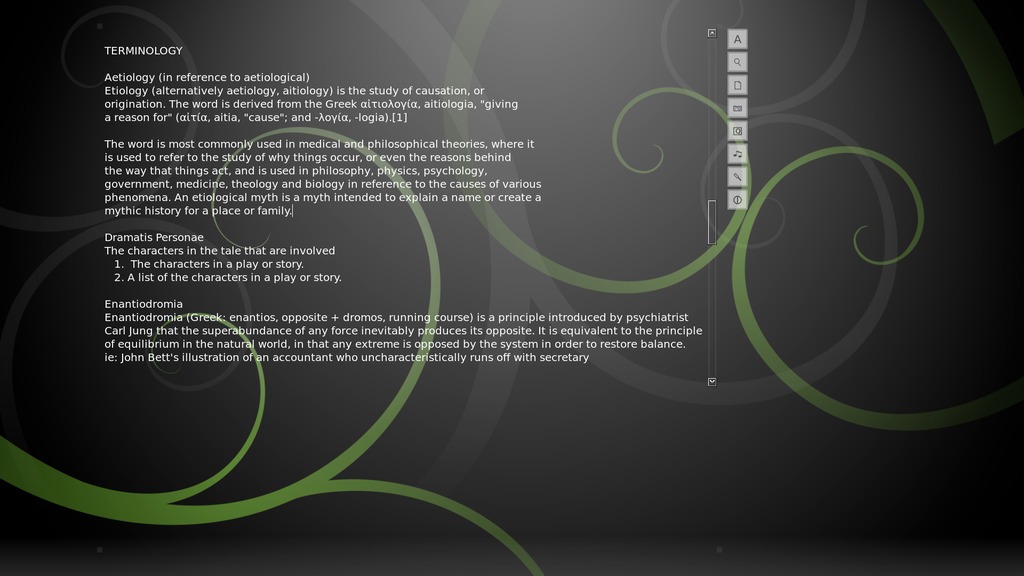
marave makes the dull world of text editing romantic and immersive with beautiful minimalism—quite a mix.

marave can use different themes (or none at all), as well as play Internet radio. Here, I'm using it to edit this month's article.
Installation
Project maintainer Roberto Alsina is hoping to integrate marave into most distros soon, but for now, the only packages available are for Arch Linux and Fedora. If you use another distro, your only option is the source, but that's okay, because installing the source is pretty easy.
In terms of requirements, the documentation says you need the following libraries:
GNU source-highlight (www.gnu.org/software/src-highlite).
Source-highlight-qt (srchiliteqt.sourceforge.net).
SIP, which should come with PyQt.
A C++ compiler.
Assuming you're going with the source, head to the Web site, grab the latest tarball, extract it, and open a terminal in the new folder.
If your distro uses sudo, enter:
$ sudo python setup.py install
If your distro doesn't use sudo, enter:
$ su
(enter your password)
# python setup.py install
Once that's done, run marave with the command:
$ marave-editor
Usage
The first thing you'll notice when you're inside is that the entire desktop has disappeared and you are in a single full-screen program. This is unabashed full-screen editing, designed to immerse you and cut out distractions. As if to reinforce this ethic, the few existing GUI elements on the side disappear until you move your mouse again, leaving you with only your text, a blinking cursor and a scroll bar.
But, enough of the straight minimalism. What really impresses me is the look of the thing. It's a sleek and undeniably gorgeous environment in which to work. An amusing touch for those who like a bit of flair (and have possibly been watching too many Hollywood movies) is a click noise for whenever you press the keyboard, adding a bit of romance to the otherwise dreary world of typing.
As for some of the other features, it's time we explore those GUI elements that usually are hidden away to the right of the scroll bar. The first button at the top allows you to change the font, as well as the color. The magnifying button has a submenu to zoom your text in and out, which is actually one of my favorite features of this program. The blank sheet of paper button has a menu with all the usual functions of loading, saving and so on.
Further down is an icon that looks like a camera. The left and right buttons switch between desktop backgrounds, including various snowy nature themes and what appears to be a Debian background. The color wheel at the right also allows you to adjust the background color and get rid of the background picture completely, if you so desire. The next button gives you amusing control over what sort of keyboard click noise you'd like (or whether to disable it). Next up, there's a music button that lets you play what I think is streaming music (as well as turn it off). I'd go into this more, but space and documentation are kind of lacking.
Second from the bottom is a button that looks kind of like a cricket bat, which appears to bump the text around, but I'm not sure I can elaborate much further on it. I found there are a number of GUI customization options to move around all of your working elements, such as the text area size and placement, but I also ran into some confusion (I deleted the config file to reset in the end, after getting myself into some UI trouble). And as I already mentioned, documentation still is lacking.
Something that really impressed me was marave's handling of foreign characters. A file of mine that had both Japanese and Greek characters mixed in with the Latin alphabet displayed without the slightest hiccup.
I can't help but feel that with a bit of modifying, marave also would make a brilliant ebook reader if it could handle files such as PDFs. Perhaps if in the short term, someone tacked on some code that would use a PDF-to-text converter, such as pdf2ascii, and then just piped the output to screen? An environment as cool as this one, with a full-screen interface, no intruding GUI elements and zooming text, easily would dissuade me from getting a commercial ebook device in favor of simply using marave on a basic Netbook.
What ultimately draws me to the project is that it doesn't just have minimalism and simplicity, it has minimalism and simplicity combined with beauty and a palpable design ethic. marave has soul, and I love that.
Before I begin, I have to offer a mea culpa. I wrote about this several months ago in the Projects at a Glance section, promising to cover it the following month, but it got lost in the noise, and I remembered it when reading over the section in LJ months later. Apologies to any Storybook fans and developers! Anyway, on with the show.
To quote the project's Web site:
Storybook is a free (open source) novel-writing tool for creative writers, novelists and authors that will help you keep an overview of multiple plot-lines while writing books, novels or other written works.
Storybook assists you in structuring your book. Store all information about your characters and locations in one place. Then, use the included Storybook features for managing chapters, scenes, characters and locations. A simple interface is provided to enable you to assign your defined characters and locations to each scene and to keep an overview of your work with user-friendly chart tools.
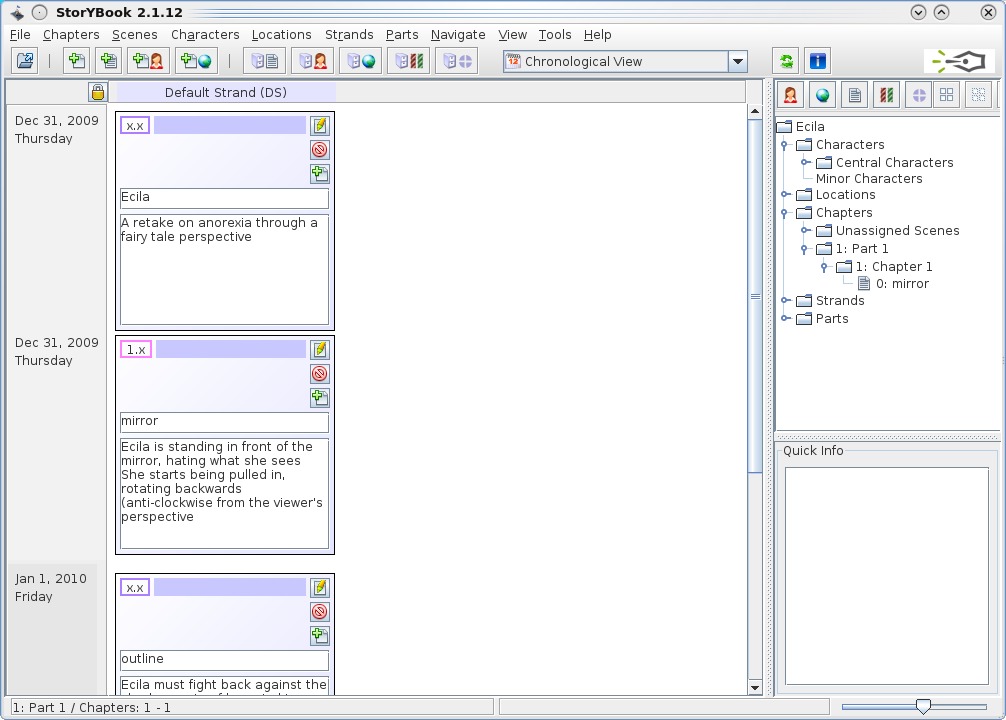
Storybook is a clever tool designed to help you structure a book and keep track of characters, scenes, locations and so on.
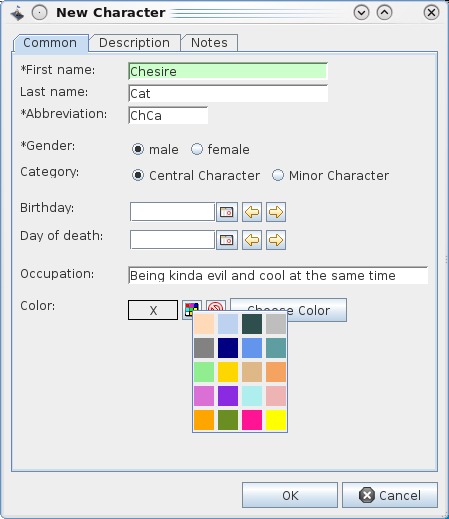
Given that characters typically are the most important part of a story, Storybook's character options are wonderfully thought out. Note the color assignment option—a brilliant touch for creative types.
Although the Web site shows a girl using Storybook, trust me, this one's really for adults.
Installation
As far as requirements go, the only one that jumped out was Java 6 (Storybook won't work with Java 5 or earlier), which shouldn't be much hassle.
Available from the Web site is what appears to be a distro-neutral tarball. Download and extract the file, and open a terminal in the new folder. Once there, enter the following command to run it:
$ ./storybook.sh
Usage
Although I can't really give you a whole rundown on how to use Storybook (that would require an article all its own), I at least can introduce you to the main elements and highlight the coolest parts of the program. Thankfully, the Web site has a very good tutorial, so have a gander if you want to explore things further.
When you first enter the program, it prompts you for a project title. Once you're past that, you'll be in the main screen where you can start exploring. The largest part of the window is called the Chronological View, which shows your scenes in chronological order (as this project is still new, this window essentially will empty for the meantime).
To the right, in the top section, is the Object Tree. This shows all the objects involved in this story thus far (such as characters, scenes, locations and so on) in a hierarchical order. In the bottom section is the Quick Info area, which pretty much does what it says—provides info for each object you're looking at in the upper pane (the Object Tree).
As for actually taking your first steps in Storybook, you need to begin with new characters, scenes and so on. The toolbar at the top with the icons will be your best friend here. The first icon is Open (ignore for now), but continuing right are New Scene, New Chapter, New Character and New Location. Each of those has very well thought-out dialog screens that link to other sections of the program.
For instance, the New Scene dialog allows you to link individual or multiple characters to a scene, as well as individual or multiple locations. The New Location dialog lets you be very detailed, giving you the chance to assign a name, address, city and country to this location, as well as a large description box to flesh out as many details about this place as possible.
However, it's the New Character dialog screen that's particularly well thought out. Each character can be assigned everything from first and last names, abbreviations, gender, birthdays, date of death and occupation. They even can be assigned a color. But, the most important feature is defining whether they are a Central Character or a Minor Character, which then affects the rest of the information throughout Storybook—masterful.
But what is the point of all this categorization, you may ask? Well, it allows you to see patterns in your story and give it structure much earlier in the process than a bare-bones, traditional pen-and-paper approach would allow. Are you overusing a character? Have you broken a piece of continuity somewhere or perhaps lost or missed out on some vital context to the story? Storybook likely will show it long before you see it yourself.
John Knight is a 25-year-old, drumming- and climbing-obsessed maniac from the world's most isolated city—Perth, Western Australia. He can usually be found either buried in an Audacity screen or thrashing a kick-drum beyond recognition.

