
Using wview
Are you fascinated with weather? Do you often find yourself checking local weather conditions? Is the weather your favorite part of the news broadcast? If so, you may be a weather geek, and wview may be the application for you.
wview is an open-source weather application that retrieves sensor readings from a weather station. The sensor data is stored in SQLite3 databases. Aggregate data, such as minimums, maximums and averages, are computed and stored in the database back end. Optional uses of the stored data include weather Web site generation; generic file generation for external applications; data submission to third-party organizations, including Citizen Weather Observer Program (CWOP) and Weather Underground; and store-forward to remote data collection centers. A user-friendly HTML interface is provided for configuring your weather station as well as for optional features.
To set up your weather station and publish your data with wview, you need a weather station. Supported stations include Davis Vantage Pro/Pro2 (Figure 1) or Vantage Vue, Texas Weather Instruments, Vaisala WXT510/520, Oregon Scientific WMR9X8 and La Crosse WS-23XX. Next, you need a platform to host the wview application. Desktop computers of any vintage work well, but it often is desirable to host wview on a low-power, unattended system. The now discontinued Linksys NSLU2 has been a popular choice. The new SheevaPlug quickly is gaining popularity as a wview host also. Industrious people even have used a Western Digital Worldbook NAS as their wview host. Because wview is modular and designed for embedded applications, it can be hosted on low-horsepower systems.
Next, you need to install a Linux distribution of your choice. The Debian (and derivatives) wview packages provide the most idiot-proof installation path, but source installs also are straightforward for any Linux distribution.
Finally, you need an interface cable. This may be a simple 9-pin serial cable or perhaps a USB-serial adapter if your host has no serial ports.

Figure 1. Dave Vantage Pro2 Weather Station
To configure wview, open your favorite browser and point it to the wview management Web site, typically http://[your_wview_server]/wviewmgmt/login.php. An HTTP server is required on the wview host (this will be installed automatically if you use the APT packages). Use the default administration password “wview” (you can change this later). After logging in successfully, the System Status page is displayed (Figure 2). The System Status page displays the current state of all wview services as well as other status information.
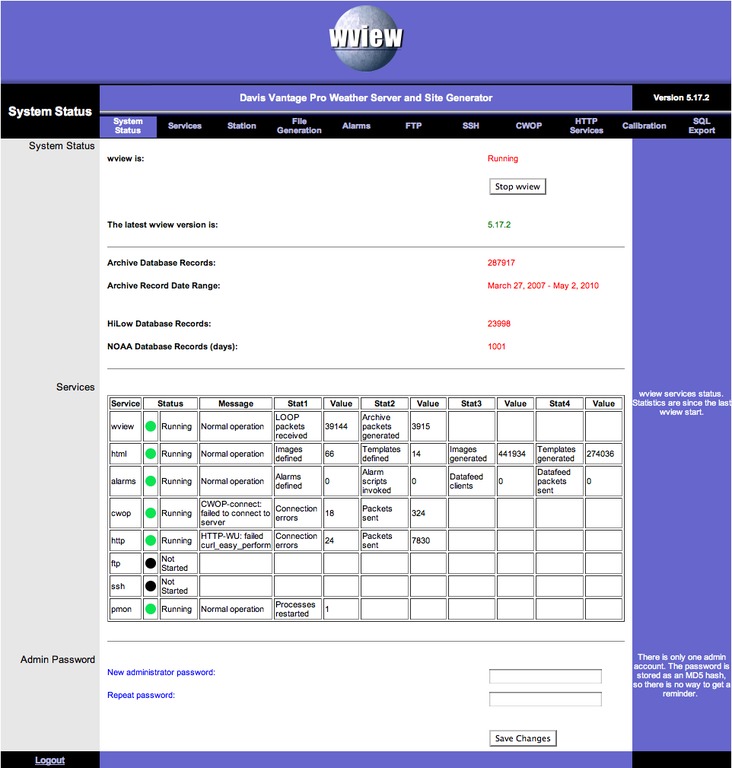
Figure 2. System Status
Configuration is broken up into logical sections with context-sensitive help available by mousing over the configuration items. Click the Station tab to configure the station parameters (Figure 3).
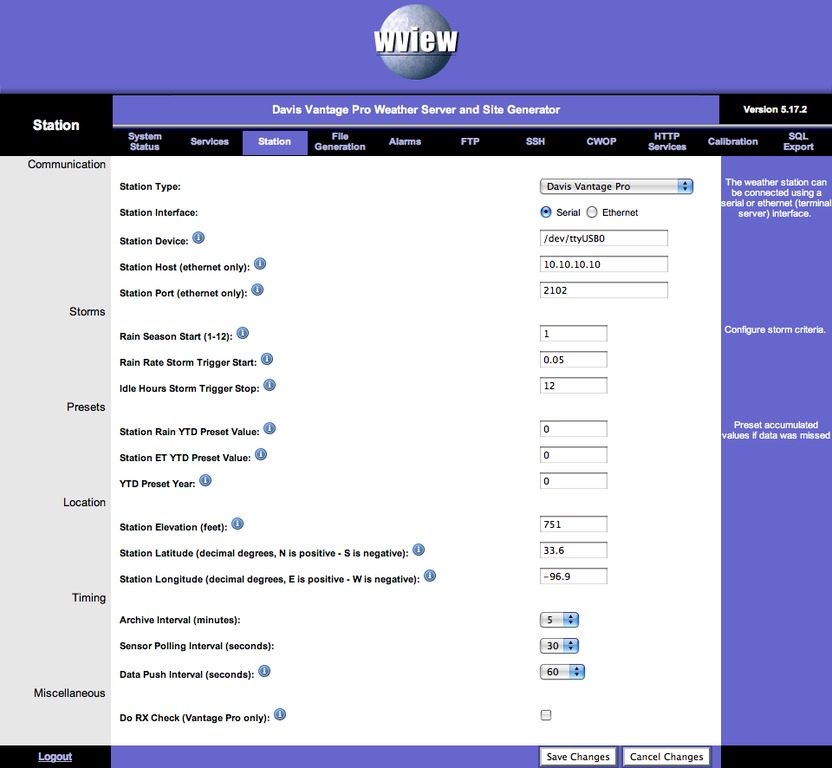
Figure 3. Station Configuration
The critical parameters here are the station type and the interface characteristics. Select Save Changes when you are done. Next, click the Services tab (Figure 4).
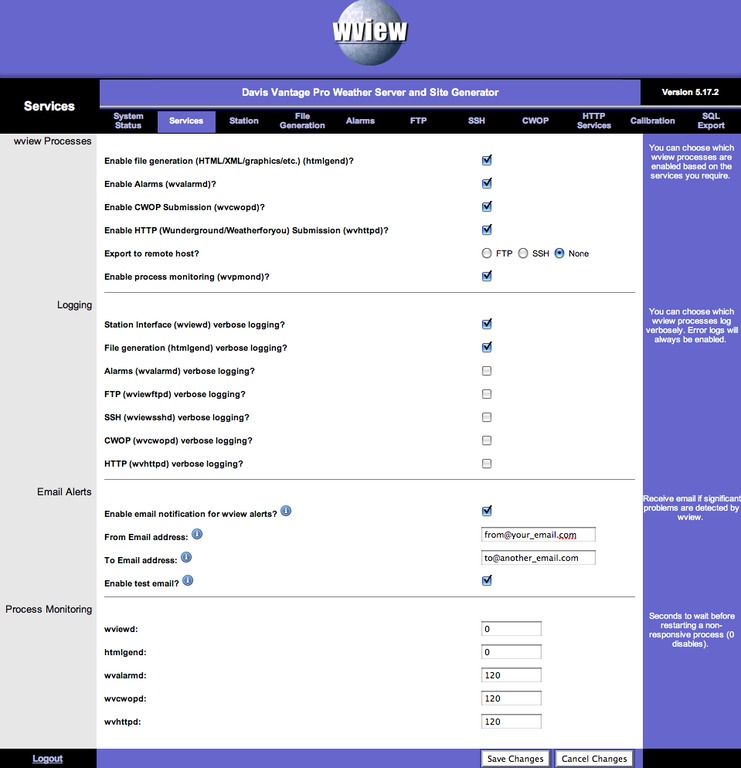
Figure 4. Services Configuration
This page provides the configuration of wview services, log verbosity for the services and e-mail alerts. Services available are File Generation, Alarms, CWOP, HTTP (Weather Underground and Weatherforyou), File Export (SSH or FTP) and Process Monitoring. For now, let's not enable any additional services until you have confirmed your station interface.
Now, let's proceed to the station interface verification. Open a shell on the system that is running wview, so you can follow updates to the system log. At the prompt, enter the following:
$ sudo tail -f /var/log/syslog
This displays new system log messages as they are generated. Here, you will monitor wview startup and status messages. Open another shell, and execute the following:
$ sudo /etc/init.d/wview stop
$ sudo /etc/init.d/wview start
You will see a flurry of activity in the system log from the wview processes as they start up. It is a good idea to familiarize yourself with these wview log messages, as a wealth of detail is included that can be very helpful.
Return to the System Status page and observe the status of the station interface and the file generation. If both are not status “green” and “Running”, further investigation in the system log file will be required to find any configuration or station interface issues.
If all is well, you now can view the default wview weather site. This is typically found at http://[your_server_url]/weather/index.html (Figure 5).
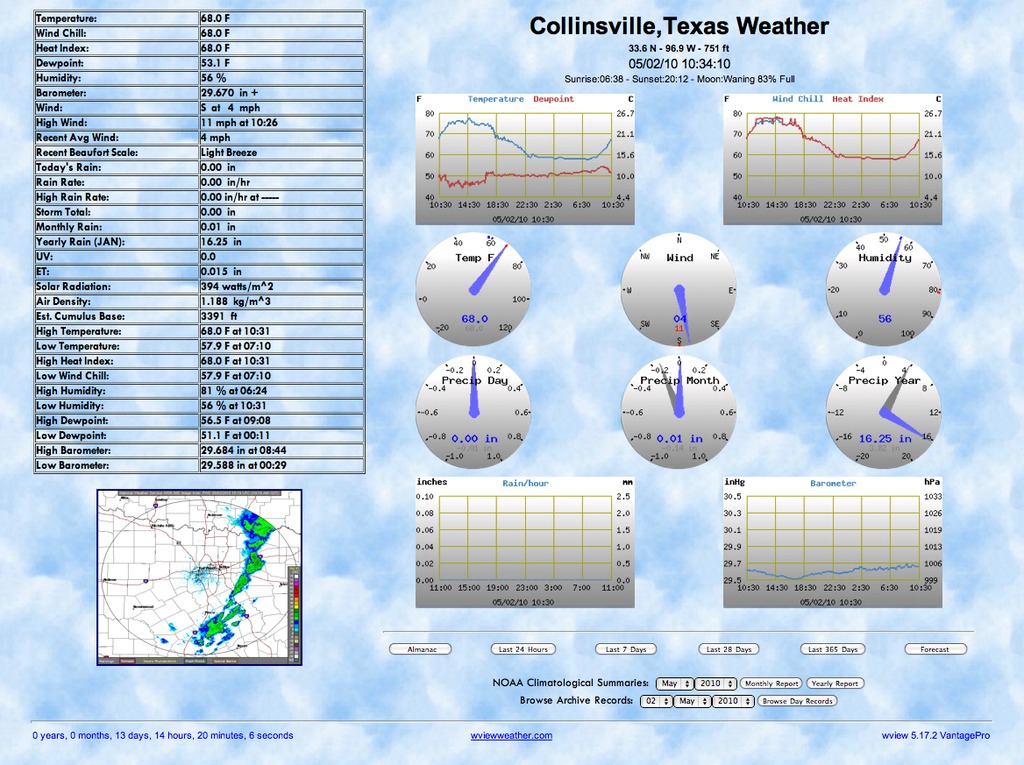
Figure 5. Default Web Site
Current conditions are given in the table on the left and by the dials in the center and on the right. These values are updated every time station data is polled (default is 30 seconds). The weather site pages are regenerated every 60 seconds (configurable). Observing changes in the current conditions is an easy way to confirm proper station interface operation.
Historical data for the last 24 hours are presented as graphs. Graphs of the last 24 hours, the last 7 days, the last 28 days and the last 365 days are available on other site pages.
CWOP is a system by which individuals with weather stations and the proper software can submit their weather data to an APRS-based data storage system, so that others, including NOAA (National Oceanic and Atmospheric Administration), can use the data however they see fit. There are some really neat station display Web sites, including some Java apps to look up station data, position, maps and so on. See www.findu.com/cgi-bin/wxpage.cgi?call=CW4097 for an example weather station.
CWOP participation requires registering for an APRS callsign. Once you have configured wview for CWOP properly and confirmed your data on-line, you must contact the maintainers via e-mail to confirm your registration. Then your data will be available for anyone to see and possibly be used in NOAA forecast models and so on.
When CWOP support is enabled and configured properly, wview transmits a new WX packet to the APRS server every ten minutes, based on the last digit of your callsign.
wview supports the APRS-IS Rollover (Automatic Packet Reporting System-Internet Service) functionality by enforcing the definition of three APRS-IS server:port pairs. The goal is to avoid data loss to the CWOP system caused by connection errors. Select three different servers from the list at www.wxqa.com/activecwd.html.
Click the Services tab and enable CWOP submission and CWOP verbose logging. Click Save Changes. Next, click the CWOP tab, and enter your callsign, latitude and longitude (see the mouse-over help for format details), the CWOP servers (three should be entered) and port numbers. Go ahead and enable “Log CWOP Packet?”; you can disable it after submission is confirmed. Click Save Changes.
Now, restart wview:
$ sudo /etc/init.d/wview restart
You can monitor CWOP packet submission in the system log (and on the CWOP status pages).
The Weather Underground (Wunderground) is a privately held organization that provides many weather services—some free and some not. Among the free services is the ability to register your weather station and submit your data to them, so you can access your data and some nice graphs from the Wunderground site. Weatherforyou.com also is a privately held outfit with similar capabilities to Wunderground.
Register for a Weather Underground Station ID (unless you already have one) at www.wunderground.com/weatherstation/usersignup.asp. Determine your accurate latitude and longitude: www.topozone.com/viewmaps.asp.
Click the Services tab and enable the HTTP service. Click HTTP Services and configure the Weather Underground settings. Click Save Changes.
Look in the system log for something similar to:
"WUNDERGROUND: configured to submit \
               station KTXCOLLI1 data to wunderground.com"
Confirm your data at the Wunderground server: http://www.wunderground.com/weatherstation/WXDailyHistory.asp?ID=XXXXXXX, where XXXXXXX is your Wunderground Station ID. This should start displaying your weather data graphically and as a packet list.
A number of simple open-source weather station applications are available that do little more than extract the data from the weather station and archive it for later post-processing or retrieval by another server for multisite analysis. Researchers wanting to gather weather data for their own purposes is one example of such an implementation.
It is often (incorrectly) asserted that wview is “more application” than is needed for simple archival purposes. In fact, wview allows for much configuration as to “how much” it does for you. Designed as a series of loosely coupled UNIX processes, wview easily can be configured as an archive-only server. It also is easy to add CWOP and/or Wunderground/Weatherforyou to the archive server—all without any “fancy” HTML or other file generation. If you don't want to generate a Web site, you don't have to have one!
After installation and typical configuration, disable all wview Processes (under the Services tab in wviewmgmt). The station interface process always is enabled and, thus, is not configurable. Start wview as normal. Only the wviewd_<station> dæmon will be running, collecting data from the station and archiving records and HILOW values in the archive databases.
Because wview stores archive data in SQLite3 databases, it is a simple matter to implement scripts or applications that access the data via SQL. Many wview users create their own custom Perl/PHP/Java/WordPress applications for their weather data.
The default generation model for wview is to generate a weather Web site based on a series of HTML file templates and images. For any template file named example.[ext]x and listed in html-templates.conf, wview will generate a file named example.[ext]. Thus, myscript.phpx listed in html-templates.conf and found in $prefix/var/wview/html will have all wview tags replaced, and the resulting file will be named myscript.php. For any template file named example.htmx and listed in html-templates.conf, wview will generate a file named example.htm. The resulting files are stored at the location specified on the wviewmgmt File Generation page: “Generation Target Path”.
Changing HTML templates in $prefix/etc/wview/html does not require you to restart wview. The changes you make will take effect at the next htmlgend (HTML generation dæmon) generation cycle. Changing the config files images.conf, html-templates.conf and (if supported) forecast.conf does not require restarting wview, but it does require an HUP signal to be sent to htmlgend to cause these files to be reread. Do this as follows (this also will toggle log verbosity):
$ sudo kill -s HUP `cat $prefix/var/wview/htmlgend.pid`
wview supports template macro file inclusion in template files. The meta-tag is <!--include filename.xxx-->. Any template macro file that is to be included in one or more template files should be listed before any templates including it in the $prefix/etc/wview/html-templates.conf configuration file. There is no restriction on the levels of inclusion, just be sure you specify macro templates early in the html-templates.conf file. The wview default Web site templates utilize several header macro files.
HTML template files (in $prefix/etc/wview/html) can be customized to your language and design preferences. The configuration file html-templates.conf specifies the template files to be used for generation. You may add or remove from this list as needed. Weather image captions can be edited in the $prefix/etc/wview/images.conf file for your language preferences. The configuration parameter on the File Generation Page “Enable Metric Units For Generation?” allows for configuration of metric units. If set to “yes”, it causes wview to output all images (buckets and charts) as well as all values for HTML tags in metric units. The file images.conf can be edited to translate the English labels, titles and units to any language. By editing this file and the HTML template files, any language can be supported by wview. In fact, you easily can switch back and forth between US and metric units by toggling this configuration parameter and restarting wview.
wview provides a number of features that allow advanced use of the weather data collected from your station. Alarms may be defined such that if an upper or lower bound is exceeded, a user-defined script will be executed. These scripts may send a notification e-mail or trigger an external application. It's also possible to connect to the wview server via TCP/IP socket and receive an unsolicited, periodic data feed of weather data. By using the “Virtual” station type, you can connect to another wview server remotely and receive the station data as if it were connected directly to the station hardware.
Resources
wview Home Page and On-line User Manual: www.wviewweather.com
wview Google User Group: groups.google.com/group/wview
Citizen Weather Observer Program (CWOP): www.wxqa.com
The Weather Underground (Wunderground): www.wunderground.com
Mark Teel is the Software Engineering Manager for a major supplier of display and control systems for mass transit and commercial airline systems. He is also an advocate of open-source software development and has contributed to several projects, including CodeAnalyzer (a Java-based source code analyzer), radlib (Rapid Application Development Library) and wview.


