
Economy Size Geek - Organizing a Library
At first glance, you might assume that I'm going to discuss code libraries in this article, but instead, I'm talking about an actual library—one made of books, magazines and other dead-tree sources of wisdom. I have always collected books, and each new project or pastime becomes an excuse to expand my library. I don't always know what I have or, more important, where a certain book is. I try to keep my library organized in a physical sense, but I've always wanted a system that kept better track of my books.
The goals for this project are pretty straightforward. I need something that can track all of the books I own. A big part of my collection is in my library at home, but I also have a large set of technical books at my office. I'd love to be able to see images of the covers (à la Delicious Monster—a Mac program that originally inspired me to sort this out). I also need something to show me where in the library the book is physically—the cabinet and shelf would be nice. One last thing is data entry. I have several thousand books, and I'd prefer not to have to type in a lot of information.
The cool part about the Open Source world is that you can access software that is way beyond the scale of what you need. In the case of this project, I found Koha. According to the Web site, “Koha is the first open-source Integrated Library System (ILS). In use worldwide, its development is steered by a growing community of libraries collaborating to achieve their technology goals.” The project is targeted at actual libraries, which sounded like overkill, but I could not resist downloading and taking it for a spin.
I decided to play with the development version (as the last release was June 2009). The first step was to check out the code repository:
git clone git://git.koha.org/pub/scm/koha.git kohaclone
The repository actually had install instructions for several distributions. Because I'm running Ubuntu, I followed those instructions. Based on the differences between the Web site instructions for installing on Hardy (8.04) and the instructions in the development version, it looks like a number of packages outside the standard package tree have been added. That is a good sign, because it means installation will get easier and easier. Be warned though, Koha is built using Perl, and a few Perl libraries are not currently packaged in Jaunty. The instructions show you how to use CPAN to install them properly (although that means you will have CPAN versions that are not controlled by the package system—a side effect of working with CPAN). After following all the instructions and getting everything installed, I ran through the Web install to set up the database.
Once everything was up and “running”, I was ready to dive in to the heady world of running my own library. After spending an inordinate amount of time figuring out that I needed to provide some default values for the library and the type of content I was going to track, I was ready to add my first book. Pulling up Koha's add form presents a huge page of options, most of which meant very little to me (such as Leader, Control Number Identified and Fixed Length Data Elements). I forged ahead by trying to search for one of my test books by ISBN. I had to do something called a Z39.50 search. This is a protocol used for getting book information from other libraries. In the process, I learned that I had to add my own Z39.50 sources. I used the Library of Congress, because I figured it would have the most complete records (Settings are z390.loc.gov:7090 Database:Voyager - Syntax USMARC). Once all that was set up, I was able to add the book.
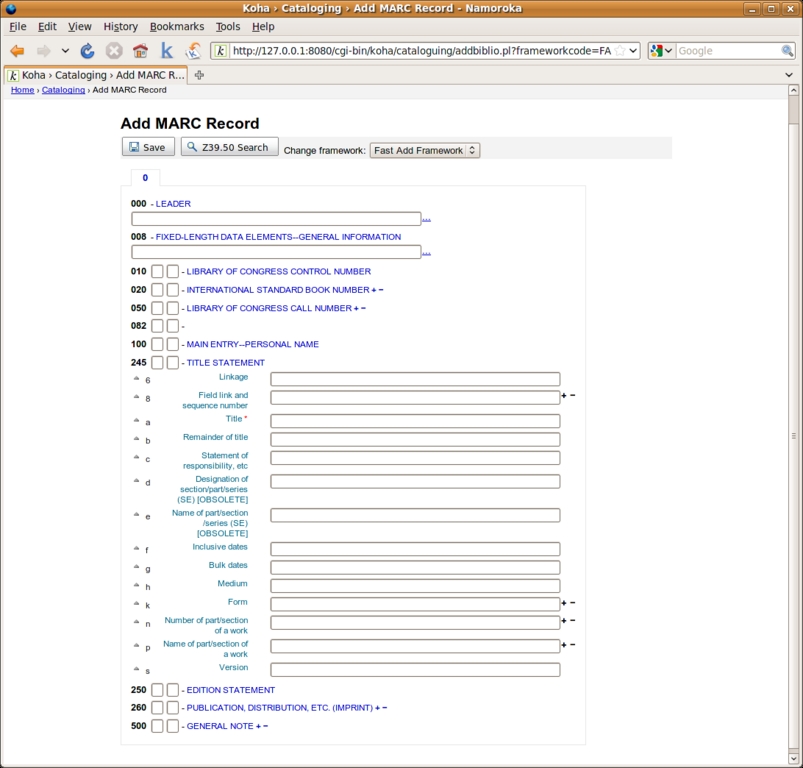
Figure 1. The Koha catalog screen—something tells me this is overkill.
All of the above was a lot of work, and I added only a single book. As much as I would like to use an industrial-strength tool, the system was too confusing for me as a layperson (my wife was kind enough to point out that there is a reason it is called Library Science). If you want to see what a properly configured Koha system is capable of, go to the Plano ISD library system (see Resources), which is running a version of Koha. It shows the book covers and even has a shelf browser. So if you have your own public library, Koha is really neat, but I realized I needed something else.
I eventually figured out that the problem with my previous searches for software was the omission of the word “personal”. Adding that word narrows down the Google search a lot. As a result, I found two different options to consider: Alexandria and GCstar. Unlike Koha, both are available as Ubuntu packages. After dealing with the install guide for Koha, it was nice that all I had to do was apt-get install, and I could try them both (well, that was almost all I had to do). In the process of playing with these tools, I found another application called Tellico. It was nice to have several apps from which to choose.
Alexandria is a Ruby GNOME application for managing a book collection. The current official version is 0.6.5. Things got off to a very bumpy start with Alexandria. The default version in Jaunty is 0.6.3. It was not able to find either of the test books. Even worse than that, it crashed and exited when I tried to search by ISBN. Not one to give up easily, I ended up downloading a current beta version (0.6.6-beta1). There was a problem related to two Ruby libraries because I was installing it under Jaunty. To get everything to work, I had to install two gems (hpricot and htmlentities) and manually install the package:
sudo dpkg   --ignore-depends=libhpricot-ruby -i
 ↪Desktop/alexandria_0.6.6beta1.deb
The system relies on Amazon for some of the lookups. Due to a change in Amazon's policy, I had to sign up to get my own Amazon AWS access key. An explanation and link are available on the Alexandria Web site (see Resources). Technically, I could have removed Amazon as a provider and skipped this step.

Figure 2. Alexandria Loaded with Some Books
The application itself is very simple, which was a nice change after wading through so many screens on Koha. You can search for books by title or ISBN. It lets you browse your library and search by details.
GCstar collection management started out as GCfilms. As a result, it supports many different kinds of collections, including books, movies, music and board games, among others. It also allows you to define your own collection type, so you can track and collect anything you want.
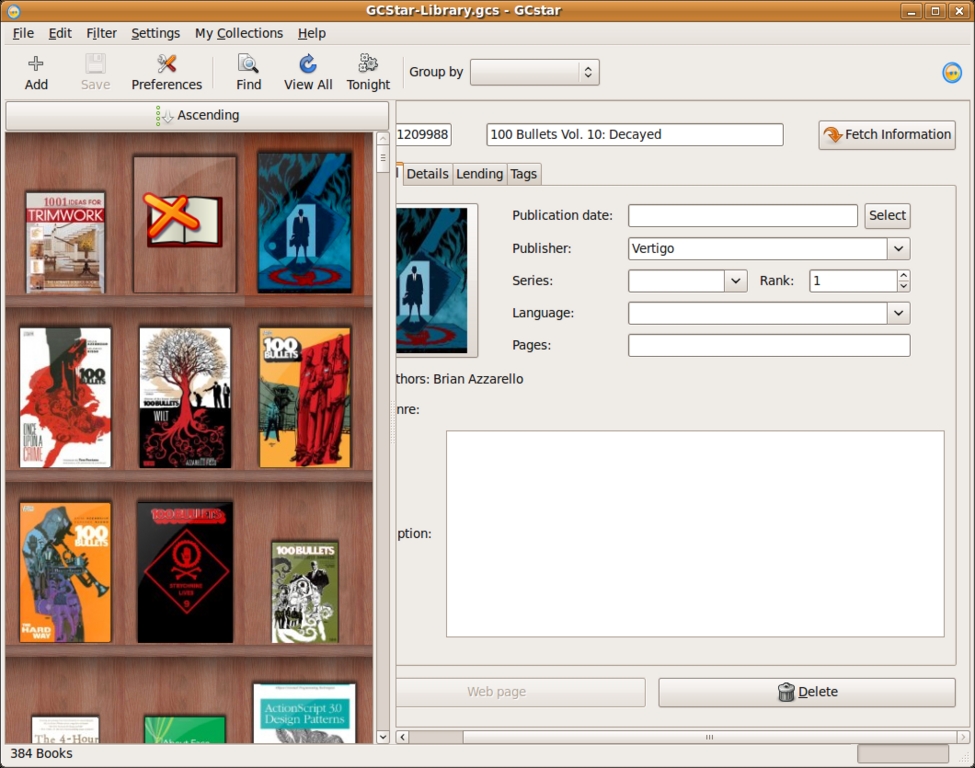
Figure 3. GCstar Loaded with Books
Installing GCstar was easy. I installed the package and then started the application. Obviously, I chose to start a collection of books. I clicked Add and started the process of looking up a book. I tried to use Amazon as an information source, but it never found anything. I assume this is related to the same policy change that affected Alexandria. I ended up using ISBNdb.com as my main source and was able to pull up information and book covers for all my test books. To make sure this wasn't fixed in a later version, I upgraded the package to 1.5.0, and it still had the same problem.
Tellico is a collection management application for KDE. It was available as a package, which installed with no problems. After creating a new collection of books, my first step was to add one of the test books. The process of adding a book was the most confusing out of the three applications. I clicked Create a new entry, which pulled up a dialog with a lot of options spread out over six different tabs. Title was on the first tab. ISBN was on the Publishing tab. I entered in a title for a book and clicked Save Entry. On the other applications, doing that triggered a lookup, but Tellico just sat there with no additional data. Eventually, I found an option to say Update Entry, which was able to pull down information and update it (though no book cover was provided). I tried a second time, and this time, I filled out only the ISBN field. I saved the entry and asked it to update, but nothing changed.
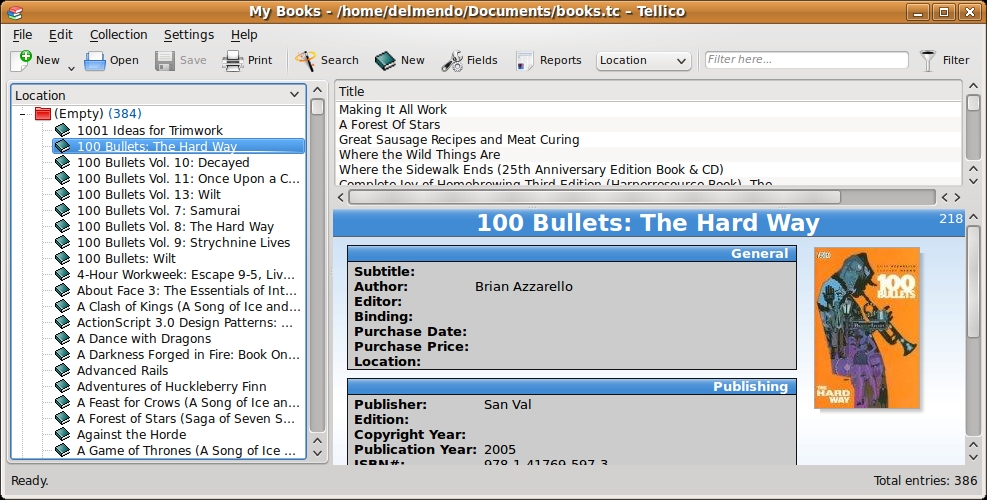
Figure 4. Default Tellico View
The version that shipped with Jaunty was 1.3.5. Version 2.1 was available as a Lucid package, so I decided to install that to see if any of these problems had been resolved. The good news is that the newer version fixed the problem with Amazon. The bad news is that it still was not able to look up the book with only the ISBN. The ISBN allows you to identify a book uniquely, which should simplify the process of confirming what book you are talking about. Searching by title provides a list of a lot of other books that are not the ones I want.
Now that I was able to add books to all three applications, I wanted to see how hard it was to add additional sources for lookup. GCstar ships with a number of sources. The application itself does not let you add or configure any of the sources, so your only option is to pick which one to use. The process of adding a book was straightforward. You just click Add and then put in the information. I am not sure if the problem was with authentication or something else, but the tool never found anything using Amazon as a source. I was able to pull up information about my books using ISBNdb.com. Once GCstar finds a book, the system pulls in a lot of details, including the book cover. There also is a field for storing the book's location. It is just a free-text field, so I would have to come up with my own way of encoding location. You can search by location, but there is no way to sort by it or store the search, so you can't browse the shelves based on where they are, which ends up being useful in my library, as I keep books on the same topic clumped together.
GCstar does not have any support for a scanner; however, it does have a number of different options for importing data. It even can import an Alexandria collection. One way to get the data into the system is to put the ISBN numbers into a CSV file, and GCStar then can import that CSV. Once the data is loaded, you have to go to each book to trigger the lookup in the remote repository.
Alexandria allowed me to add my Amazon credentials. It also supports adding in custom Z39.50 sources. Tellico had the most extensive list of options for adding additional sources. It included support for Z39.50 as well as GCstar plugins.
One of the problems I run into with my library is that even if I remember I have a book, I don't remember where it is. Recently, I moved a large chunk of my technical books to my office, making the situation even worse, so I want to be able to track books' locations.
Alexandria does not have any concept of location baked in. It does support tags, which would allow me to enter a tag to give me a better idea about a book's location (for example, Home:Cabinet 1:Shelf 3). The search allows me to search by tags, so I could see other things on the same shelf, which would be useful because I tend to put books on the same subject next to each other.
GCstar 1.3.2 had a field for location. The newer 1.5 version has replaced that with support for tags. Once the books were tagged, I could browse the books by grouping them by tags. The search function did not support tags, so I couldn't limit my searches to books only at home or only at my office.
Tellico had the most advanced features for this part. I actually could add specific fields for library, cabinet and shelf. Then, I could use those fields for grouping and searching.
All this searching and sorting is useful, but I saved the most important consideration for last. How do I get all my books into the system? The first option is simply to type in the ISBN of all my books. If your library is small enough that you are willing to do this, you probably don't need a system to track your books.
The next option is a barcode scanner. I happen to have a Flic Bluetooth barcode scanner from a previous project, and I was fortunate enough to find a great guide to getting it working under Linux (see Resources). Once everything was set up, I was able to scan the ISBNs from all the books quickly into a text file.
I tried to import the ISBNs into Tellico, but each time, it crashed on the import. I wasn't able to confirm whether this was a problem with the program or the way I installed it.
GCstar was able to import the list of ISBNs with no problem. The annoying part of that process was that once the books were imported, it did not do any lookup on the ISBN. I had to go to each book individually to tell it to download the data. Once I did, I got the book cover and everything else.
Alexandria got it right. Not only did it do the import, but it also downloaded the information about the books.
I realize that not everyone has a barcode scanner lying around. Don't worry; you have other options. If you have a Webcam, you can install ZBar. This barcode-scanning software turns your Webcam into a barcode scanner. I was able to get the same list of barcodes from ZBar that I got from my barcode scanner. The only downside is that I had to bring each book to the camera. It's a lot cheaper, but not nearly as convenient if you are scanning in a lot of books.
All the solutions I looked at are downloadable, but it seems a little silly to ignore some of the options available on the Web. I looked at two different on-line options: Shelfari and LibraryThing. It was very easy to add a book on both sites. I also was able to import my list of ISBNs into both sites. On Shelfari, the import happened very quickly. On LibraryThing, it was thrown into a queue, and I was told that it would take up to an hour for the ISBNs to process.
As for sources, LibraryThing supports more than 690 different sources for information. Shelfari did not offer any information source options. Amazon acquired Shelfari in August 2008, so I assume that is where it gets all its data.
Both sites support tags, so I can use that to encode the books' locations.
Because these are both Web sites, they offer advantages and disadvantages. You easily can access the library data from multiple computers. On the other hand, you may not want everyone in the world to know you have every book on Pokemon ever published. Originally, I was concerned any data I put into either site would be locked there, but after some surfing, I found that both sites will provide you with a complete download of your library data.
I had a Shelfari account before I wrote this article. I often use it to create virtual bookshelves to talk about what I'm reading or to recommend a reading list. I thought about moving my collection into it, but I would prefer to work locally before I deal with putting everything on the Internet. After looking at the various options, I decided to start with Alexandria. It was the easiest to use and was best for what I need it to do. Plus, it is built using Ruby (a language I know), so I might have a shot at adding any features I need. As a test, I exported the information I already had put into Shelfari into Alexandria. Then, I was able to export the Alexandria data to both Tellico and GCstar. That means once I collect all the data, I always can switch applications later, which may be essential, as I noticed Alexandria started to slow down with only 400 books in it. Now, I just need to carve out the time to get scanning!
Resources
Koha: koha.org
Plano ISD Library System: pisd.kohalibrary.com
Alexandria: alexandria.rubyforge.org
Changes to Amazon API Requires AWS Account: alexandria.rubyforge.org/news/2009-08-15--amazon-support.html
GCstar: www.gcstar.org
Tellico: tellico-project.org/about-tellico
Linux wedge (driver) for Microvision Flic barcode scanner: www.gsmblog.net/linux-wedge-driver-for-microvision-flic-barcode-scanner
ZBar: sourceforge.net/projects/zbar
Shelfari: www.shelfari.com
LibraryThing: www.librarything.com
“Amazon Acquires Shelfari: Moves to Corner Book-Centric Social Media”: techcrunch.com/2008/08/25/amazon-aquires-shelfari-moves-to-corner-social-book-space
Dirk Elmendorf is cofounder of Rackspace, some-time home-brewer, longtime Linux advocate and even longer-time programmer.


