
An Introduction to MINIX
Remember MINIX? Short for Minimal UNIX, MINIX is a close cousin of GNU/Linux. To GNU/Linux users, it is simultaneously familiar and foreign, and it challenges orthodox assumptions about how an operating system should be designed.
MINIX originally was developed in 1987 by Andrew S. Tanenbaum as a teaching tool for his textbook Operating Systems Design and Implementation. Today, it is a text-oriented operating system with a kernel of less than 6,000 lines of code. MINIX's largest claim to fame is as an example of a microkernel, in which each device driver runs as an isolated user-mode process—a structure that not only increases security but also reliability, because it means a bug in a driver cannot bring down the entire system.
In its heyday during the early 1990s, MINIX was popular among hobbyists and developers because of its inexpensive proprietary license. However, by the time it was licensed under a BSD-style license in 2000, MINIX had been overshadowed by other free-licensed operating systems.
Today, MINIX is best known as a footnote in GNU/Linux history. It inspired Linus Torvalds to develop Linux, and some of his early work was written on MINIX. Probably too, Torvalds' early decision to support the MINIX filesystem is responsible for the Linux kernel's support of almost every filesystem imaginable.
Later, Torvalds and Tanenbaum had a frank e-mail debate about the relative merits of macrokernels and microkernels. This early history resurfaced in 2004 when Kenneth Brown of the Alexis de Tocqueville Institution prepared a book alleging that Torvalds borrowed code from MINIX—a charge that Tanenbaum, among others, so comprehensively debunked, and the book was never actually published (see Resources).
Now at version 3.1.6, MINIX has taken a turn in its development. While versions 1 and 2 focused primarily on the operating system as a learning tool, with version 3, MINIX began targeting low-cost laptops and embedded devices as well. More generally, the project's Web page recommends MINIX for “applications where very high reliability is required” and for projects where the GNU General Public License would be too restrictive.
However, these new targets seem more ideal than real. I can find little evidence of MINIX being used in embedded devices or for its high reliability or licensing. Similarly, MINIX still lacks the user-friendliness that would make it a candidate for a project like One Laptop Per Child. As with previous releases, MINIX's greatest value continues to be as an educational aid to give users experience of another UNIX-like system.
Still, for those familiar with GNU/Linux, MINIX does take some acclimatization. Accordingly, what I present here is not a comprehensive review, but an introduction to help those who are interested in orienting themselves to MINIX, its structure and resources.
MINIX's hardware requirements (see Resources) should not be a major concern for most users. Requiring 16MB of RAM and a gigabyte of hard drive space, MINIX should install on most computers made in the last decade, even if all peripheral devices are not supported.
If you are interested mainly in studying MINIX, you might consider installing it in a virtual machine. MINIX is installable with a variety of virtualization solutions, including Bosch, QEMU, VMware and VirtualBox. Instructions for each solution are available on the project Web site. Installing MINIX as a guest operating system has the advantage of allowing you to make easy comparisons with a GNU/Linux host.
No matter how you decide to install MINIX, have some paper ready to take notes. Some on-line instructions are available, but, at the time of this writing, they differ so significantly from those provided by the installer that they are not reliable. The first set of instructions (Figure 1) is especially important because it explains the following:
That you install with the setup command.
How to shut down the system.
That you use xdm to start the X Window System.
That you use packman to install additional packages.
What the instructions do not mention is that you can log in after installation as the root user with no password.
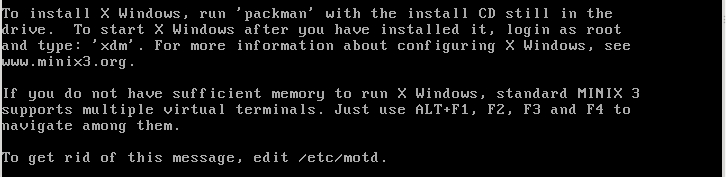
Figure 1. Bootup Instructions
Although text-based, the MINIX installer should provide few obstacles for anyone who has installed operating systems in the past. Probably the biggest standard challenge is to do expert partitioning, because MINIX has its own system. However, the default partition scheme, which includes separate partitions for /, /home and /usr, should be satisfactory for most users.
A more serious problem for some people will be the fact that MINIX supports only eight common Ethernet cards; the installer does, however, auto-detect cards.
True to its name, MINIX installs a minimal system. One of the installer's final warnings is that the first time you start the new installation, you should add users and passwords.
If you are installing on a multiboot system, you also need to add MINIX to the bootloader. For example, if you are using Legacy GRUB and MINIX is installed on the second partition of the first hard drive, the stanza in /boot/grub/menu.list would be:
title MINIX
rootnoverify (hd0,1)
chainloader +1
As with Windows, GRUB does not support MINIX natively and has to pass off its booting to MINIX's own bootloader.
MINIX remains a shell-based operating system, and its concessions to the desktop are minimal. It starts with a boot menu of different system states, including (assuming you followed the install instructions) a pristine version of the operating system that you can use for recovery. When you are finished, the command shutdown halts the system, and shutdown -r reboots it.
For anyone who has used a UNIX-like system, the MINIX directory hierarchy should be broadly familiar (Figure 2). However, you will notice a few missing top-level directories, such as the ever-contentious /opt, and directories added to operating systems like GNU/Linux for user-friendliness, such as /cdrom and /media. Also missing is /proc, which tells you that the pseudo-filesystem procfs does not exist to access process information from the kernel. Because MINIX runs drivers in userspace, it does not have the need for /proc that GNU/Linux does.

Figure 2. File Hierarchy
Descend a directory level, and you find that the logic of the directory hierarchy is differently applied. For instance, GNU/Linux's /var/spool directory, which contains queues for cron jobs, printing and mail as well as locks, is located in /usr/spool instead. But, such examples are exceptions, and previous experience with UNIX-like systems can only benefit those exploring MINIX for the first time.
What may require more acclimatization is MINIX's naming system for devices. Open /etc/fstab, and, if you accepted the default partitioning scheme during installation, you will see something like:
root=/dev/c0d0p0s0
usr=/dev/c0d0p0s2
home=/dev/c0d0p0s1
Although this naming system may seem intimidating at first, in practice, it is very simple. It lists the physical controller and disk, followed by the partition and sub-partition, with the first of each item numbered 0.
Naturally, other distinguishing characteristics of MINIX will become clearer as you explore it in more detail. But if you do need help, MINIX supports man pages, just like most UNIX-like systems, and it includes an interesting application called whichman that attempts to find approximate matches to a query. However, you will not find any info pages, despite the fact that MINIX uses utilities provided by the GNU Project. You also can find help on the MINIX Wiki, although it is not always up to date and often suffers from a lack of detail.
When you install MINIX, the result is a minimal system (a setup that is in keeping with basic security principles). If you want more, you have to install it yourself. Beyond the basic system, MINIX has a small but well-rounded collection of 135 packages, tailored to the needs of the command line. By default, it uses the ash shell, but BASH and zsh are also available. It includes support for several programming languages, including Tcl, Perl, Python and FLTK, and users can choose between vile, vim and nano for text editors.
Some of MINIX's applications, such as Kermit, might seem old-fashioned from a modern GNU/Linux user's perspective. Others will seem thoroughly contemporary, such as SQLite, OpenSSL and wget. Then, there are the usual suspects, such as ImageMagick, tar and zip. You even can unwind with a game of Nethack on MINIX. In keeping with MINIX's status as an educational operating system, typing a command without any parameters displays a brief summary of usage.
In MINIX, you won't find desktop applications, such as Firefox or OpenOffice.org. Such programs are many times larger than the whole of MINIX, and including them would go against the project's goals of being suitable for embedded systems. Strangely enough, you will find a package for The GIMP. But the closest you will find to Firefox is Lynx, and the closest to OpenOffice.org is TeX.
For that matter, you will find little attention paid to graphical interfaces in general. The X Window System is available, but the interfaces are few. You can run TWM (Figure 4) for an extremely basic desktop, but with the unaliased text, you are better off at the command prompt. The Equinox Desktop Environment (Figure 3) is considerably more sophisticated, but unless you're doing something like viewing graphics, running any sort of graphical interface in MINIX is mostly beside the point. Although you could study the X Window System in MINIX, the overwhelming majority of the work you might do in MINIX works just as well from the command line, if not better.
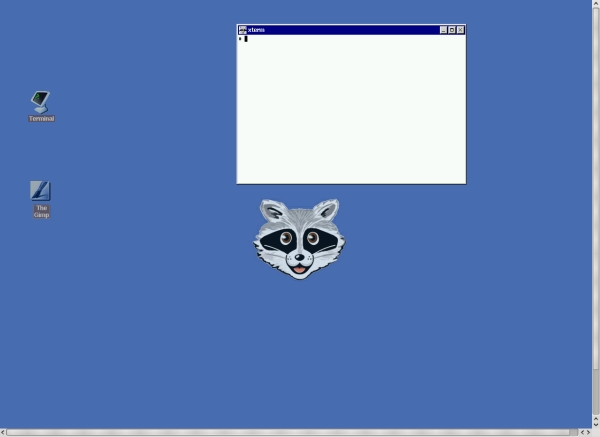
Figure 3. Equinox Desktop Environment (EDE)

Figure 4. Timeless Windows Manager (TWM)
Whatever your choice of extras, they are installed with the command packman. Packman opens with a list of the available packages (Figure 5). Dependencies are not resolved automatically in packman, but the list informs you when a package requires another one.
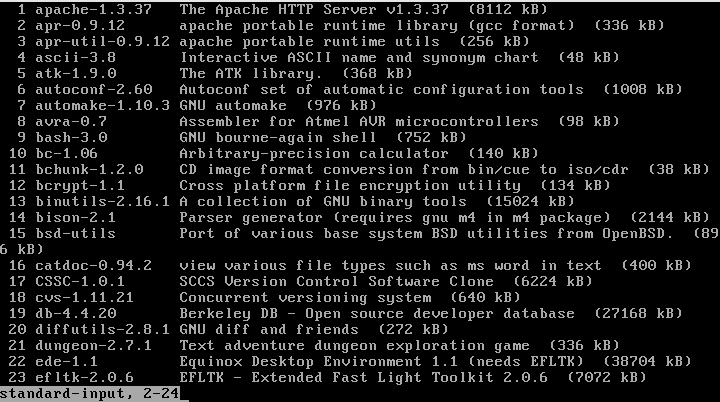
Figure 5. Available Packages in Packman
When you know what packages you want to install, press the q key, and enter their numbers at the prompt (Figure 6). When you are finished installing, press the q key twice to exit.
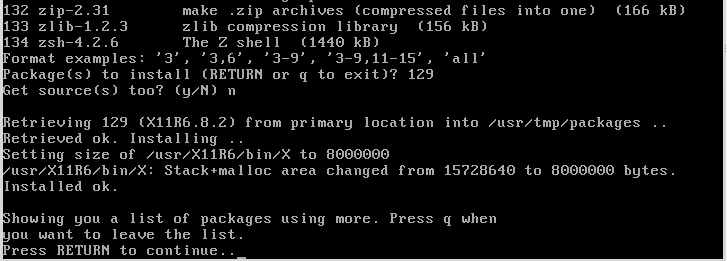
Figure 6. Installing X with Packman
Assuming you have experience with UNIX-like operating systems, you shouldn't need more than a session or two to familiarize yourself with MINIX and its resources.
If your interest is not just casual, your next step might be to read the MINIX Developer's Guide. This concise guide goes all the way from the resources you might need to learn more about programming in MINIX to explaining the MINIX API and packaging format in detail. Then, you might want to see what MINIX projects are already organized on the project's Who Is Working On What page and joining the Google Group for MINIX. Conversely, if you are considering using MINIX for teaching, look at the Teaching with MINIX Web page for resources.
But is MINIX worth this effort? Is it, perhaps, a historical relic whose best days are past? How you answer that is very much a matter of perspective.
On the one hand, MINIX development and teaching are both relatively small worlds, so individuals might expect (all else being equal) to contribute to them more easily and meaningfully than to larger free and open-source projects. MINIX development in particular seems to be at a significant stage as the project tries to redefine its relevance. And, there is something to be said about learning and teaching about UNIX-like systems in a smaller, less-cluttered environment, especially one that is not desktop-oriented.
On the other hand, some might consider MINIX (to be frank) a dead end. Why, they might argue, should anyone put effort into such a small project when working with GNU/Linux or FreeBSD is more relevant today and promises to teach more marketable job skills?
Either way, MINIX is worth some attention. You may decide not to invest a lot of time in MINIX, but after examining it in any detail, you will probably return to your own free operating system of choice with a better understanding of how it is structured. For all the efforts to refocus MINIX, teaching is very much what it continues to do best.
Resources
The Tanenbaum-Torvalds Debate: oreilly.com/catalog/opensources/book/appa.html
Some Notes on the “Who wrote Linux” Kerfluffle, Release 1.5 (Kenneth Brown book proposal): www.cs.vu.nl/~ast/brown
MINIX Hardware Requirements: wiki.minix3.org/en/UsersGuide/HardwareRequirements
MINIX man pages: www.minix3.org/manpages
MINIX Wiki: wiki.minix3.org/en/FrontPage
MINIX Software Packages: www.minix3.org/software
MINIX Developer's Guide: wiki.minix3.org/en/DevelopersGuide
Who Is Working On What: wiki.minix3.org/en/WhoIsWorkingOnWhat
Google Group for MINIX: groups.google.com/group/minix3
Teaching with MINIX: minix1.woodhull.com/teaching
Bruce Byfield is a computer journalist who covers free and open-source software. He has been a contributing editor at Maximum Linux and Linux.com, and he currently is doing a column and a blog for Linux Pro Magazine. His articles appear regularly on such sites as Datamation, LinuxJournal.com and Linux Planet. His article, “11 Tips for Moving to OpenOffice.org” was the cover story for the March 2004 issue of Linux Journal.


