
Nokia N900
The first time I thought about the N900 was about a year and a half before it was ever released. I was at the Penguicon conference, and some friends and I had settled down at a table to continue the time-honored tradition of chatting with each other on IRC even though we were a few feet away from each other. I noticed a friend take out a Nokia N800 and a Bluetooth keyboard and proceed to chat and browse the Web as though it were a laptop. I was amazed someone had managed to put together a smaller computer than I had, which made me start to reconsider what an ultraportable computer really was.
I always have preferred my portable computers to be, well, portable. My very first laptop was a Toshiba Libretto 50CT, and it was about the size of a VHS tape if you are old enough to know what those are. Since then, all of my laptops have been in the ultraportable category. As I looked at my friend's N800, I concluded that the main things missing were a bit more speed and cellular connectivity. After all, when the wireless was spotty at the conference, many of us were tethered to our cell phones or air cards. I decided if Nokia's next version of the Nseries was fast enough and had a cellular connection, it would be the device for me.
It should come as no surprise that when Nokia announced the N900, I was immediately intrigued. Would this be the new portable Linux computer I was looking for? Also, as a sysadmin who shares on-call duties, did I still need to drag my laptop around when I was on call, or could I do everything from this device? I have been fortunate to be able to spend a few months with an N900 Nokia provided me, and in this article, I review the N900 from the perspective of a longtime Linux geek who wants to know whether it can give me a small and open Linux device that can replace a Netbook or even a laptop for portable computing.
One of the things that could make or break the N900 as a Netbook/laptop replacement is its hardware. As you'll see, the N900's hardware is a hybrid between a Netbook and a smartphone. Here are some of the main technical specs:
600MHz ARM Cortex-A8 (like in the iPhone 3GS, Palm Pre, Droid, Beagleboard and Open Pandora).
256Mb RAM plus 768Mb swap on Flash.
3.5" 800x480 resistive touchscreen.
32Gb included storage + empty MicroSD slot for up to 16Gb more.
802.11b/g, quad-band unlocked GSM cellular connection and FM transmitter.
Bluetooth and microUSB port with tethering support over both.
5 megapixel camera, 3x digital zoom.
Integrated GPS with AGPS.
If you are in the US, although the N900 is unlocked and can be used on any GSM network, if you want 3G speeds, you will have to use T-Mobile, as the N900 doesn't support AT&T's 3G frequencies.
The box also includes headphones, power adapters and a TV-out cable, but unfortunately, it's only a composite cable so you won't get the full 800x480 resolution of the native screen. Although it tends to work okay for a movie or a video game, when I used it to show slides during a presentation, the text was a bit difficult to read.
Finally, like the N810 before it, the N900 includes a slide-out hardware keyboard suitable for thumb typing. The keyboard itself is a bit small and has only three rows of keys and an offset spacebar that can throw you until you get used to it. But, the keyboard feels pretty solid, and after using it for a few weeks, I can type fast enough to keep up in IRC. If you want to do extended typing on the N900, I recommend investing in a larger keyboard. Unlike the prior Nseries, there is no USB-host mode, so you'll need a Bluetooth keyboard.
A number of portable devices have similar hardware specs to the N900, but what makes it different is the software. Like the Nseries devices that preceded it, the N900 runs Maemo—Nokia's Debian-based Linux distribution. Maemo really feels like any other Debian-based distribution only optimized for a small touchscreen. Although you have custom desktop widgets, panels and application management, behind the scenes, you'll find standard Linux systems like apt-get, X, pulseaudio, upstart, dbus, gconf and sudo. Also, it's simple to get root on Maemo without hacking firmware or voiding warranties. Simply install the rootsh package that's available in the default repositories, and type sudo gainroot to get a root shell.
Maemo's desktop environment feels a lot like a slimmed-down, touchscreen-friendly GNOME desktop. The desktop is one screen high and up to four screens wide, and you can touch the screen and drag left or right to switch between desktops. Figure 1 shows a somewhat tweaked version of a Maemo desktop featuring shortcuts to some favorite applications, but you also can put shortcuts to contacts, bookmarks or various widgets on the desktop as well. Widgets act much like plasmoids or other desktop widgets and let you manage the media player, check the weather, check news or Twitter feeds, or do other similar tasks.
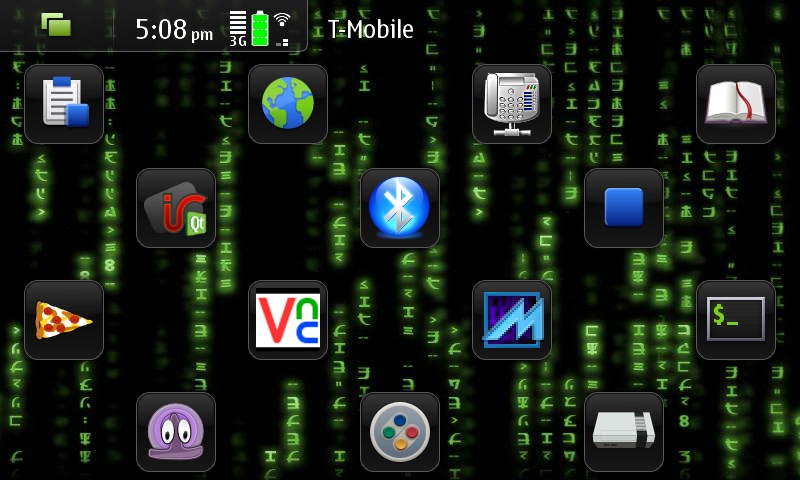
Figure 1. A Maemo Desktop with the Matrix Theme
Along the top of the desktop is a bar that acts much like a panel on GNOME or KDE. On the top left-hand corner is a button you use to switch between desktops, an application launcher screen and an Expose-like application switcher that shows all of your currently running applications (Figure 2). This last feature is particularly well done and really makes the N900 stand out for its multitasking abilities. You also can press the Ctrl-Backspace shortcut keys to present the application switcher. It is very easy to switch between different programs.
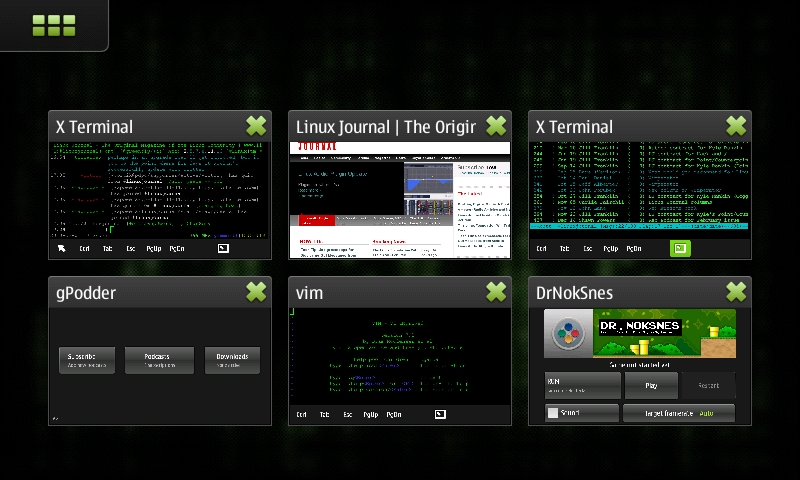
Figure 2. The Application Switcher with a Few Favorite Programs Opened
The contact list integration on the N900 is one of its most compelling features. From a user-interface perspective, there is little difference between sending an SMS, sending an instant message, making a cell-phone call or calling someone via Skype or VoIP. All of these communication methods can be integrated into each contact in your contact list and are managed from a central settings page. There also are packages to extend IM support to all the major IM protocols. Once you sign into an account for the first time, those contacts are added to your contact list, so you can merge them with any existing contacts.
For instance, if I set my Skype account to be on-line, people in my contact list who were currently on-line would have a little green dot next to their contact, and if I had a contact shortcut on my desktop, it would be there as well. If I want to IM or call people via the Skype network, all I have to do is open their contact and click that particular option. If any of my friends send me an SMS or an IM, it shows up in a standard IM window. If they call my cell phone or Gizmo number or make a Skype call, the N900 rings the same way in each case.
I've not mentioned the phone functionality much because, honestly, I rarely use a cell phone for actual phone calls. I hesitate to refer to the N900 as a phone at all, because although it certainly can make phone calls, it's really more of a portable computer than a phone. The phone feature seems to work fine for me, but if you come to the N900 primarily to make phone calls, you will discover that it's a portable computer first and a phone second or third.
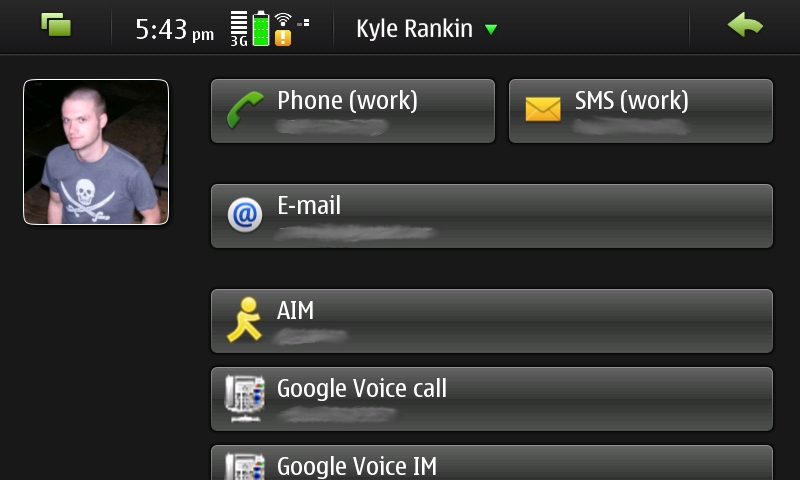
Figure 3. An Example Contact Screen with a Few of My Contact Options
A good deal of my time on a computer involves a Web browser. Compared to many other portable devices, the browser on the N900 is among the best I've seen. Its MicroB browser is essentially a slimmed-down version of Firefox and renders pages like you'd expect in a regular full-sized browser without the need to load a “mobile” version of a page.
Of course, most non-optimized Web sites do appear a little small on the 3.5" screen. If you double-click on a section of a page, the browser zooms in so that section fills the width of the browser. I really liked this automatic zooming, especially for two- or three-column Web sites with content in one column and navigation bars on the sides. When you zoom in on an article, the rest of the navigation zooms out past the edges of the screen, so you can focus on what you want to read. You also can zoom with the hardware volume keys at the top of the device or make a clockwise or counter-clockwise gesture on the screen with your finger.
The browser currently supports Flash 9.4. I've been able to view regular streaming video fine, and full-screen mode works like you'd expect. Certain Firefox add-ons, such as Adblock and Greasemonkey, also have been ported to the MicroB browser already, but because of the differences between MicroB and standard Firefox, your favorite extension may or may not work out of the box.
For average sites, the CPU seems to provide adequate performance and even will render sites like Facebook, Google Calendar and Google Wave fine. I've noticed that some JavaScript-heavy sites, like the non-mobile version of Google Reader, do lag on the browser, and sites that use AJAX to provide their own scrollbars (like Google Reader) can be a bit of a pain to navigate. Overall though, I found I could browse the Web like on any other browser. To me, this is a great advantage to the N900 versus other mobile devices, as there has been a trend to write custom applications for various sites (like Facebook) to overcome poor performance on mobile browsers. On the N900, you don't really need a custom Facebook application, as the regular site works fine.
When I'm not using a Web browser on a Linux machine, I'm in a terminal, so the N900's terminal capabilities were important to me. The terminal is installed by default, so that's one mark in Nokia's favor. Also, there's a somewhat hidden shortcut of Ctrl-Shift-x that launches a terminal automatically. Granted, it's a bit tough to press that keyboard combo, but the fact that one exists at all shows that this environment doesn't ignore people who like to get their hands dirty on the command line.
As you start to use the terminal, you'll notice that many of the common keys you might like to type in a terminal are not on the hardware keyboard. For instance, to get |, < or >, you have to press a special function key to bring up a list of special characters. The terminal does provide a shortcut bar along the bottom of the window with some common keys, so you can tap those on the touchscreen, but I just couldn't believe that | was left out. As with most things on the N900, you can tweak this shortcut bar. All of the settings for the terminal and many other applications are in gconf, so to add a pipe, I just needed to run two commands:
gconftool-2 --set --type list --list-type=string
 ↪/apps/osso/xterm/keys '[Tab,Escape,Page_Up,Page_Down,bar]'
gconftool-2 --set --type list --list-type=string
 ↪/apps/osso/xterm/key_labels '[Tab,Esc,PgUp,PgDn,|]'
If you want to switch out or add other keys, it's just a matter of changing those two gconf entries.
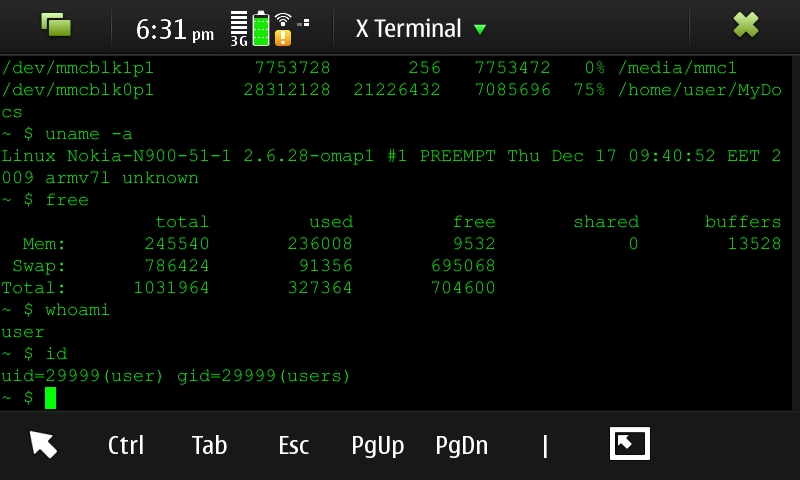
Figure 4. Default Terminal with Font and Shortcut Bar Tweaks
By default, the N900 terminal uses a BusyBox shell and vi, but if you want bash and vim, they are only an apt-get away. After the initial tweaks, I've been pretty satisfied with the terminal. I can ssh easily into a remote server and run mutt and connect to my irssi screen session. If you do this though, you'll find yourself looking for the missing Alt key to switch between irssi windows. It turns out that Esc works like Alt in standard terminals, so to switch to window 2 in irssi, just press Esc 2. In fact, that should work in your regular desktop terminal as well.
The N900 comes with quite a few applications out of the box, and although I don't cover them all here, a few are worth mentioning. One of the most important of these is probably the package manager. This program acts much like any other graphical package manager you might be used to on Linux. Maemo packages everything in debs and provides its own APT repositories. In fact, if you are comfortable with apt-get, you can install the same programs via the command line. You also can add additional repositories, including ones you've made yourself if you want, but out of the box, you have access to Nokia's own repositories along with the stable maemo.org repository.
Maemo.org is the central site that organizes the Open Source community behind Maemo and is loaded with documentation, news and the main community forum. Many of the most popular applications from prior versions of Maemo have been ported to the N900, although you might not see them all out of the box. Although the main maemo.org repository is on by default, only applications that have been throughly tested show up there. If you are willing to risk some instability, you can add Testing and Devel repositories that somewhat mirror the Debian testing and unstable system. Applications that are shown to be stable in Devel move up to Testing and eventually are promoted to the main stable maemo.org repository.
The N900 also includes a media player, photo management, calendar and e-mail program. None of these applications stand out, but they all seem to do an adequate job. The media player can take advantage of hardware acceleration, and with the right third-party packages, you can get support for most media formats you'd want to play. Although the calendar application can't natively sync to Google Calendar, you can somewhat work around that with its native Exchange sync feature, even though you still can sync only your first Google Calendar. The good news is that most of the limitations you might find in these default programs can be solved with third-party software available from the maemo.org repositories.
GPS navigation is the one main exception to being able to solve application shortcomings with third-party programs. I found the Ovi Maps application included by default to be a bit sluggish and unintuitive and overall wasn't too impressed. Unfortunately, although a few other third-party GPS programs are available for the N900, none available at the time of this writing seem to be able to provide a better set of features than the default.
Maemo's software selection may not have the numbers that Android or the iPhone have yet, however, in the short time that the N900 has been available, quite a large number of useful programs are already in the repositories. Also, the Maemo platform provides you with more options as a developer, and you can write programs in C, C++, Python or even bash and with either the GTK or Qt graphics toolkits. The maemo.org repositories are where the most interesting and useful applications are, and it's where the N900 really shows some of its strengths as a platform. Here are a few third-party apps I've personally found useful:
OpenVPN: open-source VPN to tunnel into my home network from anywhere.
gPodder: excellent podcast program.
BlueMaemo: turns the N900 into a Bluetooth keyboard, mouse and gaming pad.
VNC and rdesktop: connect to and control remote desktop sessions.
fbreader: great ebook reader with Project Gutenberg integration.
DrNokSnes, iNES and SDLMAME: SNES, NES and MAME emulators.
qtirreco: uses the IR port to turn the N900 into a universal remote.
Duke Nukem, Doom and Quake III: enough said.
Panucci: media player optimized for podcasts and audio books.
Beyond these programs, many interesting small packages extend the functionality of the N900, whether it's adding extra IM protocol support, remote control via wiimote or applications like MPlayer, nmap or even AbiWord. In fact, one of the most interesting programs is easy-deb-chroot. It sets up a complete Debian ARM chroot image on your filesystem and gives you access to a regular Debian ARM install. This means that even though GIMP, for instance, hasn't been ported to Maemo yet, it, OpenOffice.org, Konqueror, Wireshark and just about any other app from the Debian ARM repositories are available on the N900 and can run from within the chroot environment.
So after all this, what is it like to use the N900 every day as a portable computer? No matter what, a laptop with a faster processor, bigger screen, more RAM and larger keyboard probably is going to be nicer and easier to use than any portable counterpart. Of course, the majority of the things I use a computer for don't really need a large screen, fast processor or full keyboard. Ultimately, I'm talking about trade-offs and whether the limitations in the N900's size and hardware are made up by its features and portability.
The first thing you have to keep in mind is that even though hardware acceleration takes care of some things, CPU-intensive programs still are going to perform as though they are on a 600MHz processor. The N900 still handles multitasking in this circumstance better than other devices I've seen, but when the CPU is hammered (like when I update my podcasts or applications), GUI transitions stutter, and sometimes it takes a second or two to switch programs.
The browser itself works well, so if you spend a majority of your time on the Web, you'll probably find the N900 does a good job. The display still is a 3.5" 800x480 screen, so even though it's crisp and bright, it's not as nice as a 12" or 15" laptop display. Because each program shows up maximized and it's easy to switch between open windows, this is a manageable problem, but if you squint on smaller screens, you might want to check out an N900 in person first to make sure you can see the screen fine.
The keyboard is not too bad, but it does take some getting used to. I would have liked another row of keys, but honestly, when you are thumb typing, no matter how things are arranged, you aren't going to hit your touch-typing speeds. I can chat at decent speeds, and it works fine for other short-term typing, but I'm not going to write full articles on the N900 without a Bluetooth keyboard. Also, because you have to press Fn key combos to get to most symbols, working with vim or programming is a good deal slower.
In many ways, the N900 is like a laptop in that its battery life can vary widely depending on how you set it and what you do with it. If I take basic common-sense steps for power management, such as adjusting the brightness and turning off any vibration or sound notifications I don't want, I can get a full day's moderate use out of the N900 on a charge. That includes listening to a few hours' worth of podcasts, browsing the Web on and off, playing some games, connecting to a remote screen session over SSH and chatting with irssi, and other regular use. Obviously, if I play a lot of Quake III or do other tasks that peg the CPU or network for long periods, the battery takes a hit. As long as a portable device can last through the day with normal use, so I can charge it at night when I'm asleep, that's good enough for me.
One warning about battery life though. I've noticed that some IM plugins can have a dramatic effect on battery life. Also, one reason that some software is in the Testing or Devel repositories is that they haven't been optimized for the N900 yet and might cause significant drain on your battery.
So, does the N900 live up to my expectations? Before this device, I took my laptop to and from work every day, and it was with me wherever I went—especially if I was on call. Since I've been evaluating the N900, my laptop has stayed at home so far unless I'm giving a presentation. Even when I'm on call, I've found between the VPN support, SSH, VNC and rdesktop, I can manage all of my servers from anywhere. Even when I'm at home, half the time I just want to do basic tasks like browse the Web, check e-mail and chat, so I don't bother to open my laptop—I just use the N900. When I telecommute or write an article, the laptop is more comfortable, but I've found I use it much less otherwise. I also should note that when the time came to send back the review unit, I bought an N900 of my own. Having a real Linux computer in my pocket with always-on Internet access was just too hard to pass up.
Kyle Rankin is a Systems Architect in the San Francisco Bay Area and the author of a number of books, including The Official Ubuntu Server Book, Knoppix Hacks and Ubuntu Hacks. He is currently the president of the North Bay Linux Users' Group.
