
Comparing Five Music Players
On modern computers, music players are as standard as word processors and spreadsheets, but how do you choose one? You can take for granted that music players using the same soundcard and speakers will produce roughly the same quality of sound. You also can assume that any music player you try will be able to play any music format that your operating system supports, including, for GNU/Linux, the free Ogg Vorbis format. A modern music player will support various sources as well, ranging from the local collection of tracks on your hard drive to CDs, DVDs, external players and on-line sources, such as Internet radio and podcasts. So, how do you decide?
To suggest an answer, I looked at five of the most popular music players for GNOME and KDE—Amarok, Banshee, Exaile, Rhythmbox and Songbird—using the current versions available in the Debian unstable repository. After comparing them in each of six general usability categories, I ranked them and tallied the results.
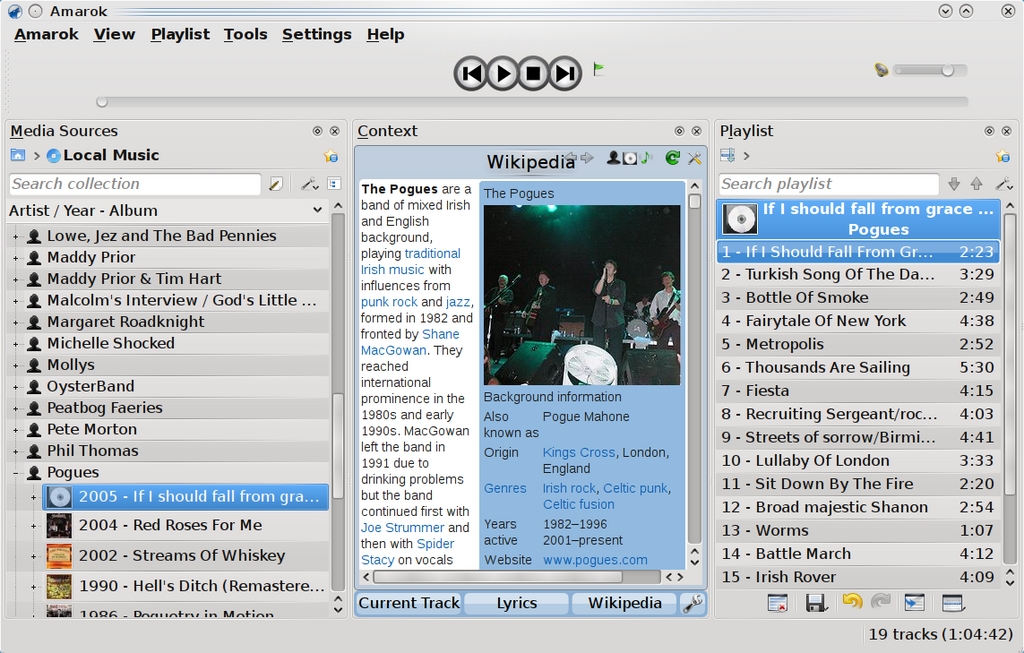
Amarok
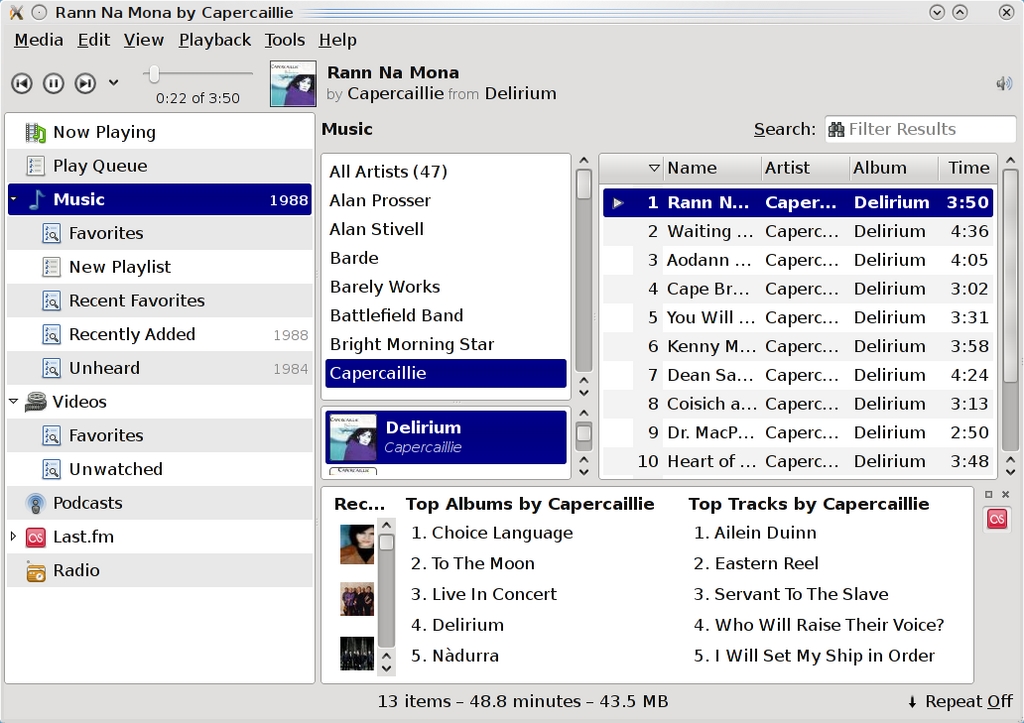
Banshee
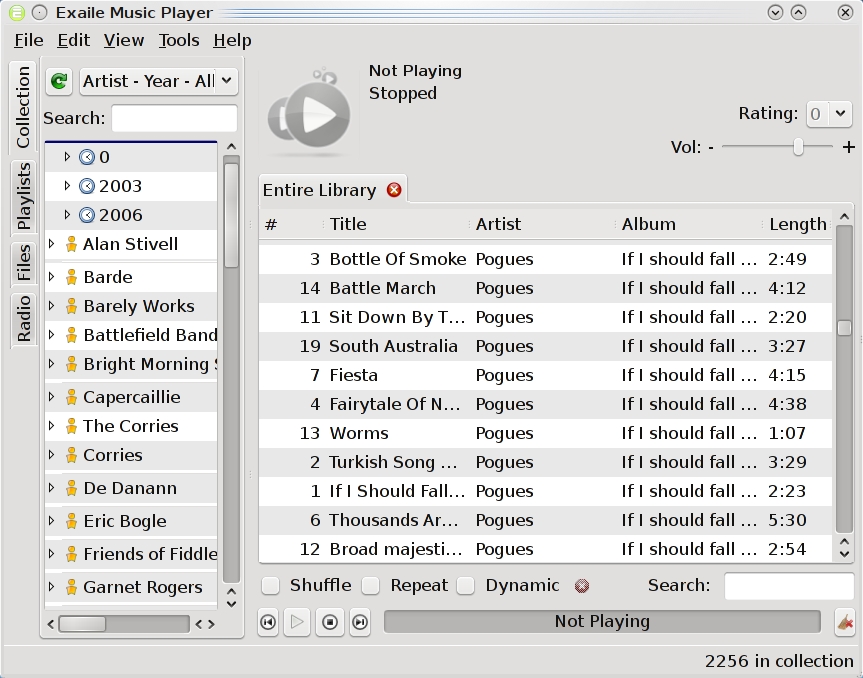
Exaile
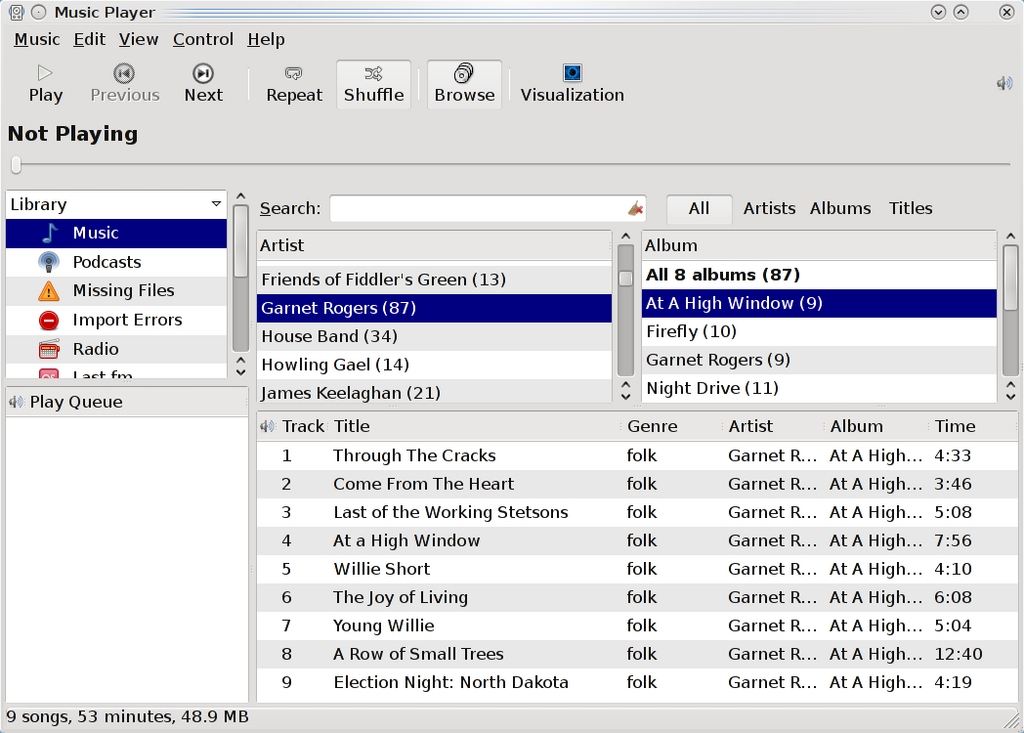
Rhythmbox
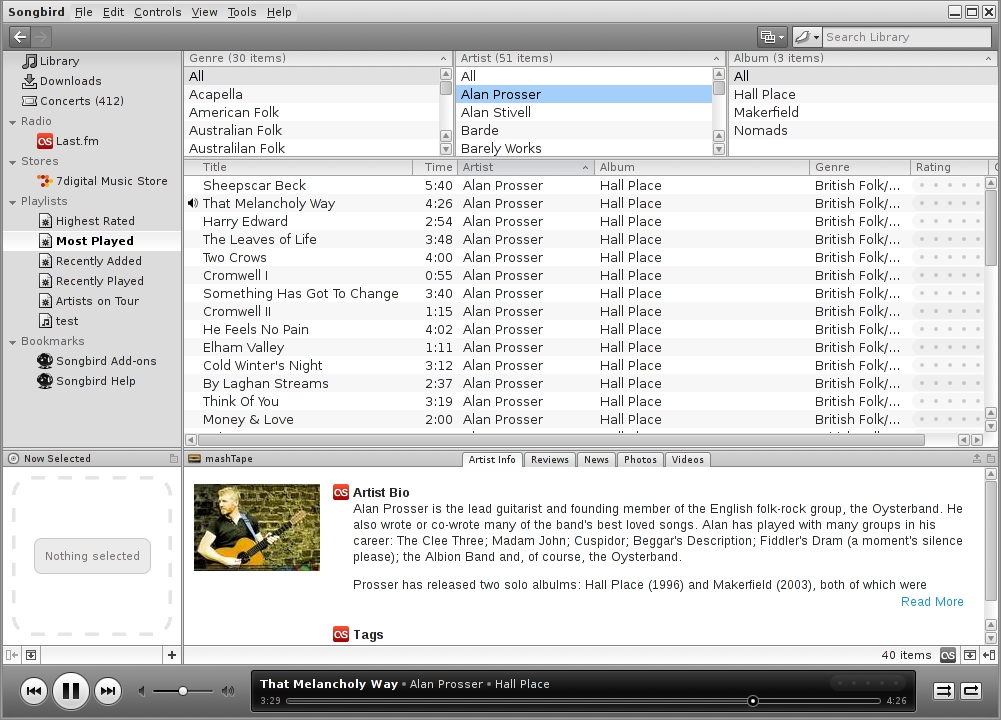
Songbird
Dragging and dropping tracks, desktop notifications and minimizing music players to the notification tray are all standard features these days. The differences in how each music player handles those features are usually minor, although Amarok, like most current KDE apps, provides the most customization for notifications. It also repurposes its middle context pane when you are moving tracks from the media source pane on the left to the playlist on the right by temporarily transforming it into live links that you can drop selections on to get different results.
However, the largest problem for all these music players is how they handle collections of local tracks and podcasts and music stores that easily can number in the thousands these days. Unfortunately, in four out of five cases, the handling of all this information is not well thought out.
The endless displays of tracks, albums, artists and playlists not only make for a cluttered window, but also can leave users with a feeling that they have too much information. At times, what controls actually do can be difficult to discover, as with the filters for Rhythmbox's search filter, which easily can be mistaken as controls for altering the panes displayed in the window. Too often, the space for each column in a pane is so limited and track or album names are so truncated in anything less than a full-screen view, they almost might not be listed at all.
The exception to this rule is Amarok, whose three main panes maximize the display space in the window while using every sort of trick—from expanded trees to hiding music sources not currently in use—to reduce the clutter and information overload. Exaile and Songbird manage some of the clutter in their default views with tabs, but Banshee and Rhythmbox both have a series of permanent panes that feel badly in need of cleanup. You can, of course, greatly improve the layout of all the music players via the View menu by selecting which panes or columns to display, but Amarok remains far ahead in general appearance. If you really want to remove the clutter, you can hide the middle context pane, reducing the information in Amarok to a functional minimum. Another possibility is to undock one or more of Amarok's panes to create a separate floating window that you can refer to only as needed.
Still, all five players do what they can to help users navigate. All can sort lists in ascending and descending order, and all include search filters, although Amarok gives you more control over both sorting and filters. In addition, Amarok and Banshee both offer bookmarks.
After Amarok, the best-designed is Songbird, whose Web structure gives it an instant familiarity. Songbird also features skins, called feathers, and a zoom for changing the size at which information is displayed, but these features, although novel and convenient, are not enough to challenge Amarok seriously.
Ranking:
Amarok
Songbird
Banshee, Exaile and Rhythmbox (tie)
The metatags for tracks are essential to any music player, not only for display, but also for automating various features, such as CD ripping and suggesting music similar to the current track.
In all five music players, tags are lumped into statistics about how often each track is played, how the track is rated and background information, such as lyrics and cover art. Yet, despite the importance of tags, Rhythmbox and Exaile do not include a general Comment tag for miscellaneous information, and only Exaile and Amarok have any provision for custom tagging (and you easily can miss the Add button in Exaile).
An even larger omission is the fact that you can edit tags only by albums in Amarok. The reason may be that Amarok is designed to play music equally by track or album, while the other players are oriented toward tracks. Yet, even so, editing tags under albums means that you have to enter them only once instead of ten or more times.
Another useful feature for handling tags in Amarok is to guess them from the filenames. If you have ripped music from a source like K3B, which names files according to sequences of tags, this feature can eliminate drudgery even further. The feature is not always accurate, however, and it can cause trouble when illegal characters are used in a filename, yet, even so, anyone digitalizing masses of music will find it essential.
Ranking:
Amarok
Exaile
Banshee
Rhythmbox and Songbird (tie)
With all five players, you can randomize the order in which the tracks on a playlist are played. However, with Rhythmbox, that is as far as automation goes.
Banshee, Exaile and Songbird all have controls to create automated playlists based on criteria, such as the most played or the least played. In Banshee, two unique playlist controls are Recently Added and Unheard, while Songbird includes Artists on Tour, which selects from artists who are touring soon in your area. By contrast, Exaile's playlist controls are less useful unless you are planning for a party, as they include Top 100, Newest 100 and Random 100 and 500—a selection that sounds like an effort to re-create the Top 40 radio that many people originally turned to music players to escape.
Exaile is more to the point with its Smart Playlists, in which you can specify the criteria for automated playlists. This feature is duplicated almost exactly in Songbird, but in my experience, it works only erratically in either Exaile or Songbird.
However, the most sophisticated automated playlists are found in Amarok. Amarok's Dynamic Playlists include three types of bias: Proportional Bias, in which playlists are forced to include set percentages of tracks that match the designated tags; Custom Bias, in which playlists include set percentages to match the tags; and Fuzzy Bias, which sets how much tags can vary from the tags specified. You can mix all of these biases to create playlists that match or exceed those in the other four players, and best of all, new lists are created with almost no delay when you click the Repopulate button.
Ranking:
Amarok, Exaile and Songbird (tie)
Banshee
Rhythmbox (lags far behind)
One disadvantage of digitalized music is that it lacks the background information you can get with a CD in the form of liner notes. Some tracks and albums use context tags to give information about producers and backup music, but this practice is relatively rare, and the information is not nearly as rich as with traditional media. Even the latest version of Amarok, in which you can add custom tags, you can't really re-create the information that comes with CDs via tags.
Instead, music players are starting to provide alternatives to liner notes using resources from the Internet. All five players can hunt the Internet for lyrics and covers, although with Rhythmbox, doing so requires enabling plugins. Exaile and Amarok also search for Artists and Albums, while Banshee bizarrely opts for a context pane that includes Top Albums and Top Tracks by the current artist—information that is minimally useful and more than a little imaginary the first few times you play tracks. However, taking a hard-core fan approach, Songbird outdoes the rest by searching for reviews, news, photos and videos.
The success of these efforts to provide extra context depends partly on the artist and album. In every case, the effort is more likely to be successful if artists are popular or at least have a cult following that increases their chances of being listed in Wikipedia or on fan sites. Disambiguation pages also can be a problem.
Even more important, searches can be long and may end with no results. Searches in Songbird for reviews and news often take longer than a single song, while in Amarok a long lyric search can freeze the track controls, although the track keeps playing. However, on the plus side, context features sometimes can produce unexpected benefits for the true fan, such as alternate record covers or (as I once found for The Pogues' “Fairytale in New York”) unrecorded versions of the lyrics.
Ranking:
Songbird
Amarok
Exaile
Banshee
Rhythmbox
In free software, music players are second only to Firefox and OpenOffice.org in their efforts to extend functionality by creating a community of plugin writers. With each player, many of these plugins automate specific Internet sources. Other plugins alter the interface or add features.
Rhythmbox provides no means for easily browsing or installing new plugins. Because the functionality provided often is standard on the other players (such as finding cover art), the impression is either that few people are writing plugins for Rhythmbox or that the project conceives plugins as a way of providing a smaller standard code base. Banshee similarly has a limited number of plugins, including some that could be standard features, although it does distinguish itself with extensions for creating bookmarks and detecting BPM (beats per minute).
By contrast, the other three players have a much richer ecosystem of plugins. Songbird distinguishes itself by add-ons for creating a mash tape or for learning about upcoming local concerts. Amarok's plugins are focused largely on providing alternative sources for lyrics and for automated logon to Internet sources, many of them (such as those for CBC radio or on-line readings of the Koran) obviously intended for specific local audiences. Only a few of Amarok's scripts, such as the script for copying the current song information into the clipboard, are intended to extend functionality, perhaps in part because the Amarok 2.x series of releases is relatively new, and at least until recently, developers were busy providing basic functionality that users missed from the 1.x series of releases.
The most varied set of plugins for functionality is found in Exaile. For example, you can add plugins to display cover art with an album or on the desktop, set an alarm, enable support for Metacity hot keys in GNOME, reduce the window to a minimal size and many other possibilities. Among this variety, Exaile's lack of a control for adding new plugins seems a strange oversight.
Ranking:
Amarok and Exaile (tie—both are varied but have different priorities)
Songbird
Banshee
Rhythmbox
All five players have features that do not fit neatly into other categories. Rhythmbox's are modest: a minimal window and a full-screen mode, and visualization—a random pattern that displays while music is playing. Banshee's are almost as modest, with options for how files and the local music collection are handled.
With Exaile, the other features start to get more interesting. Exaile includes a blacklist manager, so you can exclude tracks that you prefer not to hear but are not ready to delete, as well as commands within the context menu to burn selections to CD/DVD.
In comparison, Amarok's extras are largely practical. They include the ability to reposition notifications (which can come in handy if they block your set of icons) and the ability to edit database settings. An especially useful feature is the storage of passwords to sites in KDE Wallet to keep them secure while making them easily accessible. However, if you do not use on-line sites often, you may find logging in to KDE Wallet each time you start Amarok irksome.
In keeping with its Web origins, Songbird has a strong emphasis on privacy and security. It has Firefox-like controls for ensuring privacy, including a Clear Private Data feature. Also like Firefox, it can store passwords for sites and use a master password to save you the effort of remembering the other ones. Songbird preferences also include a page in which you can choose what information you want to share with sites that you log in to. Still another sign of its Web orientation is a tab in the preferences for setting up how you use iTunes.
Ranking:
Songbird
Amarok
Exaile
Banshee and Rhythmbox (tie)
I awarded one point for a first-place finish, two for a second-place finish and so on, which means a low score is better. Tallying the results, Amarok gets first place with 8 points, with Exaile and Songbird tied for second, with 15 points apiece. They were followed by Banshee with 20 and Rhythmbox with 26.
These results don't tell the whole story. For instance, many uses will reject Banshee automatically because it depends on Mono. Others might prefer Banshee because it is GNOME-based or Rhythmbox because it includes a minimal feature set.
Just as important, I could have included at least five more players. When you consider Audacious, Listen, Quod Libet and Sonata, you realize just how broad the selection of free music players is. However, I selected these either because they are the default players with most distributions or because they have a substantial cult following. For better or worse, they are the most popular music players on the free desktop at the time of this writing.
However, even if you do not take the ranking as absolute, the reasons behind the rankings may help you decide which player is right for you. This exercise also suggests something about the current state of music players, with Amarok well in the lead and Rhythmbox fading, and the others sometimes sporting innovative features but failing to mount a general challenge to Amarok's dominance in the field.
Bruce Byfield is a computer journalist who covers free and open-source software. He has been a contributing editor at Maximum Linux and Linux.com, and he currently is doing a column and a blog for Linux Pro Magazine. His articles appear regularly on such sites as Datamation, LinuxJournal.com and Linux Planet. His article, “11 Tips for Moving to OpenOffice.org” was the cover story for the March 2004 issue of Linux Journal.

