
Comparing Linux and Microsoft Windows for Enterprise Usage
For far too long, Linux has existed on the periphery of enterprise computing. Whether it is skepticism of open-source technology, a preference for paid instead of community support or the ever-forking tree of distributions, many businesses have shied away from Linux. In recent years, commercial Linux vendors have been hard at work polishing their distributions in the hope of establishing a beachhead in the enterprise. These mature distributions have rendered many past criticisms moot, and coupled with new opportunities in emerging technologies like virtualization, Linux stands poised to re-establish itself as an enterprise-caliber operating system. However, if these vendors are to be successful, they must take on the leviathan in the enterprise: Microsoft.
In this article, I discuss several areas of the enterprise that are prime candidates for Linux adoption or expansion. In each case, I look at the current Microsoft offering in that area and then highlight a legitimate Linux-based contender. In doing so, I do not intend to keep a running score card and come up with an unsurprisingly biased conclusion (this is Linux Journal after all). I merely want to start the conversation in order to demonstrate Linux's inherent business value and strengthen the community at large.
There are a few caveats before I proceed. For the purposes of this article, I have blurred the line between server and desktop platforms to keep the discussion at a strategic level. The topics I examine may touch upon aspects of one or both platforms. I also have limited the distributions used here to those with paid support, as they tend to be targeted at the enterprise market. With the exception of BIND and DHCP, I have avoided any technologies/packages, such as LAMP, Samba, Sendmail or any iconic Linux app I felt already has been beaten into the ground with comparisons. I want to bring something new to the table. Finally, this article does not tackle the thorny issue of application serving or application compatibility. We all know the vast majority of business apps are developed for the Microsoft platform. Wine and/or Mono are not the answers. Developing software to emulate another vendor's code always will leave Linux users behind their Microsoft counterparts. However, the rapid growth of Web-based apps, advancements in virtualization (application and desktop) and the arrival of cloud computing may change this dynamic in the near future as applications become separated from the desktop.
User Account Control (UAC) has been an essential part of Microsoft OSes since Vista. UAC protects the OS by requiring services and programs to operate with the correct permissions via security confirmation prompts. It is meant to limit the number of programs that run with unnecessary administrative privileges, a long-criticized weakness of applications developed for the Microsoft platform. Although UAC has received praise for making strides to eliminate this weakness, many admins have found that prolonged use leads some users simply to click Yes on the elevation prompts rather than evaluate the security risk. This leads to the elevation of non-desired programs, possibly to the detriment of the system. UAC can be complemented with the use of the Security Configuration Wizard that locks down unnecessary ports and services using a form-like survey to determine your minimum necessary configuration.
Security always has been an important component of the Linux pedigree. Utilities like sudo and chroot, which limit the context of certain programs and operations, long have been part of the Linux security toolbox. In the case of Debian-based distributions, root access is prohibited except through the use of sudo. Also, most distros now utilize either AppArmor or SELinux as an additional security layer at the host level. Although SELinux and AppArmor take different tacts to securing a system, each utilizes a least-privilege-based approach to minimizing the threat surface through the use of profiles. Although SELinux (Figure 1) has the distinction of being developed by the National Security Agency and of being extremely secure, it can be difficult to administer. By contrast, many admins believe AppArmor is just as effective and easier to configure. Novell includes a nice GUI tool for AppArmor in SUSE Enterprise Linux that includes a wizard for profiling applications that is a real time-saver (Figure 2).
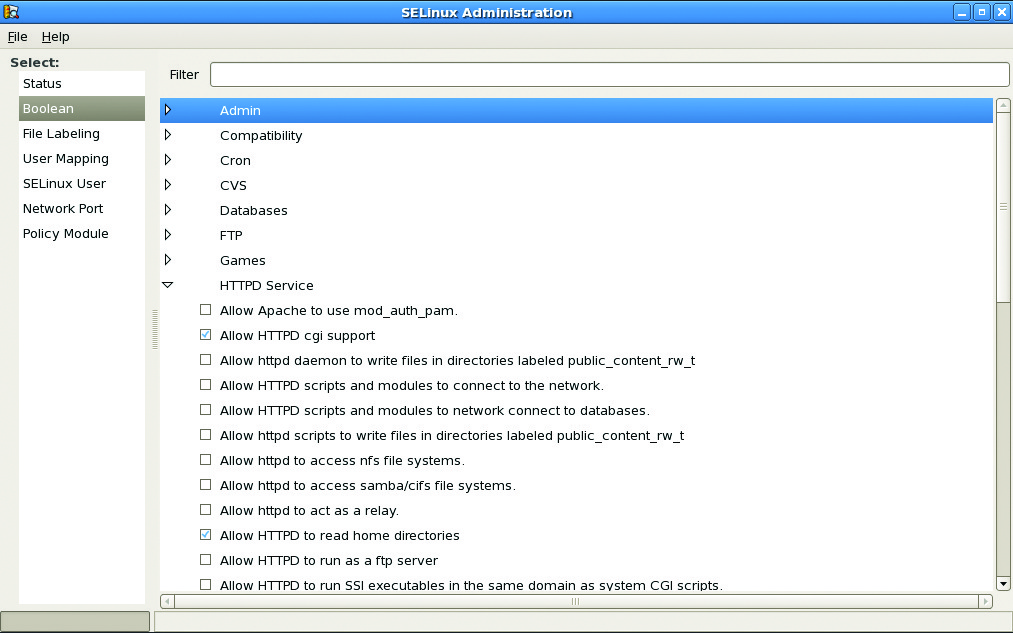
Figure 1. SELinux Administration in RHEL
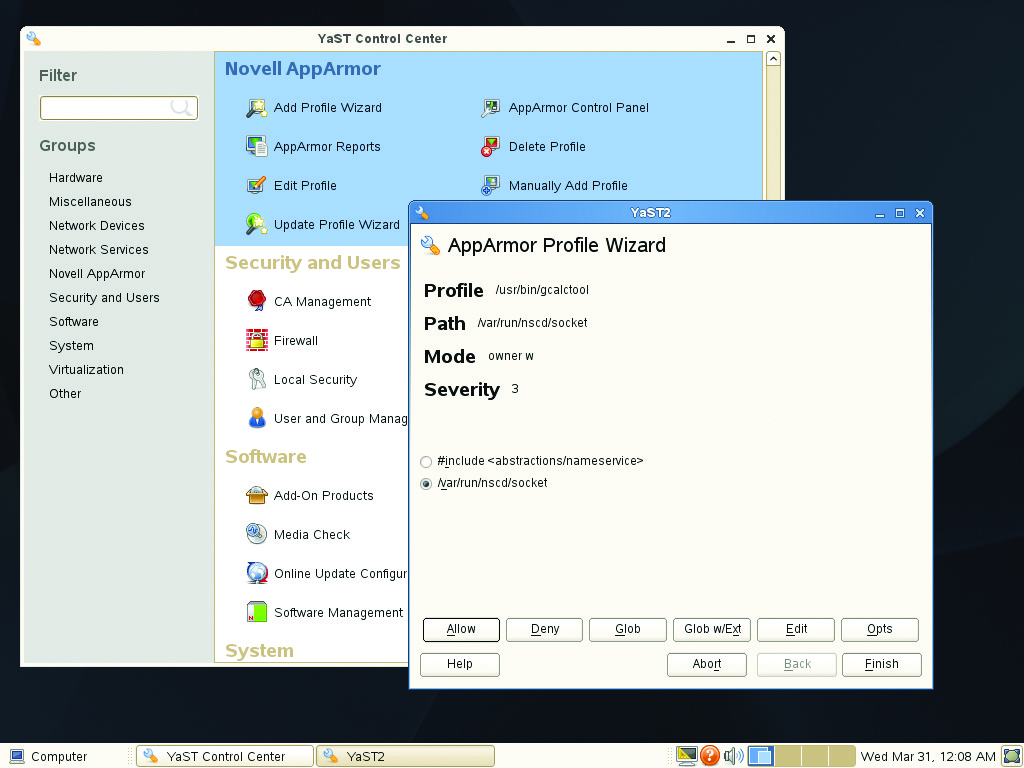
Figure 2. SUSE AppArmor Wizard
The Windows firewall included in Server 2008 and Windows 7 is a great improvement over previous incarnations. It filters on packets, IP addresses and source/destination program, and its management GUI is easy to use. However, it lacks some of the advanced features found in Linux-based firewalls. In contrast, Linux has been wed to open-source firewall development in near lockstep since ipchains and now iptables. Although many admins still prefer the text-based administration of iptables, there are many easy-to-use GUI-based interfaces, such as the one found in SUSE through Yet another Setup Tool (YaST, Figure 3). Unfortunately, these tools often limit access to advanced features, such as port redirection, IP translation and quality of service, which can be accessed from the command line. To be fair, some of these capabilities are available in Server 2008 by adding other modules (RRAS) or products (ISA), but that adds another layer of administration and cost where Linux possesses them out of the box. Some admins may feel that firewalls are not a significant factor in enterprise security except in the perimeter. Others suggest that firewalls are more important now than ever, because technologies like the cloud and mobile computing are erasing the traditional boundaries of the perimeter. Only time will tell.
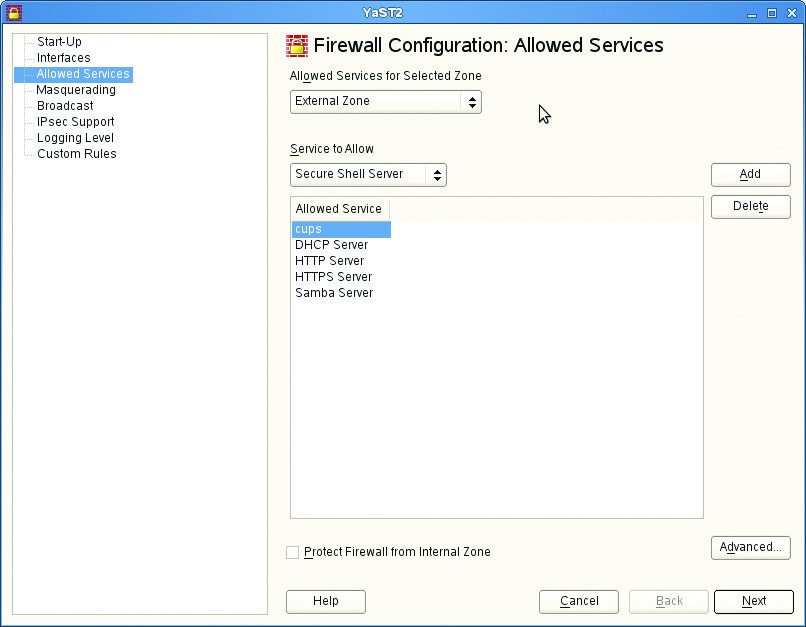
Figure 3. SUSE Firewall Configuration GUI
The last decade easily could have been labeled the Decade of the Patch. Because of the ever-evolving security landscape, new vulnerabilities are discovered daily. Don't get me wrong. Security researchers provide an invaluable service to the industry, but sometimes when I have to push patches en masse daily, I pine for the old days when I could just push a single service pack every so often. Patching is not solely a Microsoft phenomenon. Vulnerabilities exist in Linux as well. Most modern operating systems worth their salt include a native updating mechanism to address flaws and vulnerabilities. In Windows, it is Automatic Updates for individual systems or Windows Software Update Services (WSUS) for managing a large number of systems. Microsoft has done well with both programs and should be applauded for their maturation in the last five years. Like its name implies, Automatic Updates automates the patching of host systems through a Control Panel interface. WSUS adds reporting features and the ability to centralize patch distribution, although the process for approving, denying and/or superseding patches can be kludgy.
Linux updating mechanisms vary by distribution, but share similar functionality with their Microsoft counterparts. Debian-based systems have apt, Red Hat-based systems have Yellowdog Updater Modified (YUM), and SUSE has YaST (which provides a graphical front end to the ZYpp package management engine). Each tool is easy to automate and includes the ability to resolve dependency issues prior to an update. They also share the ability to deploy local repositories to reduce bandwidth consumption as with WSUS, but to achieve the nicer dashboard and reporting features of WSUS requires subscription-based services, such as Red Hat Network (Figure 4) or Landscape from Canonical (Figure 5).
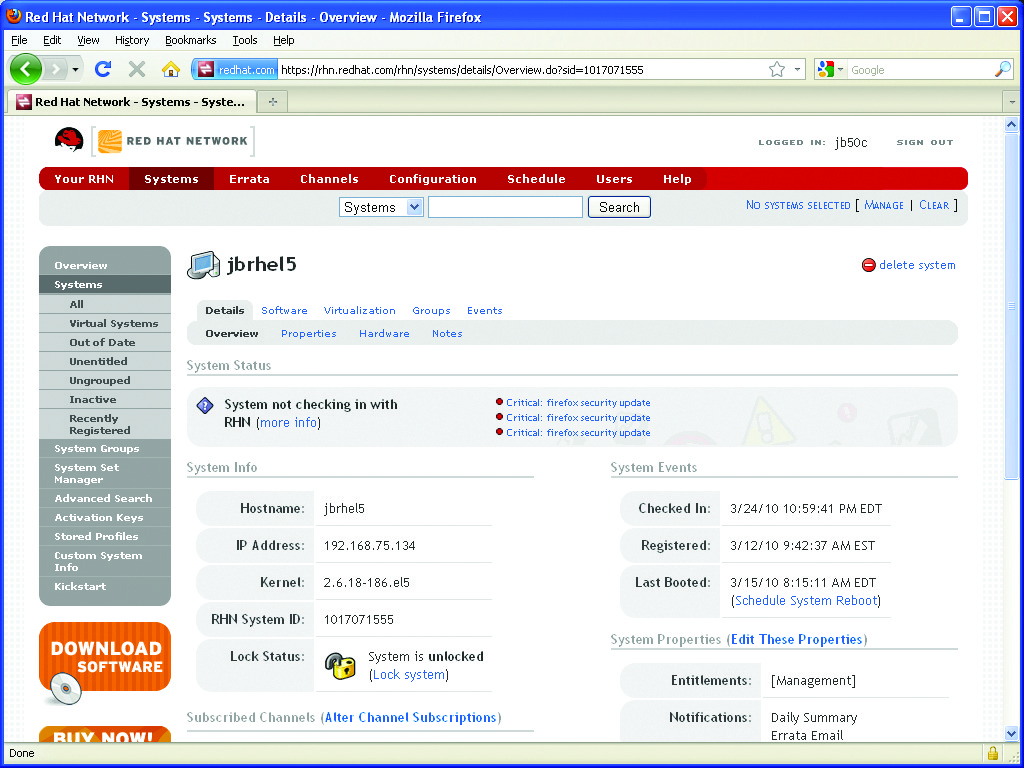
Figure 4. Managing Your System via Red Hat Network
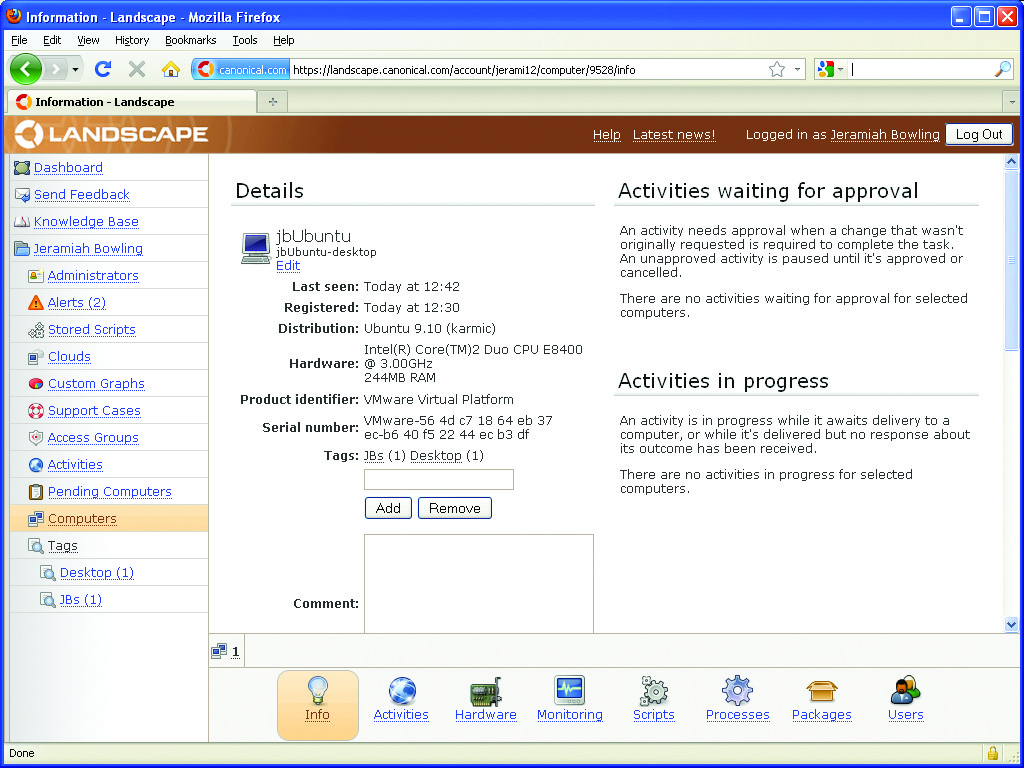
Figure 5. Canonical's Landscape Service for Ubuntu
DNS and DHCP are production network roles where many Linux servers make their entry into an enterprise. Although these services may seem boring, they form the backbone of the modern enterprise. On the Microsoft side, we have the proprietary versions of DNS and DHCP included in Server 2008. Both are configured using the Server Manger utility and then administered through their respective mmc consoles. Microsoft has integrated its versions of DNS and DHCP deeply with Active Directory (AD) and a multitude of its proprietary network services. Although on the surface this may not seem like a problem, a single misconfiguration can affect multiple parts of the Microsoft infrastructure (AD, Exchange and so on). On the Linux side, we have the Berkeley Internet Name Domain (BIND), the standards-based market leader. BIND is a dependable workhorse that has enough flexibility to support Active Directory and keep DNS administration separate from other parts of the infrastructure. You can administer BIND through the command line or GUI tools like the Red Hat BIND Configuration Tool (Figure 6).
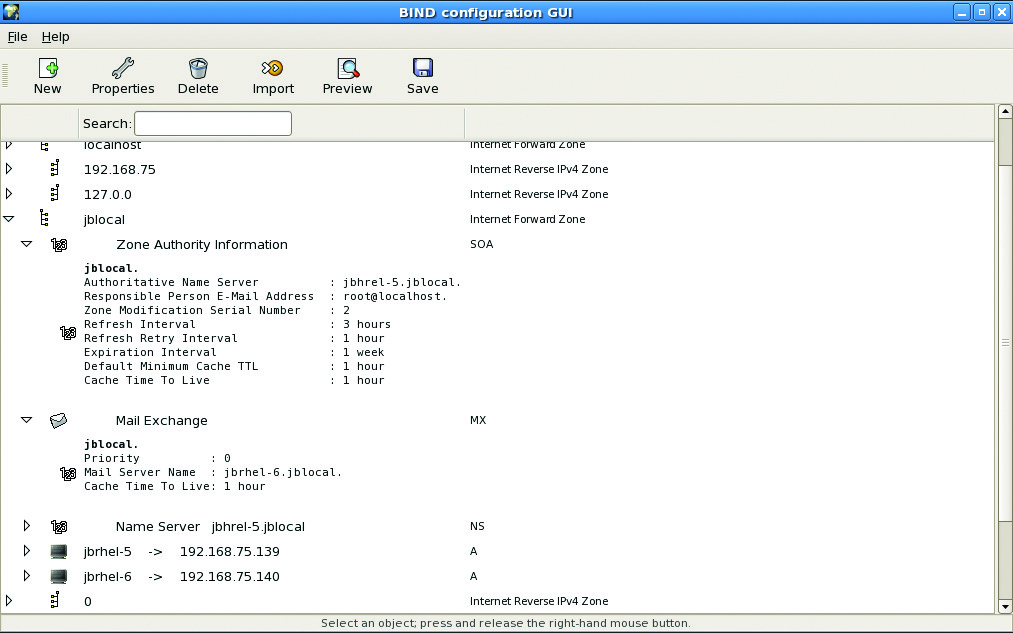
Figure 6. Red Hat's BIND Configuration Tool
Alongside DNS, DHCP is a critical, though overlooked network service. It also is an excellent springboard for Linux in a new environment. It is low impact and can integrate into almost any existing network with little interruption. DHCP is available in most distros, and tools like those found in YaST make administration a snap (Figure 7). DNS and DHCP usually can be combined on a single server, as is found in many Microsoft environments, but with a smaller footprint.
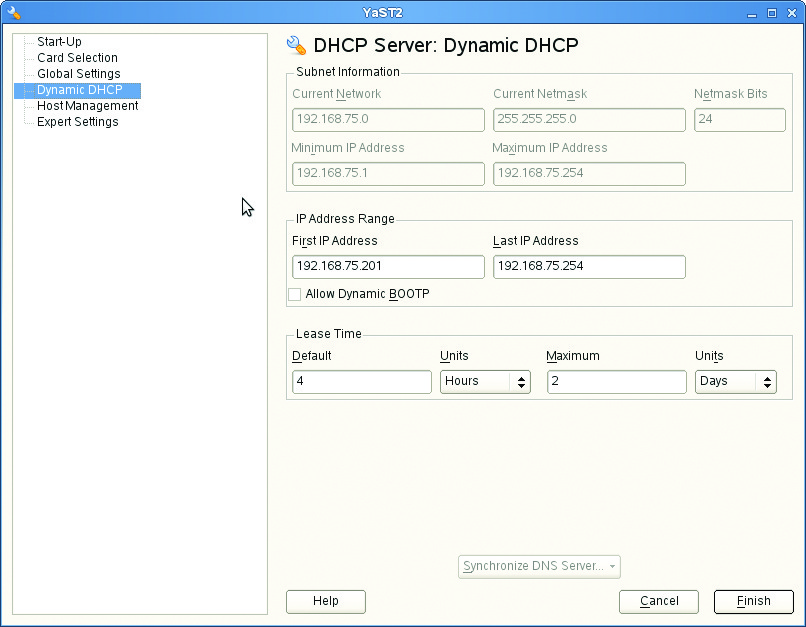
Figure 7. Managing DHCP with YaST in SUSE
Active Directory is the heart of Microsoft networking. It is a powerful tool that has a solid reputation for providing reliable directory services. Chances are, unless you are already a *nix shop, you're probably using it right now. AD has dominated the landscape for so long that many people forget its roots. In the strictest sense, AD is an LDAP-based server that uses Kerberos for authentication and DNS for name resolution. The reason for its dominance is twofold: its flagship mail product (Exchange) requires it, and every Microsoft desktop and server OS shipped has a built-in AD client. Directory services existed before AD, and other alternatives are available (even non-Linux ones) that provide similar services.
One of the better alternatives is eDirectory from Novell (Figure 8). eDirectory has its roots in Novell Directory Services (NDS), the highly popular directory service that dominated the enterprise in the 1990s. Although Novell has lost considerable market share to AD in the last decade, it has continually improved its directory products. eDirectory is scalable, supports multimaster replication and is OS-agnostic, which means it can easily be deployed to almost any environment (including Windows). For Linux systems, eDirectory can run on either SUSE or Red Hat Enterprise servers. eDirectory can be managed by using ConsoleOne (Figure 8) or the newer, sexier iManager Web management package (Figures 9 and 10) that uses role-based assignment of privileges. This is similar to AD; however, the level of granularity over directory permissions found in iManager is far greater. As a side note, Novell currently has a standing relationship with Microsoft that each will support the other's products. This could be a benefit when campaigning for a bigger Linux presence in a Microsoft-centric enterprise.
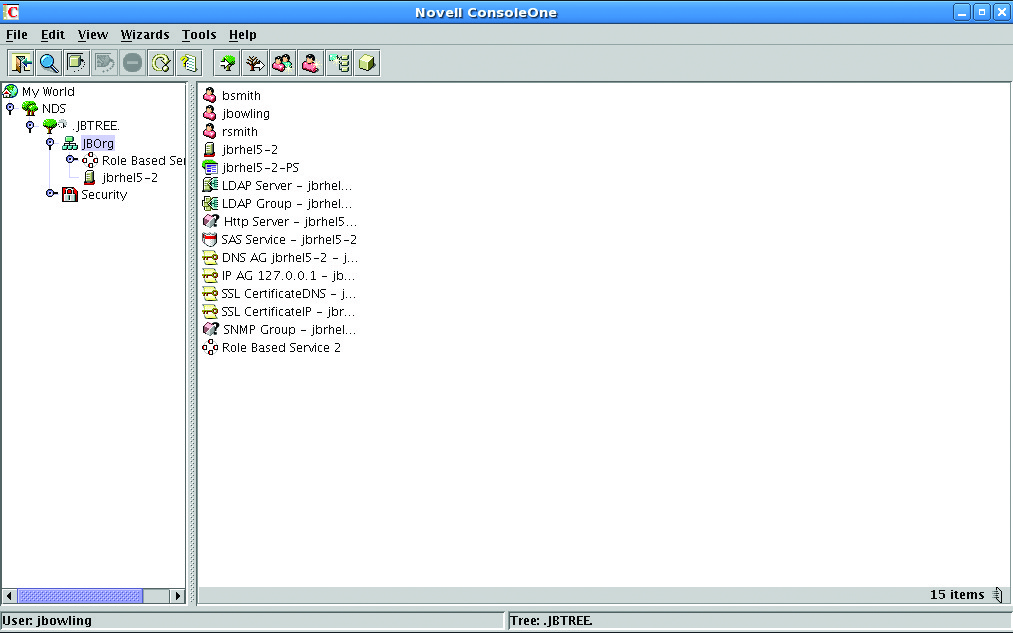
Figure 8. Novell's ConsoleOne (eDirectory)
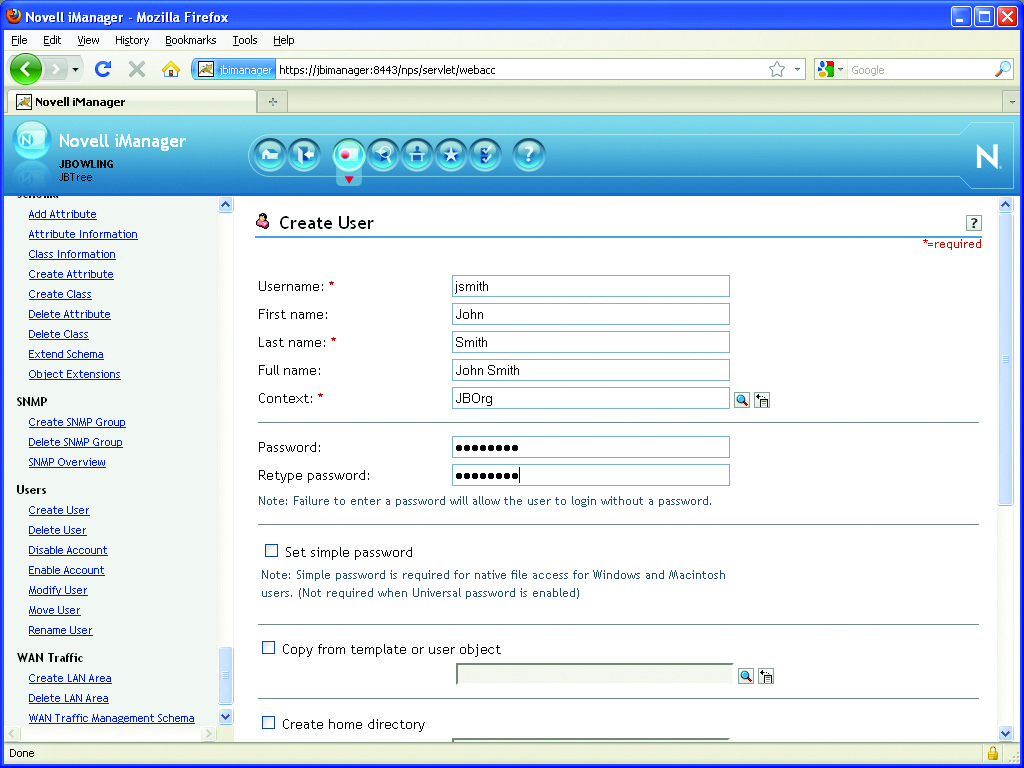
Figure 9. User Creation in iManager (eDirectory)
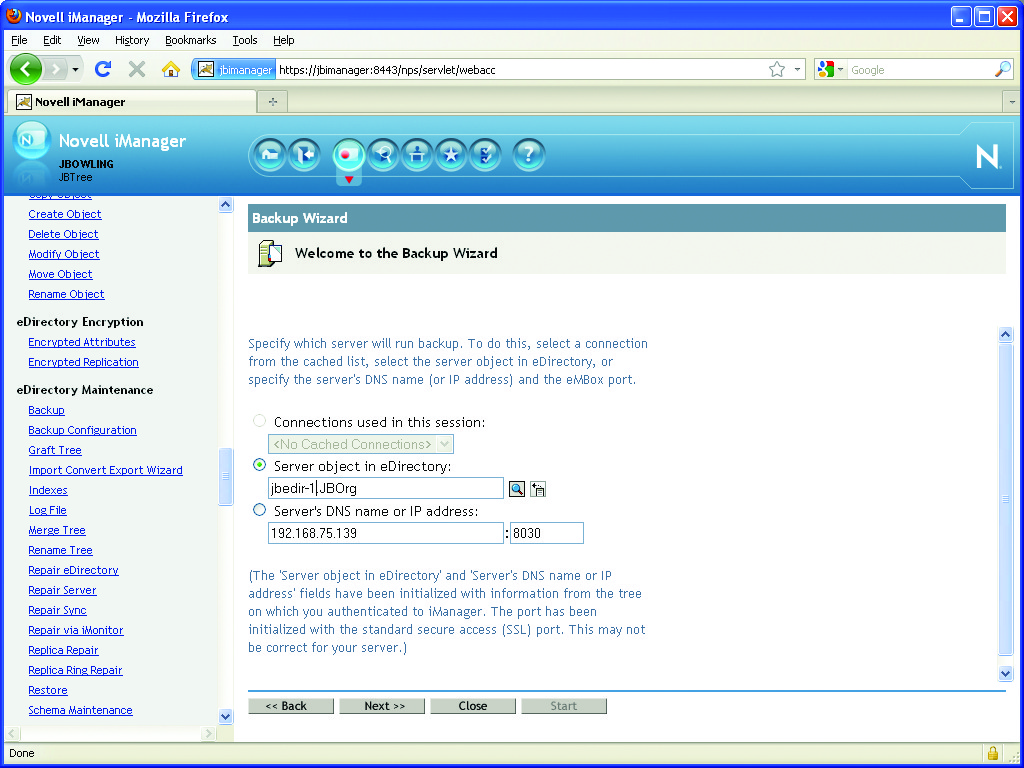
Figure 10. eDirectory Management Tasks in iManager
Virtualization may be the hottest topic in the industry at the moment. It seems like “virtual” is the buzzword of every other Webinar out there. I won't spend time explaining the value of virtualization, save that server consolidation and desktop/application virtualization seem to be the biggest reasons so many people are interested in it. Microsoft made a major move into the virtualization arena with its release of Hyper-V. Unlike Microsoft's earlier product, Virtual Server, Hyper-V sports a fully virtualized hypervisor that removes the need for running a virtual server on top of a “fat host”. Hypervisors allow guests to access underlying hardware directly, and because there is very little overhead, performance is dramatically improved. Hyper-V has received a number of improvements with the release of Server 2008 R2. It now has more enterprise-grade capabilities for management and high availability, and most notably, support for live migrations. It can be managed with the Hyper-V Manager Console, an enterprise-grade tool for creating and managing Hyper-V hosts and guests.
There are Linux-based options for virtualization as well. For the longest time, Xen was the darling of the Linux virtualization movement. Following the acquisition of Xen by Citrix, many vendors have begun making the switch to using the Kernel-based Virtual Machine (KVM) module as their primary virtualization platform. KVM is a hypervisor module that can run in a kernel of 2.6.20 or higher, but it does require a compatible vm-enabled processor. Red Hat, formerly a huge supporter of Xen prior to its acquisition, has tied its wagon to KVM. In fact, Red Hat is releasing its KVM-based Red Hat Enterprise Virtualization (RHEV) product as a direct competitor to Hyper-V, VMware and Xen. RHEV is composed of a minimalist RHEL KVM-enabled installation, tweaked as a host system for virtualization. Unlike most virtualization products on the market, RHEV is rolling out a competitive subscription-based pricing model that includes both the hypervisor and manager software in the same license (often sold separately). It also touts advanced virtualization features, such as live migration and automatic server failover. I really wanted to test-drive RHEV for this article, but I was unable to obtain a trial version of the product. Regardless, KVM runs near flawlessly in most distributions. For demonstration purposes, I deployed KVM on Ubuntu, which provides a Just enough OS (JeOS, pronounced “juice”) image configured specifically for virtual appliances. KVM hosts can be managed using the GUI-based virt-manager package (Figure 11) or other command-line tools.
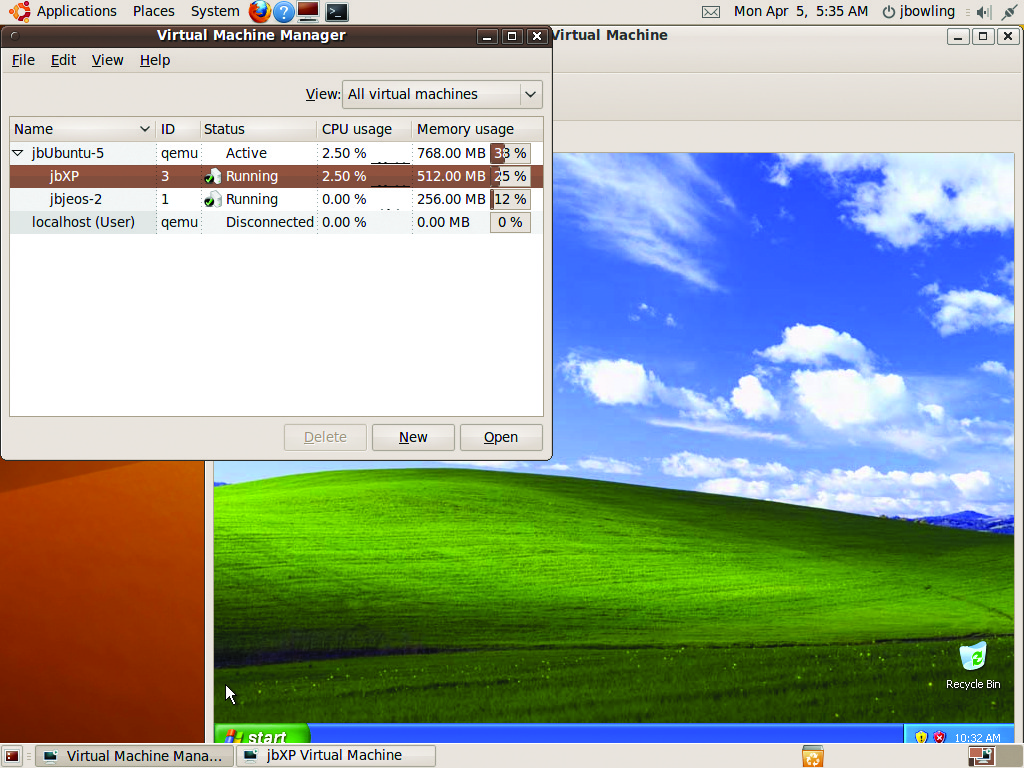
Figure 11. Managing VM's with virt-manager in Ubuntu
Cloud computing is almost as buzzworthy as virtualization, which is funny considering that it is an offshoot of the virtualization movement. Cloud computing refers to a strategy of using a pool of resources (such as servers, storage, bandwidth) or a “cloud” to offer individualized servers or services to customers. Cloud services usually pertain to Web-based application services, but more and more apps are appearing “in the cloud”. These newer apps include corporate e-mail hosting, file storage, user collaboration and mobile apps. Clouds are a cost-beneficial proposition for smaller customers that want the advantages of a data center (clustering, high availability/disaster recovery) without the cost of maintaining one. Amazon has been a pioneer in this area with its Elastic Compute Cloud (EC2) service where you can purchase your own cloud servers or applications that run within the Amazon cloud. Microsoft has jumped into the market and poured considerable resources and energy into the emerging technology. It has been live with its public cloud, Azure, since 2009. Microsoft's private cloud, which will be managed through System Center, is scheduled for release in the first half of 2010.
If you want to deploy a private Linux-based cloud now, you can do so with Ubuntu. The process is remarkably simple. Download Ubuntu server and launch the server install process. Upon boot, you will see an option from the main install screen to install the server as a Ubuntu Enterprise Cloud (UEC) server either as a cluster controller or as a node. You will need one of each to get started. Once up and running, you can download images from the management site (Figure 12) or begin creating your own images that match your cloud needs. The cloud you are deploying actually is a re-branded version of the open-source cloud software Eucalyptus. Management is accomplished via command-line or GUI-based tools like hybridfox (Figure 13), a Firefox add-in that runs like a modified version of Amazon's Elasticfox management utility.
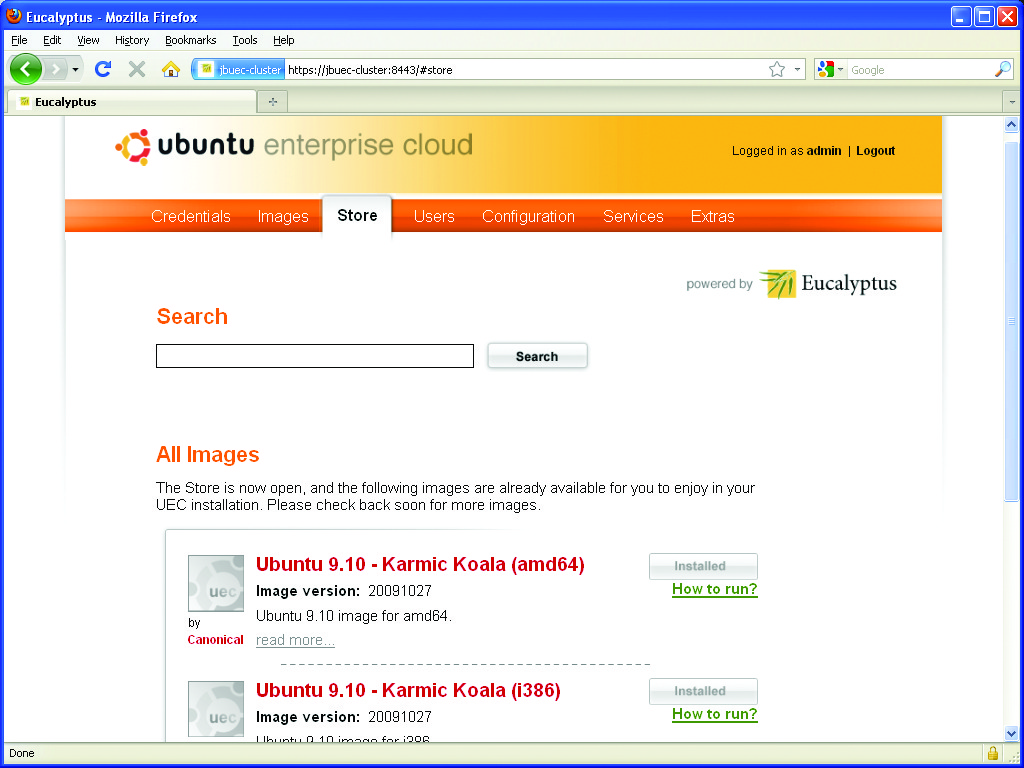
Figure 12. Ubuntu Enterprise Cloud Web Interface
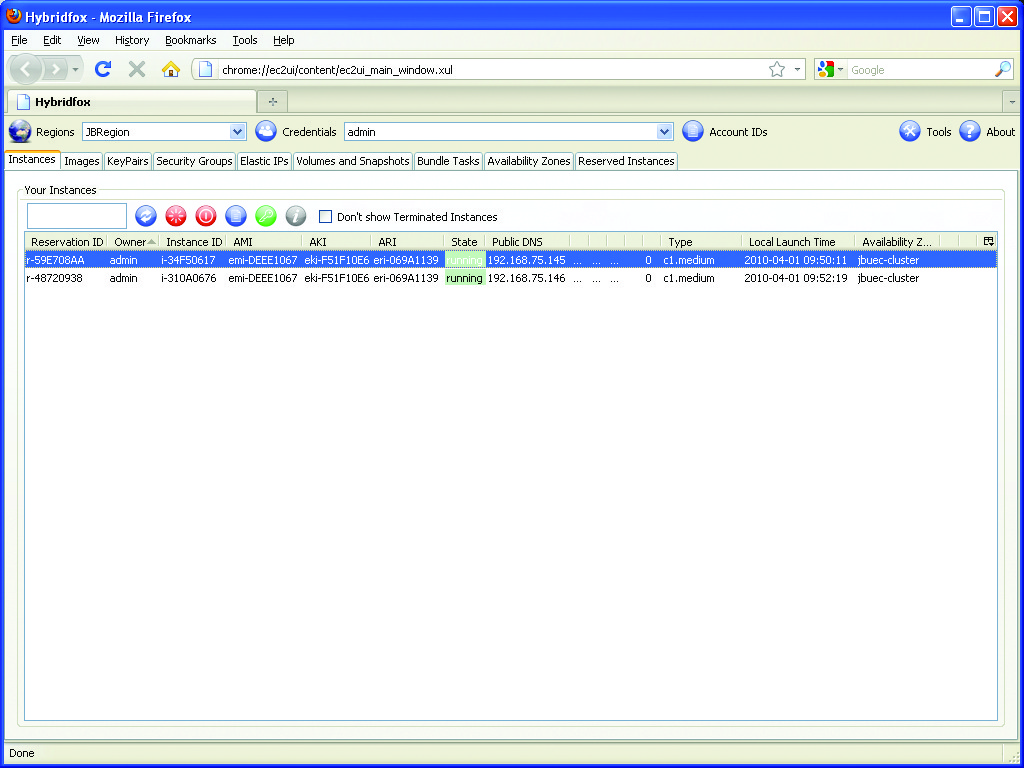
Figure 13. Managing Cloud Instances with Hybridfox
Many other areas of the enterprise are ripe for Linux penetration. The ones presented here represent some of the best chances for Linux adoption in the vast majority of enterprises. I encourage you to download and test these options to see how beneficial they can be to your business. Linux's future development, its very survival, rests in its ability to stake a claim in the business computing market, and the only way to do that is by constantly challenging the status quo with viable, cost-saving alternatives. Hopefully, I've given you some of those alternatives here.
Resources
Red Hat Network: https://rhn.redhat.com
Canonical Landscape: www.canonical.com/projects/landscape
BIND: www.isc.org/software/bind
Novell eDirectory: www.novell.com/products/edirectory
RHEV: www.redhat.com/virtualization/rhev/server
KVM: www.linux-kvm.org
Ubuntu Enterprise Cloud (Private): www.ubuntu.com/cloud/private
Hybridfox: code.google.com/p/hybridfox
Jeramiah Bowling has been a systems administrator and network engineer for more than ten years. He works for a regional accounting and auditing firm in Hunt Valley, Maryland, and holds numerous industry certifications, including the CISSP. Your comments are welcome at jb50c@yahoo.com.

