
Comparing MythTV and XBMC
The Linux desktop is a place to work and a place to play. People fortunate enough to have time to play have many distractions to amuse them. Audio fun abounds with programs like Amarok and Rhythmbox. Video enthusiasts will find a plethora of options, from standalone video players (like MPlayer, Xine and VLC) to comprehensive multimedia environments (like Freevo and Moovida). Being a video enthusiast, I find myself drawn to two of the most popular open-source entertainment tools: MythTV and XBMC.
MythTV (www.mythtv.org) is a full-featured digital video recorder built for the Linux desktop yet perfectly suited to running as a home-theater system. It includes support for live TV and recordings, video file and DVD playback, photo galleries, music collections, weather forecasts, movie rentals via Netflix and even home video surveillance.

Figure 1. MythTV can be run as a distributed system, with front and back ends on different computers.
XBMC (xbmc.org) is a media player that also supports DVD and video file playback, music collections, photo galleries and weather forecasts. Unlike MythTV, XBMC was not originally developed for the Linux desktop. Instead, it was built to run on modified Xbox hardware, and later it was modified to be a general-purpose media tool and ported to the Linux desktop. Because of this, some of XBMC's features are geared toward the use of Xbox features, such as running games and dashboards. Even so, XBMC has evolved into an excellent desktop Linux media player in its own right.
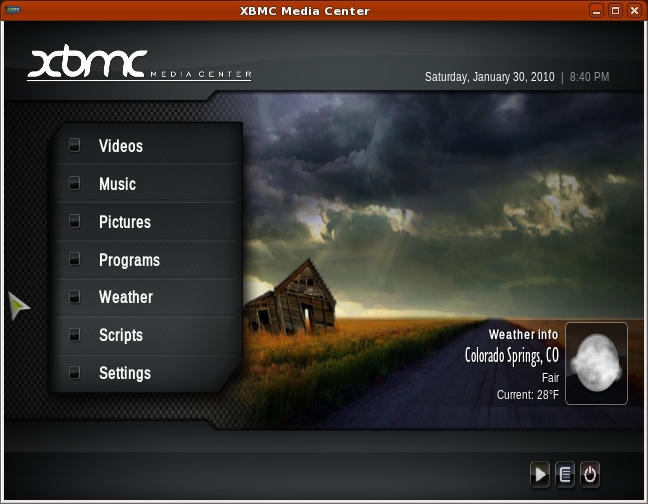
Figure 2. XBMC is a media player on steroids.
MythTV and XBMC are similar tools but have different designs and target audiences. This article doesn't attempt to compare them side by side, apples to apples. Instead, the intention is to examine each from a user perspective and discover what features have meaning to different types of users. Because these applications are so feature-rich, the primary focus here is limited to video services—playing movies and watching TV. Although both systems have been designed to work well when displayed on a TV, this article is written from the point of view of using the applications on a desktop.
MythTV is a well established project and, as such, is easily installed on most major Linux distributions using desktop package management tools. Ready-made packages are available for Fedora/Red Hat/CentOS, Ubuntu, Debian, OpenSUSE, Mandriva and Arch Linux. There also are live CD distributions, such as MythBuntu, MythDora and LinHES (formerly KnoppMyth), which allow you to run MythTV without installing it. Building from source is possible, but it can be complex, and there are many prerequisites. Using prepackaged versions is the preferred installation mechanism.
MythTV can be used without TV capture cards. The MythVideo plugin can be used to view and manage video files that have been ripped from DVDs or other sources. However, MythTV requires a supported TV capture card to allow watching live TV. It currently does not provide direct support for external TV sources, such as Hulu or Veoh.
MythTV back ends start automatically when installed from distribution packages. To start front ends, use the mythfrontend command. You can run other command-line tools, such as mythfilldatabase, although these often run automatically once MythTV is configured.
XBMC is built specifically for the Ubuntu distribution, and packages are available from the Ubuntu repositories. Other Linux distributions must build from source. Fortunately, doing so isn't hard, at least for Fedora. As with MythTV, you need to install many prerequisite packages. The XBMC Wiki provides copy-and-paste commands for installing them. Some distributions may require setting some environment variables, but building the package is the same for all listed distributions:
./bootstrap
./configure
make
make install
To install to a program-specific directory, specify a prefix. A prefix allows installation to a directory that can be removed easily later:
./configure --prefix=/opt/xbmc
To start the program, run bin/xbmc from the installation directory, such as /opt/xbmc/bin/xbmc.
MythTV is designed as a personal video recorder (PVR) application. It is a network-based system with back ends used to acquire and serve TV and other media to front ends that handle display and playback. It supports a wide variety of hardware for both analog and video capture (Figure 3). The core recording and playback system is extended with plugins that provide additional features. The MythVideo plugin handles management and playback of video files, such as DVD rips. MythTV is best known for its wide support of TV tuner hardware and ability to play and record both analog and digital TV.
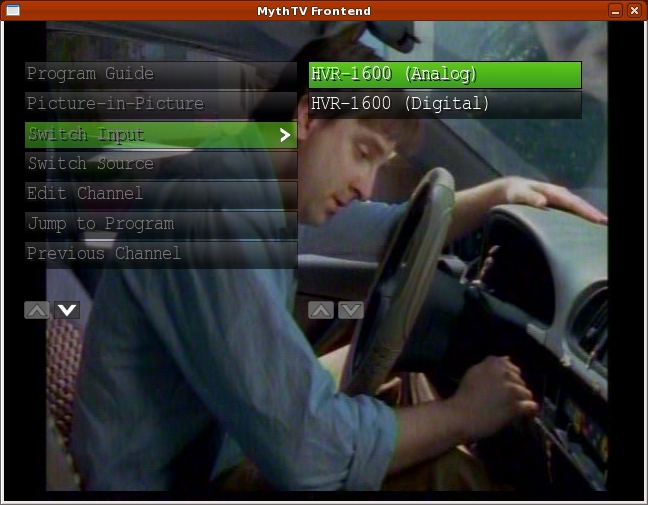
Figure 3. MythTV back ends support both analog and digital (HDTV) video capture cards.
MythTV's core focuses on watching and recording TV as well as providing extensive program guide and scheduling support. Some plugins extend this feature, such as the Archive plugin, which allows saving recorded programs to DVDs or other files.
Because of XBMC's Xbox roots, it focuses on being a multifunction media player, capable of many types of media playback from local or remote sources. This focus also allows the development team to emphasize the user experience. XBMC is best known for its well designed and sophisticated user interface and skins (Figure 4).

Figure 4. XBMC skins are plentiful and impressive.
XBMC's core focuses on video playback, but it also is extensible through the use of Python plugins. Currently, plugins are available that add support for TV and movie guides, instant messaging and front ends to other hardware like a TiVo. And, XBMC forms the basis of at least one commercial venture, Boxee.
Browsing and playback of video files, such as ripped DVDs, in MythTV is handled by the MythVideo plugin. MythVideo manages video files under a single configurable folder. Folders under the top-level folder can be mountpoints for multiple hard drives. Each folder can have its own icon (folder.png) that is displayed while browsing the collection (Figure 5). Videos can be streamed from the back end or played by the front end from an NFS mount. Over an 802.11g wireless connection, streamed files play with fewer pauses/skips.
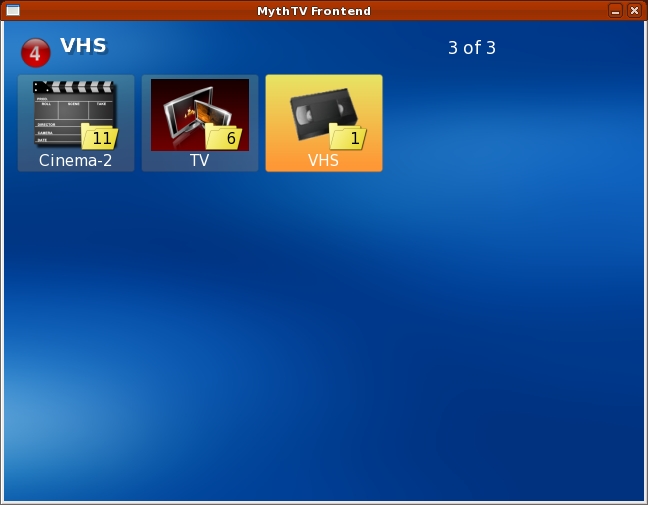
Figure 5. The MythVideo gallery view shows folder icons and is the easiest way to browse a large video collection.
Using mountpoints under the top-level directory offers multiple options on how to manage your hard drives. RAID configurations can be used to create one large storage space. Alternatively, multiple drives can be used for different genres.
Unlike MythVideo, XBMC is based entirely on the concept of sources. A source can be a local hard drive or NFS mountpoint or a remote server providing streamed data (Figure 6). XBMC supports multiple streaming formats and actually can be used to connect to a MythTV back end to watch TV and stream video.
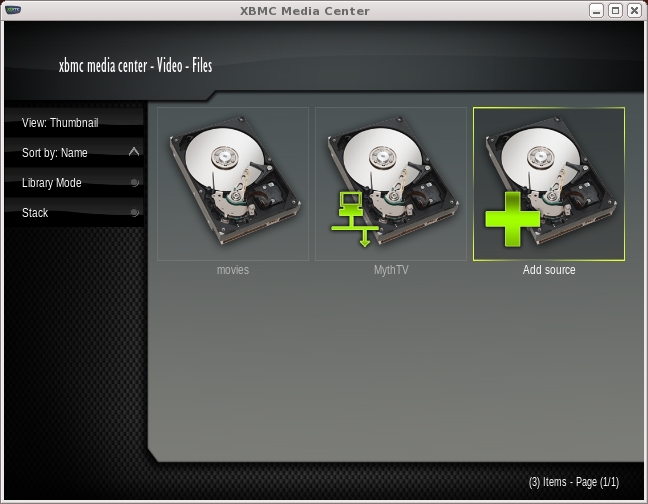
Figure 6. The movies source is an NFS drive, but the MythTV source is a network connection.
To add videos to a MythVideo collection, copy files to the appropriate folder. MythVideo can play AVI, MPEG and even DVD ISO files (including menus). To reduce disk usage, 7GB DVDs often are ripped to AVI files, which can be as small 2GB without loss of quality. However, ripping like this typically loses the DVD menu options and possibly the subtitles. If you have the disk space, a DVD ISO copy is faster to create, and you won't lose any DVD features.
Videos can be added to local or network sources for XBMC. However, XBMC cannot stream MythTV movies. Instead, the MythTV movie folders must be mounted via NFS on the XBMC system, and the local mountpoint added as a video source to XBMC. Like MythTV, XBMC can play a large number of video file formats.
MythTV provides three methods for video collection browsing. The first is Browse mode, and it allows you to browse the entire collection front to back. The page up and down keys make jumping through the list easy enough, although this method doesn't remember your last location. The second method is List mode, and it uses a tree listing to display entries. This listing benefits from a well structured hierarchy under the top-level video directory. Gallery mode is the last mode, and it uses icons for folders and movie posters for individual entries. This is visually appealing and also benefits from a well structured hierarchy for the video collection, although the number of entries in each folder displayed over the icons is rather distracting (Figure 7).
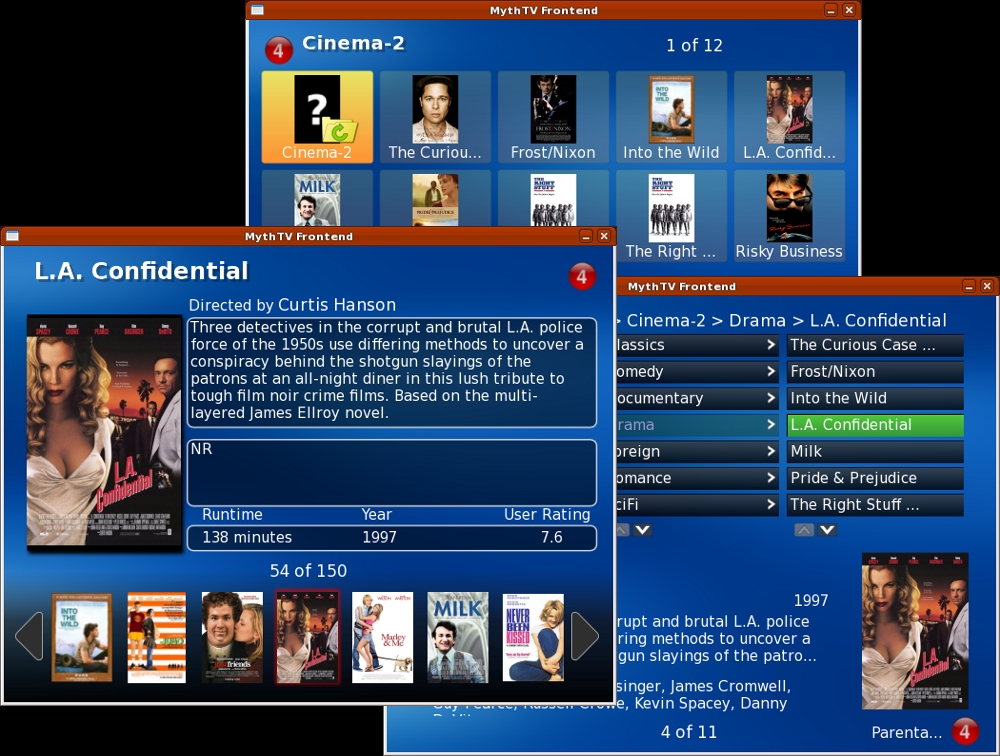
Figure 7. MythTV can browse sequentially or through a hierarchy.
You can give custom icons to folders in MythTV by creating a JPEG or PNG image in each directory. The size doesn't matter, although making them large enough to be displayed in high quality on the front end with the highest resolution may offer the best overall results. MythTV scales the image as appropriate.
XBMC approaches video organization a little differently. First, it provides two browsing modes: file and library. File browsing starts by showing the available configured sources. Choosing one of those then presents a listing of options relevant to that source. For example, if one source is a set of videos on a local hard drive and another is a remote MythTV back end, the former lists the movies in a typical tree hierarchy and the latter shows features available from the server, such as live TV or recordings.
In file mode, the listings are similar in structure to a directory listing. The typical “..” parent directory lets you back up through the hierarchy. Library mode allows you to browse only recordings. It won't show sources. Instead, it shows you the list of scanned recordings. Moving up through the hierarchy typically involves selecting an up-arrow icon (Figure 8).
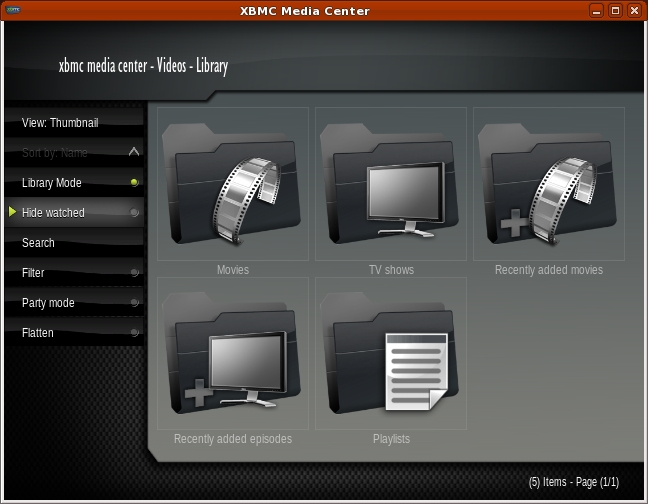
Figure 8. XBMC's Library mode displays scanned recordings, but File mode can access any remote source.
Like MythTV, folders under XBMC can have custom icons. Place a folder.jpg file in each directory that requires a custom icon, and it will be displayed in either mode. If you share the directories between MythTV and XBMC, using JPEG will mean only one icon is needed. However, JPEG images don't support transparency, which means converting a PNG folder icon with transparency from MythTV to a JPEG for XBMC will lose the transparent effect (Figure 9).
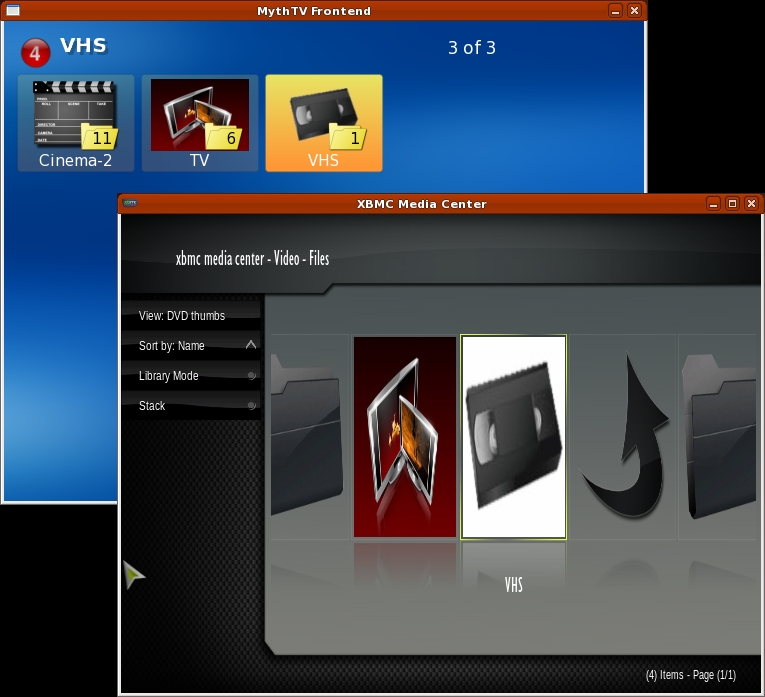
Figure 9. Transparent PNG folder icons are supported by MythTV, while XBMC uses JPEG format icons.
In either mode, the listings can have multiple views. Library mode offers List, Full List and Thumbnail views. File mode adds Wide Icons and DVD Thumbs.
Both applications allow browsing by genre. Genre information is set automatically when metadata is retrieved for a video. Both systems can stack files. Stacking associates multipart movie files as a single movie.
Information about videos is known as metadata. The metadata includes movie title, runtime, cast, synopsis and a variety of items similar to what is found on IMDB.com or TheMovieDatabase.org. Both applications can retrieve metadata automatically when new files are added to folders, and both allow you to edit this metadata while browsing the collection (Figure 10). XBMC offers multiple configurable sources for metadata on a per-folder basis. MythTV's metadata sources are dependent on configurable scripts, but only one script can be configured, and it applies to all files.
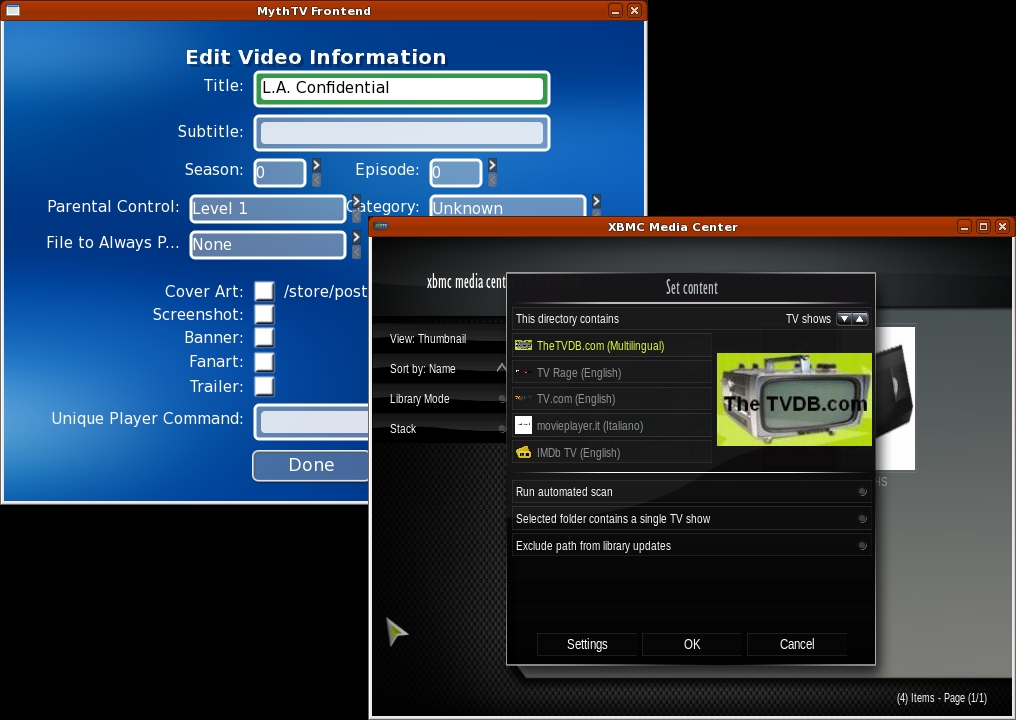
Figure 10. MythTV (left) can edit individual movies. XBMC (right) works only on folders of movies.
XBMC sets metadata via the context menu. Right-click on any folder to get the menu, and then select Set Content. Choose a source for the metadata, and then run an automated scan. XBMC will let you add a movie that is not found manually, but once you've done this, there is no easy way to remove the entry if it's wrong. In MythVideo, pressing I over a movie in any browse mode will bring up a context menu. From there, you can edit the metadata data, reset it, play the movie or just view more details about the movie.
Once you're past the setup and management, you finally can play your videos. And, this is where the two systems shine. Both offer high-quality playback of files in AVI, MPEG4 and even ISO formats. ISO offers the best viewing, because all of the DVD features are available, including menus and subtitles. Of course, both programs also will play a DVD directly from a local DVD drive. MythVideo plays videos with no embellishments—the full window is the video. XBMC actually can wrap its menus around a playing video and will play a video in a small window while the user browses other features (Figure 12). XBMC also offers the usual media controls on-screen. MythTV uses an on-screen menu, but media controls are supported by keyboard keys without the aid of on-screen controls (Figure 11).
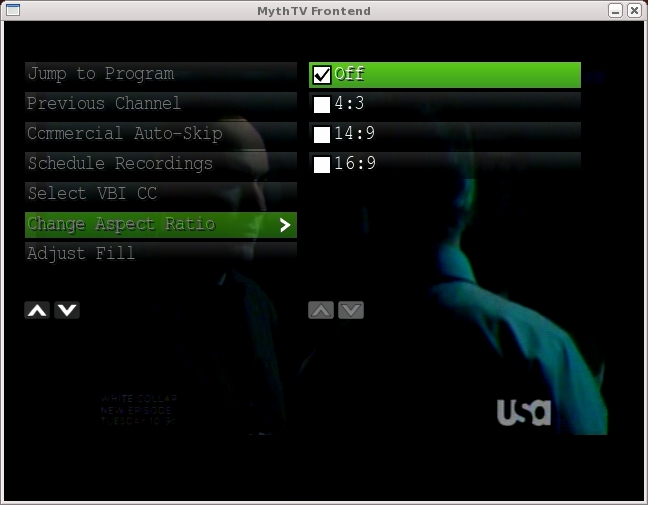
Figure 11. MythTV's on-screen display handles most functions except media control while playing.
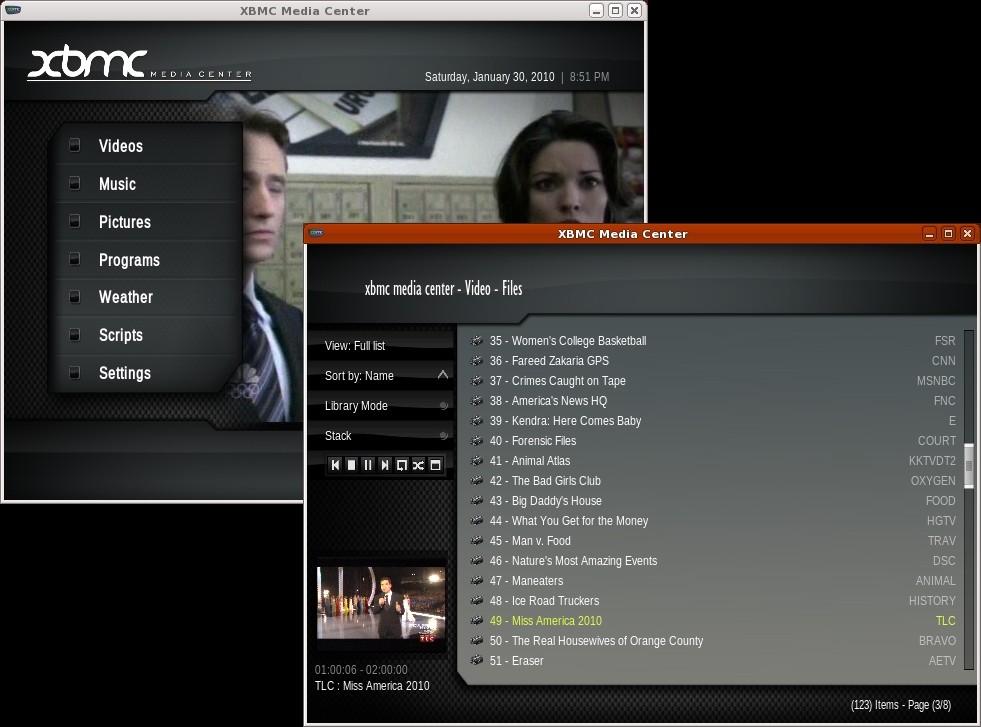
Figure 12. XBMC can wrap menus around playing video (left) or place it in a small window (right).
From the user perspective, TV playback under both systems is very similar to video playback. XBMC places TV as another source under its Video feature. MythTV separates videos from TV, although TV recordings still are under the TV function. The main difference between MythTV and XBMC is the way the guide is displayed. MythTV has a built-in guide that is updated by a back-end server (Figure 13). The guide is accessed from the OSD menu while watching live TV or when scheduling a recording.
MythTV can record live TV from any configured hardware. The more TV tuners installed on the back ends, the more sources for recordings. When one tuner is busy recording, another can be used to watch live TV. You can schedule recordings using any of the numerous guide search mechanisms, and you can start recordings while watching a show. You also can view recordings even while it is still recording, as long as some recorded data is available. Recordings are given priorities so that if they conflict and not enough video sources are available, the higher priority gets access to the device.
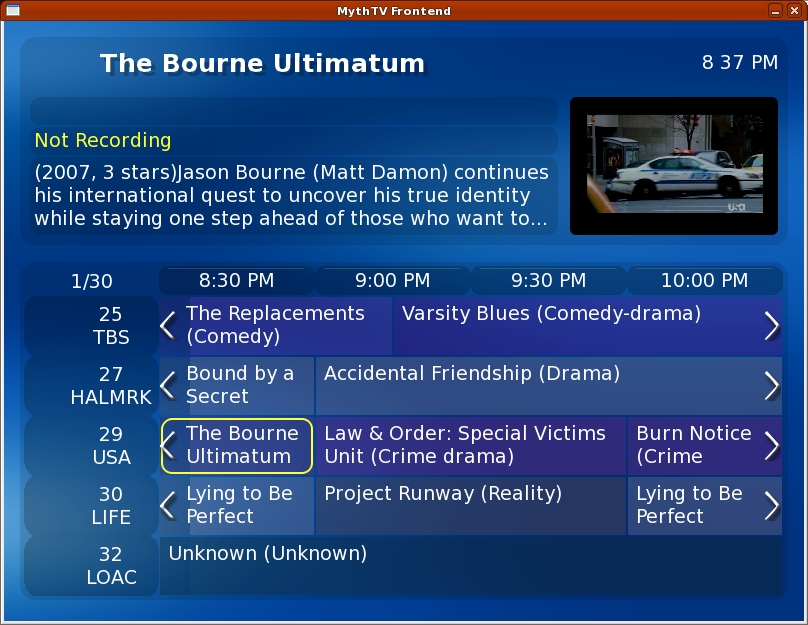
Figure 13. The MythTV guide is color-coded by genre.
There is only one way to watch recordings, and MythTV uses a tree structure for finding the recordings. Migrating recordings from MythTV's TV feature to MythVideo requires archiving them first via MythArchive. This is not particularly user-friendly, so keep your expectations low for hanging onto recordings.
XBMC uses a MythTV back end to show live TV. It also uses MythTV's guide information. However, it shows the guide information using the same view types as videos in File mode. XBMC, however, cannot record data. It can play only live TV or view existing video files. It cannot create new video files from live TV.
Both systems support the VDPAU extensions for NVIDIA, which provides high-quality playback. Because both support OpenGL, they also provide video controls, such as brightness, contrast and color controls (Figure 14). The actual features available under MythTV depend on various configuration options for both video and TV features. XBMC always has the same options available from any video playback, be it video files or live TV. These controls were available for an NVIDIA-based display. Other video hardware may present different options.
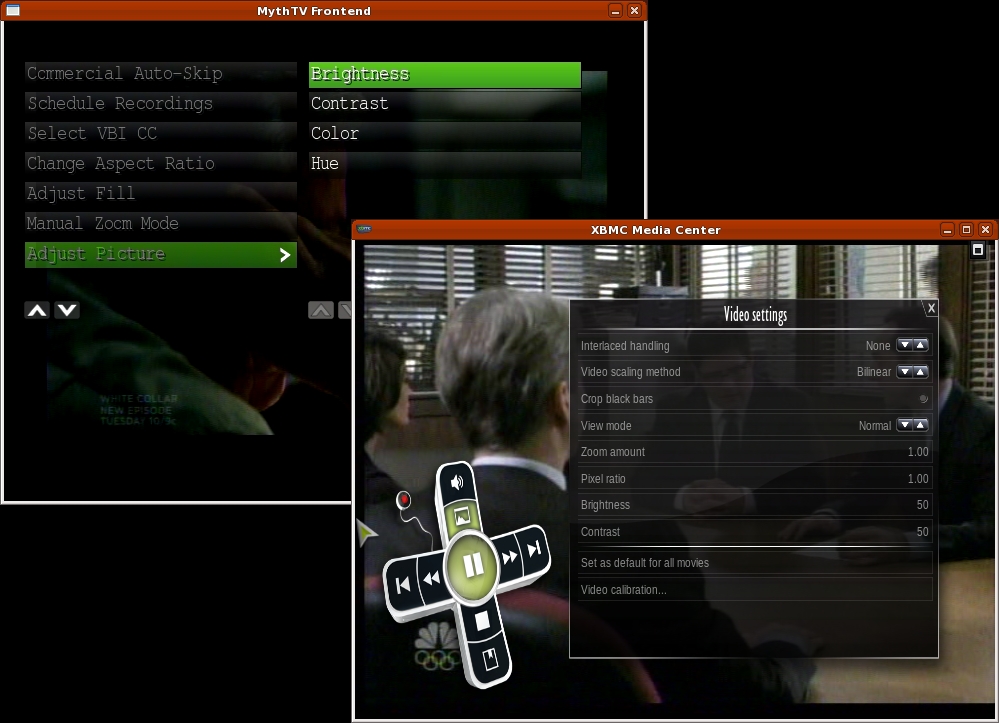
Figure 14. Video controls are available in both programs.
MythTV uses upfront configuration of window sizes and doesn't allow scaling the display while you watch. This isn't a problem once you're set up to display on a real TV, but if you watch on a desktop while you work, it's more of an issue. XBMC can display full screen, as does MythTV, but it also allows playing in a window that can be scaled while video is playing.
Neither system will stream Internet video, so you can't get to Hulu or Veoh from them. There are hacks for doing this, but they mostly just launch the Hulu player as an external application.
Both systems are fairly stable. XBMC crashed a few times during my research, and I experienced a few lockups, although the latter may have been due to some interaction with the MythTV back end. MythTV crashes are very seldom. During my research, it crashed once while experimenting with the use of subtitles while playing a DVD ISO file.
The XBMC experience with its polished skins is very entertaining. But, without a TV source, you still need a MythTV back end to watch TV. If you watch TV while you work, using XBMC as a TV front end to a MythTV back end is ideal, because you can scale the XBMC window interactively. MythTV may be your only choice if you need to watch, schedule and record multiple sources at once.
Both tools do an admirable job with video file collections. MythTV provides more flexibility in setting metadata on a per-movie basis, while XBMC has attractive browsing options and supports more metadata sources. But, don't expect to play Blu-ray disks any time soon with either tool. For one thing, they produce huge files (50GB typically), if you can rip them at all.
This is far from a comprehensive review of MythTV and XBMC. Both offer far more features and capabilities than can be given justice in a single article, especially if your goal is to hook them up to a real TV and use them as home-theater systems. If you enjoy using your Linux system for media playback, you owe it to yourself to investigate both of these excellent applications.
Michael J. Hammel is a Principal Software Engineer for Colorado Engineering, Inc. (CEI), in Colorado Springs, Colorado, with more than 20 years of software development and management experience. He has written more than 100 articles for numerous on-line and print magazines and is the author of three books on The GIMP, the premier open-source graphics editing package.

