
Automating Remote Backups
Linux users are a diverse group because of the wide swath of choices they have at their fingertips. But, whether they choose Ubuntu, Fedora or Debian, or KDE, GNOME or Xfce, they all have one thing in common: a lot of data. Losing data through hard disk failure or simply by overwriting is something all users must face at some point. Yet, these are not the only reasons to do backups. With a little planning, backups are not nearly as hard as they might seem.
Hard disk prices have dropped to the point where USB storage easily replaces the need for off-line tape storage for the average user. Pushing your data nightly to external USBs, either local or remote, is a fairly inexpensive and simple process that should be part of every user's personal system administration.
In this article, I describe a process for selecting files to back up, introduce the tools you'll need to perform your backups and provide simple scripts for customizing and automating the process. I have used these processes and scripts both at home and at work for a number of years. No special administrative skills are required, although knowledge of SSH will be useful.
Before proceeding, you should ask yourself the purpose of the backup. There are two reasons to perform a backup. The first is to recover a recent copy of a file due to some catastrophic event. This type of recovery makes use of full backups, where only a single copy of each file is maintained in the backup archive. Each file that is copied to the archive replaces the previous version in the archive.
This form of backup is especially useful if you partition your system with a root partition for the distribution of choice (Fedora, Ubuntu and so forth) and a user partition for user data (/home). With this configuration, distribution updates are done with re-installs instead of upgrades. Installing major distributions has become fairly easy and nearly unattended. Re-installing using a separate root partition allows you to wipe clean the old installation without touching user data. All that is required is to merge your administrative file backups—a process made easier with tools like meld (a visual diff tool).
The second reason to perform a backup is to recover a previous version of a file. This type of recovery requires the backup archive to maintain an initial full backup and subsequent incremental changes. Recovery of a particular version of a file requires knowing the time between when the full backup was performed and the date of the version of the file that is desired in order to rebuild the file at that point. Figure 1 shows the full/incremental backup concepts graphically.
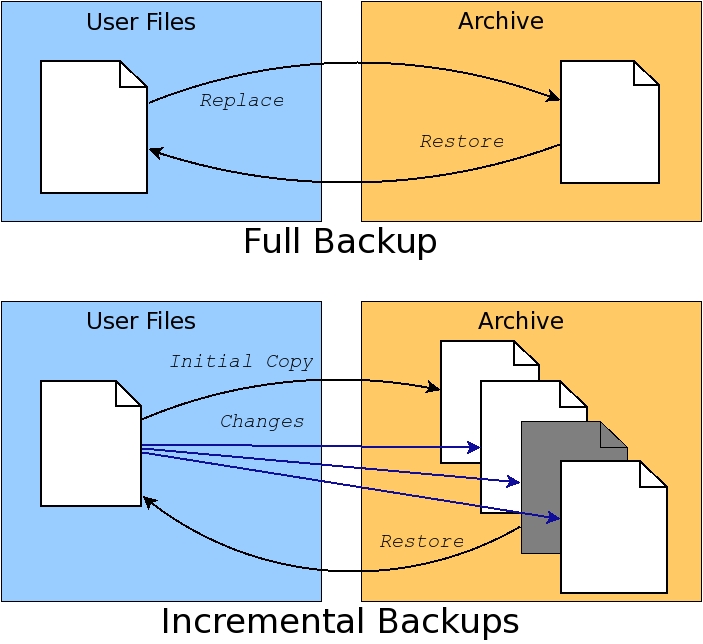
Figure 1. Full backups replace archive contents. Incremental backups extend archives with time-based file changes.
Incremental backups will use up disk space on the archive faster than full backups. Most home users will be more concerned with dealing with catastrophic failure than retrieving previous versions of a file. Because of this, home users will prefer full backups without incremental updates, so this article focuses on handling only full backups. Fortunately, adding support for incremental backups to the provided scripts is not difficult using advanced features of the tools described here.
In either case, commercial environments often keep backups in three locations: locally and two remote sites separated by great distance. This practice avoids the possibility of complete loss of data should catastrophe be widespread. Home users might not go to such lengths, but keeping backups on separate systems, even within your home, is highly recommended.
The primary tool for performing backups on Linux systems is rsync. This tool is designed specifically for handling copying of large numbers of files between two systems. It originally was designed as a replacement for rcp and scp, the latter being the file copy tool provided with OpenSSH for doing secure file transfers.
As a replacement for scp, rsync is able to utilize the features provided by OpenSSH to provide secure file transfers. This means a properly installed SSH configuration can be utilized when using rsync. In fact, SSH transfers are used by default using standard URI formats for source or destination files (such as user@host:/path). Alternatively, rsync provides a standalone server that rsync clients can connect to for file transfers. To use the rsync server, use a double colon in the URI instead of a single colon.
SSH (secure shell), is a client/server system for performing operations across a network using encrypted data. This means what you're transferring can't be identified easily. SSH is used to log in securely to remote Linux systems, for example. It also can be used to open a secure channel, called a tunnel, through which remote desktop applications can be run and displayed on the local system.
SSH configuration can be fairly complex, but fortunately, it doesn't have to be. For use with rsync, configure the local and remote machines for the local machine to log in to the remote machine without a password. To do this, on the local machine, change to $HOME/.ssh and generate a public key file:
$ cd $HOME/.ssh
$ ssh-keygen -t dsa
ssh-keygen will prompt you for various information. For simplicity's sake, press Enter to take the default for each prompt. For higher security, read the ssh-keygen and ssh man pages to learn what those prompts represent.
ssh-keygen generates two files, id_dsa and id_dsa.pub. The latter file must be copied to the remote system under $HOME/.ssh and appended to the file $HOME/.ssh/authorized_keys. In this code, remoteHost is the name of the remote computer and localHost is the name of the local computer:
$ scp id_dsa.pub \
      remoteHost:$HOME/.ssh/id_dsa.pub.localHost
$ ssh remoteHost
$ cd $HOME/.ssh
$ cat id_dsa.pub.localHost >> authorized_keys
In this article, I assume a proper SSH configuration with no password required in order to perform the rsync-based backups. These automated backup scripts are intended to be run from cron and require a proper SSH configuration.
For users who prefer to use a desktop tool instead of scripts for setting up and performing backups, there is the Grsync tool. This is a GTK+-based tool that provides a nearly complete front end to rsync. It can be used to select a single source and destination and is likely available from Linux distribution repositories.
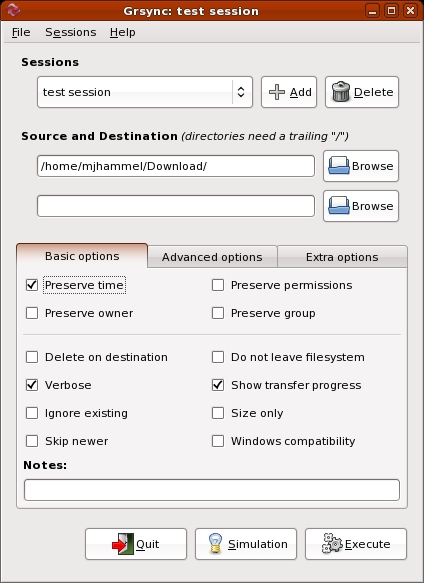
Figure 2. Grsync is a desktop tool for scheduling backups. Although generally useful, it lacks include/exclude options and direct cron management.
Although previous versions appear to have had an integrated cron configuration, the current version available with Fedora does not. Also, Grsync does not allow selection of multiple source files or directories nor does it allow setting exclusion lists. Both of these are supported by the rsync command line. Grsync can create a session file that can be called from cron, but it does not include information on how to notify the user of the results of the backup.
Due to the lack of cron integration, missing include and exclude options and no integration of user notification, Grsync is not an ideal backup solution. The scripts described here, along with the addition of ssmtp for simplified SMTP-based notification, are a better solution.
With SSH set up and the choice to script backups instead of using a desktop application out of the way, it is time to consider what files to back up. Four sets of files should be considered: system configuration files, database files, users' home directories and Web files.
System configuration files include files such as the password and group files, hosts, exports and resolver files, MySQL and PHP configurations, SSH server configuration and so forth. Backup of various system configuration files is important even if it's not desirable to reuse them directly during a system re-install. The password and group files, for example, shouldn't be copied verbatim to /etc/passwd and /etc/group but rather used as reference to re-create user logins matched to their home directories and existing groups. The entire /etc directory can be backed up, although in practice, only a few of these files need to be re-installed or merged after a distribution re-installation.
Some applications built from source, such as ssmtp, which will be used for notification in the backup scripts, may install to /usr/local or /opt. Those directories can be backed up too, or the applications can be rebuilt after a distribution upgrade.
MySQL database files can be backed up verbatim, but it may be easier to dump the databases to a text file and then reload them after an upgrade. This method should allow for the database to handle version changes cleanly.
User home directories typically contain all user data. Generally, all files under /home except the /home/lost+found directory should be backed up. This assumes that all user logins are kept on /home. Check your distribution documentation to verify the location of user home directories.
Home users may not use Web servers internally, but there is no reason they shouldn't be. Wikis, blogs, media archives and the like are easy to set up and offer a family a variety of easy-to-use communication systems within the home. Setting up document root directories (using Apache configuration files) under /home makes backing up these files identical to any other user files.
There are also files and directories to avoid when performing backups. The lost+found directory always should be excluded, as should $HOME/.gvfs, which is created for GNOME users after they log in.
All of the backups can be handled by a single script, but because backup needs change often, I find it easier to keep with UNIX tradition and created a set of four small scripts for managing different backup requirements.
The first script is used to run the other scripts and send e-mail notifications of the reports on the backup process. This script is run by root via cron each night:
#!/bin/bash

HOST=`hostname`
date=`date`
mailfile="/tmp/$$.bulog"

# Mail Header
echo "To: userid@yourdomain.org"          > $mailfile
echo "From: userid@yourdomain.org"       >> $mailfile
echo "Subject: $HOST: Report for $date"  >> $mailfile
echo " "                                 >> $mailfile
echo "$HOST backup report:"              >> $mailfile
echo "-------------------------------"   >> $mailfile

# Run the backup.
$1 >> $mailfile 2>&1

# Send the report.
cat $mailfile | \
    /usr/local/ssmtp/sbin/ssmtp -t \
    -auuserid@yourdomain.org -apyourpassword \
    -amCRAM-MD5
rm $mailfile
The first argument to the script is the backup script to run. An enhanced version would verify the command-line option before attempting to run it.
This script uses an external program (ssmtp) for sending backup reports. If you have an alternative tool for sending e-mail from the command line, you can replace ssmtp usage with that tool. Alternatively, you can skip using this front end completely and run the backup scripts directly from cron and/or the command line.
ssmtp is a replacement for Sendmail that is considerably less complex to configure and use. It is not intended to retrieve mail, however. It is intended only for outbound e-mail. It has a small and simple configuration file, and when used as a replacement for Sendmail, it will be used by command-line programs like mail for sending e-mail.
ssmtp is not typically provided by Linux distributions, but the source can be found with a Google search on the Internet. Follow the package directions to build and install under /usr/local. Then, replace sendmail with ssmtp by setting a symbolic link from /usr/sbin/sendmail to the installation location of ssmtp.
$ mv /usr/sbin/sendmail /usr/sbin/sendmail.orig
$ ln -s /usr/local/sbin/ssmtp /usr/sbin/sendmail
If your distribution supports the alternatives tool, you may prefer to use it instead of the symbolic link to let the system use ssmtp instead of Sendmail. Note that, as a bonus, when the author replaced Sendmail with ssmtp, LogWatch suddenly began sending nightly reports via e-mail, allowing me a view on system activity I never had seen before and which many Linux users probably never have seen before either.
Backing up system configuration files is handled by a Perl script that verbosely lists the files to be copied to a location on the /home partition. The script is run by root via cron every night to copy the configuration files to a directory in user data space (under /home):
#!/usr/bin/perl
$filelist = <<EOF;
/etc/passwd
/etc/group
...  # other config files to backup
EOF

@configfiles = split('\n', $filelist);
for (@configfiles)
{
    if (-e $_) { $files = join(" ", $files, $_); }
    elsif (index($_, "*") >= 0) {
        $files = join(" ", $files, $_);
    }
}
print "Creating archive...\n";
`tar Pczf $ARGV[0]/systemfiles.tar.gz $files`;
This brute-force method contains a list of the files to back up, joins them into a single tar command and builds a tar archive of those files on the local system. The script is maintained easily by modifying the list of files and directories. Because the configuration files are copied locally to user data space, and user data space is backed up separately, there is no need for rsync commands here. Instead, the system configuration tar archive is kept with user data and easily referenced when doing restores or system upgrades. The backup script functions as a full backup, replacing the tar archive with each execution unless a different destination is specified as a command-line argument.
What this script lacks in Perl excellence it makes up for in simplicity of maintenance. Note that the “retail” version of this script ought to include additional error checking for the command-line argument required to specify the location to save the archive file.
Like system configuration files, databases are backed up to user data directories to be included in the user data backups. Databases are of slightly higher importance in day-to-day use, so this script uses a seven-day rotating cycle for database file dumps. This allows restoring backups from up to a week ago without overuse of disk space for the backups. This method is not incremental, however. It is a set of seven full backups of each database.
Like the system configuration file backup script, this script lists the items to back up. The mysqldump command assumes no password for the root user to access the databases. This is highly insecure, but for users behind a firewall, it is likely the easiest way to handle database management:
#!/usr/bin/perl -w
use File::Path qw(make_path remove_tree);
my $BUDIR1="/home/httpd/db";
my ($sec,$min,$hour,$mday,$mon,$year,
    $wday,$yday,$isdst) = localtime time;
$year += 1900;
$mon += 1;
if ($mon < 10 )  { $mon  = "0".$mon; }
if ($mday < 10 ) { $mday = "0".$mday; }
$TODAY = $wday;

@dbname = (
    "mysql",
    "wordpress",
);

make_path ("$BUDIR1/$year");
foreach $db (@dbname) {
    $cmd = "mysqldump -B -u root $db " .
           "-r $BUDIR1/$year/$TODAY-$db.sql";
    system("$cmd");
}

print ("Database Backups for " .
       $year . "/" . $mon . "/" .
       $mday . "\n");
print ("-------------------------------\n");
open(PD, "ls -l $BUDIR1/$year/$TODAY-*.sql |" );
@lines = <PD>;
close(PD);
$output = join("\n", @lines);
print ($output);
Unlike the configuration file backup script, this script prints out the list of files that have been created. This provides a quick, visual feedback in the e-mailed report that the backups produced something meaningful.
The system configuration backup script and the database backup script are run first to generate backups to user data space. Once complete, all data is ready to be backed up to the remote system with an rsync-based script:
#!/bin/bash
function checkRC
{
    rc=$1
    name=$2
    if [ $rc != 0 ]
    then
        echo "== $name failed with rsync rc=$rc =="
    fi
}
LOGIN=root@feynman
BRAHE=$LOGIN:/media/BackupDrive/feynman
if [ "$1" != "" ]
then
    BRAHE=$1
fi
The script includes a shell function to test rsync's return code and print an error message on failure. The front-end script redirects output from this script to a file, so error messages show up in the e-mailed backup report.
The default destination for the backup is configured at the start of the script. The first command-line argument can be used to override the default:
DIR1="/home/httpd"
DIR2="/home/mjhammel"
EXCL2=--exclude-from=/home/mjhammel/.rsync/local
The user data backup script is focused on directories. Unlike the other backup scripts, the list of items to back up are hard-coded in separate variables. Again, this is a brute-force method used for simplicity, because each directory to back up may have one or more sets of include and exclude arguments. Associative arrays could be used instead of the set of variables in a more generalized version of this script.
Notice that this configuration calls out individual directories under /home instead of backing up all of /home. The script from which this was pulled is used on a machine with development directories under /home that do not need to be backed up. Specifying /home and using an exclusion file is an alternative way of doing the same thing:
DATE=`date`
echo "== Backing up `uname -n` to $BRAHE."
echo "== Started @ $DATE "
echo "== Directory: $DIR1"
rsync -aq --safe-links $DIR1 $BRAHE
checkRC $? "$DIR1"
The first directory is backed up to the remote system. The -a option tells rsync to operate in archive mode, where rsync will do the following:
Recursively traverse the specified directory tree.
Copy symlinks as symlinks and not the files they point to.
Preserve owner, groups, permissions and modification times.
Preserve special files, such as device files.
The safe-links option tells rsync to ignore symbolic links that point to files outside the current directory tree. This way, restoration from the archive won't include symbolic links that may point to locations that no longer exist. The -q option tells rsync to run with as few non-error messages as possible:
echo "== Directory: $DIR2"
rsync -aq --safe-links $EXCL2 $DIR2 $BRAHE
checkRC $? "$DIR2"
DATE=`date`
echo "Backups complete @ $DATE"
The second directory tree is backed up using an exclusion list. This list is a file that specifies the files and directories within the current directory tree to be ignored by rsync. Entries in this file prefixed with a dash are excluded from the set of files and directories rsync will process. The three asterisks match anything below the specified directories:
- /mjhammel/.gvfs/***
- /mjhammel/Videos/***
- /mjhammel/brahe/***
- /mjhammel/iso/***
This example shows that no files under the Videos and iso directories will be included in the backup. It would be a poor use of disk space to back up files that exist in your home directory but that also can be retrieved from the Internet.
The brahe reference is a mountpoint for the home directory of an identical user ID on a remote system. This allows access to files under a login on another system simply by changing into the remote system's local mountpoint. But, there is no reason to back up those remote files on the local system, as that remote system has its own backup scripts configured.
The full version of this script includes an SSH-based verification that the remote system has the required external USB drive mounted and it is available for use. This allows the script to recognize that the remote system is misbehaving before wasting time trying to run a backup that would fail anyway.
The order in which these scripts is run is important. The system configuration file backup script and the database backup script can run in parallel but must complete before the user data backup script is run:
30 0 * * * /path/to/backup-db.pl
30 1 * * * /path/to/backup-configfiles.sh \
           /path/to/save/dir 2>&1 > /dev/null
30 2 * * * /path/to/backup-frontend.sh \
           /path/to/backup-data.sh
To pass arguments to backup-data.sh, enclose the entire command in double quotes:
30 2 * * * /path/to/backup-frontend.sh \
          "/path/to/backup-data.sh root@copernicus:/backups"
Each morning, the backup report is available for each machine that runs these scripts and can be reviewed to make sure the backups completed successfully. In practice, the most common problems encountered are related to unmounted or non-functioning drives, or to network outages that occur before or during the backup process.
In preparing a personal backup strategy, it is important to identify the purpose of the backup, establish a set of processes that prepares files for backup and performs backups to remote systems. It is also important that automation of these processes provide feedback, so users can have at least a starting point of understanding why backups are failing and when that may have occurred.
The methods shown here are somewhat simple and certainly not ideal for every user. The scripts probably are not bug-free and also have room for improvement. They are intended only as a starting point for building personal backup plans. I welcome feedback on any improvements you make to these scripts.
Resources
Backup Scripts for This Article: ftp.linuxjournal.com/pub/lj/listings/issue194/10679.tgz
ssmtp: www.graphics-muse.org/source/ssmtp_2.61.orig.tar.gz
rsync: samba.anu.edu.au/rsync
OpenSSH: www.openssh.com
meld: meld.sourceforge.net
Michael J. Hammel is a Principal Software Engineer for Colorado Engineering, Inc. (CEI), in Colorado Springs, Colorado, with more than 20 years of software development and management experience. He has written more than 100 articles for numerous on-line and print magazines and is the author of three books on The GIMP, the premier open-source graphics editing package.



